A single-board Chia plotter, a DOA RMA, and an adventure in external boot installers with the Orange Pi 5B

This isn’t entirely a Chia post, although it was inspired as such. You may have seen a teaser post on r/Chia, but if you didn’t, you’ll be okay.

In my time in the Evergreen Miner community, and elsewhere, I’ve had people ask if you can plot Chia on a Raspberry Pi.

I’m pleased to report that it can be done on a 4GB Raspberry Pi 4B, and you can create a Gigahorse compressed C5 plot in about 22.1 hours. For this test I used the 4GB board, booted from a MicroSD card, with an external USB 3.0 to SATA enclosure and a 1.92TB Dell Enterprise SATA SSD.

I wanted to try on my remaining 8GB board, but it is having issues with USB storage, so after a couple of hours of testing, I set it aside and thought about other low cost, low power options.

I tried my Zimaboard 216 single-board x86_64 server, featuring a 2 core Celeron processor, 2GB RAM, 16GB eMMC storage, a PCIe 2.0 x4 slot, two SATA ports with power (for SSDs), two ports USB 3.0, dual Gigabit Ethernet, and a completely silent (fanless) design. Alas, while the plotter “worked” on this system, 2GB was not enough, and the OOM killer process took down the plotter. I have a Zimaboard 832 (the 2021 green edition, good for Chia) but ran out of weekend so I just went with plan C.

Enter the Orange Pi

I’d heard good things from the Evergreen co-founder about the Rockchip 3588, and ordered an Orange Pi 5B with 16GB RAM and 256GB eMMC. I got it over the weekend, hooked it up, discovered that you have to use rkdevtools to install it, but still could not get video or network connectivity with it. It got power, and drove the fan, but no status LEDs, no network LEDs, and no rkdevtools access.

After checking with a friend, I learned that it should not have come loose in a cardboard box.
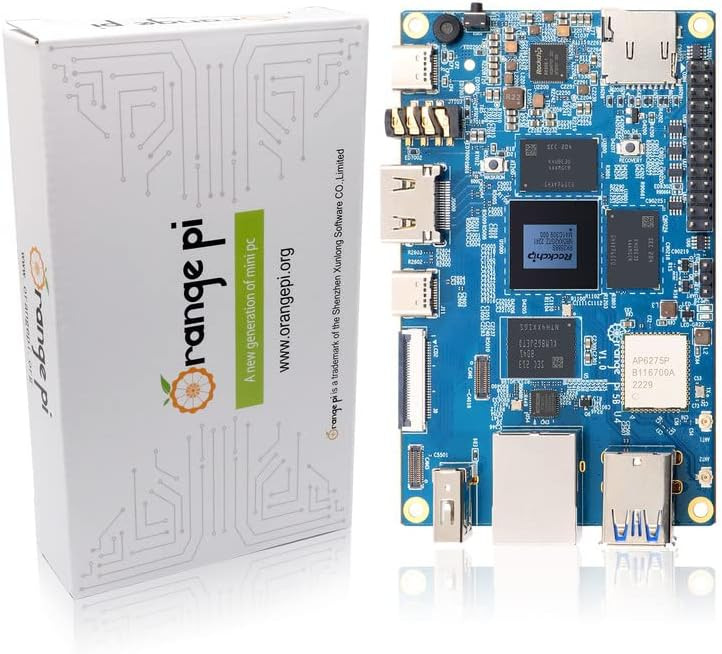
My first Orange Pi arrived exactly like this product page photo, but with the wifi antennas connected. No anti-static bag, no packaging protection, and no functionality.

I put in for an exchange, dropped off the board at my local Whole Foods for return, and got the replacement board Tuesday morning. This time, it was in a sealed anti-static foil bag in a plastic protective case. Much better.

The second Orange Pi arrived like this, and seems to have worked.

I set about doing the board bring-up. It’s more complicated than a Raspberry Pi, requiring the Rockchip dev tools package, a boot loader, and a specific Orange Pi build of Ubuntu. The well-formatted instructions for Klipper on the 5B from 3DP and Me were very useful for getting things going. You can also get the apparently-official 357 page users guide from Orange Pi’s Google Drive that has the instructions and more. I don’t recommend it if you can avoid it, though (ps: you probably can’t completely avoid it, but maybe don’t start with it).

The software downloads were a bit confusing for me… you have to get an Android image download (even if you’re not installing Android) from another Google Drive, which includes the RKDevTool program for Windows, the “DriverAssitant” bundle including the USB driver for board bringup, and the Miniloader folder with boot loader and configuration. It’s a long way from Raspberry Pi Imager or Rufus. And random Google Drive download sources are sketchy.

Anyway, after waiting two hours for the “download complete” message in RKDevTool that never came, I tried logging in via ssh with root / orangepi and got in. (Page 87 on the manual above, so maybe don’t completely avoid it).

From there I made a few more adjustments:

  1. Installed Zerotier VPN and joined it to my network.
  2. Executed ‘apt update’ followed by ‘apt upgrade’
  3. Set my time zone away from Asia/Shanghai with ‘dpkg-reconfigure tzdata’
  4. Verified that I could log in with orangepi, and left the root shell
  5. Changed root and orangepi passwords
  6. Rebooted to make the updates take effect (and to install my external USB SSD)

There are a lot of Orange Pi 5 series models

Another odd sequence of discoveries is that there are three primary models of the Orange Pi 5, each of which may come with different RAM and eMMC storage. I learned some of the distinctions after digging for my one NVMe drive that was smaller than 2280, and then finding there was no NVMe slot.

Here are the three models, with pricing for the smallest configuration I could find on Amazon. I would really recommend the 16GB models, and max out the storage if you go 5B. But it depends on your use case of course.

ModelOrange Pi 5Orange Pi 5BOrange Pi 5 Plus
CPURK3588SRK3588SRK3588S
RAM options4/8/16/324/8/16/324/8/16
Video options1x HDMI 2.1 out1x HDMI 2.1 out2x HDMI out, 1x HDMI in
Network options1x Gigabit Ethernet1x Gigabit Ethernet2x 2.5 Gigabit
Onboard storageNone32/64/128/256None
Optional storageMicroSDMicroSDMicroSD
2230/2242 NVMe2280 NVMe
eMMC
USB2x 2.0, 1x 3.0, 1x 3.1C2x 2.0, 1x 3.0, 1x 3.1C2x 2.0, 2x 3.0, 1x 3.0C
OtherWiFi 6 w/2 antennasm.2 E-Key
Bluetooth 5.0 w/BLE
Amazon PriceFrom $90 (4GB)From $100 (4GB/32GB)From $107 (4GB)
Orange Pi 5 models, with prices as of 7/25/2023 (affiliate links for Amazon, direct links for OrangePi.org).

Be aware that on the 5 and 5B, the USB 3.0 port shares a dual blue port assembly with a 2.0 port–the 3.0 port is on the top, and the bottom port, despite being blue, is USB 2.0. The 5 Plus has a pair of USB 2.0 (black) ports, and a pair of USB 3.0 (blue) ports.

On the Orange Pi 5 and 5B, the only USB 3.0 Type A port is the top port.

You can use a 5V/~4A USB-C power supply and cable, your own HDMI cable, and run without a case (these are slightly larger than a Raspberry Pi so you can’t reuse those cases), but I decided to drop almost $30 on an add-on starter kit. This kit from GeeekPi includes a clear case with tinted top and bottom, rubber feet for said case, USB-C power supply with inline switch, a fan, heatsinks for the DRAM and CPU, a 64GB MicroSDXC card and USB-A card reader, and a HDMI cable. (The description currently says Micro HDMI cable, but the board has native full size HDMI unlike the Pi4b).

Some machines to compare with the Orange Pi 5 family

After posting my plotting tests on Reddit r/chia, someone asked and clarified a question about the Radxa Rock and ODROID machines. I did some quick research and found some viable alternatives. If you have local supply chain or Amazon Prime limitations, these may get you going faster.

Radxa’s Rock 5 Model A and ODROID M1 are comparable to the Orange Pi 5B I tested.

For an upgrade to the Orange Pi 5B Plus style, Rock PI Model B also gives you NVMe onboard and a single 2.5 Gigabit Ethernet port (vs Orange’s dual ports) and support for a Power over Ethernet hat.

If you really want to go overboard, ODROID’s H3 supports NVMe, two DDR4 SODIMMs up to 64GB, dual 2.5 Gigabit Ethernet, two onboard SATA ports, and eMMC support..

I’ve set up an Amazon wishlist to show the systems I’m looking at. If you feel generous and want to send me something from the list, I’ll be happy to give you credit when I post the testing results. If not, it’s a checklist for me to work through.

Where do we go from here?

I tried to keep this post as chia-free as possible, as it’s relevant to a lot of other use cases. I may not have completely succeeded at that. In any event, I will have a Chia plotting post around single board and small board computers in August, and a few other things in mind.

Have I missed your favorite single board computer? Share it in the comments and I’ll add it to my list.

Cisco C22 M3 “Build” report: From Zero to vSphere in… two days?

Hi folks. The pile of project boxes in my home lab has gotten taller than I am, so when a Twitter follower asked me about running VMware vSphere on one of the systems not too far down in the stack, I took the challenge and said I’d try to get it going to see what I could report back.

Disclosure: While my day job is with Cisco, this computer was purchased out of my own pocket and used no proprietary/employee-only access to software or information. I do not provide end-user support for Cisco gear, nor do I recommend using used/aftermarket gear for production environments.

That system is a now-discontinued Cisco UCS C22 M3S. Yes, C22, not C220. It was an economy variant of the C220, more or less, with a lower cost and lower supported memory capacity as I recall. The one I have features a pair of Intel Xeon E5-2407 v2 processors (quad core 2.4GHz) and 48GB of RAM. The RAID controller is LSI’s 9220-8i, and for now I have a single 73GB hard drive installed because that’s what I found on my bench.

This is a standalone system, even though it’s sitting underneath a UCS 6296 Fabric Interconnect that’s freshly updated as well. I have the two on-board Gigabit Ethernet ports as well as a 4-port Gigabit Ethernet add-on card. And by way of disclosure, while I do work for Cisco and probably could have gotten a better box through work, I bought this one in a local auction out of my own pocket.

Warming up the system

The first thing I needed to do was make sure firmware, management controller, and so forth were up to date and usable. Cisco has long followed the industry standard in servers by making firmware and drivers freely available. I wrote about this back in 2014, when HPE decided to buck the standard, even before I worked for Cisco. You do have to register with a valid email address, but no service contract or warranty is required.

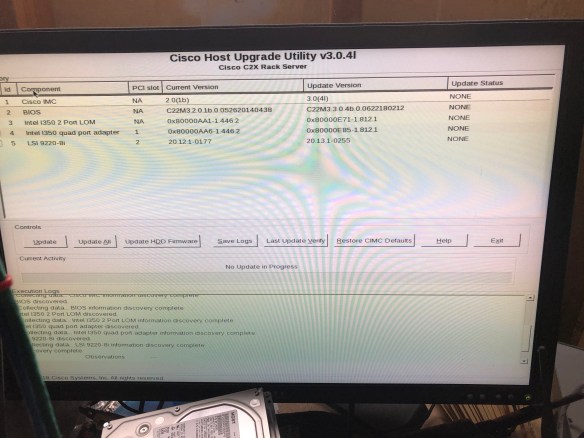
Since I was going to run this machine in standalone mode, I went to the Cisco support site and downloaded the Host Update Utility (HUU) in ISO form.

Updating firmware with the Host Update Utility (HUU) ISO

I loaded up Balena Etcher, a program used to write ISO images and other disk formats to USB flash drives. USB ports are easy to come by on modern computers, but optical drives are not as common. I “burned” the ISO to a flash drive and went to boot it up on the C22.

No luck. I got an error message on screen as the Host Update Utility loaded, referring to Error 906, “firmware copy failed.”

Doing some searching, I found that there were quirks to the bootability of the image. A colleague at Cisco had posted a script to the public community site in 2014, and updated it in 2017, which would resolve this issue. So I brought up my home office Linux box (ironically a HPE Microserver Gen8 that I wrote about in January), copied the script and the iso over, and burned the USB drive again with his script. This time it worked.

Recovering a corrupted BIOS flash image with recovery.cap

Alas, while four of the five firmware components upgraded, the BIOS upgrade was corrupted somehow. Probably my fault, but either way I had to resolve it before I could move forward.

Corrupt bios recovery, before and after

Seemed pretty obvious, and I figured the recovery.cap file would have been copied to the flash drive upon boot, but I figured wrong. You have to extract it from a squashfs archive inside the HUU ISO file. There’s even a ‘getfw’ program in the ISO to do this. Easy, right?

Of course not.

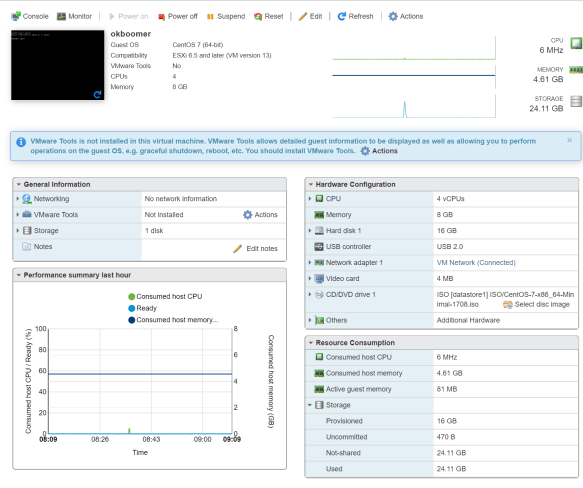
Turns out newer versions of OpenSSL won’t decrypt the filesystem image and extract the needed file, and even my year-out-of-date CentOS 7 box was too new. So I spun up a VM with the original CentOS 7 image and extracted there.

  1. Get the HUU for your system and UCS version (don’t use a C22 BIOS on a C240 or vice versa, for example).
  2. Mount or extract the ISO file
  3. Copy the GETFW/getfw binary out
  4. Unmount the ISO file
  5. ./getfw -b -s <HUU ISO FILE> -d .

This will drop a “bios.cap” file in the current directory. Rename it to “recovery.cap” … put it on a flash drive (plain DOS formatted one is fine), put it into the system, and reset your machine. You’ll go from the first screen with “Could not find a recovery.cap file..” to the second screen transferring to controller. And in a few minutes, your system should be recovered.

Preparing to boot the system

This is the easiest part, in most cases,  but there are a couple of things you may have to modify in the Integrated Management Controller (IMC) and the LSI WebBIOS interface.

Set your boot order. I usually go USB first (so I don’t have to catch the F6 prompt) followed by the PCIe RAID card. The RAID card will only show up if supported and bootable drives are installed though. This can be changed on the fly if you like, but I prefer to do it up front.

Check your RAID controller settings. Follow the BIOS screen instruction for going into WebBIOS (the text interface to configuring the RAID card), and make sure that you have disks presented in virtual drives. I had plugged a UCS drive and a random SSD in and only the UCS drive (a 73GB SAS drive) showed up. It did not appear to the F6 Boot Order menu though, as it was not set bootable in WebBIOS. A few key taps fixed this, and the drive appeared. Again, you can change the boot order after installing, but why not do it first?

Moving forward with VMware installation

This is the easy part, more or less. I went to VMware’s site and grabbed the Cisco custom ISO (which should have current drivers and configurations for Cisco components, especially the RAID controller and network cards). You can also install with the standard vSphere installer if you like.

I burned the 344 MB ISO to a flash drive, finding again that Etcher didn’t like it (complaining not being a bootable ISO) but Rufus did. With a Rufus-burned 8GB drive (choose “yes” to replace menu.c32 by the way), I was able to install the vSphere system and bring it up.

On first install attempt, I did see this message for about a second, and had no drives show up.

Turns out this error warns you that log files are not stored permanently when booting from a USB installation drive, and it was unrelated to the missing drives (which didn’t show up because I originally had an unconfigured SSD and no configured drives installed–see previous section to resolve this).

But when I had the hard drive configured, the install went smoothly.

It is somewhat funny that I’m working with 48GB of RAM and only 60ish GB of storage at the moment, but from here I was able to copy over my OS installation ISOs (8GB over powerline networking made it an overnight job) and bring up my first VM on the new system.

So where do we go from here?

For now, the initial goal of confirming that vSphere will install neatly on a C22 M3 with the 9220-8i RAID controller has been accomplished.

Next up, adding some more storage (maybe SSD if I can find something that will work), maybe bumping the RAM up a bit, and doing something useful with the box. It only draws 80-100 watts under light use, so I’m okay with it being a 24/7 machine, and it’s quiet and in the garage so it shouldn’t scare the neighbors.

If you’re looking to turn up an older Cisco UCS server in your home lab, get familiar with the software center on Cisco.com, as well as the Cisco Community site. Lots of useful information out there as well as on the Reddit /r/homelab site.

Have you rescued old UCS servers for your homelab? Share your thoughts or questions below, or join the conversation on Facebook and Twitter.


Upgrading the HPE Microserver Gen 8 and putting it into service

[Updated March 2025 with new processor prices/links, a “new” CPU option, and a better RAID option.]

A year and a half after my original write-up of the Ivy Bridge-based HP Gen8 Microserver, I’m finally doing a last round of pre-launch updates and documenting the upgrades I made.

The Microserver Gen8 is easily found for under $200 on eBay as of 2025. And it’s still quite a capable little machine.

You can read the original write-up (as updated to December 2018) here: Warming up the HP Microserver Gen8 and PS1810-8G switch

More links at the end of this post. Pricing has been updated as of 2019-08-15, and again on 2025-03-18, but is still subject to change without notice.

Where do we start?

The HPE Microserver Gen8 as I received it had the Intel Pentium G2020T processor, a dual core, dual thread, 2.5 GHz processor with integrated Intel HD Graphics. For an ultra-low-end workgroup or SOHO server, that’s not too bad, and it’s better than the Celeron G1610T option.

gen8-cpus

Stock processor options for the HP Microserver Gen8

But since we’re not worried about the warranty and do want a bit more power, we looked at the following options for a CPU upgrade.


Xeon Processor CPU speed C/T TDP Integrated graphics? eBay price/link March 2025 (
August 2019 , December 2018)
E3-1230 v2 3.30 – 3.70 4/8 69* No $20.00
(49.00, 75.00)
E3-1260L (v1) 2.40 – 3.30 4/8 45 HD2000 $15-20
(34.30, 57.00)
E3-1265L v2 2.50 – 3.50 4/8 45 HD2500 $35ish
(99.00, 100.00)
E3-1230 v2
(added 3/2025)
3.30 – 3.70 4/8 69* No $10-15
  • The 69W parts may require additional cooling consideration.

Since we didn’t have a use case in mind for this, we went for the E3-1265L v2 processor. CPU speed is reasonable, power is within the envelope for this system’s cooling capacity, and the price didn’t turn out too bad (although it was almost twice as much a year and a half ago).

The system arrived with 16GB of memory, which is the maximum supported with this generation of processor and a two-DIMM-slot motherboard (the CPU will handle 32GB but no more than 8GB per DIMM, and the Memphis Electronics 16GB DDR3 DIMMs require a newer generation of CPU).

The system also shipped with a single 500GB SATA drive and three empty trays for expansion, connected to the onboard B120i storage controller. There’s a low profile slot at the top suitable for an optical drive, or a hard drive carrier. According to the specs, the first two bays are 6gbit SATA and the last two bays are 3gbit SATA. You can add a P222 Smart Controller to provide battery-backed cache and expanded RAID options; these can be had for less than $25 on eBay (although a P410 for as low as $20 might be easier to implement).

I installed a 32GB Micro-SD card for OS boot. Like the previous Microservers, the Gen8 offers an internal USB port, but Gen8 adds a MicroSD slot which may be less likely to snap off during maintenance. If I were running a heavy duty Windows or Linux server on this machine, I’d probably either put an SSD on a PCIe carrier card or use the optical drive SATA connector on the board to mount a boot drive in the optical bay. But for VMware or appliance-type platforms, or for light use Linux, the MicroSD should be enough.

Bringing the Microserver Gen8 up to date

One of the first things I do when building or populating a system is to upgrade any applicable firmware on the system. This could include the lights-out management, the system BIOS itself, drive controllers, optical drives, etc.

This gets complicated with HPE gear, as they decided to restrict all but “critical” BIOS update to customers with active support contracts or warranties. There are dubious workarounds, but it’s more of a pain than for any other mainstream vendor. Luckily (and I say that sadly), some of the critical vulnerabilities around Intel microcode in the past year led to the most recent Microserver Gen8 BIOS being considered critical.

So I gathered the latest BIOS, the ILO 4 firmware for out-of-band management, and the latest firmware for the PS1810-8G switch that this system will be connected to. (Unlike the computer systems, HPE’s networking gear carries a lifetime limited warranty and free access to firmware updates.)

With the switch connected to our upstream POE switch and the Microserver’s three network ports (two gigabit LAN, one ILO) connected to the switch, I upgraded the firmware on all three components and installed CentOS 7 from the latest ISO image via external USB flash drive. Additionally, I got a free 60-day trial license for ILO 4 Advanced from HPE.

One quirk I ran into was with regard to the .NET-based remote console and Chrome browser. In short, it doesn’t work unless you install a plugin to handle the .NET launching. I didn’t want to bother with Java either, so I accessed ILO from Microsoft Edge and used the .NET option from there.

Where do we go from here?

In the near term, I’m planning to install the Aquantia AQN-107 10GBase-T/NBase-T adapter and use it to test a couple of new devices in the home lab. Linux with iPerf or the like should be a good endpoint, and with a Thunderbolt 3-to-NBase-T adapter and an economical NBase-T/10G switch to work with, it should be compact and functional.

Longer term, with the former VMware “$25 server” being converted to EdgeLinux (from the makers of the Antsle servers we wrote about here and here), I will probably have this box serve as my in-home vSphere / ESXi system.

There’s a very small chance that I’ll break down and get the new Gen10 machine, but with as many spare computers as I have in the home lab now, it’s not a high priority.

What have you done with your Microserver recently? Share in the comments, or join the conversation on Facebook or Twitter.

For more information on the Microserver Gen 8 (especially around expandability):

HomeServerShow.com has an exhaustive page on Gen8 upgrades and other features and functions.

ServeTheHome has their release-time update on the Gen8 system here: HP ProLiant Microserver Gen8 Updated Specs and Pricing

And if you want the latest and greatest, the Microserver Gen10 came out a year ago with AMD Opteron X3000 processors.

Looking ahead into 2019 with rsts11

This is becoming somewhat of a tradition… I’ll point you toward a Tom Hollingsworth post and then figure out what I want to look back on a year from now. As long as Tom’s okay with that, I am too.

This year, Tom’s New Year’s post is about content. He seems to think 2019 is the King of Content. I’m not really sure what that means, but seeing as my blogs seem to be alternately seasonal (with most rsts11 content in the winter/spring and rsts11travel in the summer/fall), I’m hoping to get a more balanced content load out there for you this year on both blogs.

You can see the new year’s post for rsts11travel, my travel-themed blog, over on rsts11travel of course.

Looking back on 2018

Looking back on rsts11 for 2018, our top-viewed posts were a bit surprising to me.

Continue reading

One Size Fits All: Hyper-V on VMware turf, custard trucks, and IT evangelism

At VMworld 2013 in San Francisco, there was a lot of buzz around Hyper-V, oddly enough. A few vendors mentioned multi-hypervisor heterogeneous cloud technologies in hushed tones, more than a few attendees bemoaned the very recent death of Microsoft TechNet Subscription offerings, and guess who showed up with a frozen custard truck?

8015.Custard_picks

Yep, Microsoft’s server team showed up, rented out and re-skinned a Frozen Kuhsterd food truck, and handed out free frozen custard for a chance to promote and discuss their own virtualization platform and new publicity initiative, branded Virtualization2.

The frozen custard was pretty tasty. Well worth the 3 block walk from Moscone. It was a pretty effective way to get attention and mindshare as well–several people I spoke with were impressed with the marketing novelty and the reminder that VMware isn’t the only player in the game, even if one friend considered it an utter failure due to the insufficient description of frozen custard.

Almost two years ago when I did my Virtualization Field Day experience, the question I asked (and vendors were usually prepared to answer) was “when will you support Xen in addition to VMware?” This year, it’s more “when will you support Hyper-V?” So a lot of people are taking Microsoft seriously in the visualization market these days.

Insert Foot, Pull Trigger

One nominal advantage Microsoft has had over VMware in the last few years is an affordable way for IT professionals to evaluate their offerings for more than two months at a time. But first, some history.

time-bomb-meme

Once upon a time, VMware had a program called the VMTN (VMware Technology Network) Subscription. For about $300 a year, you got extended use licenses for VMware’s products, for non-production use. No 60-day time bomb, no 6-reinstalls-a-year for the home lab, and you can focus on learning and maybe even mastering the technology.

Well, in February 2007, VMware did away with the VMTN subscription. You can still see the promo/signup page on their site but you’re not going to be able to sign up for it today.

At that point, Microsoft had the advantage in that their TechNet Subscription program gave you a similar option. For about $300/year you could get non-production licenses for most Microsoft products, including servers and virtualization. I would believe that a few people found it easier to test and develop their skills in that environment, rather than in the “oops, it’s an odd month, better reinstall the lab from scratch” environment that VMware provided.

Well, as of today, September 1, the TechNet Subscription is no more. If you signed up or renewed by the end of August 31, you get one more year and then your licenses are no longer valid. If you wanted some fresh lab license love today, you’re out of luck.

Technically, you can get an MSDN subscription for several thousand dollars and have the same level of access. The Operating Systems level is “only” $699 (want other servers? You’re looking at $1199 to $6119). Or if you qualify for the Microsoft Partner Program as an IT solutions provider, you can use the Action Pack Solution Provider to get access to whatever is current in the Microsoft portfolio for about $300/year. But the latter is tricky in that you need to be a solutions provider and jump through hoops, and the former is tricky because you might not have several thousand dollars to send to Redmond every year.

Help me, Obi-Wan vExpert, you’re my only hope

In 2011, Mike Laverick started a campaign to reinstate the VMTN subscription program. The thread on the VMware communities forum is occasionally active even two years later. But after two years of increasing community demand and non-existent corporate support, a light appeared at the end of the tunnel last week at VMworld in San Francisco.

As Chris Wahl reported, Raghu Raghuram, VMware Executive Vice President of Cloud Infrastructure and Management, said the chances of a subscription program returning are “very high.” Chris notes that there’s not much detail beyond this glimmer of hope, but it’s more hope than we’ve had for most of the last 6 years. For those of you who remember Doctor Who between 1989 and 2005, yeah, it’s like that.

Today, your choices for a sustainable lab environment include being chosen as a vExpert (or possibly a Microsoft MVP–not as familiar with that program’s somatic components) with the ensuing NFR/eval licenses; working for a company that can get you non-expiring licenses; unseemly licensing workaround methods we won’t go into; or simply not having a sustainable lab environment.

I added my voice to the VMTN campaign quite a while ago. When nothing came of that campaign, and I found myself more engaged in the community, I applied for (and was chosen for) vExpert status. So the lab fulcrum in my environment definitely tilts toward the folks in Palo Alto, not Redmond.

But I did mention to the nice young lady handing out tee shirts at the Microsoft Custard Truck that I’d be far more likely to develop my Hyper-V skills if something like TechNet subscription came back. She noted this on her feedback notebook, so I feel I’ve done my part. And I did get a very comfy tee shirt from her.

When I got back to my hotel, I found that the XL shirt I’d asked for was actually a L. Had I not been eating lightly and walking way too much, it wouldn’t have come anywhere near fitting, and it probably won’t any more, now that I’m back to normal patterns. But maybe that size swap was an analogy for a bigger story.

One size doesn’t fit all.

If Microsoft and VMware can’t make something happen to help the new crop of IT professionals cut their teeth on those products, they’ll find the new technologists working with other products. KVM is picking up speed in the market, Xenserver is moving faster toward the free market (and now offers a $199 annual license if you want those benefits beyond the free version), and people who aren’t already entrenched in the big two aren’t likely to want to rebuild their lab every two months.

And when you layer Openstack or Cloudstack (yeah it’s still around) on top of the hypervisor, it becomes a commodity. So the benefits of vCenter Server or the like become minimal to non-existent.

So where do we go from here?

Best case, VMware comes up with a subscription program, and Microsoft comes up with something as well. Then you can compare them on even footing and go with what works for you and your career.

Worst case, try to live with the vCenter and related products’ 60 day trial. If your company is a VMware (or Microsoft) virtualization customer, see if your sales team can help, or at least take the feedback that you want to be able to work in a lab setting and spend more time testing than reinstalling. 

And along the way, check out the other virtualization players (and the alternatives to VMware and Microsoft management platforms… even Xtravirt’s vPi for Raspberry Pi). Wouldn’t hurt to get involved in the respective communities, follow some interesting folks on Twitter and Google+, and hope for the best.

Did you say something about Doctor Who up there?

Yeah, and I should share something else with you.

When I saw the mention of the custard truck, my first thought was honestly not frozen concoctions in general. Obviously, it was the first Matt Smith story on Doctor Who, Eleventh Hour, wherein he tries to find some food to eat at Amy Pond’s home after regenerating. He ends up going with fish fingers (fish sticks) and custard (not the frozen kind).

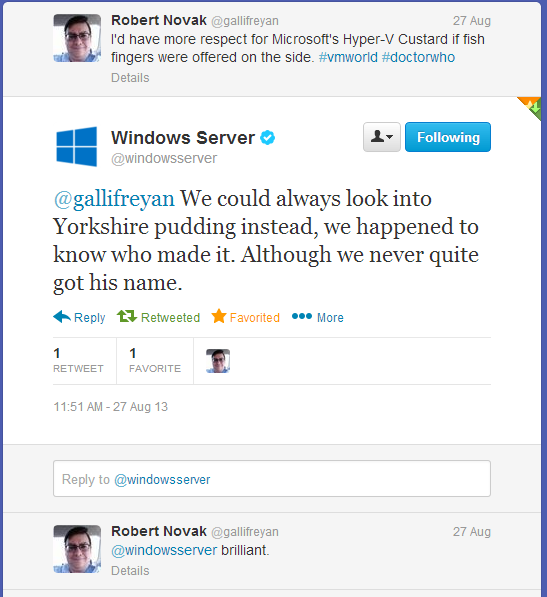
So I made a comment on Twitter, not directed at anyone, saying “I’d have more respect for Microsoft’s Hyper-V Custard if fish fingers were offered on the side.”

And this really happened.

this-really-happened

So even if they’re discouraging me and other technologists from effectively labbing their products, I have to give them credit for a sense of humor. Not usually what you expect to come out of Redmond, now is it?

Related Links:

Mr Jones posted an article that really annoyed me until I read his well-reasoned response to the well-reasoned comments. Check out his interpretation of the TechNet subscription and brave the comments for some very sane discussions.

A couple of pieces from the Microsoft team about their marketing activity. Fun read, and the source of the truck photos above.

tardis.wikia.com definitions and a BBC video clip from Youtube,to help you understand the Twitter exchange.