Colin Quinn and the Art of Mining Rig Maintenance

I’ve been doing a lot with cryptocurrency mining lately, so there’s been a lot of activity here on rsts11 about it as well. For this post, a lot of the concepts can apply to a home lab in general, although it was inspired by several conversations on mining channels on Telegram and Discord over the past month.

In the late 1980s, actor Colin Quinn was an announcer on a game show called Remote Control. It’s not terribly remarkable in context, but as I’ve had a few people of differing technical levels ask about remote control for their mining rigs, it seemed relevant. 

Whether you’re managing a single server, a home lab, a mining rig, or an entire farm, it’s likely that your gear will not be in  your home office or possibly not even in your home at all, but you won’t want to travel to where the gear is everytime something needs to be power cycled. In the case of one of the people I consulted for recently, he was going to deploy mining rigs at a friend’s house in another country, and would not be able to be hands-on with the gear more than 2-3 times a year.  

So the considerations I’m making here are tuned for a relatively small number of systems that may not have IPMI console access, and may not have convenient access or remote hands services available. In a datacenter or similar environment, you may have contracted services to send someone to hit the reset button or look for issues. For many of my readers, this is not a luxury you’ll enjoy. 

My own remote access adventure happened when my oldest mining rig was a few miles from home. Thanks to my Meraki networks, I did have direct VPN access, but the rig would occasionally crash and require a physical power cycle. It was only 5-10 minutes each way, and I did have 24/7 access to the facility, but it got very inconvenient at times. 

The considerations I’ll layout here fall into a couple of categories. 

  1. Network access (usually via VPN of some sort)
  2. Console access (remote KVM)
  3. Power control (remote power controller over Ethernet, via #1 above)

Disclosure: Neither Robert M Persig, Colin Quinn, nor Ken Ober have any association or endorsement or even awareness of this blog post. 

Continue reading

Wrestling with an ONDA B250-D8P-D4 mining motherboard

Most casual crypto miners use a conventional motherboard, especially if they have a PC/case/power supply with sufficient PCIe slots for their GPUs. But when you get beyond 2-4 GPUs, you either need a rat’s nest of riser extenders, or maybe (just maybe) a dedicated mining motherboard.

I recently got a new-to-me mining motherboard, and found it painful to find some information and resources I needed. I’m aggregating this information in this post, and it will get updated as I get more relevant experience with the ONDA motherboard in question. If you have any info to share, feel free to comment below and I’ll update. (Last update 2021-03-14)

I’ve mined with an Octominer 8-slot motherboard for 3 years now. In addition to an onboard Celeron 3855U and a single DDR3 SODIMM RAM slot (max of 8GB), it has eight PCIe x16 slots, so you don’t need to use the common x1-to-x16 risers. It’s complicated in that you have to power the motherboard with a number of additional power connectors (in this case, 6-pin PCIe power leads from the power supply). But it sits flat on a custom frame I ordered in 2018, and it doesn’t have much that I don’t need (like lots of drive controllers, extra memory slots, audio, etc). And if you get a custom mining power supply (or breakout board) with only 6-pin connectors, you’re in good shape. 

Octominer has discontinued their 8-slot boards, and the boards may not support the latest GPUs on the market (much like the Ethos mining distro I used on it until this past week). I couldn’t get the board to boot with an AMD 5500XT GPU (Amazon, eBay) in the first slot, for example. So it’s chugging along with eight Sapphire Nitro+ RX580 8GB cards (Amazon, eBay), seven of which have been chugging for almost three years now.

While they still make custom boards, the only ways to get their products are either to find the rare used item on a marketplace, or to buy the one integrated rig they currently sell in quantities less than 10 (their x12 rig with everything but the GPUs, which runs almost $1,000 shipped to the US). 

Another company making custom boards is ONDA. You can usually find them on eBay or other marketplaces for a couple hundred dollars, with a range of slot support. I found a good deal on the B250 D8P-D4 recently, and since I wanted to aggregate a mess of old GPUs, it was an easy way to go. Continue reading

Quick Take: Different ways of acquiring cryptocurrency

With this past month’s stock and crypto activity (various stocks heading for lunar orbit, Bitcoin breaking US$40,000, etc), a lot of people have started looking for ways to buy cryptocurrency (and stocks).

In a lot of forums, they’re being hit with misleading or outright false information. I’m here today to give you some pointers and context, and help you understand the cryptocurrency options available to you.

Send me a few thousand SHIB (well, enough for a coffee or two) on Ko-Fi, or use the referral links below.

Nothing in this post is provided as investment advice or recommendations to conduct any financial transactions. There is risk in any of these processes, and you are on your own for that.

If you choose to use one of my referral links to sign up for one of the services mentioned, I’ll either get a share or two of a cheap stock, a few bucks worth of a stock, or sometimes a cash bonus. And I’ll appreciate your support. (Note that promos can change, and I may not come back and update these promos later; see the respective websites for active promotion terms)

  • SoFi Invest (fund an active account including crypto with $1000, and we’ll both get $50 worth of stock) (crypto available)
  • SoFi Money (fund an account with $500, and we both get $50 cash) (Virtual money management account, linkable to Invest and other services)
  • Robinhood (sign up and link a bank account, and we both get a free share of stock) (crypto available)
  • Webull (fun an account with $100 and get at least one stock share, maybe two) (crypto under tags like BTCUSD, ETHUSD, no DOGE)
  • Public (app-only, complete application and get a free amount of stock up to $16, must hold the value of the free stock in the account for 90 days) (no crypto, just stocks)

What is cryptocurrency? Do I get an actual physical bitcoin?

Cryptocurrency is a virtual currency that is created through a process called mining, and can be transferred and converted to other currencies (including “fiat” or what some would call “real” money). You don’t get a physical bitcoin (or ethereum or anything like that), and if you’ve seen one of those metal “Real Bitcoin Coin” items at a store, you’ve just seen a souvenir with little to no value and no association with any bitcoins.

Many cryptocurrencies have developed value, primarily through people giving them value and accepting them in transactions. This isn’t entirely unlike paper money – a piece of green and white paper alone doesn’t have any value, but when a nation accepts that that piece of paper is worth a certain amount and uses it in trade, it suddenly has value. 

The cryptocurrencies you’ve probably heard most about are Bitcoin, Ethereum, Litecoin, and (lately) Dogecoin. Bitcoin is the grandfather of crypto, and has been around since 2009. The others have come along since, to address perceived shortcomings or scaling issues with Bitcoin. Continue reading

Looking ahead into 2019 with rsts11

This is becoming somewhat of a tradition… I’ll point you toward a Tom Hollingsworth post and then figure out what I want to look back on a year from now. As long as Tom’s okay with that, I am too.

This year, Tom’s New Year’s post is about content. He seems to think 2019 is the King of Content. I’m not really sure what that means, but seeing as my blogs seem to be alternately seasonal (with most rsts11 content in the winter/spring and rsts11travel in the summer/fall), I’m hoping to get a more balanced content load out there for you this year on both blogs.

You can see the new year’s post for rsts11travel, my travel-themed blog, over on rsts11travel of course.

Looking back on 2018

Looking back on rsts11 for 2018, our top-viewed posts were a bit surprising to me.

Continue reading

Getting Started with Cryptocurrency Mining – Building Your First Rig

This is a post I’ve started three or four times, with different aims and detail, but since I haven’t gotten it posted and people keep asking, I thought I’d start with a simple build plan and some caveats and considerations.

Where I refer to a ‘rig’ here, it’s simply a system dedicated to, or purposed for, mining cryptocurrency of some sort. It might be a single board computer, or a dedicated device, or a PC with one video card (or just a good cpu), or an open frame build with lots of GPUs and a beefy power supply.

Big Hairy Audacious Caveats

The numbers in this article, from prices to currency rates, are based on the time of writing (which may have been a while before the time of posting). They are not guaranteed to last even as long as it takes for this article to post. I am not advising on the value or prospects of any mining or cryptocurrency. You may gain money, lose money, or break even, or your entire city may sink into the ground like a big ole glowing gopher, if you engage in cryptocurrency mining on any level. Do so at your own risk. 

Other Reading

See the sidebar: A note about mining pools

See the other sidebar: Setting up your cryptocurrency wallet

Givens and Druthers

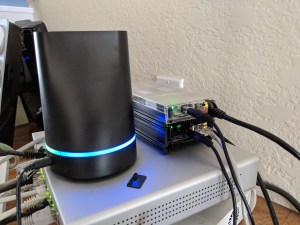
Two ODROID HC1 single board computers, next to a Transporter NAS device.

There are a lot of options out there, from multi-thousand-dollar ASIC miners for Bitcoin to sub-$50 single board computers that can mine Verium or the like. Your budget will determine a lot of the details of your rig, and your power cost may influence it as well. It’s also worth keeping family approval requirements in mind, since an Antminer may be noisy and generate a lot of heat, whereas a Raspberry Pi or ODROID might fit better behind something in your living room.

You can build a starter rig with one GPU, and depending on the GPU, you might be able to bring in $10-20 a week or more from that. Considering that you can do this with an existing PC and operating system, it may be an economical way to get your feet wet, and it won’t require messing with special power supplies, excessive cooling, or riser cards.

If you’re looking to impress people or make a lot of money, well, good luck. But you’ll be looking at open frame systems with riser cables or even multiplexers for PCIe. That’s beyond the scope of this post. Continue reading