I’ve been planning to do some network testing and deploy some new storage for VMware vSphere in the home lab. My Synology NAS boxes (DS1513+ and DS1813+) have good performance but are limited to four 1GbE ports each, and my budget won’t allow a 10GbE-capable Synology this spring. [See below for a note on those $499 Synology systems on Amazon.] Continue reading →
It got me to thinking about how I’d define “cloud” and why others feel differently. So here’s a bit of a soft-topic consideration for you along the way.
I was first exposed to the buzzword around 2009, when a major PC and IT gear reseller from the midwest was trying to convince me on every call and email thread that I should buy The Cloud(tm). My rep never could tell me why, or what problem it would solve, a common shortcoming of quota-bound sales reps. I think the closest to a justification I ever got was “Just give a try, you’ll be able to tell where you can use it.” And I didn’t.
As the current decade rolled along, anyone running the server side of a client/server model called themselves The Cloud(tm). And of course, Amazon Web Services and other players came along to give their own definitions and market shares to the matter.
Today, at its extreme interpretation, anything not running in focus on your current personal device is probably considered “cloud” by someone. And to be fair to antsle, that’s where they fit in a way. Continue reading →
Most of you know I don’t shy away from building (or refurbishing) my own computers. I used to draw the line at laptops, but in the last couple of years I’ve even rebuilt a few stripped-for-parts Dell and Toshiba laptops for the fun of it. Warped definition of “fun,” I’ll admit.
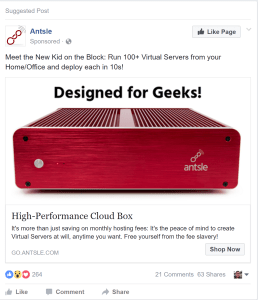
So when I saw a Facebook ad for a “cloud server” called “antsle,” I was curious but unconvinced. It was something like this:
The idea is you’re buying a compact, fanless, silent microserver that, in addition to some fault-tolerant hardware (mirrored SSD, ECC RAM), includes a proprietary user interface for managing and monitoring containers and virtual machines. You can cram up to 64GB of RAM in there, and while it only holds two internal drives, you can add more via USB 2.0 or USB 3.0, for up to 16TB of officially supported capacity. Not too bad, but I’ve been known to be cheap and/or resourceful, so I priced out a similar configuration assuming I’d build it myself. Continue reading →
After being chosen as a VMware vExpert for 2017 this month, I was inspired to get working on refreshing my vSphere “homelab” environment despite a busy travel month in late February/early March. This won’t be a deep technical dive into lab building; rather, I just wanted to share some ideas and adventures from my lab gear accumulation over the past year.
As a disclosure, while I do work for Cisco, my vExpert status and homelab building are at most peripherally-connected (the homelab at home connects to a Meraki switch whose license I get an employee discount on, for example). And even though I’m occasionally surprised when I use older higher end Dell or HP gear, it’s not a conflict of interest or an out-of-bounds effort. It’s just what I get a great deal on at local used hardware shops from time to time.
rsts11 note: This is the second of a two-part series featuring mobile internet routers. The first part is posted over on rsts11travel.com, as it is a bit milder technology. The second part appears on #rsts11 since it’s a bit more POHO than random travel, and will be cross-promoted on the travel side.
When you travel, you probably have a number of devices that demand connectivity.
Many venues limit your allowed devices, and maybe you don’t want your devices out on the open network. Additionally, you may want to use streaming devices or shared storage in your room, and that may not work with typical public network setups. Last time we looked at some battery powered routers with charging functions and other network features.
Today on rsts11 we’ll look at some choices for sharing a wired connection as well as a cellular modem. We’ll briefly revisit the Hootoo and Ravpower routers from part 1, and then dive into Meraki, Peplink, and Cradlepoint devices for the higher-power user. Continue reading →


 rsts11 - Robert Novak on system administration