First look: Checking out the “antsle” personal cloud server

Check out the followup to this post, featuring antsle’s second generation of servers, here: Quick Take: Antsle coming out with Xeon-D models with 10GbE in December

Most of you know I don’t shy away from building (or refurbishing) my own computers. I used to draw the line at laptops, but in the last couple of years I’ve even rebuilt a few stripped-for-parts Dell and Toshiba laptops for the fun of it. Warped definition of “fun,” I’ll admit.

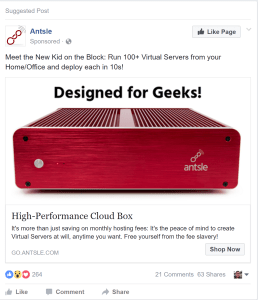
So when I saw a Facebook ad for a “cloud server” called “antsle,” I was curious but unconvinced. It was something like this:

The idea is you’re buying a compact, fanless, silent microserver that, in addition to some fault-tolerant hardware (mirrored SSD, ECC RAM), includes a proprietary user interface for managing and monitoring containers and virtual machines. You can cram up to 64GB of RAM in there, and while it only holds two internal drives, you can add more via USB 2.0 or USB 3.0, for up to 16TB of officially supported capacity. Not too bad, but I’ve been known to be cheap and/or resourceful, so I priced out a similar configuration assuming I’d build it myself.  Continue reading

Overkill in the rsts11 lab workshop – a homelab update for 2017

After being chosen as a VMware vExpert for 2017 this month, I was inspired to get working on refreshing my vSphere “homelab” environment despite a busy travel month in late February/early March. This won’t be a deep technical dive into lab building; rather, I just wanted to share some ideas and adventures from my lab gear accumulation over the past year.

As a disclosure, while I do work for Cisco, my vExpert status and homelab building are at most peripherally-connected (the homelab at home connects to a Meraki switch whose license I get an employee discount on, for example). And even though I’m occasionally surprised when I use older higher end Dell or HP gear, it’s not a conflict of interest or an out-of-bounds effort. It’s just what I get a great deal on at local used hardware shops from time to time.

The legacy lab at Andromedary HQ

Also read: New Hardware thoughts for home labs (Winter 2013)

C6100

Stock Photo of a Dell C6100 chassis

Continue reading

What planet are we on? (The Third) — the RSTS11 Interop preview

Greetings from Fabulous Las Vegas, Nevada. For the third year, with apologies to Men Without Hats, I’m back in the Mandalay Bay Convention Center for Interop. 

This week, I’m actually a man without hats as well. My Big Data Safari hat is in my home office, and my virtual Cisco ears are back at home as well, next to the VPN router that was powered down before I headed for the airport. (Alas, after moving from Disney to Cisco, I lost the theme park discounts and the epic mascot reference.)

What are you up to at Interop this year, Robert?

So why am I back at Interop, when a dozen conference calls a day could have been in the cards for me this week? 

My readers, my fans, and my groupie all know that I’ve been a fan of the Psycho Overkill Home Office (POHO) for quite a while, going back to when I had a 19-server, 5-architecture environment with a 3-vendor network in my spare bedroom. Today it’s about 12 servers, all x64 (Shuttle, Intel, Cisco, Supermicro, Dell, and maybe another secret brand or two), and technically a 5-vendor network, but the idea is similar enough.

And having built a couple of startups up from the under-the-desk model to a scalable, sustainable production-grade infrastructure, the overkill in my home office and labs has led to efficient and effective environments in my workplaces. 

This week I’m taking a break from my usual big data evangelism and the identity aspects of working for a huge multinational juggernaut. It’s a bit of a relief, to be honest; earlier this month I attended my first event in 10 months as a non-booth-babe, and now I’m getting to focus on my more traditional interests. 

What’s on the agenda this week?

I’m looking forward to return visits to the folks at Sandisk, Opengear, and Cradlepoint. Cradlepoint was the first interview I did two years ago at Interop 2013, and I’ve been a customer on my own for many years; Opengear was a presenter at Tech Field Day Extra at Cisco Live 2013; and I last talked with Sandisk at Storage Field Day 5 about a year ago, as well as having been a Fusion-io customer at a previous job. 

I have a couple of other meeting requests out, so we may hear from a couple of other POHO/SOHO/ROBO/lab staples, and I’ll at least be dropping by their booths in the Interop Expo to see what’s new. 

While I’m only recording this week for notetaking convenience, I am starting to ponder what to do about the podcast I’ve been thinking about for a couple of years. So maybe I can pull in some interesting people from time to time… last night’s conversation over Burger Bar shakes with Chris Wahl and Howard Marks probably would have been fodder for several podcasts alone (and I don’t think any of us even had any alcohol!).

And seeing as a number of my friends are presenting this year, including Chris and Howard, I’ll be trying to make my way to their sessions (although there’s a LOT of overlap, and triple-booking isn’t uncommon… there’s a lot more than the Expo floor to experience at Interop, as always).

So where do we go from here?

If you’re at Interop, who are you looking forward to seeing/hearing/heckling/buying drinks for? (And if you’d like to meet up, catch me on Twitter at @gallifreyan.) If not, check out the exhibitor list at interop.com/lasvegas and let me know who you are curious about on that list. 

The Endpoint Justifies The Veeam: New free “personal” backup product coming soon

Apologies to Sondheim and Lapine for the updated title on this article.

Veeam announced their “Endpoint Backup FREE” product in the wee hours of the morning Wednesday, as about a thousand attendeees of the first-ever VeeamON user conference were still recovering from the event party at LIGHT nightclub in Las Vegas. More on VeeamON in another post later… but let’s get back to the new product for now.

Nope, this isn’t a hangover. Veeam, a leader in virtual machine backup/recovery and disaster recovery technology, is stepping out of the virtual world to allow you to back up bare metal systems. From early comments, this has been a long-awaited feature.

Veeam Endpoint Backup FREE

Endpoint Backup FREE is a standalone software package targeted at IT professionals and technophiles for use on standalone systems with local or networked storage. It should fit into anyone’s budget, and with flash drives and external USB drives coming down in price, none of us should have an excuse not to back up our personal laptops and desktops anymore (I’m talking to me here).

eblog5_thumb advanced recovery disk

Veeam offers an “Advanced Recovery Disk” that enables you to do a bare metal restore to a point in time. With some products you can restore from a backup image to a new disk or replacement computer, but you have to install and patch your OS from scratch first. Other products may limit you to local storage, or require driver alchemy, but with the Endpoint Backup recovery disk, you can boot from it (i.e. USB flash drive or optical media) and restore your full system image from a network share on your LAN.

Hey, can I back up a million Windows Servers with this product?

grumpy-cat

No, you can’t, and you shouldn’t.

Veeam are using a specific term in the product name–endpoint–to distinguish this offering from a bare metal server backup product. While it runs on Windows Server 2008 and later (as well as Windows 7 and later on the desktop side), it is being developed as a client OS backup solution. It does not have any central control or client management functionality, as it is a standalone program. This model doesn’t really scale for a large number of systems.

However, if you’ve virtualized all but two or three servers in your environment, or if you run a small number of physical servers in a home lab, this can cover that gap without having to license an additional enterprise product for a small number of legacy servers. You can even use a Veeam infrastructure as your backup target, whether backing up Windows Server or the standard desktop offerings.

Also, at this time Veeam does not support mobile devices (iOS, Android, Windows Phone, Sybian, Tizen, etc) so it is not a universal endpoint solution. You’ll want to either use your platform’s cloud option or something like Lookout or a carrier-specific app to back up your tablets and phones.

What are the downsides to this new product?

Well, the main thing for me personally is this (courtesy of Rick Vanover’s vBrownBag talk this morning):

Veeam Not Yet

It’s not available yet. Veeam employees are doing an alpha test now. A public beta is expected in November, with general availability (GA) offering in early 2015. However, for me it’s not that bad as it will take me a couple more weeks to have any free time, so for once I can probably wait patiently.

Another thing, which will probably affect a few of my readers:

no macs

That’s right, no Macs. At launch, and for the foreseeable future, Endpoint Backup FREE will only support Windows systems. Today there is no Linux or Mac OS X support. You can of course back up the Windows VM on your Mac with this product, but you’d have to use one of the server products to back up Linux, and if customers request Mac OS X support enough, they will likely consider it down the road.

And a fifth thing, that builds on the previous item:

Windows_me_logo

For reasons that should be obvious, Veeam has chosen to support only current Windows OS revisions. Windows 7 and later and Windows Server 2008 and later will be supported.

XP is out of service, and Vista is, well, Vista. Windows Server 2003 goes out of service next year. So for most users this will not be a major hindrance, but if your home lab has a lot of old Windows OSes, the Endpoint Backup FREE product will probably not fit your needs. And you should use this as an excuse to start upgrading (as if you needed any more reasons).

So where do we go from here?

It’s going to be an interesting year coming up, in the PC backup world. Veeam has a long history of free products, going back to their first product, FastSCP from 2006. Many technologically savvy end users will probably try out the new offering and then be tempted to check out Veeam’s other products if they haven’t already.

I wouldn’t be surprised to see this functionality integrated and expanded into a paid/enterprise grade offering in Veeam’s future, incorporating feedback from the beta and first production release of Endpoint Backup FREE. There’s some logic in expanding from there to supporting bare metal servers in a scalable way as well. If Veeam follows this path, the other big backup players may end up with a bit of heartburn.

You can sign up for the beta at go.veeam.com/endpoint and get notified when it’s available for download.

Disclosure: Veeam provided me with a complimentary media pass to attend VeeamON 2014. No other consideration was offered, and there was no requirement or request that I write about anything at the event. As always, any coverage you read here at rsts11 is because I found it interesting on its merits.

How do you solve a problem like Invicta? PernixData and external high performance cache

PernixData and unconventional flash caching

We spent a captivating two hours at PernixData in San Jose Wednesday. For more general and detailed info on the conversations and related announcements, check out this post by PernixData’s Frank Dennenman on their official blog, and also check out Duncan Epping’s post on YellowBricks.

At a very high and imprecise level, PernixData’s FVP came out last year to provide a caching layer (using flash storage, whether PCI-E or SSD) injected at the vmkernel level on VMware hypervisors. One big development this week was the option to use RAM in place of (or in addition to) flash as a caching layer, but this is unrelated to my thoughts below.

One odd question arose during our conversation with Satyam Vaghani, CTO and co-founder of PernixData. Justin Warren, another delegate, asked the seemingly simple question of whether you could use external flash as cache for a cluster (or clusters) using PernixData’s FVP. Satyam’s answer was a somewhat surprising “yes.”

I thought (once Justin mentioned it) that this was an obvious idea, albeit somewhat niche, and having worked to get scheduled downtime for a hundred servers on several instances in the past year, I could imagine why I might not want to (or be able to) shut down 100 hypervisor blades to install flash into them. If I could put a pile of flash into one or more centrally accessible, high speed/relatively low latency (compared to spinning disk) hosts, or perhaps bring in something like Fusion-io’s Ion Accelerator platform.

I took a bit of ribbing from a couple of other delegates, who didn’t see any situation where this would be useful. You always have plenty of extra spare hypervisor capacity, and flash that can go into those servers, and time and human resources to handle the upgrades, right? If so, I mildly envy you.

So what’s this about Invicta?

Cisco’s UCS Invicta platform (the evolution of WHIPTAIL) is a flash block storage platform based on a Cisco UCS C240-M3S rackmount server with 24 consumer-grade MLC SSD drives. Today its official placement is as a standalone device, managed by Cisco UCS Director, serving FC to UCS servers. The party line is that using it with any other platform or infrastructure is off-label.

I’ve watched a couple of presentations on the Invicta play. It hasn’t yet been clear how Cisco sees it playing against similar products in the market (i.e. Fusion-io Ion Accelerator). When I asked on a couple of occasions on public presentations, the comparison was reduced to Fusion-io ioScale/ioDrive PCIe cards, which is neither a fair, nor an applicable, comparison. You wouldn’t compare Coho Data arrays to single SSD enclosures. So for a month or so I’ve been stuck with the logical progression:

  1. Flash is fast
  2. ???
  3. Buy UCS and Invicta

Last month, word came out that Cisco was selling Invicta arrays against Pure Storage and EMC XtremIO, for heterogeneous environments, which also seems similar to the market for Ion Accelerator. Maybe I called it in the air. Who knows? The platform finally made sense in the present though.

Two great tastes that taste great together?

Wednesday afternoon I started putting the pieces together. Today you can serve up an Invicta appliance as block storage, and probably (I haven’t validated this) access it from a host or hosts running PernixData’s FVP. You’re either dealing with FC or possibly iSCSI. It will serve as well as the competing flash appliances.

But when Cisco gets Invicta integrated into the UCS infrastructure, hopefully with native support for iSCSI and FCoE traffic, you’ll be talking about 10 gigabit connections within the Fabric Interconnect for cache access. You’ll be benefiting from the built-in redundancy, virtual interface mapping and pinning, and control from UCS Manager/UCS Central. You’re keeping your cache within a rack or pod. And if you need to expand the cache you won’t need to open up any of your servers or take them down. You’d be able to put another Invicta system in, map it in, and use it just as the first one is being used.

If you’re not in a Cisco UCS environment, it looks like you could still use Invicta arrays, or Fusion-io, or other pure flash players (even something like a whitebox or channel partner Nexenta array, at least for proof-of-concept).

So where do we go from here?

The pure UCS integration for Invicta is obviously on the long-term roadmap, and hopefully the business units involved see the benefits of true integration at the FI level and move that forward soon.

I’m hoping to get my hands on a trial of FVP, one way or another, and possibly build a small flash appliance in my lab as well as putting some SSDs in my C6100 hypervisor boxes.

It would be interesting to compare the benefits of the internal vs external flash integration, with a conventional 10GBE (non-converged) network. This could provide some insight into a mid-market bolt-on solution, and give some further enlightenment on when and why you might take this option over internal flash. I know that I won’t be able to put a PCIe flash card into my C6100s, unless I give up 10GBE (one PCIe slot per server, darn). Although with FVP’s newly-announced network compression, that might be viable.

What are your thoughts on external server-side cache? Do you think something like this would be useful in an environment you’ve worked with? Feel free to chime in on the comments section below.

This is a post related to Storage Field Day 5, the independent influencer event being held in Silicon Valley April 23-25, 2014. As a delegate to SFD5, I am chosen by the Tech Field Day community and my travel and expenses are covered by Gestalt IT. I am not required to write about any sponsoring vendor, nor is my content reviewed. No compensation has been or will be received for this or other Tech Field Day post. I am a Cisco Champion but all Cisco information below is public knowledge and was received in public channels.