rsts11: Who makes your multi-hypervisor life easier?

BayLISAI’m working on a BayLISA (Silicon Valley, California) meeting in May that revolves around multi-hypervisor technologies. Pretty much anything that makes a virtualization life easier on the admin, and that works with (or will soon work with) non-VMware hypervisors/platforms (as well as VMware, nothing against them of course).

Do any of my readers or linkees have any suggestions?

We’d prefer a company who has a technical presence in Silicon Valley, or would be likely to be here frequently… and as I mentioned, I have nothing against VMware but would like to extend the scope. I’ve heard a lot more about XenServer/XenSource deployments in the past six months than at any time since I deployed XenServer 5.x at that real estate startup in San Francisco 4 years or so ago.

I should note (since my survey on Meetup about this produced odd results) that I know the other hypervisors… so unless HyperV actually manages Xen or VMware or kvm or Oracle’s stuff too, it doesn’t really count as a multi-hypervisor technology, even though it’s a hypervisor.

rsts11: Building my compact VMware server at home

About a year ago I bought a homebuilt Intel Core i7 (1st generation) desktop from a friend to run VMware ESXi on. He had gone to the trouble of assembling the system with a beautiful Gigabyte motherboard, and getting 4.1 to run on it, and I got a good deal on the system with 6GB of RAM and a 2TB hard drive.

I upgraded to 12GB, then to 24GB, but never put it into use.

Two months ago, I started it up and ran some computationally intensive software on it and discovered it was munching 320W. And it’s a mid-tower size case. Somewhat unwieldy for an apartment with a few other computers already running, and a significant other who doesn’t appreciate a living room that resembles a small colo.

It gets… smaller…

About that time, I think it was Kendrick Coleman who mentioned a new Shuttle barebones XPC system, the SH67H3, that in typical XPC form factor supported a second generation i7 processor and 32GB of RAM. Four slots of DDR3. Problem was threefold.

1) Shuttle on the VMware HCL? Unlikely.

1a) Onboard LAN and SATA controllers supported? Almost as unlikely.

2) 8GB DIMMs were expensive. And how could I in clear conscience run a system capable of 32GB with just 16GB of RAM?

3) Have you seen my holiday credit card bill?

So I was willing to risk 1a, live with 1 (as I’m not buying support or expecting it), and wait out 2 until memory prices came down.

Once 3 was resolved, I emptied my wallet into the cash register at Central Computers and bought the SH67H3 barebones XPC, and an i7-2600s (low power) processor. I had a pair of 2GB DDR3 DIMMs to use until I could upgrade, so I went about installing. I hung a SATA DVD drive off the system and installed ESXi 5 to the flash drive, and all went well.

Well, not quite.

Turned out one of the two DIMMs was bad, keeping the Shuttle from taking off, so to speak. Brief monitor sync and then it went out of sync, no beeps, no signs. I tried one DIMM, it worked; tried the other, it didn’t. Swapping the DIMM slots didn’t help. So I booted with one DIMM, 2GB, the minimum to run the ESXi installer.

No dice.

Turns out system reserved memory and/or shared video RAM managed to pull me under 2GB, and the installer quit on me.

So I realized I had 6 4GB DIMMs in the old VMware box, and I pulled two to get the Shuttle system going. Bueno. Just short of 10GB and it installed pretty well. The Shuttle disk and network were supported under ESXI 5.0.0 without any additional effort.

It got… better…

By the time this happened, I found some 8GB DDR3 DIMMs on Amazon from Komputerbay. These were not on the Shuttle compatibility list, but they were less than half the price, so I took a fortuitous risk. I’ve bought memory from them before, for the last ESXi server I built (at my last job), so I was willing to try out a pair. The memory was $58/stick, and I paid $10 for expedited shipping (twice, as I bought two pairs separately just in case).  They worked fine, survived memtest86+, and made me happy.
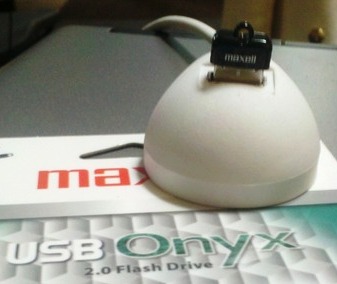
I added a 4GB Onyx flash drive from Maxell, a very low profile drive that hides on the back of the system, to install the hypervisor onto. (Picture shows it in an extension USB pod, to show how much it sticks out. It actually fits in a regular soda bottle cap.)

For disk storage, I put a four-drive SATA enclosure in the 5.25″ half-height bay, and occupied the two SATA3 and the two SATA2 ports on the motherboard. The first bay got a 50GB SATA2 SSD I had on hand, for the initial datastore, and the second has a 500GB 7200RPM SATA disk.

I’m almost embarrassed to admit that the first VM I built on this system was Windows 7 Professional, but it was. And it worked pretty well.

Then the little one spilled a handful of change behind an electric plug and blew up the circuit breaker, while I was away from home… so it’s been on hold for a little while.

What’s in the box?

I bought the following new:

  • Shuttle SH67H3 barebones ($240 at Amazon)
  • Intel Core i7-2600S processor, retail box ($300)
  • 4x Komputerbay 8GB DDR3 RAM ($53 per stick, $212 total)
  • Four-drive 2.5″ SATA cage ($71)
  • Intel PCIe x1 Gigabit Ethernet adapter ($40)

The following came from stock.

  • 4GB Maxell Onyx flash drive ($9)
  • 50GB OCZ Vertex 2 SSD ($126, much more when I bought it)
  • 500GB 7200RPM SATA drive ($120 today, much less when I bought it)

So to build the whole mess today, I’d pay about $1,118 plus tax and sometimes shipping.

What’s next, Rob?

Well, I’m going to be a bit limited by 4 2.5″ drive bays, although I will probably put some more drives in there. I have some 32GB SSDs that are gathering dust, and a couple of 500GB disks, so we’ll see how that goes. The Patriot Pyro SSDs are coming down in price (after rebate) at the local Fry’s store, so maybe I’ll make use of the SATA3 channels.

But for now, my next step is going to be a home NAS (that I threatened to do a while back) starting from an HP N40L Microserver. The Microserver, and its 8GB of DDR3 ECC RAM, came in last month. FreeNAS 8 is currently running on this system,  with an internal USB flash drive, although I’m tempted by OpenFiler’s ability to serve as a fibre channel target.

I will probably put the 8GB of RAM back into the mid-tower VMware box and use it as a second node, put some multiport cards into both ESXi servers, and power up a Summit 400-48T switch for the backbone of my virtualization network. I’m still watching for absurdly affordable PCIe 10GB Ethernet cards (since my Summit 400 has two 10GBE ports), but all I have for now is PCI-X, and only one of the three involved machines has even PCI.

I also now have a second location for lab equipment, as you may see in my write-up of the new store I’m starting. So the old desktop, and probably a Fibre Channel-enabled OpenFiler on a small SAN, will go over there. I can replicate across a 20ms latency link once, and have a pretty valid test environment for anything I’m likely to do.

Random thoughts

The LAN (RTL 8111E Gigabit Ethernet), and SATA onboard on the SH67H3 were supported out of the box, no oem.tgz tweaking needed. I had an Apricorn PCIe SSD/SATA3 controller that I plugged in with the SSD, but it wasn’t recognized by ESXi, so I went forward with the drive bay options.

I haven’t tried the SATA RAID on this system. I wouldn’t expect it to be supported, and I’d be inclined to use FreeNAS or OpenFiler or NexentaStor Community Edition to handle resilience, rather than the onboard RAID. If I get a chance, I’ll configure a pair of disks under the onboard RAID just to see how it works, or if it works. But it’s not a long-term prospect for this project.

Other people doing similar stuff

My friend Chris Wahl just put together his home whitebox systems. He went a bit more serverward, and he’s going with a pre-constructed NAS from Synology (which was tempting for me).

Kendrick Coleman wrote about his “Green Machines” project for his lab, and has built out a bit more (and put a bit more detail into his shipping list).

Simon Gallagher of vinf.net fame is well known in Europe for his vTARDIS projects, virtualizing virtualization inside virtual machines. Or as Nyssa said in Castrovalva, it’s when procedures fold back on themselves. I was reading about this, and doing a little bit of it on a quad core desktop at my last job, so I think he gets credit for my thinking about this scale of virtualzation in the first place.

rsts11: Setting up shop, part 1

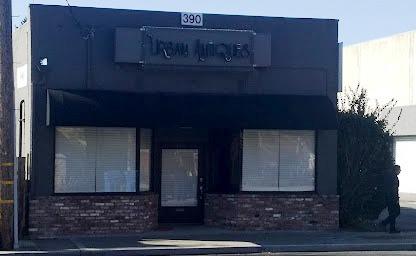
As I’ve hinted at a couple of times recently, I’m setting up a shop. It’s a couple hundred feet from home, in a building constructed 60 years ago as a laundry facility and since then serving as a lawnmower shop, auto repair shop, bazaar (really–that’s what the planning permit said), antique shop, real estate agent’s office, jeweler, and who knows what else?

My incarnation of this particular location will be called Andromedary Instinct, a name I chose ten years ago to avoid the common “* Networks” or “* Microsystems” naming that a lot of places were going with back then. Sure, it took me ten years to decide what to do with the name, but I plan to sell used, homebuilt, and vintage computers and electronics, in the store, on eBay, and at local flea markets and swap meets as time permits. It’s definitely a step up from pulling stuff out of storage once or twice a year for the flea market and trying to do eBay sales from home without angering my significant other or having her reorganize things for me. 🙂

A funny thing happened on the way to the grand opening…

In the course of about two weeks, I managed to get a fictitious business name filed with the county, a business bank account opened with my credit union, a state seller’s permit issued/tax account opened, and a federal EIN issued by the IRS. I also got the lease handled and Internet service going with Sonic.net (single line fusion ADSL2+, 18mbit for $50). Along the way I got most of my old storage merged together, took a long weekend for Gallifrey One and a couple of days for Tech Field Day, and mostly kept up with work too.

Then came the last bit, the city business permit.

The planning/use permit history on this property is pretty interesting, and it’s been the source of no small amount of distress as I’ve gone through the process of making a legitimate business of the shop. It seems the last use permit issued was in early 1969, for lawnmower repair and sales. I’ve seen it in two different incarnations since moving to Sunnyvale, one of which wasn’t retail so it wouldn’t have required a planning permit.

But past use is not necessarily indicative of future permission. In 1993, Sunnyvale adopted a Downtown Specific Plan (revised in 2003), which specifies certain uses for certain blocks of downtown. This particular block, which features a large non-descript self-storage facility, a large bicycle sales and repair shop, an auto parts shop, and (until last year) a glass dealer, is zoned for “Very High Density Residential” or “Medium Density Residential.” My side, with all the businesses on it, is VHD Residential. So new uses that aren’t residential may run afoul of the planning division, or at least require special dispensation. (Apparently the previous tenant avoided this by not getting a permit, and may have moved out when she got caught. I didn’t want to bet on that.)

The building isn’t really conducive to residential use as it is now, with concrete floors, limited climate control, no shower/bath/hot water facilities for the most part… in San Francisco it might be convertable to a loft/live-work type thing with a LOT of work… and the owner isn’t seeming to be in a hurry to tear it down to build more condos. So I think it makes sense to have some business here. “For Rent” signs don’t really improve the sense of the neighborhood.

And either way, I have the county, state, and federal stuff taken care of… so all that’s needed at this point is a place I can legally do retail business, with compatible city regulations and permits and an affordable lease.

So I’m hoping that my efforts with the city planning department are successful toward getting a use permit to do retail business here. The folks at the planning department have been extremely helpful and friendly, for what it’s worth…  Hopefully I’ll know within the next two weeks so I can either schedule my grand opening or buy some new boxes and think about a new location.

UPDATE: I got confirmation this morning that the Miscellaneous Plan Permit and my business license have both been approved as of today. So a bit of delay, a few fees, and a fair bit of effort put into the Plan Permit application paid off.

So what’s next?

If things clear up with the City, I’ll be finishing up my sorting of stuff… doing a fair bit of trash, recycling, and Goodwill runs this month. I’ll also be starting to post some smaller eBay sales to get my reputation and Paypal record going. I think I will actually be selling as a legit business at the next Electronics Flea Market at Deanza College… and should have my first store hours near that time. If you’re local, I hope you’ll drop by and take a look around.

rsts11: My first Tech Field Day is over…

As the only VFD2 participant who does not have to go through TSA security in the next week, I got delegated to take the open bottles of adult beverages home. So while I haven’t had all that much to drink these past few days, the final toasts have been raised and downed, hands have been shaken, and in the morning I’ll head all nine miles home and go back to my day job on  Monday. I think by then, the other delegates will all have left the west coast.

I still have a couple of sessions to write about, and I’m planning to do so next week if not before. PureStorage brought back memories of my days early on at 3PARdata, before they dropped the “data” so to speak. Xangati is an impressive solution for tracking performance and patterns in a virtualization environment. And despite my inaccurate guess at the Dell model of server used by Pivot3, they had an interesting product for distributed ESXi/VDI that I’m pondering a bit further.

I just wanted to take a moment to thank my colleages at Virtual Field Day 2 for making it an impressive experience for me… to Matt Simmons for a great job running the show in Stephen’s absence, and Stephen Foskett and all of the past delegates who decided to invite me to participate.  It was a bit overwhelming at times, when I stopped to think about how intensely involved in virtualization these guys are. I’ve been a deep/broad generalist for most of my career, and while I’ve done virtualization of multiple flavors and degrees, it’s not my living. But I think maybe that balanced out some of the crowd and brought a different perspective into the mix, which is a valuable element for a gathering such as this.

So here are the folks you should go check out. As they blog about the sessions we shared, I’ll add links to my posts about them, but they’re all interesting and involved and interactive, so I can’t over-recommend giving their respective sites a look.

Yeah, that copy and paste didn’t come through so well, but it should work.

So I hope to be invited back for a future event, and I’m pleased with the experience I had over the last 50ish hours. I don’t think this more-than-one-blog-entry-a-week thing will last too much longer, but I still have a draft on my Shuttle VMware box and some other stuff to share soon.

Thanks all… see you virtually, and physically soon.


rsts11: #VFD2 Day 1 part 1 ft. 7am and Symantec

Today was the first full day of Virtualization Field Day 2, with presentations by Symantec’s backup divisions (Netbackup and Backup Exec), and some of the higher-up tech minds from Zerto and Xangati. Bacon Bar

You probably know the disclaimer bits… these folks and our presenters tomorrow (Pure Storage, TrueBit.tv, and Pivot3) are sponsoring my presence (and the other dozen delegates’ presence as well) at Tech Field Day, providing for our lodging, transportation, feeding, entertainment, and the occasional trinket or sample software. While they do this out of the goodness of their hearts and their marketing departments, we are independent in our responses to the presenters, presentations, technologies, and trinkets. What you’re reading here is actually my take on things, what I want you to hear, and not necessarily what the presenters want me to tell you. We are grateful for their involvement, but we’re not required to blog or fluff or fold for them.

Seven O’WTF?

I don’t believe in 7am most of the time. When I went to grad school, my earliest class all year was at 3:30pm. Not a morning person. However, we all showed up at the lobby Starbucks and caffeinated ourselves at 7:15am before heading for the vehicle to take us over to our first session. We’ll be up and caffeinating again tomorrow at 7:15am, but I have to say I’m looking forward to normal hours after that.

Backup, Wait A Minute

Many of you know Symantec for their Peter Norton legacy, and the Norton Antivirus/Internet Security/Constant Guard/360 family of home data protection software. Those of us in the IT business know them as the more often mentioned backup solution for small and large enterprises. EMC still has Legato Networker, and that was my backup software of choice for most of my Solaris career (and aside from Rational ClearCase, my only actual formal certification–LCA1), but you don’t run across it as much, and I didn’t have much luck getting EMC to pitch it productively to me a couple of jobs ago when I needed something better than Windows Server 2003’s built-in backup package. So one way or another, Either Netbackup (NBU) or Backup Exec (formerly BENT) tend to be the front runner.

Honestly, backup software is no longer my bailiwick, as most places I’ve worked in the last few years use alternatives to commercial backup systems. Configuration, code, and tools in version control/source control systems, as little local unreconstitutable data, and databases backed up via replication, master/slave, hotcopy, rsync, or some combination of the bunch. Generally these standards have applied to bare metal and VM data protection/busines continuance, so while I did try to get some backups going for the Windows environment at a green-logoed real estate search site in San Francisco back in the day, it’s been outside my focus for a while.

Netbackup

We landed at Symantec’s World Headquarters/Executive Briefing Center and started in on NBU with George Winter, Technical Product Manager for that product line. To be honest, I didn’t get a lot from the presentation, which spanned about 3 1/2 hours and sixty Powerpoint slides, and some heated discussions with a couple of our VMware experts.

I did see and like the NBU Accelerator, which does changed block tracking to improve non-initial-backup performance especially over a WAN. It chopped the time for a backup from multiple hours to multiple minutes.

I didn’t really care for being lumped in with another delegate as “nobody” in reference to who has relatively low utilization on their virtualization systems. You can’t always run  your VMware or Citrix servers at 80%+ even if your power supplies are rated for 80+… and if 20% of your relatively-small audience responds to a question, it would be polite to notice it, even if you don’t take it into consideration in your interpretation of the Powerpoint deck.

I did feel that a Powerpoint Accelerator would have made a better impact on the delegates, as we probably could have gotten through the material in ten slides and an hour or so. Some of this deceleration came from the presentation, and some came from eager interruptions from some of the delegates… I’d put the weight more on the former but they definitely had help in slowing down.

Backup Exec

Next up were Kelly Smith and Gareth Fraser-King for the Backup Exec team, who got nearly half an hour if you include the time we had to grab lunch and take a bio break. I think they were short-changed, and hope to learn more about their line in the future.

The two products, which aim at the high end (NBU) and lower end (BE) business scales, still have distinct teams, product roadmaps, development, and usually feature sets. So you may find a feature you want in the other product, and it may make it into your own product eventually. But they haven’t been combined, integrated, streamlined, or merged yet.

The admin interface for Backup Exec certainly looked slicker than I remember from my chats with Symantec in 2008 or so. I found myself longing for a command line interface… but I think most virtualization people have been bullied into accepting a Windows system for management (Citrix, VMware, of course Hyper-V) so it didn’t seem worth mentioning at the time.

As I mentioned, backup systems aren’t in my core focus these days, so while it would be nice to get more up to speed on the options and benefits, I couldn’t really come out of the presentation seriously yearning to try these products out in my labs.

The Morning’s Lesson: Know Thy Audience

It’s important to know and play to your audience, whether it’s five thousand people checking their phones and playing Angry Birds in a convention, or a dozen seasoned professionals in a room wanting to be impressed and informed and maybe even confused once in a while. I hope that the folks behind the presentations from Symantec will work on their focus, and target future presentations to the present audience. When you have a majority of the room who are experts in the field they’ve come to hear you speak about, and multiple published authors and/or instructors on the topic in the room, you can probably assume that at least some of them know the basics already, and want to hear what makes your solution noteworthy and businessworthy. Working from that assumption makes it more likely that your audience will think that you “get” virtualization, or whatever the focus of the event happens to be.

There’s a great page on the Tech Field Day web page about presenting to engineers that would be excellent preliminary reading for people wanting to talk to folks like us. Think about how you want to be remembered a month or six from now when we’re advising on (or making) an enterprise purchase, or even a day or six from now when we’re writing about our impressions.

Some Other Thoughts

You can read some of my fellow delegates’ thoughts on this presentation here:

Rodney Haywood’s post: http://rodos.haywood.org/2012/02/vfd2-symantec.html

Other posts related to VFD2 can be found at http://techfieldday.com/2012/vfd2-links/

Coming Soon

I’ll write about the afternoon’s presentations from Zerto and Xangati a bit later… these were moving more into the areas I have both an interest and a potential business need for. I’ll also explain the bacon bar pictured above. But for now, I have another cup of coffee and a pile of pillows in my near future. Thanks for visiting and reading.