
Last minute tips for Cisco Live 2014 in San Francisco

We just had a great Cisco Champion Radio program that was half about Cisco DevNet and half about surviving Cisco Live. The latter was more of a fit for me, and I wanted to open a post with some of the suggestions from that program.

Do you have suggestions for folks who are new to Cisco Live (or who haven’t been to a Live lately)? If so, please share them in the comments below.

1. Apparent apparel

Wear comfortable shoes. Tom @networkingnerd Hollingsworth brought this one up, and I definitely agree. Typical business shoes may seem de rigueur, but there’s a lot of walking between the three buildings of Moscone Center and a lot within each building. So you’ll want something that looks reasonable but is comfortable. Wear what you can stand in all day.

Bring a spare pair of shoes and alternate if you can. And by all means, don’t wear a new pair of shoes for the first time at an event. I’d say go buy your new shoes this week and wear them next week to break them in. Your feet will thank you.
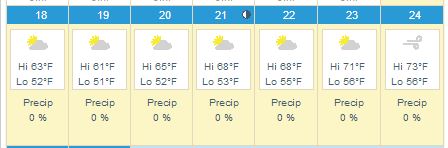
If you’re not direly familiar with San Francisco weather, or even if you are, bring cold/windy weather outerwear. The graphic above is Weather.com’s San Francisco planner. It’s linked to the current forecast page, so if you check after the 15th you’ll see the full week’s forecast. But consider a sweater, a sweater vest, a light jacket, a heavy jacket, a scarf, an anorak, and closed-toed shoes as your personal comfort may require.

2. Time management

Don’t feel the need to fill every session slot. There will be a lot of what LISA calls the “hallway track,” where you can talk to other professionals on an ad-hoc basis. The Social Media Hub is a good place to start, or the DevNet space if you’re more inclined in that direction. Or both!

Don’t feel obligated to attend every after-hours event either. You’ll find half a dozen events every night but you can prioritize, or try putting in an hour at each if you must. Note that some events may be offsite (a few miles away) and the sponsors may not offer transportation after the first hour. You can take taxis or Uber. Consider sharing rides with other attendees to save some money. You can also take MUNI (trains or buses) to AT&T Park (easy on the N or T trains) and to much of the rest of the City.

Do touch base with your favorite vendors to see if they’re hosting special events or receptions. It’s easier to get those arranged (and get on the guest list) before you get there.

3. Food and bev

There will be meals, snacks, coffee, and refreshments during the event, but you may not always be able to get away for them. Bring energy bars, protein bars, and other dry crush-proof snacks (thanks Rick @rickvanover Vanover for this suggestion) so that you can have a quick burst of energy between sessions even if you can’t get something to eat. There are places to buy them near Moscone if you prefer to shop on site.

Bring a water bottle. I recommend a crushable/collapsible bottle for convenience (also works for airports), something like this “H2O 2 GO” one. Last year, one of the vendors at one of the summer shows was giving these away, and it was possibly the most useful swag item I have received at a show. If you can’t find one of these, bring a relatively crush-proof bottle and fill it up often.

Cisco Live will have twitter tables in the lunch room by the way. If you want to meet up with other Twitter folks and the Cisco Champions, this would be the place to look. I believe they’re going to be near the front of the table space, but hopefully one of the CLUS coordinators will correct me if I’m wrong.

4. Technology

Plug in and charge up every chance you get. This goes for laptops, tablets, phones, and your portable battery packs as well. I have this Poweradd Pilot E2 12Ah battery that’s been one of the best USB power packs I’ve used (and I have at least a dozen of them). Great deal if you need something like this, to half-charge your iPad or fully charge most smartphones.

Travel light. As Tom Hollingsworth mentioned, it may not seem like a 10 pound bag is all that heavy, until you’ve been carrying it around for 18 hours. Empty your bag and only put what you know you’ll need. Even I won’t be carrying my usual two smart phones, Nexus 7, iPad, and two laptops. You can scale down too.

apple-microsoft-moscone

You can buy tech stuff here. In addition to the things that the Cisco Press store will offer, you will be within relatively easy walking distance of the One Stockton Apple Store and the Microsoft Store at Westfield, both along Market St within 10 minutes distance. And a little-known gem of the Bay Area is even closer. Central Computers is a Bay Area mainstay for computers, components, accessories, etc. It’s likely the best place to go if you forgot your charger cable or need a hard drive or phone case or a new laptop, and it’s directly across the street from what will probably be the bus terminal at the Moscone West building.

5. Communications

Follow @CiscoLive and the #CLUS hashtag. You’ll get lots of useful information and be able to get answers to your event-related questions wherever you are. There might even be giveaways and contests.

Bring business cards to share. Consider getting some printed (or making your own) with your personal contact info (Twitter handle, blog address, appropriate logos and such) in case you have affiliations aside from your employment.

Pick up a prepaid SIM once you get here if you’re not on a US cellular carrier. I have a T-Mobile starter kit in one of my phones; it’s $35 on Amazon and includes a month of service including 100 minutes/100 text messages/5GB 4G data. If you have an unlocked GSM-type phone, this or another SIM will get you covered for your stay in the US.

There will be WiFi. If you don’t have a data plan, don’t worry too much. Most hotels and most of the convention center will have wireless Internet access, and the odds are pretty good that Cisco will take care of us in terms of connectivity on-site.

6. Swag Management

Get some flat rate shipping boxes from the post office (either at home or in San Francisco–there’s a Post Office in the Macy’s on O’Farrell and Stockton a few blocks away) to send your swag bag home in. Domestic flat rate for a medium box is under $20 and may be more convenient than buying another suitcase. International shipping is also available. There is UPS service at Moscone, and a Fed Ex ship center on Bryant nearby, if you prefer those.

Ship stuff to your hotel. If you’re bringing things that would be more convenient not to go through airports with, consider shipping it to your hotel in advance. Check with the hotel first, though, to see if there are any limitations or charges for this sort of activity.

Drop-ship stuff to your hotel. I do this even within the US. If you know you’re going to want things like a battery pack, or a case of bacon raspberry cheesecake energy bars, or a new pair of eating pants, consider ordering them to be sent directly to the hotel. This can save you packing and shopping time in advance, and may be cheaper than finding them locally.

Don’t feel obligated to take every bit of swag you’re offered. Last year I think I came home from 4 conferences with 40-50 shirts. Half of them went straight to Goodwill, and I still had to lug them home from SF or Orlando. If you do take more than you need, consider taking them over to Goodwill or Out Of The Closet or another thrift store in the area. Or ask for smaller sizes for your kids. Or some mix of those.


7. Money Considerations (especially for non-USians)

There are automated teller machines (ATMs) all over the place. Before you come to San Francisco, check with your bank to see what ATMs you can use with minimal or no surcharge, or whether your bank rebates surcharges (many credit unions do this). ATMs in hotels and conference centers may charge $5 (or more) for a withdrawal, but most of the major US banks are available a couple of blocks away on Market St.

If you plan to use a non-US credit or debit card, check into whether your card has foreign transaction fees and be prepared for those.

Check with your bank or credit union to see if you should provide a “travel notification” to minimize the risk of your card being shut down by automated fraud checking systems.

So where do we go from here?

To San Francisco, and BEYOND!

Seriously though, these were just some of the suggestions I came up with in one hour (so far). If you have suggestions for fellow Cisco Live attendees, feel free to share them in the comments and I’ll pass them along. And check back often, as hopefully there will be updates and improvements to this post as we get closer to the magical date.

These 3 hot new trends in storage will blow your mind! Okay, maybe not quite. (2/2)

I’ve attended a couple of Tech Field Day events, and watched/participated remotely (in both senses of the word) in a few more, and each event seems to embody themes and trends in the field covered. Storage Field Day 5 was no exception.

I found a couple of undercurrents in this event’s presentations, and three of these are worth calling out, both to thank those who are following them, and give a hint to the next generation of new product startups to keep them in mind.

This post is the second of a series of two, for your manageable reading pleasure. The first post is here.

Be sure to check out the full event page, with links to presenters and videos of their presentations, at http://techfieldday.com/event/sfd5/

3. The Progressive Effect: Naming Names Is Great, Calling Names Not So Much

Back at the turn of the century, it was common for vendors to focus on their competition in an unhealthy way. As an example, Auspex (remember them) told me that their competitor’s offering of Gigabit Ethernet was superfluous, and that competitor was going out of business within months. I’ll go out on a limb and say this was a stupid thing to say to a company whose product was a wire-speed Gigabit Ethernet routing switch, and, well, you see how quickly Netapp went out of business, right?

At Storage Field Day 5, a couple of vendors presented competitive/comparative analysis of their market segment. This showed a strong awareness of the technology they were touting, understanding of what choices and tradeoffs have to be made, and why each vendor may have made the choices they did.

Beyond that, it can acknowledge the best use for each product, even if it’s the competition’s product. I’ll call this the Progressive Effect, after the insurance company who shows you the competitor’s pricing even if it’s a better deal. If you think your product is perfect for every customer use case, you don’t know your product or the customer very well.

Once again, Diablo Technologies did a comparison specifically naming the obvious competitor (Fusion-io), and it was clear that this was a forward-looking comparison, as you can order a hundred Fusion-io cards and put them into current industry standard servers. That won’t work with most of the servers in your datacenter with the ULLtraDIMMs just yet. But these are products that are likely to be compared in the foreseeable future, so it was useful context and use cases for both platforms were called out.

Solidfire’s CEO Dave Wright really rocked this topic though, tearing apart (in more of an iFixit manner than an Auspex manner) three hyperconverged solutions including his own, showing the details and decisions and where each one makes sense. I suspect most storage company CEOs wouldn’t get into that deep of a dive on their own product, much less the competition, so it was an impressive experience worth checking out if you haven’t already.

There were some rumblings in the Twittersphere about how knowing your competitor and not hiding them behind “Competitor A” or the like was invoking fear, uncertainty, and doubt (FUD). And while it is a conservative, and acceptable, option not to name a competitor if you have a lot of them–Veeam chose this path in their comparisons, for example–that doesn’t mean that it’s automatically deceptive to give a fair and informed comparison within your competitive market.

If Dave Wright had gone in front of the delegates and told us how bad all the competitors were and why they couldn’t do anything right, we probably would’ve caught up on our email backlogs faster, or asked him to change horses even in mid-stream. If he had dodged or danced around questions about his own company’s platform, some (most?) of us would have been disappointed. Luckily, neither of those happened.

But as it stands, he dug into the tech in an even-handed way, definitely adding value to the presentation and giving some insights that not all of us would have had beforehand. In fact, more than one delegate felt that Solidfire’s comparison gave us the best available information on one particular competitor’s product in that space.


This is a post related to Storage Field Day 5, the independent influencer event being held in Silicon Valley April 23-25, 2014. As a delegate to SFD5, I am chosen by the Tech Field Day community and my travel and expenses are covered by Gestalt IT. I am not required to write about any sponsoring vendor, nor is my content reviewed. No compensation has been or will be received for this or other Tech Field Day post.


These 3 hot new trends in storage will blow your mind! Okay, maybe not quite. (1/2)

I’ve attended a couple of Tech Field Day events, and watched/participated remotely (in both senses of the word) in a few more, and each event seems to embody themes and trends in the field covered. Storage Field Day 5 was no exception.

I found a couple of undercurrents in this event’s presentations, and three of these are worth calling out, both to thank those who are following them, and give a hint to the next generation of new product startups to keep them in mind.

This post is one of a series of two, for your manageable reading pleasure. Part two is now available here.

Be sure to check out the full event page, with links to presenters and videos of their presentations, at http://techfieldday.com/event/sfd5/

1. Predictability and Sustainability Are The Right Metrics

There are three kinds of falsehoods in tech marketing: lies, damned lies, and benchmarks. Many (most?) vendors will pitch their best case, perfect environment, most advantageous results as a reason to choose them. But as with Teavana’s in-store tasting controversy, when you get the stuff home and try to reproduce the advertised effects, you end up with weak tea. My friend Howard Marks wrote about this in relation to VMware’s 2-million IOP VSAN benchmark recently.

At SFD5, we had a couple of presenters not stress best case/least real results, but predictable and reproducible results. Most applications aren’t going to benefit a lot from a high burst rate and tepid average performance whether it’s on the server hardware, storage back-end, or network. But consistent quality of service (QoS) and a reliable set of expectations that can be met (and maybe exceeded) will lead to satisfied customers and successful implementation.

One example of this was with Diablo Technologies, the folks behind Memory Channel Storage implemented by Sandisk as ULLtraDIMM. In comparing the performance of the MCS flash implementation against a PCIe storage option (Fusion-io’s product, to be precise), they showed performance and I/O results across a range of measurements, and rather than pitching the best results, they touted the sustainable results that you’d expect to see regularly with the product.

Sandisk themselves referred to some configuration options under the hood, not generally available to end users, to trade some lifespan for daily duty cycles. Since these products are not yet mass market on the level of a consumer grade 2.5″ SSD, it makes sense to make that a support/integration option rather than just having users open up a Magician-like product to tweak ULLtraDIMMs themselves.

Another example was Solidfire, who also advocated setting expectations to what would be sustainable. They refer to “guaranteed performance,” which comes down to QoS and sane configuration. Linear scalability

2. Your Three Control Channels Should Be Equivalent

There are generally three ways to control a product, whether it’s a software appliance, a hardware platform, or more. You have a command-line interface (CLI), a graphical user interface (GUI) of some sort–often either a web front-end or an applet/installed application, and an API for automated access (XML, REST, SOAP, sendmail.cf).

I will assert that a good product will have all three of these: CLI, GUI, API. A truly mature product will have full feature equity between the three. Any operation you can execute against the product from one of them can be done with identical effectiveness from the other two.

This seems to be a stronger trend than it was a couple of years ago. At my first Tech Field Day events, as I recall, there were still people who felt a CLI was an afterthought, and an API could be limited. When you’re trying to get your product out the door, before your competitor locks you out of the market, it could be defensible, much as putting off documentation until your product shipped was once defended.

But today, nobody should consider a product ready to ship until it has full management channel equality. And as I recall, most of the vendors we met with who have a manageable product (I’m giving Sandisk and Diablo Tech a pass on this one for obvious reasons) were closer to the “of course we have that” stance than the “why would we need that” that used to be de rigueur in the industry.

Once again, this is part one of two on trends observed at Storage Field Day 5. Part 2 is now available at this link.

This is a post related to Storage Field Day 5, the independent influencer event being held in Silicon Valley April 23-25, 2014. As a delegate to SFD5, I am chosen by the Tech Field Day community and my travel and expenses are covered by Gestalt IT. I am not required to write about any sponsoring vendor, nor is my content reviewed. No compensation has been or will be received for this or any other Tech Field Day post. 

How do you solve a problem like Invicta? PernixData and external high performance cache

PernixData and unconventional flash caching

We spent a captivating two hours at PernixData in San Jose Wednesday. For more general and detailed info on the conversations and related announcements, check out this post by PernixData’s Frank Dennenman on their official blog, and also check out Duncan Epping’s post on YellowBricks.

At a very high and imprecise level, PernixData’s FVP came out last year to provide a caching layer (using flash storage, whether PCI-E or SSD) injected at the vmkernel level on VMware hypervisors. One big development this week was the option to use RAM in place of (or in addition to) flash as a caching layer, but this is unrelated to my thoughts below.

One odd question arose during our conversation with Satyam Vaghani, CTO and co-founder of PernixData. Justin Warren, another delegate, asked the seemingly simple question of whether you could use external flash as cache for a cluster (or clusters) using PernixData’s FVP. Satyam’s answer was a somewhat surprising “yes.”

I thought (once Justin mentioned it) that this was an obvious idea, albeit somewhat niche, and having worked to get scheduled downtime for a hundred servers on several instances in the past year, I could imagine why I might not want to (or be able to) shut down 100 hypervisor blades to install flash into them. If I could put a pile of flash into one or more centrally accessible, high speed/relatively low latency (compared to spinning disk) hosts, or perhaps bring in something like Fusion-io’s Ion Accelerator platform.

I took a bit of ribbing from a couple of other delegates, who didn’t see any situation where this would be useful. You always have plenty of extra spare hypervisor capacity, and flash that can go into those servers, and time and human resources to handle the upgrades, right? If so, I mildly envy you.

So what’s this about Invicta?

Cisco’s UCS Invicta platform (the evolution of WHIPTAIL) is a flash block storage platform based on a Cisco UCS C240-M3S rackmount server with 24 consumer-grade MLC SSD drives. Today its official placement is as a standalone device, managed by Cisco UCS Director, serving FC to UCS servers. The party line is that using it with any other platform or infrastructure is off-label.

I’ve watched a couple of presentations on the Invicta play. It hasn’t yet been clear how Cisco sees it playing against similar products in the market (i.e. Fusion-io Ion Accelerator). When I asked on a couple of occasions on public presentations, the comparison was reduced to Fusion-io ioScale/ioDrive PCIe cards, which is neither a fair, nor an applicable, comparison. You wouldn’t compare Coho Data arrays to single SSD enclosures. So for a month or so I’ve been stuck with the logical progression:

  1. Flash is fast
  2. ???
  3. Buy UCS and Invicta

Last month, word came out that Cisco was selling Invicta arrays against Pure Storage and EMC XtremIO, for heterogeneous environments, which also seems similar to the market for Ion Accelerator. Maybe I called it in the air. Who knows? The platform finally made sense in the present though.

Two great tastes that taste great together?

Wednesday afternoon I started putting the pieces together. Today you can serve up an Invicta appliance as block storage, and probably (I haven’t validated this) access it from a host or hosts running PernixData’s FVP. You’re either dealing with FC or possibly iSCSI. It will serve as well as the competing flash appliances.

But when Cisco gets Invicta integrated into the UCS infrastructure, hopefully with native support for iSCSI and FCoE traffic, you’ll be talking about 10 gigabit connections within the Fabric Interconnect for cache access. You’ll be benefiting from the built-in redundancy, virtual interface mapping and pinning, and control from UCS Manager/UCS Central. You’re keeping your cache within a rack or pod. And if you need to expand the cache you won’t need to open up any of your servers or take them down. You’d be able to put another Invicta system in, map it in, and use it just as the first one is being used.

If you’re not in a Cisco UCS environment, it looks like you could still use Invicta arrays, or Fusion-io, or other pure flash players (even something like a whitebox or channel partner Nexenta array, at least for proof-of-concept).

So where do we go from here?

The pure UCS integration for Invicta is obviously on the long-term roadmap, and hopefully the business units involved see the benefits of true integration at the FI level and move that forward soon.

I’m hoping to get my hands on a trial of FVP, one way or another, and possibly build a small flash appliance in my lab as well as putting some SSDs in my C6100 hypervisor boxes.

It would be interesting to compare the benefits of the internal vs external flash integration, with a conventional 10GBE (non-converged) network. This could provide some insight into a mid-market bolt-on solution, and give some further enlightenment on when and why you might take this option over internal flash. I know that I won’t be able to put a PCIe flash card into my C6100s, unless I give up 10GBE (one PCIe slot per server, darn). Although with FVP’s newly-announced network compression, that might be viable.

What are your thoughts on external server-side cache? Do you think something like this would be useful in an environment you’ve worked with? Feel free to chime in on the comments section below.

This is a post related to Storage Field Day 5, the independent influencer event being held in Silicon Valley April 23-25, 2014. As a delegate to SFD5, I am chosen by the Tech Field Day community and my travel and expenses are covered by Gestalt IT. I am not required to write about any sponsoring vendor, nor is my content reviewed. No compensation has been or will be received for this or other Tech Field Day post. I am a Cisco Champion but all Cisco information below is public knowledge and was received in public channels.

FirmwareGate and FCoEgate two months later

I was surprised last week at Interop to hear people still talking about both FCoEgate and HP FirmwareGate. It seems that in the absence of any clarity or resolution, both still bother many in the industry.

For those of you who missed the early February drama (and my relevant blog post):

FCoE-gate

FCoEgate: An analyst group called The Evaluator Group released a “seriously flawed” competitive comparison between an HP/Brocade/FC environment and a Cisco/FCoE environment. Several technical inquiries were answered with confusing evidence that the testers didn’t really know what they were doing.

Several people I talked to at Interop mentioned that this was a perfectly understandable mistake for a newbie analyst, but experienced analysts should have known better. Brocade should have known better as well, but I believe they still stand by the story.

The take-home from this effort is that if you don’t know how to configure a product or technology, and you don’t know how it works, it may not perform optimally in comparison to the one you’re being paid to show off.

This one doesn’t affect me as much personally, but I’ll note that there doesn’t seem to have been a clear resolution of the flaws in this report. Brocade has no reason to pay Evaluator Group to redo a valid comparison, and technologists worth their salt would see through it anyway (as many have). So we have to count on that latter part.

FirmwareGate

https://twitter.com/ProLiant/status/433252908755582976

FirmwareGate: HP’s server division announced that, for the good of their “Customers For Life,” they would stop making server firmware available unless it was “safety and security” updates. How can you tell if it’s “safety and security?” Try to download it.

HP claimed repeatedly that this brings them in line with “industry best practices,” thus defining their “industry” as consisting exclusively of HP and Oracle. I don’t know any working technologists who would go along with that definition.

HP promised clarification on this, and defended their policy change by declaring industry standard x86/x64 servers as equivalent to commercial operating system releases and Cisco routers.

They even had a conversation with my friend John Obeto, wherein they convinced him that nothing had changed. Ah, if only this were true. (It isn’t.)

But I had fleeting faith that maybe they’d fixed the problem. So I went to get the firmware update for a nearly 2-year-old Microserver N40L, which had a critical firmware bug keeping it from installing a couple of current OSes. Turns out it’s not a “safety and security” fix, and my system apparently came with a one year warranty.

So if I wanted to run a current Windows OS, I either have to spend more on the support contract than I did on the server (if I can find the support contract anymore), or go with an aftermarket third party reverse-engineered firmware (which, unlike HP’s offerings actually enhances functionality and adds value).

Or I can go with the option that I suspect I and many other hobbyists, home lab users, influencers, and recommenders will — simply purchase servers by companies that respect their customers.

What should HP be doing instead?

The “industry best practices” HP should be subscribing to include open access to industry standard server firmware that fixes bugs they delivered, not just vaguely declared “safety and security” upgrades, much as every other industry standard server vendor except Oracle does. That includes Dell, Cisco, Supermicro, Fujitsu, NEC, Lenovo/IBM, and probably a number of other smaller players.

As my friend Howard Marks noted, some of us would be satisfied with a software-only or firmware-only support contract. On-site hardware maintenance isn’t necessary or even affordable for many of us. Many of us who buy used servers would be better off buying an extra server for parts, and most of us buying used servers know how to replace a part or swap out a server. Some of us even better than the vendor’s field engineers.

HP has been silent on this matter for over a month now, as far as I can tell. The “Master Technologists” from HP who won’t distinguish an MDS router from an x86 server have gone silent. And I’m sure many of the “customers for life” that the 30-year HP veteran graciously invites to keep buying support contracts will start looking around if there’s not a critical feature in HP servers that they need.

So where do we go from here?

I can no longer advocate HP servers for people with budgets containing fewer than 2 commas, and even for those I’d suggest thinking about what’s next. There are analogous or better options out there from Dell, Cisco, Supermicro, Fujitsu, NEC, Lenovo, and for the smaller lab form factors, Intel, Gigabyte, Shuttle, and others. (It’s also worth noting that most of those also provide fully functional remote management without an extra license cost as well.)

If you do want to go with HP, or if you can’t replace your current homelab investment, there are ways to find firmware out there (as there has been in the past for Sun^wOracle Solaris). It took me about 15 minutes to find the newly-locked-down Microserver firmware, for example. It didn’t even require a torrent. I can’t advocate that path, as there may be legal, ethical, and safety concerns, but it might be better than going without, at least until you can replace your servers.

And I’ve replaced most of my HP servers in the lab with Dell servers. One more to go. If anyone wants to buy a couple of orphaned DL servers in Silicon Valley (maybe for parts), contact me.

If anyone else has seen any clarity or correction in the state of FCoEgate or FirmwareGate in the last month or so, let me know in the comments. I’d love to be wrong.