Ready for Cisco Live? The Customer Appreciation Event band is…

Lenny picThe leading guesses for Cisco Live CAE band are:

1) A new group called 1023MB. They’ve never had a gig before.

2) T-Mobile CEO John Legere, with his new Macklemore cover band. Spoiler: Their encore number goes “Carrier my wayward son, we’ll have yours when 2014’s done” or something like that. They won’t play Free Bird. 

3) Lenny Kravitz joined by Imagine Dragons

If you guessed #2, I like the way you think. But if you guessed #3, you’re right.

Lenny Kravitz

Kravitz, also recognized by many as Cinna from the Hunger Games movies, will be bringing his award winning musical talents to the stage at AT&T Park in San Francisco on Wednesday, May 21. And only Cisco Live attendees can get in. (Social Pass or higher, Explorer Pass doesn’t count).

Check out his video for “Let Love Rule” at the bottom of this post for a refresher.

imagine dragonsImagine Dragons

Those of you who made it to VMworld last year may remember Imagine Dragons, who were on stage at that CAE, and who won a Grammy for “Radioactive.” They’ll be back in the City By The Bay to perform for Cisco Live attendees as well. Check out their performance of “Radioactive” on NBC’s Saturday Night Live at the bottom of this post.

I’m also hearing that there will be “Rock ‘n Roll Tricks” during the halftime show of the concert. I don’t know what that means, but I’m pretty sure it will be cool.

So there we have it. The biggest Cisco news of the year so far, bigger than UCS Invicta, bigger than UCS 2.2, bigger than the B460 M4 server. And you read it here.

So where do we go from here?

Are you signed up for Cisco Live yet? Check out the registration options here, including the $195 Social Event Pass which is the least costly way to get in to the World of Solutions, Keynotes, Receptions, and of course the Wednesday night Customer Appreciation Event.

If you’re going for one of the full size passes, early reg discount ends this Friday, March 14, Save up to $300 if you get your registration in now.

Still on the fence? Check out my original Cisco Live 2014 blog post, Jeff @fryguy_pa Fry’s preview post, my Scheduler and Keynote post (scheduler is open already!), and some other “blogs of interest” as curated by the Cisco Live Social Media team.

In Praise Of Microsoft Store, or, To QHD And Back Again (Another Laptop Journey)

There are two pieces of information that will inform this article, and I’ll get them out there first.

One, I’m not a Microsoft fanboy. My favorite MS products are still the 16KB expansion card for the Apple ][+ and a selection of their keyboard and mouse options. I liked Windows 2000, Windows XP, and Windows 7, and when each was current it was my daily driver OS for the most part. But I’m usually no more likely to advocate them than I am any other jumbo company.

Two, I probably buy more laptops than you do. As in, personally purchasing out of my own pocket (not IT department purchases). Probably twenty in the last 14 months. These ranged from old HP “thin client” laptops to play with, to my current daily driver, the ASUS Zenbook UX32VD I talked about in my Pitfalls blog post last August (more toward the cheaper side of course). I’ve agonized over details of some (like the Zenbook) and just thrown the cash down on others (like the thin clients or some other cheaper ones). So I’ve been through the process before.

You already want another laptop? And what’s QHD?

So I’ve been thinking about upgrading the daily driver role again. I went from a very heavy but very powerful Sony VAIO with 16GB ram, 4c/8t, 1080p display, USB3… to the Zenbook with 10GB ram, 2c/4t, 1080p display, USB3, and about half the mass/weight. But I’d like to get that memory back up there, and add some real estate, and get rid of the proprietary third display connector while keeping discrete graphics. Getting a 1920×1200 (WUXGA+) display requires 17″ LCD and/or Core2 processor, neither of which is optimal, so I have to look larger. I did pick up a 1920×1200 Macbook Pro last year, but it’s limited to 6-8GB of RAM and has a Core 2 processor.

QHD, for those among you not familiar, is “quad high definition,” generally 2560×1440, WQHD, or 4x 720p. There’s WQXGA+, which is 3200×1800, which also gets called QHD or QHD+, which is 4x 1600×900. Don’t confuse this with lower-case-q qHD, which is a 960×540 standard, a quarter of 1080p resolution. I’m okay with 2560×1440 or 3200×1800 or anything in that range, to be honest.

QHD? Could you spell that?

As an aside, I go to Fry’s a couple of times a week, as I live a mile from one store and work 3 blocks from another, so I just do. One time I wandered around looking at laptops and one of the helpful but useless sales associates asked if he could help. “Yes,” I said, “I’m looking for a QHD laptop, you know, 2600×1800 or so resolution?” He scrambled for a piece of paper to write on, asking me to spell Q-H-D, and then handing me off to another sales associate who told me what I’d already discovered–they didn’t carry any such devices.

So I’ve been browsing the web every so often, searching eBay for Precision M6500 (17″ 1920×1200 with 32GB capacity and first gen i7 processors), looking at other retailers when I’m in their laptop sections, and pondering what to do when the urge to upgrade finally takes over. I don’t really have to explain the decision to my significant other, although she wonders why I need a new laptop in less than five years.

The first three I found online were

  • Fujitsu Lifebook u904, an i7-4600U with 14″ 3200×1800 display, 10GB max RAM like my current ultrabook, 802.11abgn; $2154 with 4GB RAM from shopfujitsu.com.
  • Dell XPS15 6842sLV, which has an i7-4702HQ, 15.6″ 3200×1880  display, 802.11ac, and 16GB max RAM; $1766 used with 16GB RAM from Amazon.com
  • IBMLenovo Thinkpad W540 with i7-4700MQ, 15.5″ 2880×1620, 802.11ac, and support for 32GB on the quad-core models. $1830 with 16GB from lenovo.com

Yeah, that’s kinda pricy, but I’m looking for what turns out to be workstation-class hardware, not pure 720p ultrabook.

I suspect I’d do nicely with either of the 15″ displays, but as you might guess, I’m nervous about buying into a product line I’ve never touched or seen in person, especially when it’d set me back $2000.

So I just kept looking, and asked around on Twitter about any Bay Area retail or showcase options. Jake Ludington came up with a good suggestion, just about the time Google found a hint to the same effect.

So, having had an uneventful morning, I headed out to the Microsoft retail store at Valley Fair.

Microsoft Store? What’chu talking about, Willis?

Here’s where I used to be a little bit critical, and some of my friends downright ridiculed the idea. Apple has their retail thing down cold pretty much after 13 years… you can find Apple Stores all over the place and go in and see what they want you to buy.  You can talk to a person whose boss has declared him or her a “Genius(tm),” in much the same sense as some companies declare all their managers “Leaders(tm).” And you can buy one of their preconfigured options for a laptop.

Microsoft started opening up their own retail stores almost five years ago. They’re not quite the same, as Microsoft doesn’t manufacture/brand a whole lot of systems. So instead of the company’s hardware, software, and blessed accessories, you get a lot more partner products. For example, alongside the Surface tablet line you’ll see Nokia and Dell tablets. Next row over, you’ll find laptops and ultrabooks and convertibles from Samsung, Acer, Dell, HP, ASUS, and probably some I forgot about. There’s a corner for XBox (including Disney Infinity), a corner for accessories and gadgets, and a display section for Windows Phone. And you’ll find “Technical Advisors” available to help you… a bit more down-to-earth ranking, I’d say. 

Those of you who were in San Francisco around the turn of the century may remember the Microsoft store on the second floor at Metreon, and the XBox Store on the first floor. It’s like that, but combined and a lot more focused, and there are 60+ of them in North America.

Some people joke that the Apple Store is filled to the gills with customers, whereas the Microsoft Store has 3-5 sales associates for each customer. That was probably true five years ago. But I’d guess the buying-customer to browsing-customer ratio is higher under the four-colored logo. It’s seemed that way each time I’ve been in the Microsoft Store.

So how’d your visit go?

It was actually pretty good. The store has tables set up like the Apple Store, with a couple of demo products on either side. There are stools for you to sit on while you try out the devices, which is a nice touch… unless you use a standing desk you won’t get a feel for the keyboard and display without sitting down and relaxing a bit.

The labeling of the laptops was concise and easily compared. Some models had multiple sample devices out. I tried four models that mostly met my requirements:

  • Samsung ATIV Book 9 Plus, a 13.3″ i5 with 8GB RAM/128GB SSD and 802.11n for $1449. The i7 with 256GB SSD is listed on their site for $1599.
  • Acer Aspire S7, a 13.3″ i7 with 8GB RAM/256GB SSD and 802.11n for $1499
  • Dell XPS 15, a 15.6″ i7 with 16GB RAM/512GB SSD and 802.11ac for $2299
  • HP Envy Touch 14, a 14.0″ i5 with 8GB RAM/500GB SATA and 802.11ac as well as 200MB/mo free mobile broadband, for $899

(The links above are to approximate analogues on Amazon; there are a lot of configurations and they don’t always match with what’s in retail locations or microsoftstore.com.)

The machines were all logged in to a regular user account (Device Manager warned me about this on each system), wireless was working, and I was able to check out the details without sales reps acting like I was trying to stick my tongue in the USB ports.

I probably could’ve stayed longer, and there was one idle sales rep of about half a dozen who was available should I have any questions. However, I was fully aware that I wouldn’t be making a purchase today. Even if I were, I’d have done my own research (probably on one one of the sample laptops) before engaging the staff, but they seemed friendly and reachable despite my not befriending or reaching for them.

So I just got the stand-out details tapped into my Evernote client on Android, and even disqualified one of the machines because it had a very weird keyboard (the Aspire S7 has some weird keyboard features including Caps Lock sharing its traditional space with the backtick/tilde key)

Then I wandered around looking at what else was available. There was a Surface Music Kit cover on display which, while not set up with the app, looked pretty cool. Lots of tablets were present, including my 2-in-1 ASUS T100TA and the Dell Venue 8 (Pro, I think).  The staff were smiling but not creepily so, and thanked me for visiting when I left to find some caffeine.

So where do you go from here?

Well… as I mentioned, I am not buying just yet. So I have some time for absurd amounts of research, review-reading, comparison shopping, maybe even looking into fan/rumor sites to see what’s coming out in the next four weeks.

I may head back in to look into any other interests or concerns I have during the research phase; it seems like the odds of the model systems being functional and available are higher there than at most consumer electronics stores I visit (hi Best Buy, Fry’s). And I can give the sales associates a chance to show their chops in terms of customer experience with the QHD laptops.

But assuming the prices aren’t that different from competitors and the specs I want are available, I’d be happy to head back to the Microsoft Store to buy my next laptop.

If you’ve had an experience buying a laptop at a Microsoft Store, or have recommendations or warnings about QHD/WQHD/QHD+ display laptops, feel free to chime in on the comments below. I’m especially interested in anything with 32GB memory capacity, and I’ll be digging deeper into specs in the near future.  I’ll keep you posted as my search progresses.

Disclaimer: I’ve received no consideration or influence from Microsoft on this post. I’ve not yet spent even a penny at a Microsoft Store. Although I wouldn’t turn down promo codes or coupons of course.

What’s a commodity server? Why should you want one?

A lot of people talk about commodity servers, especially where and when to use them, and many have good reasons one way or the other. However, not everyone has a good definition of what makes a commodity server (or platform), and that can lead to confusion.

Today on RSTS11, I’m going to look at contexts where a commodity server or platform is important, how I define the concept, and what you might find when getting into a discussion about commodity servers.

What’s a commodity server?

My definition of a commodity server is a piece of fairly standard hardware that can be purchased at retail, to have any particular software installed on it.

I further define ‘fairly standard’ to mean an industry standard platform that does not require custom coding to implement an operating system on. I define ‘purchased at retail’ to mean that you can call/email/visit the website of a vendor and acquire the hardware without a pre-existing contract or design process (vs OEM/ODM arrangements).

Some examples of commodity servers would be any server you can order from Supermicro (or its integrators), HP, Dell, Cisco, Lenovo, or various other maintream vendors. If there’s a “Buy now” button next to it on their website, and you can order it with a credit card right then and there, it’s probably commodity. These are sometimes called “Industry Standard Servers” but there may be some distinctions between the two concepts. And in theory, blade servers could count (since they don’t require anything custom other than the chassis) but I generally don’t think of them in the category.

The goal for a platform that’s based on commodity servers is that you’re not tied into a given brand of server, or seller of servers, for acquiring your hardware. If a vendor fails you (i.e. trying to force you to buy service contracts or extra licensing for basic functionality and maintenance), you can go to another vendor for the servers, and as long as you specify components (cpu, memory, disk, network) properly, you’re good to go.

Where would I use a commodity server?

#1: Hadoop.

One place commodity servers are often discussed is in Hadoop clusters. Hadoop was designed, on one level, to be the RAID of compute farms. You use inexpensive, homogeneous servers that can be easily replaced, with software that can handle losing a few servers at a time.

There is a not-uncommon misgiving about Hadoop’s node model; namely, that using branded servers is somehow counter to the nature of Hadoop. The impression some folks get is that since Hadoop doesn’t care about any given server (at least for datanodes and tasktrackers), you have to go with the cheapest possible hardware, possibly even building it yourself. Those folks believe that spending money to have someone else build the servers for you, or going with a brand name server, is a bad thing.

I see their perspective, in a sense. If you have a team of people who can maintain your servers at that level, rebuild them when they fail, and keep track of component versioning and compatibility and firmware levels, that’s great. Larger environments (Yahoo, Google, etc) may have this, but your typical environment with fewer ops people than Google has chefs can’t hold up under those considerations.

On the other hand, if you pick a brand of servers, you’re more likely to have consistent configurations, support mechanisms, warranties, remote management, firmware updates, and so forth.

Mind you, some vendors do change hardware or firmware in mid-release without telling anyone (even Apple’s done it a few times), and no vendor has perfect support or perfect firmware.

But the advantages to focusing on what your team can do (deploying and supporting applications and platforms, satisfying your users), and letting others do the stuff that’s not in your core (building servers, stocking hard drives and memory by the ton, making bezels), should be pretty obvious if you can’t allocate a full team to the latter.

Where else would I use a commodity server?

#2: Storage platforms.

A Twitter friend who works for a VAR was asking about scalable storage platforms that run on commodity hardware. Think a mixture of Nexenta, Nutanix, and VMware Virtual SAN (a.k.a. vSAN), but not any of those particular ones for reasons that may become evident (they don’t have to, as they’re his requirements, not ours, of course). One of the first recommendations was Nutanix “because it runs on commodity hardware.” 

There are a lot of virtualization and storage vendors whose platform is based on a commodity hardware base. However, I don’t consider them a commodity platform unless I can choose the server to run on (within reason, of course… I’ll keep my Macintosh Quadras in storage for this project).

I completely understand why companies use, for example, Dell Poweredge R-series servers (or Intel reference chassis back in the day). You can buy them in bulk, don’t have to do the interoperability testing for standard hardware and firmware, parts and maintenance are easy to arrange, and they tend to have a reasonable shelf life. In case of an emergency, you can buy one that has the OEM’s bezel rather than yours. And you can test your solution (and iterate on your logo and company name a few times) before investing in your own bezels anyway. 

And if you’re a VAR wanting to deploy a solution on the hardware your company has a particularly good relationship with, or a warehouse full of off-lease hardware from, or just a company your client prefers, the model that Nutanix or Nimble Storage or Pivot3 uses wouldn’t work for you. That doesn’t mean their model (which is far from uncommon in the rackmount appliance world) is bad or wrong, it’s just not a fit in this case.

Speaking of cases, one of the concerns that came up was needing short chassis. Sometimes you have a customer needing short cases (think Rackable half-depth, for example), or maybe a desktop-looking platform for SOHO/ROBO/POHO.

So we’re left looking for something that is readily available like Nexenta, serves out multiprotocol storage like Nutanix, scales out like Nutanix and vSAN, but isn’t tied to VMware like vSAN. In this context, while the definition is like Michaelangelo’s model–simply chip away anything that doesn’t look like our scalable platform on our choice of hardware.

So where do we go from here?

The conversation on Twitter led us toward Maxta, and toward Nutanix being curious about what form factor my friend was looking to meet. While it’s outside the scope of this post, if you have other suggestions for fellow readers of RSTS11, feel free to suggest them below.

If you have thoughts on commodity servers, or questions about anything up there, feel free to chime in as well.

Disclaimer (I love these things): I have friends and acquaintances at most of the companies mentioned above. However, my paraphrasings and overgeneralizations should be taken in context, and not as representing any official positions or standards of any of them.

And today’s pithy tweet:

Cisco UCS for beginners – an end-user’s overview

Update: At the time I wrote this post (February 2014), I was not a Cisco employee. Between June 2014-November 2020 I worked for Cisco. between November 2020 and April 2023,  I no longer worked for Cisco. And since April 2023, I again work for Cisco. This shouldn’t change anything about the post, and it is still just me and not an official publication, but since the original disclaimer below is not currently accurate, I thought I would clarify that.

I’ve been working on a series of posts about upgrading an integrated UCS environment, and realized about halfway through that a summary/overview would make sense as a starting point.

I recommend a refreshing beverage, as this is longer than I’d expected it to be.

I will note up front that this does not represent the official presentation of UCS by Cisco, and will have errors and omissions. It does reflect my understanding and positioning of the platform, based on two years and change of immersive experience. It is also focused on C-Series (rack-mount servers), not B-Series (blade servers and chassis), as I have been 100% in the C-series side of the platform, although I try to share a reasonable level of detail that’s applicable to both. And I expect it will provide a good starting point to understanding the Unified Computing System from Cisco.

Unified Computing System – Wait, What?
UCS, or Unified Computing System, is Cisco’s foray into the server market, with integrated network, storage, management, and of course server platforms. As a server admin primarily, I think of it as a utility computing platform, similar to the utility storage concept that 3PAR introduced in the early 2000s. You have a management infrastructure that simplifies structured deployment, monitoring, and operation of your servers, reducing the number of inflection points (when deployed properly) to coordinate firmware, provisioning, hardware maintenance, and server identity.
ucs rack layoutUCS includes two types of servers. The original rollout in 2009 included a blade server platform, generally known as B-Series or Chassis servers. I would guess that 9 out of 10 people you talk to about UCS think B-Series blades when you say UCS. Converged networking happens inside the blade chassis on an I/O Module, or IOM, also known as a Fabric Extender, or FEX. Local storage lives on the blades if needed, with up to 4 2.5″ drives available on full-width blades (2 drives on half-width), and a mezzanine card slot for a converged network adapter and/or a solid state device.
At some point along the way, it seems customers wanted more storage than a blade provides, and more I/O expansion capacity, so Cisco rolled out a rack-mount product line, the C-Series “pizza box” servers, which provided familiar PCI-e slots, no less than twice the drive bays (8 2.5″ or 4 3.5″ on the lowest storage density C200/C220 models), and an access convergence layer outside the server in the form of a Fabric Extender, or FEX, a Nexus 2200-series switch.
Both platforms are designed to go upstream to a Fabric Interconnect, or FI, in the form of a UCS 6100 or 6200 series device. The FI is the UCS environment’s egress point; all servers (blade and/or rack-mount) in a single UCS domain or “pod” will connect to each other and the outside world through the FI. Storage networking to FCoE and iSCSI storage devices happens at this level, as does conventional Ethernet uplink.

So far it sounds pretty normal. Isn’t it?

You can use Cisco UCS C-series rack-mount servers independently without a FI, in the same way you might use a Dell PowerEdge R-series or HP ProLiant DL-series server. They work in standalone mode with a robust integrated management controller (CIMC) that is analogous to iDRAC or iLO, and they present as industry standard servers. The fully-featured CIMC functionality is included in the server (no add-on licensing, even for virtual media), and there’s even a potent XML API for the standalone API.
Many of the largest deployments of Cisco UCS C-Series servers work this way, and in the early days of my deployment, it was actually the only option (so we had standalone servers running bare metal OSes managed on a per-server basis). And for storage-dense environments, this method does have its charm.
The real power of the UCS environment, however, comes out when you put the servers under UCS Manager, or UCSM. This is what’s called an “integrated” environment, as opposed to a “standalone” environment where you manage through the individual CIMC on each server.
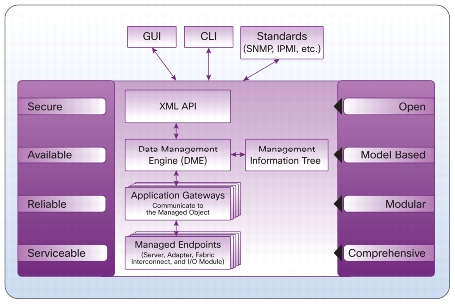
ucs model based frameworkUCSM lives inside the Fabric Interconnect, and is at its core a database of system elements and states called the Data Management Engine or DME. The DME uses Application Gateways to talk to the managed physical aspects of the system–server baseboard (think IPMI), supported controllers (CNAs and disk controllers), I/O subsystem (IOM/FEX), and the FI itself.
UCSM is both this management infrastructure, and the common Java GUI used to interact with its XML API. While many people do use the UCSM Java layer to monitor and manage the platform, you can use a CLI (via ssh to the FI), or write your own API clients. There are also standard offerings to use PowerShell on Windows or a Python shell on UNIX to manage via the API.

What’s this profile stuff all about?

A key part of UCS’s benefit are the concepts of policies, profiles, and templates.
Policy is a standard definition of an aspect of a server. For example, there are BIOS policies (defining how the BIOS is set up, including C-state handling and power management), firmware policies (setting a package of firmware levels for system BIOS, CIMC, and supported I/O controllers), disk configuration policies (providing initial RAID configuration for storage).
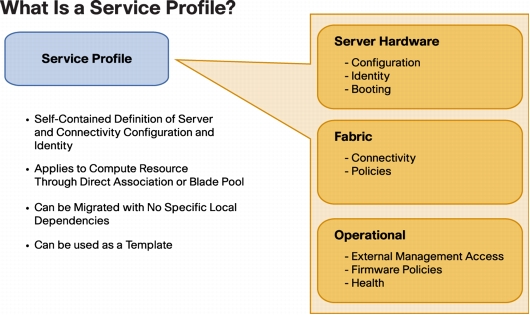
UCS service profileA Service Profile (SP) contains all the policies and data points that define a “server” in the role sense. If you remember Sun servers with the configuration smart card, that card (when implemented) would contain the profile for that server. In UCS-land, this would include BIOS, firmware, disk configuration, network identity (MAC addresses, VLANs, WWNs, etc) and other specific information that gives a server instance its identity. If you don’t have local storage, and you had to swap out a server for another piece of bare metal and have it come up as the previous server, the profile has all the information that makes that happen.
A Service Profile Template provides a pattern for creating service profiles as needed, providing consistency across server provisioning and redeployment.
There are also templates for things like network interfaces (vNIC, vHBA, and iSCSI templates) which become elements of a Service Profile or a SP Template. You might have a basic profile that covers, say, your web server design. You could have separate SP templates for Production (prod VLANs, SAN configuration) and Test (QA VLANs, local disk boot), sharing the same base hardware policies.
And there are server pools, which define a class of servers based on various characteristics (i.e. all 96GB dual socket servers, or all 1U servers with 8 local disks, or all servers you manually add to the pool). You can then associate that pool with a SP template, so that when a matching server is discovered in your UCS environment, it gets assigned to an appropriate template and can be automatically provisioned on power-up.
There are a lot more features you can take advantage of, from logging and alerting to call-home support features, to almost-one-click firmware upgrades across a domain, but that’s beyond the scope of this post.

I hear you can only have 160 servers though.

This is true, in a sense, much like you can only have 4 people in a car (but you can have multiple cars). A single UCS Manager can handle 160 servers between B-Series and C-Series. This is probably a dense five datacenter racks’ worth of servers, or 20 blade chassis, or some mix thereof (i.e. 10 chassis of 8 B-Series blades each, plus 80 rack-mount C-Series servers). But that’s not as bad a limitation as some vendors make it out to be.
You can address the XML API on multiple UCS Manager instances. A management tool might check inventory on all of your UCSM domains to find the element (server, policy, profile) that you want to manage, and then act on it by talking to that specific UCSM domain. Devops powers activate? This will get confusing if you create policies/profiles/templates at different times (i.e. while you’re waiting for your tools team to write a management tool).

But there’s something easier.

UCS Central is a Cisco-provided layer above the UCSM instances, that provides you with central management of all aspects of the UCS Manager across multiple domains. It’s a “write once, apply everywhere” model of policies and templates, that allows central monitoring and management of your environment across domains and datacenters.
UCS Central is an add-on product that may incur additional charges, especially if you have more than five UCS domains to manage. Support is not included with the base product. But when you get anywhere close to that scale, it may well be worth it. Oh, and in case you didn’t see this coming, there’s an XML API to UCS Central as well.

I don’t have a six figure budget to try this out. What can I do?

I’m glad you asked. Cisco makes a free “Platform Emulator” available. It’s a VM commonly referred to as UCSPE, downloadable for free from Cisco and run under the virtualization platform of your choice (including VMware Player, Fusion, Workstation, or others). 
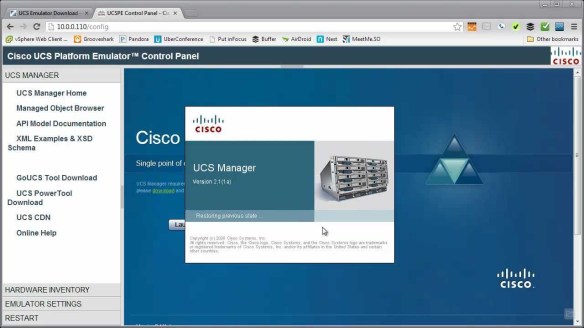
Chris Wahl has a video demonstrating the download process and a series introducing the Cisco UCS Platform Emulator here on Youtube. You can get the actual downloads at Cisco’s Communities Site and bring the emulator up on your own computer.
Chris Wahl UCS PE screenshotThe UCSPE should let you get a feel for how UCSM and server management works, and as of the 2.2 release lets you try out firmware updates as well (with some slightly dehydrated versions of the firmware packages).
It obviously won’t let you run OSes on the emulated servers, and it’s not a replacement for an actual UCS server environment, but it will get you started.
If you have access to a real UCS environment, you can back up that physical environment’s config and load it into the UCSPE system. This will let you experiment with real world configurations (including scripting/tools development) without taking your production environment down.

Is Cisco UCS the right solution to everything?

grumpy-cat

Grumpy cat says “No.” And I just heard my Cisco friends’ hearts drop. But hear me out, folks.
To be completely honest, the sweet spot for UCS is a utility computing design. If you have standard server designs that are fairly homogeneous, this is a very good fit. If your environment is based around some combination of Ethernet, iSCSI, and FCoE, you’re covered. If your snowflake servers are running under a standard virtualization platform, you’re probably covered as well.
On the other hand, if you build a 12GB server here, a 27.5GB server there, a 66GB server with FCoTR and a USB ballerina over there, it’s not a good fit. If you really need to run 32-bit operating systems on bare metal, you’re also going to run up against some challenges. Official driver support is limited to 21st Century 64-bit operating systems.
If you have a requirement for enormous local storage (more than, say, 24-48TB of disk), there are some better choices as well; the largest currently available UCS server holds either 12 3.5″ or 24 2.5″ drives. If you need a wide range of varied network and storage adapters beyond what’s supported under UCS (direct attach fibre channel, OC3/OC12 cards, modems, etc.), you might consider another platform that’s more generic.
Service profiles let you replace a server without reconfiguring your environment, but if every server is different, you’re not going to be able to use service profiles effectively. You can, of course, run UCS C-Series systems in standalone mode, with bare metal OSes or hypervisors, and they’ll work fine (with the 32-bit OS caveat above), and many companies do this in substantial volume, but you will lose some (not all) of the differentiation between Cisco UCS and other platforms.

Disclaimers:

I’ve worked with Cisco UCS as part of my day job for about two years. I don’t work for Cisco, and I’m not posting this as a representative of my employer or of Cisco. Any errors, omissions, confusion, or mislaid plans of mice and men gone astray are mine alone.

More details:

Images other than Grumpy Cat above borrowed under belief of fair use from the Cisco UCS Manager Architecture paper, the Understanding Cisco Unified Computing System Service Profiles paper, and the fine work of Chris Wahl of WahlNetwork.com.

I’ve been called certifiable before – a sysadmin’s developing thoughts on certification

I’ve been a system administrator in some form or another since, I suppose, Summer 1988 when I provided ad hoc support for the RSTS/11 system at my college. I made a few bucks doing it as a lab assistant for two years, but I was probably too much of a proto-BOFH to stay on the payroll. I still fielded more questions than most of the lab assistants, and it prepared me moderately well for the following 25 years of user, system, and platform support.

One thing I’ve rarely ever done is get formally trained, or even less often, certified in a technology. I was three classes short of a computer science undergrad major just for fun, which should tell you I’m certifiable (didn’t take RPG, COBOL, or Calculus, but I did a bit of recreational Discrete Mathematics and two doses of Machine Structures).

Around the turn of the century, I took the Legato Certified Administrator (Data Protection) class and exam, and got certified on a technology I’d been deploying and managing for a few years at the time. In 2010 I took the Cloudera Hadoop Administrator course. I almost passed the certification exam then, but didn’t have time to go back and retake it before the retake offer expired. And that’s the extent of my formal training to date.

So what’s changed now?

Having been welcomed into the communities around Cisco’s datacenter technology and VMware’s virtualization platforms, I’m feeling an unnatural desire to work toward certifications in both of those areas. I have the 200-120 box set for CCNA Routing & Switching, although I’ve been leaning toward the datacenter path. I’m still trying to figure out what path to take with VMware, but we’ll have to see.

I was reading the Cisco Learning Network post “6 Reasons Employers Value Cisco Certifications” and it made me think about my aversion to certification over the last few years. So what’s wrong with certification, and what might be right about it?

What could possibly go wrong?

For one, some people collect certifications the way I collect old computers and soho routers. The cert may be representative of being able to complete a vendor’s exam, but may not reflect feet-on-the-ground (or hands-on-the-keyboard) skills, much less big picture architectural thinking. This was common when we were searching for a full year for a network admin at one job a few years back. No matter how many network certs you have, if you can’t at least give a shot to explaining subnetting, you’re probably not ready for the real world.

Another issue is that most certifications are vendor-specific, and may impart an undue bias toward that vendor over others. I’d like to think this isn’t the case, and a truly good network administrator/architect would know a broad swath of the market and be able to fit technology to an identified and triaged problem/business need, rather than trying to squeeze the business need into a given technology.

But what’s right?

For one, there are different skill levels and foci, and tiered/niched certifications can give a hint as to what level someone is. If I come in to an interview with a CCNA R&S, for example, I probably won’t be asked to provide in-depth explanations of SS7 or 802.11ac. There will always be bad interviewers, like the guy a few years ago who wanted me to explain in depth how BGP worked, after I had said twice that I wasn’t a network engineer and had only worked on LANs. So this isn’t foolproof on either end.

More important to me, now that I’m thinking about the process, is that pursuing a certification gives you a roadmap to study and prepare, and a somewhat finite goal to achieve. I never learned Perl because I didn’t really have a scope or a fixed goal. Making a personal goal to “learn me some networking,” alas, probably won’t get me anywhere.

Having a goal to, say, “take the CCNA DC exam at Cisco Live in May” gives me a framework and a finite goal. I can set aside time every week, study some of the Cisco Learning Network materials, watch some Pluralsight programs with Chris Wahl, and have a fixed time frame for preparation for the exam.

So where do we go from here?

For one, I think that box set of the 200-120 CCNA R&S library will probably sit in the closet for a few more months. It was on sale with an extra coupon at Barnes and Noble last summer, so I don’t feel too bad about it.

I will be plotting out my Cisco Certification Written Exam at Cisco Live in May, as hinted above. I blew off the free exam last year, which was probably good considering I’d had Tech Field Day 9 the week before (Tech Field Day events are great for scrambling the brain, and the 90-100F temperatures were leaning toward poaching my brain along with it).

I’m going to get more involved with Cisco Learning Network, as I’m sure Matt Saunders won’t let me slip on this. Hopefully some of my fellow Cisco Champions will cheer, jeer, prod, or otherwise support me on the journey as well.

And I’ll be sure to share my adventure with you fine readers… feel free to poke at me here if you have suggestions or haven’t heard from me on the certification path in a while.

Do share any certification feedback, suggestions for me, or warnings for other readers… in the comments below.