
Some of you know I’m mildly obsessive about my coffee. I don’t hand-grind my coffee every day and I don’t own any coffee gear that costs more than a new-car car payment. But I like to make sure I have a consistent supply around, even when traveling, and sometimes I like to go out of my way for the experience.
I’ve brought in beans from Hawaii, Key West, local roasters, and occasionally local retail. I did this for my company two jobs ago, where the finance team got annoyed that a 2 pound bag of pre-ground Costco coffee didn’t last two weeks anymore. And I do it at home, of course.
The end justifies the beans
Earlier in June, I discovered the LA-based Tonx coffee service. They had a Father’s Day promo for a free Aeropress with subscription. I figured I’d give it a try, because you can never have enough Aeropresses. Ask Stephen Foskett.
Disclaimer: All the equipment and supplies in this post were purchased by me, out of my own pocket change, with no consideration given by Tonx or any other mentioned supplier or venue. Although I am hoping a few of you use my referral link so I can get a free Tonx t-shirt.
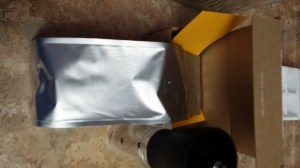
12oz of Tonx coffee beans
Their subscription model gives you a an every-other-week shipment of either 12oz or 24oz of beans, freshly roasted in or around Los Angeles. It’s $19 and $34 per shipment, for 12oz or 24oz respectively, including shipping. You can also subscribe to a half sack (6oz for $12), and from Twitter it appears you can do a standard plus a half sack if you want something in the middle.
A bit pricy compared to grocery store or Cost Plus coffee, but competitive with boutique/specialty roasters when you take shipping into account.
Tonx roasted my shipment of Costa Rica “HELSAR DE ZARCERO” beans on June 16, and it arrived (along with the free Aeropress) while I was off in the land of heat and humidity (probably Austin at the time). When I got back, the little box with the beans and a newsletter were here, along with the Aeropress.
Introducing the dripper

Clever Coffee Dripper, 7T of ground coffee, and a tablespoon measure
The good folks at Red Rock Coffee in Mountain View do hand-dripped coffee for a slight premium, and when I worked next door to them, I’d go in once or twice a day for a hand-dripped coffee. They use the Clever Coffee Dripper, an twist on the typical Melitta or Hario V60 pourover funnel that you’ve probably used at some point in your life.
The difference between the Clever and a typical pourover is that your ground coffee soaks in the water for at least 4 minutes as a part of the brew cycle. You can bring out more of the flavor of your coffee this way, rather than rushing the water past the beans. When your coffee is steeping in the dripper, the stopper on the bottom is “down,” meaning that it’s closed. When you place the dripper on a cup, the rim of the cup pushes the stopper up, and the coffee flows gradually through the grounds to produce a richer flavor.
Another advantage of the Dripper over the Aeropress is that it requires a lot less arm strength first thing in the morning, since you’re only lifting the dripper, not pushing the plunger.
The Clever is available at Red Rock–if you’re in the area, go in and buy it there, and have Brendan or one of the other coffee gurus show you how it’s done. If you’re not local to Mountain View, you can either buy it on Amazon or order from Sweet Maria’s in Berkeley.
Let’s brew this thing
 Supplies:

- Hario MSS-1B hand-crank grinder (or not… keep reading)
- Clever Coffee Dripper
- #4 funnel-style paper filter (white or natural)
- Beans!
- A 1T measure and a stirring stick (wood, plastic, a small spoon if nothing else is available)
- A timer, or an eye on a clock.
My process
Grind a MSS-1B worth of beans by hand. Rough estimate suggests that this was 600 cranks of the hand crank on the grinder, and a sore left hand from holding the grinder. Result is about 7T of ground coffee, which was dumped into a finger bowl for measuring.
Heat filtered water (12oz plus a bit to rinse the filter) to almost boiling.
Put one filter into the Clever, douse it with hot water and drain, then add 2T coffee per 6oz water. In this case, 4T coffee is used for 12oz water.

Timing the first phase of brew. 2 minutes, stir, 2 minutes, stir, release.
Pour hot water slowly over the grounds in the filter, making sure to douse all the grounds first. I let the grounds bloom a little bit before adding the rest of the water, although this is not strictly necessary.
When all the water is poured into the filter, put the cover on the dripper and start a 2 minute timer. After 2 minutes, gently stir the water and coffee with your stirring stick. Replace the cover and start another 2 minutes on the timer.
After your 4 minutes and change are done, stir one more time and then put the dripper on a mug. It will probably take at least 3 minutes to fully drain, maybe more, but be patient.

The end result. Darker than expected, due to finer grind than intended.
Finally, after about 20 minutes of the ritual, you’re ready to try your coffee. If, like me, you adulterate your coffee, try each new variety without sweetener or lightener. you may still adulterate it afterward, but at least you get a feel for what your beans result in.
So how were those beans?
In a word or two, pretty good.
This shipment was Helsar de Zarcero from Costa Rica. A mild roast that one blog described as “Medium, creamy body. Fresh blackberry aroma & mellow acidity. Finishing with honeycomb sweetness.”
I made one critical “mistake” in the preparation of this coffee. The Hario hand mill grinds a very fine grind, but for Clever you should generally use a coarser grind–one person I read suggested a rock salt texture, and if you’re having a professional grind your beans, ask for press pot or French press coarseness.
Still, despite the grind being very small and thus taking longer to get through the filter as the coffee bonded… I got a dark but not overwhelming brew out of the coffee. The paper filter keeps your coffee from being silty, and it came out creamy and not too acidic, as expected.
A spoon of turbinado sugar brought out a bitter tone, as I’m sure any coffee so insulted would show. A bit of half-and-half calmed it down, and I was back to my usual level of adulteration. A very smooth sipping coffee.
I had 3T of coffee left, so I brewed it in my Black & Decker 16oz pod/ground brewer with 9oz of water. This is a brewer that does wonders with coffee pods, but as a basket drip coffeemaker it didn’t really do any justice to the Tonx beans.
So where do we go from here?
First, no more hand cranking of the mill for a while. I’ll run the rest of this batch, and probably future batches, through my Pro Line burr mill from KitchenAid. Most of the time I don’t need the full-on ritual, and I do need the use of my arms.
Second, I do think I’ll keep my Tonx subscription for a while. They’re roasting my next shipment, a Valiente from Santa Ana, El Salvador, today. I should have it by the end of the week and I’ll try to comment on it when I try it.
Check them out — if you use this link, I’ll get points toward something or other, and maybe a t-shirt. They’re on twitter @tonxcoffee and elsewhere as well.
Third, I’ll probably try the Costa Rican beans in an Aeropress this week. My fiancee hides my “spare” coffee equipment in baskets on the top of our kitchen cabinets, so I’ll have to go climbing to find one that’s not new in box. As mentioned, I prefer to do Aeropress when I’m awake, as it can require a lot of pressure to brew. But it’s worth the effort, and it’s easier to travel with than Clever (although a medium handy box from Target or a hardware store can protect the Clever very well).
Disclaimer redux: All the equipment and supplies in this post were purchased by me, out of my own pocket change, with no consideration given by any supplier or venue. Links may be affiliate referrals that help pay for my coffee habit and other adventures, and your use of them is appreciated.
What about you? Have you tried Tonx or any other specialty/micro roasters? Or have suggestions on my coffee gear and methods? Feel free to chime in on the comments below.

 but with the NVelo software license included.


 rsts11 - Robert Novak on system administration