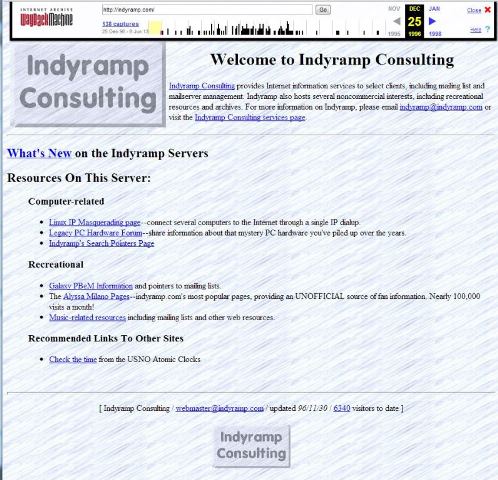
Eighteen years ago today, my registration for indyramp.com went through.
Creation date: 03 Jul 1995 04:00:00
The next day, as I recall, the Network Solutions $100 registration charge for two years of service went into place. It later decreased, and my domains moved from Network Solutions to Joker.com (requiring a fax to Germany to confirm), to a friend’s OpenSRS/Tucows RSP, to GoDaddy, and finally to its current resting place at Namecheap.
Indyramp Consulting had been around a bit before that, originally designed to be a third Internet Service Provider in Indianapolis, Indiana. In those days, it still wasn’t completely insane to seriously consider introducing an ISP that didn’t offer SLIP or PPP connections. Anyway, that plan didn’t quite work out, and I took a job at one of the other two ISPs, IQuest, which is now called LightBound.
But I kept the Indyramp name around, registered the domain, and set up a couple of web sites on it–including my earliest claim to fame, the pop music page (and first Internet fan page of any sort) for Alyssa Milano.
In 1995, I had a dedicated dialup connection from IQuest (an employee perk), and hosted much of my site on a recased Gateway 2000 i386 PC with 16MB of DIP RAM on a riser board and a 540MB hard drive that dual-booted the October beta of Windows 95.
From 1996 to 2003 the site was hosted in my apartments in Hayward and then Milpitas, California, on various levels of dedicated hardware (from a SPARCstation IPC and SPARCstation 2 to various Pentium Pro workstations to a 19-server multivendor multi-OS “colo” in my spare bedroom in Milpitas).
In 2003, I had been laid off and the job market was challenging, and I moved from home-hosting to a virtual machine at Johncompanies.com (technically a FreeBSD jail, but virtually the same thing). The site is still hosted there just over 10 years later.
Between 1995 and the mid-2000s I hosted/ran many mailing lists, play-by-email games, the original website/mailing list for Linux IP Masquerading, and a few other random things that came up.
Nowadays it’s mostly email filtering and a screen session for irc, but the name is still there and I have a lot of history out there on the interwebs with Indyramp.
So happy 18th birthday to Indyramp. I’m pretty sure the Fitbit on my arm has more memory than the first server that hosted you, but ultimately the Fitbit didn’t get me into hosting and networking, out to California, and to where I am today.
The replacement boards came in from Shuttle, and they’ll be going back into the chassis. But as you may have seen at the end of the last post, I discovered the Intel Next Unit of Computing server line. The NUC line current includes three models.
DC3217IYE – i3-3217U processor at 1.8 GHZ dual core with 3MB cache), dual HDMI, Gigabit Ethernet at $293 (pictured)
DC3217BY – i3-3217U processor, single HDMI, single Thunderbolt, – no native Ethernet – at $323
DCCP847DYE– Celeron 847 (1.1 GHZ dual core with 2MB L3 cache, dual HDMI, Gigabit Ethernet at $172
(Prices are estimated list from Intel’s site–probably cheaper by a buck or ten at Amazon, Fry’s, Central Computer, or your favorite retailer. Feel free to use my links and help me buy the next one. 🙂 )
All three have three USB 2.0 ports outside (one front, two rear), as well as two USB headers inside, conceivably useful for a USB flash drive or flash reader. They also have an mSATA-capable Mini-PCIe slot as well as a short mini-PCIe slot suitable for a WiFi/Bluetooth card. And there are two DDR3 SODIMM slots, supporting a reported 16GB of RAM (the processor supports 32GB, but the board/kit do not mention this). They all include VT-x with EPT.
I don’t see the Celeron being that useful for virtualization labs, but these are rather multifunctional for a little 4″ square computer. Imagine putting a broadband modem (3G/4G/Wimax) inside for reasonably potent portable kiosk purposes (VESA mount kit included). A card reader and a DVD burner for saving and sharing (and even editing) photos. Intel’s WiDi wireless display technology is supported as well, if you have a suitable receiver. Or use it with a portable projector for presentations on the go (no more fiddling with display adapters for presentations at your meetings!).
But we’re talking about a VMware lab here.
And let me get this out of the way… this was one of the coolest features of the NUC.
That’s correct, the box has its own sound effects.
Let’s get this party started…
Those of you of my era and inclinations may remember when KITT’s brain was removed and placed in a non-vehicle form factor on the original Knight Rider tv series. When I got ready to RMA my Shuttle motherboards, I was thinking about this sort of effect for a couple of VMs on the in-service ESXi server that was about to have its board sent to southern California. And that’s what I had to do. I couldn’t quite miniaturize the server Orac-style, but that thought had crossed my mind as well.
I backed up the VMs from the original system using vSphere Client, so that I could re-deploy them later to the NUC. Someday I’ll get Veeam or something better going to actively back up and replicate my VMs, but for the limited persistent use of my cluster (cacti and mediawiki VMs) this was sufficient.
One gotcha: Fixing the NUC network…
I originally tried reusing the 4GB usb drive my existing server was booting from, but it didn’t recognize the Ethernet interface. I installed a fresh 5.0u2 on a new flash drive, and still no luck. I found a post at tekhead.org that detailed slipstreaming the new driver into ESXi’s install ISO. I did so, installed again, and was up and running.
I did have to create a new datastore on the mSATA card — my original server had used a small Vertex 2 SSD from OCZ, which obviously wouldn’t work here. But I was able to upload my backed up OVF files and bring up the VMs very quickly.
And one warning I’ll bring up is that the unit does get a bit warm, and if you use a metal USB flash drive, it will get hot to the touch. My original ESXi lab box used a plastic-shelled USB drive, and I’m inclined to go back to that.
What’s next, Robert?
My next step is going to be bringing central storage back. There is a new HP MicroServer N54L on the market, but my N40L should be sufficient for now–put the 16GB upgrade in and load it up with drives. As those of you who saw my lab post last year know, it was running FreeNAS 8, but I’m thinking about cutting over to NexentaStor Community Edition.
I’ve taken the original Shuttle box and replaced a mid-tower PC with it for my primary desktop. I will probably set the other one up with a Linux of some sort.
And in a week or so I’ll grab a second NUC and build it out as a second cluster machine for the ESXi lab. All five of them are slated to go into my new EXPEDIT shelving thingie in the home office, and I’ll bring you the latest on these adventures as soon as they happen.


 ESXi servers to support Ivy Bridge processors. If you want to read more about that, feel free to visit my
  – i3-3217U processor at 1.8 GHZ dual core with 3MB cache), dual HDMI, Gigabit Ethernet at $293 (pictured)
 i3-3217U processor, single HDMI, single Thunderbolt, – no native Ethernet – at $323
 – Celeron 847 (1.1 GHZ dual core with 2MB L3 cache, dual HDMI, Gigabit Ethernet at $172
 ) at Central Computers, and took a
  from my stock. Assembling it took only a few minutes and a jeweler’s screwdriver, and then I was ready to implement ESXi.
 on the market, but my N40L should be sufficient for now–put the 16GB upgrade in and load it up with drives. As those of you who saw my lab post last year know, it was running FreeNAS 8, but I’m thinking about cutting over to
  rsts11 - Robert Novak on system administration