
What to do with your Evergreen farming rig

See bottom for an update on Evergreen Mining as of 2025-03-23, and another as of 2025-05-11. The project is shutting down on 2025-05-23. Stable farming rigs will continue to work, but the app will not, and no updates will be made to the software on your rig.

tl;dr: Evergreen is having issues. If you have issues with your farmer or app and want to head in another direction, you can set up your own farmer using Spacefarmers community node or your own full node, or you can reuse your drives for other things.

Also, you can use the official Chia software in wallet-only mode, along with the keys/mnemonic from the app, to transact your farmed Chia (it’s not “in the app” or held in any way by Evergreen).

Also, this post is a work in progress, as I want to get the info out there before everyone sets their EVG rigs on fire.

Finally, if this helps and you want to throw me a donation, https://ko-fi.com/robnovak is there. Completely optional, but it helps my coffee stash and my motivation.

As you’ve seen over the last couple of years, I’ve written about the Evergreen “miner” for Chia. It was designed as a turnkey farmer where you buy pre-plotted drives and run them with a low power single-board computer “hub.”

Evergreen was a good low-effort way to get into Chia farming, and while the price was at a premium over what you could build on your own (see my original Evergreen post for a dated example), for people who couldn’t or just didn’t want to invest the time (and some expense) into building and maintaining/managing their own farm, it was a valid option. I personally have a single-drive 12TB rig under my television and it’s spent most of its life doing what it’s supposed to. (I did get a $100 coupon for it as a promotion when I bought the gear almost two years ago, but I have never been compensated for writing about Evergreen, and they have no say in what I write.)

In the last six months, though, support responsiveness has been low, visibility of the leadership team has been mostly non-existent, and a lot of farmers have been stuck in extremely high latency support ticket loops. As I finish up this post on Saturday afternoon (March 8, 2025), it’s been over a week since either of the visible members of the Evergreen team have posted anything on Discord.

I don’t fault the support team (Jakub) for this, having been the one support person for many organizations, including crypto pools, before. But with a recent Chia day-zero type bug fix causing a flurry of panic around the closed Evergreen software platform, the Android app disappearing from the app store, along with a public conflict between the founder (and his girlfriend) and the person responsible for the software and farmer software… a lot of people are concerned about the future of the project, and people who are stuck with hardware or software issues wonder if they have expensive paperweights.

I hope that Dylan and Evergreen are able to recover and get support ramped up and the open issues resolved soon. But given that a lot of people are considering just shutting down their gear if a problem comes up, I am providing some suggestions on how to deal with the discomfort around your Evergreen farmer.

It should be painfully obvious, but this is in no way an official, endorsed, approved, or even reviewed statement from Evergreen. It’s just a guy who’s about up to 4 years in Chia trying to help the community out. And if you take any of this advice, it’s all on you with regard to the outcome. Should be pretty clear, right?

Easy button: Just let it keep farming

If your Evergreen gear is still working, submitting partials, and getting payouts, you should feel free to just let it run as long as it works. I expect based on the support volume on their Discord that most farmers are in this category.

For any of the following options, there is absolutely no official support, and you take full and complete responsibility for any change you make to the gear you bought from Evergreen. I will not provide any support either. Proceed at your own risk.

NUC5I5 mini-PC, suitable for a community node farmer or a full node farmer (with a 500GB or larger NVMe drive for the blockchain database). It should cost you less than US$100 used.

Semi-easy button: Connect to a mini-PC and load your keys

If you have a mini-PC, a Raspberry Pi, or even a spare desktop or laptop that can run Linux, you can relatively easily set up your plotted drives on your own instance of the Chia software. This should be a computer you can leave on all the time, hence the focus on low power. And you need Linux because the hard drives use the Linux ext4 filesystem (if you have a way to access them on another OS, you probably didn’t need this post).

Some possible options for your replacement farming PC (not my listings, but they are affiliate links and I may receive a commission if you buy through these links):

I would suggest a minimum of a 5th gen Intel Core processor (i5/i7), 8GB RAM, 128GB SSD for use with community node or 512GB SSD for running your own node. Most of these machines can be upgraded afterward. You’ll also need a USB flash drive of at least 16GB to put the Linux installer on.

You can run a farmer with or without node on a Raspberry Pi 4 or later, although you may not be saving a lot of money and you’re giving up a lot of expansion and growth capability.

You just need to install Chia software or MadMax’s Gigahorse software (the latter is required if you’re using compressed plots, or if you plan to make compressed plots), set it up for the Spacefarmers community node, get the mnemonics off your plotted drives (see below), and configure your farmer to farm the plots on your external hard drives.

Each plotted drive should have a preload.pconf file that contains your mnemonics and addresses. Don’t modify it just in case. It isn’t used by standard Chia software. And note that these sample addresses and mnemonics are invalid. Don’t try using them, you’ll get errors.

{
"mnemonic": "chicken chicken chicken chicken chicken chicken chicken chicken chicken chicken chicken chicken chicken chicken chicken chicken chicken chicken chicken chicken chicken chicken chicken chicken
",
"first_address": "xch1xxxxcx3xx333xx3x3xccx3xx3xxxxxhx3xxcxxxxx0c3xx3xgxxxxxxx3",
"contract_address": "xch1xxxxcx3xx333xx3x3xccx3xx3xxxxxhx3xxcxxxxx0c3xx3xgxxxxxxx3",
"payout_address": "xch1xxxxcx3xx333xx3x3xccx3xx3xxxxxhx3xxcxxxxx0c3xx3xgxxxxxxx3",
"launcher_id": "q3s3n3qsp33q333o3r3333pn333o3qn3333q333333ro3r333r3qsrn3rq33333r",
"worker_name": "Evergreen_v1"
}

You use the ‘chia keys add’ command to add the mnemonic phrase shown in your files, so that your chia system can recognize your plots as yours. The “-l” parameter puts a label on the key.

This labeling is optional, but good for keeping track of multiple keys, especially if you have multiple Evergreen drives..You probably have to do this once for every Evergreen-plotted drive.

chia@chianuc5:~/chia-gigahorse-farmer$ ./chia.bin keys add -l chicken
Enter the mnemonic/observer key you want to use: chicken chicken chicken chicken chicken chicken chicken chicken chicken chicken chicken chicken chicken chicken chicken chicken chicken chicken chicken chicken chicken chicken chicken chicken

You could even install Linux (Raspberry Pi OS or Ubuntu probably) on a new 32GB MicroSD card and use the existing “hub” as your new farmer. This method also means that if your issues with Evergreen are resolved, you can just swap back in and run normally.

Note that you should start the chia wallet as well, let it get synced (via ‘chia wallet show’), and once that’s done, your farming should work. This bit me, with almost a day of “plots were eligible for farming” but no proofs. On average, a 12TB Evergreen drive with 109 plots should get 1090 points a day, or a point every 80 seconds on average, so if you don’t see proofs in the logs, check the wallet sync. Once your wallet is synced and you’re finding proofs, you can stop the wallet and reduce load on the community node.

If you have the compressed C29 plot option with remote compute, you would need a machine with a fairly modern GPU available for the compression. This is not a huge barrier, as most gaming PCs can handle this load, as well as other machines with a reasonably sized NVIDIA GPU (probably with 6GB or more of VRAM). But it is a bit more complicated, and beyond what I’ll cover here. If your new farmer has a NVIDIA GPU, it should just work.

This method also means that if your issues with Evergreen are resolved, you can just swap back in and run normally.

Scorched earth method: They’re Just Hard Drives

While there’s some proprietary magic to the Evergreen Hub mostly around software, the rest of the rig is just USB external hard drives. You can always connect them to another machine and replot over them, or reuse them for other things (backing up your NAS, etc).

Sketchy option: Sell your rig

This one isn’t something I would recommend, and I wouldn’t be comfortable selling a rig I was decommissioning for the reasons currently floating around Evergreen’s platform. But if you find someone who wants the gear and understands the issues, or who just wants the components, you could probably sell it. You can’t get your purchase price back, I’m pretty sure, but you can recover some shelf space and get a bit of cash out of it.

Where do we go from here?

I unplugged my Evergreen node, since it got quirky recently and I haven’t had the inclination to troubleshoot it myself. The drive is now connected to a NUC5i5RYB mini-pc I picked up at a flea market this morning (March 9) for about $40. I upgraded it from a 256GB SSD to 1TB because I had one around and may want to run a full node on it, but without the full node, even 128GB is more than enough.

Pro-tip: For your new farmer rig, if you choose to use one, make sure to set it to power on after power loss. I forgot that when setting up my NUC5i5, and my former-Evergreen rig was offline after some weather-related power outages at home. With Raspberry Pi or the like you shouldn’t have to do this. With most PC-type solutions, you probably do.

I hear that there will be some updates coming from the Evergreen team soon, as the support guy is back and responding again.
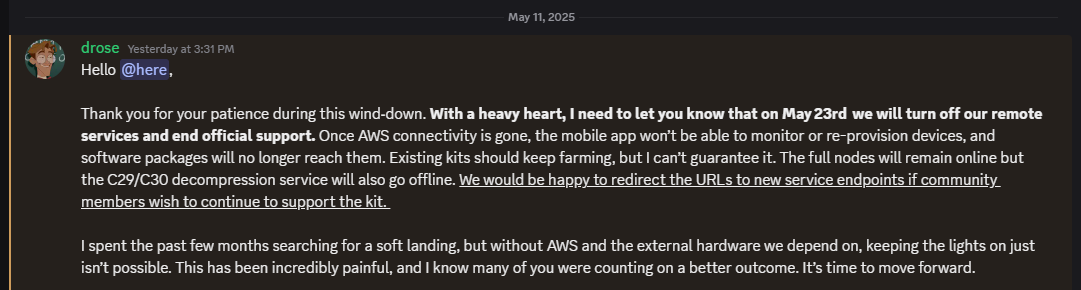

Update as of May 12, 2025.

Dylan of Evergreen Miner has made an update post to the Evergreen Discord.

In short, remote services will end on May 23, 2025. There will be no more official support, although that has been the case for two months now anyway.

If your rig still works, it will continue to farm and earn XCH as before.

There is a replacement OS being developed by a group called Druid Garden (including former Evergreen folks) to keep the gear running mostly as it is today.

You can sell your drives on eBay (my guess is $10/TB in good condition), reuse them for your own purposes (Chia or not) as noted above, or Dylan has a form to connect with liquidators. This is (imffho) more relevant to larger farmers – liquidators will probably not bother with one or two drives.

Dylan doesn’t call this out, but if you have not already done so, GO INTO YOUR APP AND GET YOUR MNEMONIC/SEED PHRASE so you can access your wallet even if the app dies.


Update as of March 22, 2025.

I haven’t watched the videos about the downfall of Evergreen, but on the EVG Discord today, Dylan, the founder of Evergreen, said he has no ability to do anything with Evergreen.

I asked him to make a more clear and centralized announcement, but for now it looks like the odds of the service restoring customer support, RMAs, or fulfilling any orders that have not already shipped are pretty close to zero.

So see above, and if you’re interested in a video on the process, or even a more step-by-step blog post on the cutover and/or the GPU remote compute, let me know in the comments.

And I’ll be posting another blog soon with some farmer/plotter designs for 2025, including the machines I personally use today for both purposes. So stay tuned.

As always, if you buy through eBay, Amazon, or some other links on my post, I may earn a small commission.
One easy step to save two weeks of waiting for Chia Network farming, and a quick node build for under $500

I’ve started work on a walkthrough of Chia farming from download to payout. It’s turned out to be a bit more challenging than I thought, but I’m still plowing through. 

This video (below) is NOT the walkthrough. It is a quick overview, with an hour of sped-up node syncing. Three hours to get the last four weeks synced… not very fun but it makes a point, and gets some content up on the Andromedary Instinct YouTube channel. 


Looking at the snapshot sync process

In March/April 2023, Chia Network posted a snapshot of the blockchain database as of March 31, 2023. They updated it in July to the June 30 snapshot. 

Why does this matter? Well, syncing the blockchain to your node is necessary to plot and do transactions (there may be workarounds for both, but the usual path is to sync a full node and then start farming). That’s a pretty slow process.

On a very well-tuned farmer with great network and I/O, I suspect you can get a node synced in a day or so. Last time I synced from scratch on a Raspberry Pi, I believe it was 11 days, and would be longer today. The machine in this video took three hours to sync 4 weeks of activity, and that skips over the dust storm phase of the blockchain (which effectively knocked a lot of slower nodes offline until Chia Network did some software enhancements to better deal with dust storms). 

By using BitTorrent to grab a snapshot (about 65GB compressed, 125GB uncompressed) in a few hours, you skip closer to the front of the line in syncing status. You can then “resume” syncing from the start of July and even on a suboptimal machine like my test machine, you’ll be done in under a day. 

This video also shares one of the better guides to moving your database directory. In my case, the boot drive it was originally syncing to is a 256GB drive, and it would eventually fill up the drive. I moved it off to a second SSD so that the boot drive won’t degrade. 

Building that system, and what I’d do differently

I realized as I started plotting (heh) the video flow that it would be easier to start with a fresh computer. I had another use for an Alder Lake-based machine coming up, and I managed to get a complete system new in open box for $250 locally, so I went for it. As configured, it cost me less than $500, but if I were building it for long term Chia use without “free” review stock from Amazon Vine, I’d make a few other changes. 

Bill of Materials, as built ($537 with caveats)

If I were building it today without existing parts stock ($474):

This HP desktop system maxes at 32GB RAM, so plotting may be limited even with a GPU. However, for storage it’s pretty good, with two 5GBit USB-A ports, two 10GBit USB-A ports, and one 10GBit USB-C port on the front (in addition to two USB 2.0 ports on the back). The board supports two SATA drives with power connectors plus the NVMe. And it’s not a bad CPU – 6 P-Cores with hyperthreading. 

Once I finish the video, I’ll be swapping out the boot drive for a better one to install Ubuntu and Arweave on. I still prefer running my node databases on moderate to good performance NVMe over an economy SATA drive whenever possible. 

Some other options for plotting and farming systems

This HP desktop build met my primary criterion – ability to get a system cheap and quick and local to set up Chia from the ground up. But as noted above, it’s not perfect, and has definite limits (like one x1 and one x16 PCIe slot, only two SATA drives, 32GB max RAM). 

Some other options that I can recommend would be:

I have two T7910s, and even though they’re several years old, they have a lot of expandability and performance while being fairly manageable in size, shape, noise level, and power draw. 

This one has two E5-2695v4 processors and 512GB RAM included. You can branch out into compressed plots and/or RAM-based plotting, both of which will accelerate your plotting. With several x16 PCIe slots and either 4 3.5″ or 8 2.5″ drives (not sure which is the case on this system), you can expand with GPUs, storage adapters, internal SAS/SATA drives, or even faster networking. 

My primary plotter is still a T7910 with two E5-2650Lv4 (14c28t) processors and 128GB RAM, plus a RTX3060 GPU 

If you’re looking for a slightly different config, there are a number of options with different mix of CPU, RAM, and storage at the Amazon Renewed store.

Another alternative is to go a bit more modern with a T7920, which uses first gen Xeon Scalable processor instead of the Xeon E5 v4 line. There are a fair number of first gen Xeon Scalable gold processors for double digit prices on eBay in case you start with a silver or bronze level processor.

  • Mini PCs, primarily for farming or uncompressed plotting

There are a lot of NUCs and NUC-Class systems out there. I’ve got systems from ACEMAGICIAN, GEEKOM, and Beelink in the home lab/studio, as well as my classic Chia NUC plotter, the NUC10i7FNH from a couple of years ago. 

These are not very expandable in terms of interfaces or GPUs, but with Thunderbolt you could use a Thunderbolt Hub to attach additional USB hubs and drives, or a Thunderbolt PCIe enclosure to attach a SAS card or GPU.

At some point, however, if you’re looking at expanding your NUC or mini-PC that much, though, you may want to consider either a NAS or a desktop/workstation/server with SAS enclosures to handle the drives. 

Little-known ways to work with GPUs for Chia farming with Gigahorse (#4 will surprise you)

A lot of people hate reading documentation, so I’m writing meta-documentation based on the documentation to help you get things going with FlexFarmer and Gigahorse compressed plots.

The authoritative site for Gigahorse details is madMAx43v34’s github, which is where you can find all of his software. And any references in this post will be to Gigahorse software, not Bladebit.

And as always, anything I post even vaguely related to Flexpool here on rsts11.com is not official or endorsed by Flexpool, even though I have been on their support team for over two years now.

In this post:

  1. Farming Gigahorse compressed plots on Windows
  2. Using a remote GPU for farming from Windows or Linux
  3. Selecting which GPUs to use for farming
  4. There is no spoon
  5. A shortcut to farming compressed plots (albeit Bladebit compressed), at a premium

Farming Gigahorse compressed plots on Windows (kinda)

You need a Linux system to farm compressed plots at this point. Luckily if you have Windows 10 or later with current patches, you have a Linux system ready to install.

I’ve co-written a guide to FlexFarmer + Gigahorse compressed plots + Windows + WSL over on Reddit. It’s not an official supported deployment for Flexpool (i.e. the pool doesn’t provide official support for it) but it does work. I’ve used it myself on a small farm to verify the guide, and many others do the same with as much as a petabyte or more.

Using a remote GPU for farming from Windows or Linux

But maybe your Windows machine doesn’t have a suitable GPU, or you want to farm using an AMD GPU when the Gigahorse module in FlexFarmer only recognizes NVIDIA.

That’s easier to document, and in fact it works with Linux farmers too (I set up remote compute from my Linux plotter to my Windows 10 desktop so I could dedicate the GPU to plotting for a while).

The right thing to do of course would be to go to the Remote Compute section of madMAx43v34’s github and read up on the feature there. But to simplify it, here are the steps.

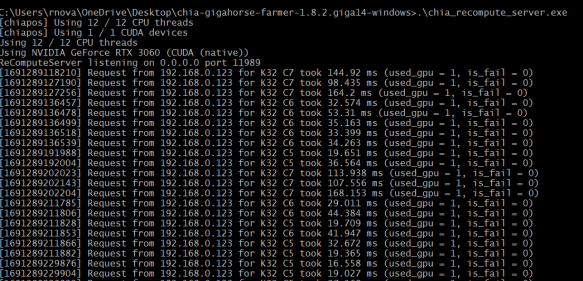
On the machine with the GPU you want to share (the “recompute server”), either get the Gigahorse bundle for the relevant OS, or download the chia_recompute_server program from the appropriate directory.

On the recompute server, make the downloaded binary executable (on Linux), and then run it.

That’s it.

Now on your farmer, you need to set the environment variable CHIAPOS_RECOMPUTE_HOST to your recompute server’s name or IP address.

Note that this name does NOT mean you need to be running chiapos plotter or the Chia or Gigahorse full node. If you are running Gigahorse farmer, you have to restart the Gigahorse farmer after setting the variable, but for FlexFarmer you do not. 

For example, if your recompute server is 192.168.0.2, you enter:

export CHIAPOS_RECOMPUTE_HOST=192.168.0.2

before running FlexFarmer on your Linux farmer.

If you’re running Windows WITHOUT WSL, Max provides this link on to set environment variables in Windows: https://phoenixnap.com/kb/windows-set-environment-variable#ftoc-heading-4

Selecting GPUs to farm with

If you have multiple GPUs but you want to only use selected GPUs with FlexFarmer, Max’s documentation explains how to do this. It’s worth noting that this generally applies to any CUDA software.

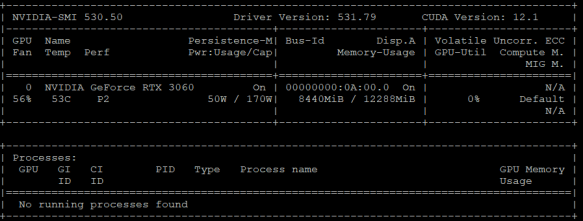
Use the “nvidia-smi” command inside of WSL, or under Linux natively, to list your GPUs and determine which device numbers apply.

You use the CUDA_VISIBLE_DEVICES environment variable to choose the devices you want the farmer to use. In the example above, I only have one GPU so it’s device 0, but if you have multiples, they will be listed and you can choose the ones you want.

From Max’s documentation:


Once again, the note above about full notes applies. If you’re using a configured FlexFarmer instance, just set this environment variable and the CUDA libraries used in the Gigahorse module will pick it up.

CDN media

If you want to disable GPU usage in FlexFarmer, there’s a two line configuration option to disable hardware (GPU) acceleration.


Using Evergreen Miner as a shortcut to compressed farming

This is a somewhat controversial option, and if you already have the hardware to plot and farm and can manage your software on your own, you don’t need Evergreen.

Based on developments between August 2024 and February 2025, I can no longer recommend this option, but I am leaving the content here (and removing my affiliate link).

However, if you want a power optimized option where you don’t have to have a plotter at all, and just buy drives in enclosures with plots already made for you, Evergreen Miner is a viable option.

In short, you buy an “Evergreen Hub” which is a single-board computer with a customized Linux install that provides all the software for farming, interacting with the mobile app, and managing storage attached to it. Then you buy (or provide and plot your own) hard drives that connect to the Hub over USB.

Generally you’d buy a starter kit that includes 1 or more hard drives pre-loaded with plotted drives. You can then add more drives, up to 25 per hub, either through their pre-plotted offer or sourced and plotted by you (if you choose to expand on your own).

With the kits and drives from Evergreen, you get the needed cabling, including a single PSU (12V 10A) and splitter cables, as well as everything to connect the hub to the drives and to your network.

Even though I’ve been plotting since mainnet launch in 2021, and have plenty of gear and ~160TB plotted and farming, I bought a 12TB starter kit and it’s been chugging along.

I believe the beta compressed-plot farmer for Evergreen is going into general release in the next week or two (i.e. mid August 2023), and the Chia Blockchain software release that includes Bladebit compressed plot generation is coming soon after (it’s in release candidate 3 as I write this). When those both happen, I’ll be giving a try to the Bladebit compression, and may get a chance to update this post with the details.

Where do we go from here?

I’m working on some video demos of the Chia process, from initial downloads to first payout. I hope those will go live later this month.

I also have some mini-PC reviews in the buffer. Stay tuned. It’s not all crypto out there after all.

Have you been working with compressed plots or Evergreen Miner or both? Any observations, discoveries, or questions? Join us in the comments below.

How not to embarrass yourself when writing about mining (or anything else)

Disclosure: I work with Flexpool.io but I am not writing in any official capacity or with any proprietary knowledge. You should mine with Flexpool, but it’s not mandatory.

Disclaimer: Hashrate rental can be expensive and unprofitable if you don’t know what you’re doing. If you do know what you’re doing and can manage your risk, check out Nicehash and MiningRigRentals and maybe you too can embarrass the tech media. (Referral links may earn me a little bit.)

This morning, some “news” pieces came out in some of the tech press. Not the big names most people have heard of, but venues with some reach and some expectation of basic knowledge.

The headline from notebookcheck dot net

The “story” was that some unreleased and possibly even non-existent GPUs were mining to Flexpool, the number 5 Ethereum mining pool in the world This sounds pretty amazing, even unbelievable, although after the April 1, 2021 Captains Workspace reveal video on the “RTX 4090” you realize some people will believe anything.

The evidence? High hashrate and workers named “4090TI-Overclock-Test,” “RX7000-Control-Test,” and “RX7000-Overclock-Test.”

The “story” got a lot of coverage, starting at wccftech, spreading to Notebook Check and Digital Trends, and later with a bit more justifiable incredulity from Windows Central and TechRadar. Also seen at TweakTown after this was originally posted.

A couple of these mention later in the article, after breathless references to the scale and/or specs of the cards named and the vast amounts of Ethereum that could be mined by these farms, that it’s unlikely.

How could this happen?

Continue reading

Quick Take: Is It Too Late To Get Into Crypto?

Short answer: Maybe. But read on.

In January 2021, I refreshed my involvement with cryptocurrency mining, after two years of Ronco-mode Ethereum mining. Set it and forget it worked pretty well, except when a power supply died.

I started a post then, and had told some friends about my calculations for Ethereum mining with the new 30-series from NVIDIA or even my old RX580 cards. A $1500 rig that could pay for itself in six months? Amazing.

But in the week or two after I said that, as James Burke might say, the universe changed. Or at least the crypto and GPU world started to transmute in strange ways.

Continue reading
