Galaxy S 4 Onboarding – Use Protection

For a while I had it made. With four lines on my cellular plan, three of which started out without a contract, I could sanely upgrade my phone every six months at a discount/promo rate, pass the old device down the chain, and just repeat every time a new device came out.

To the death? No, to the pain.

I do use the word “sanely” very loosely here. It’s still about $300 for the upgrade with tax. Every six months. Re-learning the new phone’s customizations, quirks, ringtones, etc.

And there are two more painful problems with this model, though. One is that you often have to re-buy all your accessories. Car docks, home docks, cases, cool Doctor Who skins… they all have to be replaced with your phone changes form factor and/or manufacturer. The other is that my cellular carrier makes it increasingly challenging to keep an unlimited data plan. The last thing I want to do is slip up on an upgrade transfer and start paying current rates for a sharing plan that really doesn’t meet my needs.

So for a few months I drooled silently over the Motorola RAZR MAXX HD and the HTC DROID DNA, until I saw that Samsung was coming out with a new Galaxy S 4 any day now. Those of you on Big Red probably know that we got it last of the major carriers–I think Credo Mobile even had the GS4 before Verizon did. But finally it came along, and I started suffering the same curse I’d suffered when buying previous bleeding-edge machines, even going back to those sweet 60GB iPods I bought last decade.

So I’m here today with some thoughts on protecting a new phone, and on the accessory ecosystem for the Galaxy S4 specifically.

Disclaimer: With the exception of the Speck case (free sample) and the Skinomi case (birthday present), all devices and accessories mentioned in this article were purchased by me through retail channels, albeit some with standard Verizon corporate discounts. Also, links in this post might result in affiliate commissions if you buy stuff from Amazon through them.

Use protection

Seriously. It doesn’t have to be ugly, or mint-flavored, but the first two things you should do with your new phone are protect the screen and protect the body.

I’ve found that the 3-pack screen protectors that the cell carriers sell are quite acceptable. I won’t leave the phone shop without one. You pay about $10-12 after discounts and you might never need the other two. Double-check whether the ones you’re offered are matte or glossy screen style (and if the shop doesn’t have the one you prefer, shop around quickly). Set them aside for when you sell the phone (more on this later). But if you’re mean to your phone, consider the Zagg option below.

As for protecting the body, you have a couple of options, depending on your aesthetics, usage needs, and your phone materials.

Slimline option – go with a clear protective skin for the whole phone. Zagg is the most prominent name, and if you install them properly (or pay the mobile folks at Best Buy $12 to do it), the skin will last forever. I’ve also used Skinomi once, thanks to a birthday gift from a coworker, with no concerns there.

Zagg Invisible Shield is a pain to install, although they now have different levels of installation difficulty/resilience. You can buy screen-only, which is good if you share your phone pocket with keys or bricks or angry rodents. I’d lean toward the full body coverage though.

Standard/slim case – you can get a variety of cases that basically cover the phone except for the screen, providing a somewhat resilient bumper for the edges (something the protective skins can’t really do). These are often available in different materials (silicone, hard plastic, even various metals) and opacities (solid, translucent, clear).

Standard/chunky case – If you want more of a sense of protection for your device, there are a lot of cases out there that provide more of a bumper, including Otterbox and the like. I wouldn’t recommend this for the Zoolander style of phone, but if you’re resigned to (or enamored with) a large phone already, and know you’re going to put it through abuse, you may find this option the best.
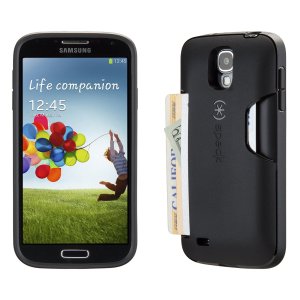
speck-cardcase-gs4

Featureful case – with larger screens and more multimedia, many people want a phone case that doubles as a stand, so you can watch a video or type with a bluetooth keyboard while using the phone’s display. There are also cases a couple of vendors which offer a mini-wallet for various devices. I tried the Bear Motion wallet case but got annoyed with having to open and close it. It does offer a stand feature, and more screen protection than some other options.

After I visited with Speck at Interop, they were kind enough to provide me with a free sample of the SmartFlex Card Case for GS4 (pictured here), which I’ve been using for over a month now. I wasn’t sure I’d be able to survive with just three cards of space, but it was perfect for a week around Disneyland and for most of my other travel (ID, work credit card, personal credit card). I could leave a thin wallet in my front pocket and rarely need it.

Battery case – With that huge brilliant screen, the high speed data, and the always-on mode we live in these days, you’re going to run out of power sooner than before. For a few devices (iPhones, Galaxy S3 and S4, probably others) you can find a case that contains an extra battery for your phone. I found a random import 3200mAh “Power Bank” case at a local computer shop for $30, and it saved my butt a few times at Cisco Live and other conference events. It also features a kickstand and an audio reflector to send the sound from your phone back toward you. The iDevice battery cases are a bit more polished, but hopefully this segment will expand a bit.

Cool But Not Protective Cases – When I bought my Galaxy S4, I got the Flip View cover, which lets you see notifications through the cover without flipping it open. I found that the flip view window picked up fingerprints from my screen, and I didn’t really use it as it was meant to be used, so it sits on my desk at home now. I’m glad Verizon price-matched Amazon on this, as I would have hated to write off $60 for the case.

There are also skins you can get that provide a nominal amount of protection (or distraction) from damage. I’ve been a big fan of the Custom Phone Skins line, especially their Doctor Who phone skins, and have bought 3-4 of them. However, while they protect a bit from scuffs, they won’t do much for you when you bounce your phone off the pavement getting out of a car. This would be a good choice if you go with a transparent/translucent case, or if your phone has a Kevlar coating like the RAZR MAXX did.

My daily driver is the Speck case these days, with the stock Verizon/Samsung screen protector. I keep the battery case in my laptop bag just in case, but most days when I’m not traveling, I’m rarely more than 200 feet from a charging cable. And as I learned in Nanowrimo in 2002, if you can plug in, do plug in.

So where do we go from here?

I’ll be sharing some thoughts on car accessories, as well as the evaluation process I went through before deciding not to change carriers, in upcoming posts. You can see some caveats for car accessories, and the TARDIS phone skin I had on my RAZR MAXX, at my earlier post on fun with Verizon phones and vehicle navigation mounts.

Have you found an accessory for your mobile phone or tablet that you can’t do without? Or something you wish you’d done without? Feel free to share in the comments.
Indyramp is old enough to drink now!

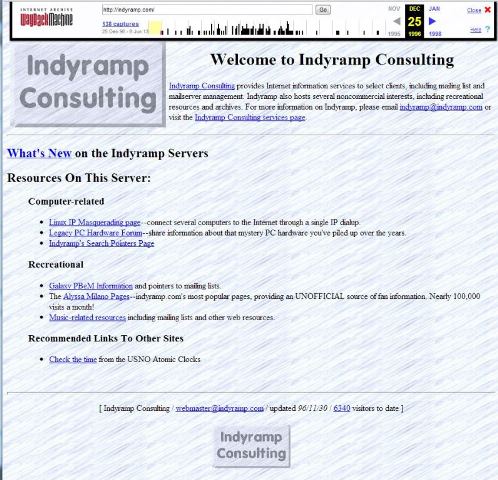
www.indyramp.com as of December 1996 (earliest archive.org entry)

http://www.indyramp.com as of December 1996 (earliest archive.org entry)

Eighteen years ago today, my registration for indyramp.com went through.

Creation date: 03 Jul 1995 04:00:00

The next day, as I recall, the Network Solutions $100 registration charge for two years of service went into place. It later decreased, and my domains moved from Network Solutions to Joker.com (requiring a fax to Germany to confirm), to a friend’s OpenSRS/Tucows RSP, to GoDaddy, and finally to its current resting place at Namecheap.

Indyramp Consulting had been around a bit before that, originally designed to be a third Internet Service Provider in Indianapolis, Indiana. In those days, it still wasn’t completely insane to seriously consider introducing an ISP that didn’t offer SLIP or PPP connections. Anyway, that plan didn’t quite work out, and I took a job at one of the other two ISPs, IQuest, which is now called LightBound.

But I kept the Indyramp name around, registered the domain, and set up a couple of web sites on it–including my earliest claim to fame, the pop music page (and first Internet fan page of any sort) for Alyssa Milano.

In 1995, I had a dedicated dialup connection from IQuest (an employee perk), and hosted much of my site on a recased Gateway 2000 i386 PC with 16MB of DIP RAM on a riser board and a 540MB hard drive that dual-booted the October beta of Windows 95.

From 1996 to 2003 the site was hosted in my apartments in Hayward and then Milpitas, California, on various levels of dedicated hardware (from a SPARCstation IPC and SPARCstation 2 to various Pentium Pro workstations to a 19-server multivendor multi-OS “colo” in my spare bedroom in Milpitas).

In 2003, I had been laid off and the job market was challenging, and I moved from home-hosting to a virtual machine at Johncompanies.com (technically a FreeBSD jail, but virtually the same thing). The site is still hosted there just over 10 years later.

Between 1995 and the mid-2000s I hosted/ran many mailing lists, play-by-email games, the original website/mailing list for Linux IP Masquerading, and a few other random things that came up.

Nowadays it’s mostly email filtering and a screen session for irc, but the name is still there and I have a lot of history out there on the interwebs with Indyramp.

So happy 18th birthday to Indyramp. I’m pretty sure the Fitbit on my arm has more memory than the first server that hosted you, but ultimately the Fitbit didn’t get me into hosting and networking, out to California, and to where I am today.

Getting a workflow together for mobile blogging #rsts11

So I’m headed for my fourth Tech Field Day event, and so far I’ve generally been more about the “real-time blogging” by way of twitter. But this time around, I’m going to try to more timely persistent posts.

This will also be my first time going with a laptop that weighs less than a typical newborn. But even with that transition, from the Sony VAIO quadcore to a ASUS Zenbook Prime dualcore, I’m wanting to make use of one of my tablets.

So I’m trying out a few different options. Today I’m using my Nook HD+ (Barnes&Noble is seriously cutting the prices on their HD & HD+ tablets, so I got the HD+ 32GB and added a 64G MicroSDXC). After realizing that the cool new wireless keyboard I had wouldn’t work with the tablet (as it wasn’t Bluetooth), I I found my old Apple Wireless Keyboard.

A fresh set of batteries and a $2 BlueKeyboard Pro app later, I’ve got a mobile blogging system with the Android WordPress client.


Update: I wrote this Saturday night in front of the television, and apparently the button I interpreted as “save” as in “save draft” was actually “publish.” So I will be updating this entry over the next couple of days–it wasn’t really ready to go out, but we’ll deal.

2013-08-23: A further edit… once I got out to Tech Field Day 9, my keyboard didn’t want to work with the Nook HD+. As I update this, I’m getting ready to head for VMworld in a day or two, and I am going to try the iPad with Apple keyboard (and I’m updating on this combination right now… seems to work fairly well even in my lap except for the Marware keyboard protector I’m trying out.

It’s pilgrim time, people… #vExpert #CLUS #TFD9 #rsts11

Got your best John Wayne voice in mind?

April showers bring May flowers, and what do Mayflowers bring?

Pilgrims.

vexpert-tint

First, I’m honored and (at least) a little bit surprised to have been chosen as a VMware vExpert this year. To be in the company of both Scott Lowes, and several hundred other people who contribute to the VMware community, well, it’s an amazing category to be in.

I applied under the Evangelist Path because, while I work for a company that has more than a few VMware licenses, this is a category I qualify for under my own auspices. And the blog entries you’ve read, linked to, and followed in your own labs have been out of my own pocket and without benefit of a Fortune 100 company’s sway or budget.

Thanks to some of the benefits of the vExpert program, I expect to be able to expand my home lab and work on some new projects in the coming year, meet lots of new friends and cohorts, and contribute more of another voice to the VMware community. Although I suppose this means I should follow the recommended capitalization of VMware more consistently.

TFD-Logo-300

Speaking of pilgrims, I’ll be making a pilgrimage to Austin, Texas in just over three weeks to be a part of the All-Star All-Datacenter Tech Field Day 9. I know over half of the other delegates, having participated with them on previous field day events, and am looking forward to maybe remembering all of their names by the end of the week.

This is my first field day outside of Silicon Valley (unless you count the roundtables at Interop last month), so it should be interesting to actually have to go more than a 15 minute drive to join the rest of the delegates.

Tune in June 19-21 for live coverage of our conversations with Dell, Nutanix, Solarwinds, Veeam, Neverfail, Commvault, and a top secret stealth company I’m not allowed to name yet.

Update! As of June 4th, Infinio has outed themselves as the “top secret stealth company.” They describe themselves as “inventor of downloadable storage performance” (and I assume that’s storage performance enhancement that’s downloadable rather than being hardware). Looking forward to seeing what their Infinio Accelerator is and how it compares to other things on the market that sound like software-layer virtualization storage enhancement.


cisco-live-250

And speaking of pilgrims even more, well, I’ll at least be in the neighborhood of my employer’s largest campus when I head down to Orlando after TFD9 for the Cisco Live event.

I’ve been heavily involved in Cisco UCS for the past year and change, and am looking forward to exposure to more about Cisco’s datacenter platforms as well as maybe touching on other areas of their business. I probably won’t be able to turn my Cisco 1605R routers into SDN gear anytime soon, but I’ll survive.

Balancing-Act-001

And finally, as time permits I’m going to be evaluating and writing up a couple of SMB WAN load balancing solutions that have been introduced/enhanced recently. I had good conversations with two of the bigger names in SMB WAN aggregation and failover while at Interop earlier this month, and I’m looking forward to experimenting with some of their gear in the foreseeable future. You’ll probably see some of the names in my “How many Internets do you need?” post from March, and maybe a surprise or two if I’m lucky.

So stay tuned. And if there’s anything in the SMB (small/medium business) and/or POHU (psycho-overkill-home-user) market space you’re curious about, let me know and I’ll see if I can dig into it. Chime in on the comments below!

I survived Interop

I made it back from my first Interop expedition. I’m sure a lot of you are finding my blog as a result of meeting me at Interop — I owe a few of you an email to follow up on our conversations, and those will be going out next week. Feel free to initiate contact if you like, leave a comment, drop me an email, or catch me on Twitter.

I’d like to take a moment to thank Stephen Foskett and the Tech Field Day organization for faciliatating my Interop visit, as well as Spirent, NEC Networking, and Juniper Networks for sponsoring our activities and presence this week.  I’d also like to thank Jennifer “JJ” Jessup, General Manager of Interop, for her help dealing with an interesting PR contact before the event, and Jamie Porter from the UBM/Interop PR team for helping to set up a couple of meetings with exhibitors while I was there.

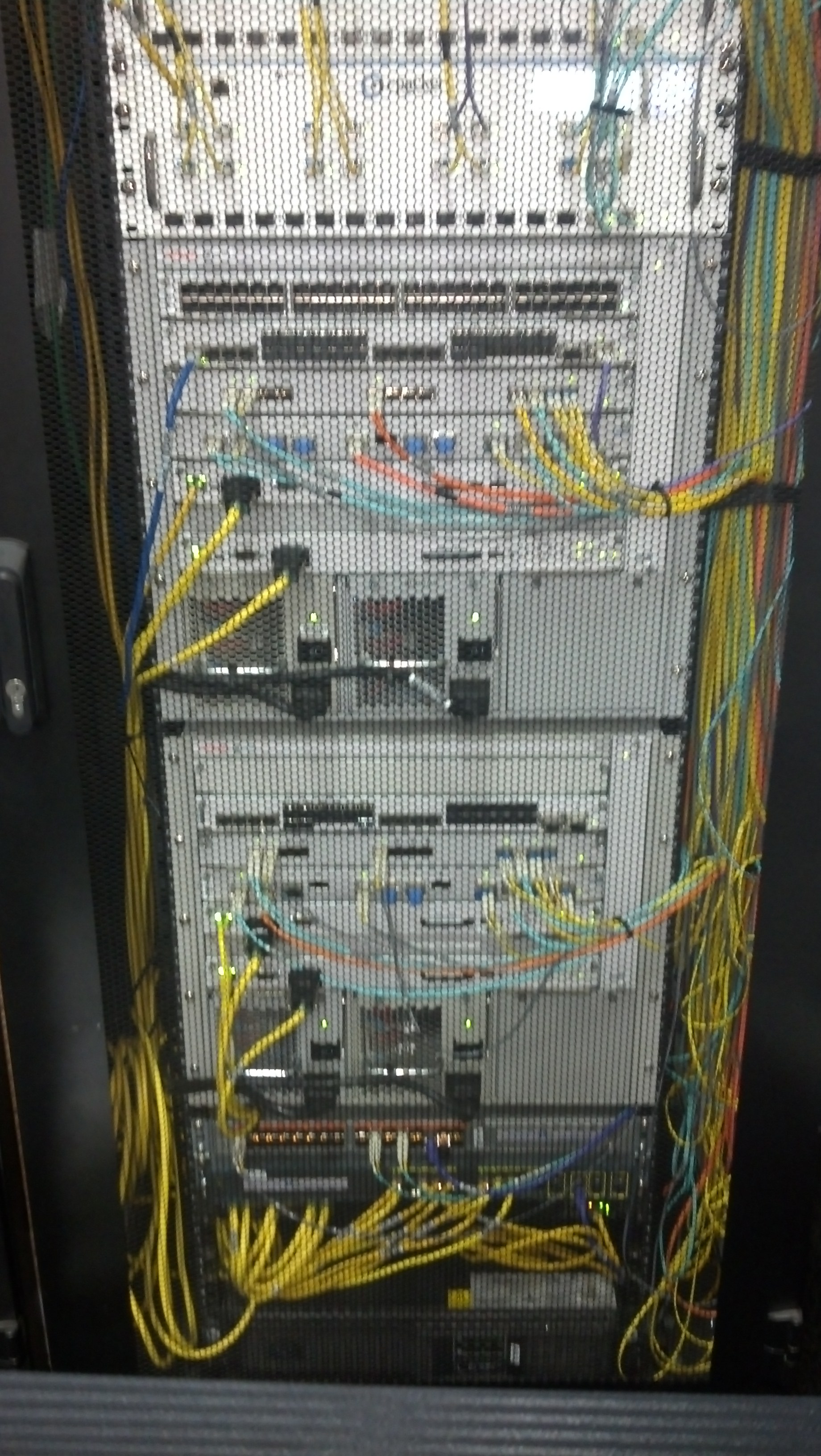
2013-05-09 12.05.40I met a  lot of interesting vendors, found some products and technologies to dig into more over the next couple of months, and managed to catch up on my email. There will be a couple more blog entries coming this month, but oddly one of the most impressive things I saw at Interop was that a couple of my babies were running in the core of the network.

From 1997 to 2000, I worked as the sysadmin for what used to be called Rapid City Communications. They brought out an Accelar line of routing switches with Gigabit Ethernet, got acquired by Bay networks, got acquired by Nortel Networks, and somewhere along the line converted to the Passport naming structure with the 8000 line of chassis switches. The picture to the right is the descendant of the 8606, which I probably built code for tens of thousands of times.

The Avaya fellow I spoke with came from Bay Networks… Avaya acquired Bay/Nortel’s Ethernet Routing Switch product line in 2009. Even if 10/100 with two 1GBE ports doesn’t seem that powerful anymore, and even if Nortel (and now Avaya) have had 10GBE for 12 years on the ERS8600 line, I still have a soft spot for the whole Accelar line, and always love seeing them turn up in places like the Tech Museum in San Jose and now Interop in Las Vegas.

Stay tuned for some further thoughts and experiments with WAN load balancing, Hadoop grumblings, and some interesting consumer tech that I’m expecting to try out in the foreseeable future. Thanks for dropping by.