Another Novel November, this time with video

Welcome back to rsts11. As many of my readers know, I was deep in National Novel Writing Month (NaNoWriMo) from 2002-2009, from the 7-seconds-left finish in 2002, to running the SFNanos for a couple of years and helping my friend Linda start the Pensinsula group, to coordinating over half a dozen writers retreats, as well as finishing eight 50,000 word drafts for those years.

Last year, I did an unofficial November Novel with the Reedsy project, and I’m doing it again this year. And this time, I’m using it as a prompt (heh) to do videos.

The first two are posted, and yeah, the production values are a bit light. I’ve been out of video production for almost two years, and with plans to do 1-3 videos a week this month, I’m hoping to get my studio space working and my productions polished.

The first video was scripted, although I went off in a lot of places. That’s okay. I’m okay with how it turned out (and the original script is below, for your enjoyment).

If you’re doing a November Novel with any of the entities doing events in NaNoWriMo’s wake, subscribe to the Andromedary Instinct YouTube channel and my Novel November playlist.

Haven’t started yet? It’s not too late, as I mention in the first video. You can either accelerate your daily rate (if you start on November 5, you have 25 days of 2,000 words), or just start your thirty days then. My record for daily word count was a little over 19,000 words on November 30, 2003, and I don’t recommend it, but with Veteran’s Day and the 4-day Thanksgiving holiday (for those whose employers observe), you can catch up better than almost any other month of the year.

I’ll also be doing some tech and health videos before the end of the month, including my 2025 adventure to back away from Type 2 Diabetes and get an efficient home lab running.

Stay tuned for more videos, and text accompaniment to the videos, here on rsts11.com. And there might be some travel stuff soon on rsts11travel.com too.

DO YOU WANT TO WRITE A NOVEL?

I never thought I would start from Disney Princess karaoke and get to Hello Kitty when planning a video, but here we are.

Do you want to write a novel?

Are you one of the millions of people out there who say you want to write a novel? Or even a short story?

Are you looking at the length of a novel and getting winded just thinking about writing 40 to 120 thousand words?

Just need a push in the right direction?

Then write a novel with me this November.

Continue reading

Quick note on importing transactions into Quickbooks

I’ve decided to get ahead of my bookkeeping this year, instead of spending Christmas break going back through my notes. Sure, I’m four months behind, but better late than never.

So the “easy” way to do this is to type every single transaction into Quickbooks (I use Self-Employed, for what it’s worth). The interface is functional but clunky, and the thought of adding a year’s worth of monthly subscriptions really hurts.

I could also import all transactions from my bank and credit card via xls/csv export and import, but some things (like cash transactions) would be easier to do in my own csv import file.

tl;dr: this is the format, although you can use a ‘credit’ and ‘debit’ column separately if you like. That last transaction is fictional, alas.

I found a downloadable package of sample import files, but they seem more complicated than what I need for this effort.

So I made my own import file in Excel, exported as csv of course, and tried to import it to Quickbooks.

Darn. File upload failed. (Probably our fault.) Please give it another try. If you see this message again, you might need to contact us.

I did what they told me to and chatted in to Quickbooks support. The first thing they suggested was a fresh reload of the upload/import page, which I did with Ctrl+F5. That got me farther, but my next error was:

Uh-oh, looks like we ran into some trouble importing this file at line Cannot read properties of null (reading ‘code’). Look for a date or an amount that shows odd formatting. Correct it and try again.”

After reporting that error, I got the tip I needed from my customer service agent.

The format must be either Date, Description, Amount or Date, Description, Credit, Debit. Make sure there is no total amount at the bottom, and the file contains only 3 or 4 columns.

This in fact resolved my issue. Of course the thing I didn’t think about was that in the first format, debits have to be negative. So I then had imported entries that I can exclude, but not delete, showing a *credit* for each of my eBay fees. Oops.

For now, I will exclude those credits, and import the transactions I need with the actual debit (negative) notation. And unlike past years, I’ll try to do it as I go, rather than at the end.

Have you found any tips in Quickbooks that your google-fu didn’t solve for you? Share in the comments!

A little bit about Hot UCS Summer, and a realworlducs guest blog post

As most of you know, I try to keep work-specific stuff off the blog whenever possible. Yes, my Cisco UCS primer post is still one of my top three[1] blog posts of all time, but it was written before I applied to Cisco the first time around, if memory serves. Of course, it was DDR3-1600 memory back then, so….

Anyway, my friend Craig Simpson pinged me on Linkedin the other day asking if there was anything going on with UCS these days. And, sure enough, there is. I originally gave him a few links, but when he wanted to throw them up on his blog, I offered to write something a bit more exciting than links.

I don’t want to spoil it, but if you’re a fan of UCS Mini or AMD processors, or both, you’ll want to check it out here:

https://realworlducs.com/cisco-ucs-hot-summer-announcements-and-innovations/

I will give you one spoiler here though: Up to 2048 cores, 48TB of RAM, and 734TB of storage in 7U of rackspace. And those numbers will go even higher soon.

Thanks to Craig for accepting the idea of a guest blog post, and thanks to you, my readers, with whom I should have some new non-work-related stuff to share later.

[Edited as I’d had the wrong Craig’s last name in there.]


[1] My top three posts of all time, so far, in terms of page views at least.

3. Cisco UCS for beginners – an end-user’s overview

2. Five fun and useful uses for an extra PCI slot

  1. So you think you want to farm chia?

What’s it like to write a thousand reviews in a year?

Can you imagine writing a thousand online reviews in one year? Well, I couldn’t have imagined it a year ago, but I’m well on my way to that number for 2023, thanks to the Amazon Vine program.


What’s this Vine program about?

The official explanation of the invite-only Vine program is here on Amazon’s site, and pictured above; in short, Amazon invites prolific writers of useful reviews to join the program. I believe it’s over 15 years old, based on some Reddit traffic. I was invited to join in August 2022, eleven months ago as of this writing. 

In return for writing honest, detailed, and insightful reviews, you get your choice of an enormous assortment of products at no upfront cost. You do receive a 1099-NEC at tax time for the fair market value of your items at the time they were ordered, so it’s not entirely “free” but depending on your tax situation they can be considered dramatically discounted. 

Continue reading

Problems expanding a Synology SHR volume on DS1821+ with a faulty SSD cache attached

I got a Synology DS1821+ array about two years ago, planning to finally cascade my other Synology units and let one or two go. So far, that has not happened, but I’m getting closer. 

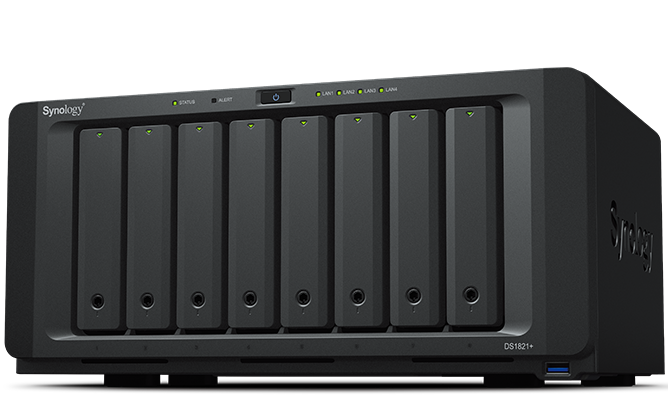
DS1821plus Network Attached Storage array from Synology

Synology DS1821+, photo courtesy of Synology. Mine looks like this but with a bit more dust.

The back story of my DS1821+

This is the 8-bay model with a Ryzen V1500B 4-core 2.2GHz processor, support for virtual machines and containers, and a PCIe slot which I filled with a dual port Mellanox ConnectX-3 (CX312A) 10 Gigabit SFP+ card which came in under $100 on eBay. The expansion options include two eSATA ports (usually used for the overly expensive DX expansion units) and four USB 3 ports (one of which now has a 5-bay Terramaster JBOD attached). 

Today I could get a 40 Gigabit card for that price. In fact, I did for another project, for about $90+tax with two Mellanox cables, just last month, but I’m not sure it would work on. It’s not too hard to find one of these 10 Gigabit cards for under $50 shipped in the US. Be sure to get the dual plate or low profile version for this Synology array.

I ran it for a while with 64GB RAM (not “supported” but it works), and then swapped that out to upgrade my XPS 15 9570 laptop, putting that machine’s 32GB back into the Synology. I had a couple of 16TB MDD white label hard drives and a 256GB LiteON SSD as a cache. I know, I know, there’s NVME cache in the bottom and you can even use it as a filesystem volume now.

Here’s where something went wrong

Sometime in the past couple of updates, the SSD cache started warning that it was missing but still accessible. I ignored it, since this system doesn’t see a lot of use and I don’t really care about the cache.

Volume expansion attempt, which failed. SSD cache warning showing here as well.

Earlier this month, I got a couple more of the MDD white label drives (actually ST16000NM001G-2KK103 according to Synology Storage Manager), I was able to expand the storage pool but not the volume.

Successful storage pool expansion
The volume expansion error. No filesystem errors were discovered.

“The system could not expand Volume 1. This may be caused by file system errors. To rescue your data, please sign in to your Synology Account to submit a technical support ticket.”

Well, as I went to the Synology website to enter a ticket, I remembered the SSD issue and wondered if that caused the problem with growing the volume. 

Easier to fix than I had feared

Sure enough, removing the cache made the volume expand normally, bringing me from 93% used to 45% used. Not too bad. 


Where do we go from here?

At some point in the next month or two, I plan to get three more of these 16TB drives, pull the unused 8TB and unused 256GB SSD, and get the system maxed out. 

I’m a bit torn between using this array to replace my Chia farms, at least for a while, or merge my other two substantial Synology arrays onto it and then use one of them (maybe the DS1515+) as the Chia farm with the DX513 and an assortment of external USB drives. Flexfarmer on Docker makes it pretty easy to run Chia farming on a Synology with minimal maintenance.