Unknown's avatar

About rsts11

Big data integrator/evangelist I suppose. Formerly a deep generalist sysadmin and team lead, still a coffee guru, and who knows what else...

Cisco UCS for beginners – an end-user’s overview

Update: At the time I wrote this post (February 2014), I was not a Cisco employee. Between June 2014-November 2020 I worked for Cisco. between November 2020 and April 2023,  I no longer worked for Cisco. And since April 2023, I again work for Cisco. This shouldn’t change anything about the post, and it is still just me and not an official publication, but since the original disclaimer below is not currently accurate, I thought I would clarify that.

I’ve been working on a series of posts about upgrading an integrated UCS environment, and realized about halfway through that a summary/overview would make sense as a starting point.

I recommend a refreshing beverage, as this is longer than I’d expected it to be.

I will note up front that this does not represent the official presentation of UCS by Cisco, and will have errors and omissions. It does reflect my understanding and positioning of the platform, based on two years and change of immersive experience. It is also focused on C-Series (rack-mount servers), not B-Series (blade servers and chassis), as I have been 100% in the C-series side of the platform, although I try to share a reasonable level of detail that’s applicable to both. And I expect it will provide a good starting point to understanding the Unified Computing System from Cisco.

Unified Computing System – Wait, What?
UCS, or Unified Computing System, is Cisco’s foray into the server market, with integrated network, storage, management, and of course server platforms. As a server admin primarily, I think of it as a utility computing platform, similar to the utility storage concept that 3PAR introduced in the early 2000s. You have a management infrastructure that simplifies structured deployment, monitoring, and operation of your servers, reducing the number of inflection points (when deployed properly) to coordinate firmware, provisioning, hardware maintenance, and server identity.
ucs rack layoutUCS includes two types of servers. The original rollout in 2009 included a blade server platform, generally known as B-Series or Chassis servers. I would guess that 9 out of 10 people you talk to about UCS think B-Series blades when you say UCS. Converged networking happens inside the blade chassis on an I/O Module, or IOM, also known as a Fabric Extender, or FEX. Local storage lives on the blades if needed, with up to 4 2.5″ drives available on full-width blades (2 drives on half-width), and a mezzanine card slot for a converged network adapter and/or a solid state device.
At some point along the way, it seems customers wanted more storage than a blade provides, and more I/O expansion capacity, so Cisco rolled out a rack-mount product line, the C-Series “pizza box” servers, which provided familiar PCI-e slots, no less than twice the drive bays (8 2.5″ or 4 3.5″ on the lowest storage density C200/C220 models), and an access convergence layer outside the server in the form of a Fabric Extender, or FEX, a Nexus 2200-series switch.
Both platforms are designed to go upstream to a Fabric Interconnect, or FI, in the form of a UCS 6100 or 6200 series device. The FI is the UCS environment’s egress point; all servers (blade and/or rack-mount) in a single UCS domain or “pod” will connect to each other and the outside world through the FI. Storage networking to FCoE and iSCSI storage devices happens at this level, as does conventional Ethernet uplink.

So far it sounds pretty normal. Isn’t it?

You can use Cisco UCS C-series rack-mount servers independently without a FI, in the same way you might use a Dell PowerEdge R-series or HP ProLiant DL-series server. They work in standalone mode with a robust integrated management controller (CIMC) that is analogous to iDRAC or iLO, and they present as industry standard servers. The fully-featured CIMC functionality is included in the server (no add-on licensing, even for virtual media), and there’s even a potent XML API for the standalone API.
Many of the largest deployments of Cisco UCS C-Series servers work this way, and in the early days of my deployment, it was actually the only option (so we had standalone servers running bare metal OSes managed on a per-server basis). And for storage-dense environments, this method does have its charm.
The real power of the UCS environment, however, comes out when you put the servers under UCS Manager, or UCSM. This is what’s called an “integrated” environment, as opposed to a “standalone” environment where you manage through the individual CIMC on each server.
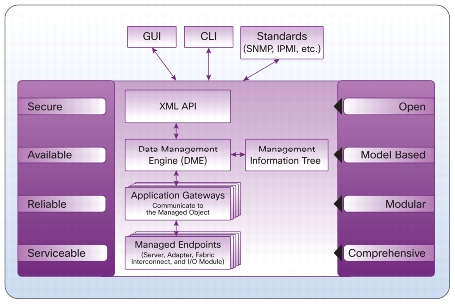
ucs model based frameworkUCSM lives inside the Fabric Interconnect, and is at its core a database of system elements and states called the Data Management Engine or DME. The DME uses Application Gateways to talk to the managed physical aspects of the system–server baseboard (think IPMI), supported controllers (CNAs and disk controllers), I/O subsystem (IOM/FEX), and the FI itself.
UCSM is both this management infrastructure, and the common Java GUI used to interact with its XML API. While many people do use the UCSM Java layer to monitor and manage the platform, you can use a CLI (via ssh to the FI), or write your own API clients. There are also standard offerings to use PowerShell on Windows or a Python shell on UNIX to manage via the API.

What’s this profile stuff all about?

A key part of UCS’s benefit are the concepts of policies, profiles, and templates.
Policy is a standard definition of an aspect of a server. For example, there are BIOS policies (defining how the BIOS is set up, including C-state handling and power management), firmware policies (setting a package of firmware levels for system BIOS, CIMC, and supported I/O controllers), disk configuration policies (providing initial RAID configuration for storage).
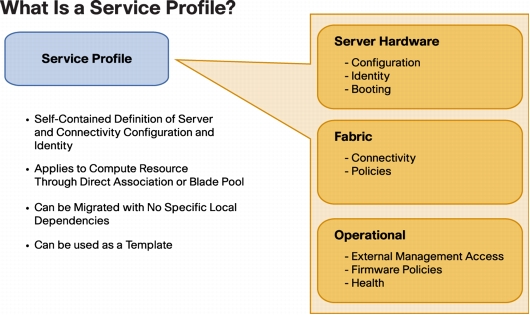
UCS service profileA Service Profile (SP) contains all the policies and data points that define a “server” in the role sense. If you remember Sun servers with the configuration smart card, that card (when implemented) would contain the profile for that server. In UCS-land, this would include BIOS, firmware, disk configuration, network identity (MAC addresses, VLANs, WWNs, etc) and other specific information that gives a server instance its identity. If you don’t have local storage, and you had to swap out a server for another piece of bare metal and have it come up as the previous server, the profile has all the information that makes that happen.
A Service Profile Template provides a pattern for creating service profiles as needed, providing consistency across server provisioning and redeployment.
There are also templates for things like network interfaces (vNIC, vHBA, and iSCSI templates) which become elements of a Service Profile or a SP Template. You might have a basic profile that covers, say, your web server design. You could have separate SP templates for Production (prod VLANs, SAN configuration) and Test (QA VLANs, local disk boot), sharing the same base hardware policies.
And there are server pools, which define a class of servers based on various characteristics (i.e. all 96GB dual socket servers, or all 1U servers with 8 local disks, or all servers you manually add to the pool). You can then associate that pool with a SP template, so that when a matching server is discovered in your UCS environment, it gets assigned to an appropriate template and can be automatically provisioned on power-up.
There are a lot more features you can take advantage of, from logging and alerting to call-home support features, to almost-one-click firmware upgrades across a domain, but that’s beyond the scope of this post.

I hear you can only have 160 servers though.

This is true, in a sense, much like you can only have 4 people in a car (but you can have multiple cars). A single UCS Manager can handle 160 servers between B-Series and C-Series. This is probably a dense five datacenter racks’ worth of servers, or 20 blade chassis, or some mix thereof (i.e. 10 chassis of 8 B-Series blades each, plus 80 rack-mount C-Series servers). But that’s not as bad a limitation as some vendors make it out to be.
You can address the XML API on multiple UCS Manager instances. A management tool might check inventory on all of your UCSM domains to find the element (server, policy, profile) that you want to manage, and then act on it by talking to that specific UCSM domain. Devops powers activate? This will get confusing if you create policies/profiles/templates at different times (i.e. while you’re waiting for your tools team to write a management tool).

But there’s something easier.

UCS Central is a Cisco-provided layer above the UCSM instances, that provides you with central management of all aspects of the UCS Manager across multiple domains. It’s a “write once, apply everywhere” model of policies and templates, that allows central monitoring and management of your environment across domains and datacenters.
UCS Central is an add-on product that may incur additional charges, especially if you have more than five UCS domains to manage. Support is not included with the base product. But when you get anywhere close to that scale, it may well be worth it. Oh, and in case you didn’t see this coming, there’s an XML API to UCS Central as well.

I don’t have a six figure budget to try this out. What can I do?

I’m glad you asked. Cisco makes a free “Platform Emulator” available. It’s a VM commonly referred to as UCSPE, downloadable for free from Cisco and run under the virtualization platform of your choice (including VMware Player, Fusion, Workstation, or others). 
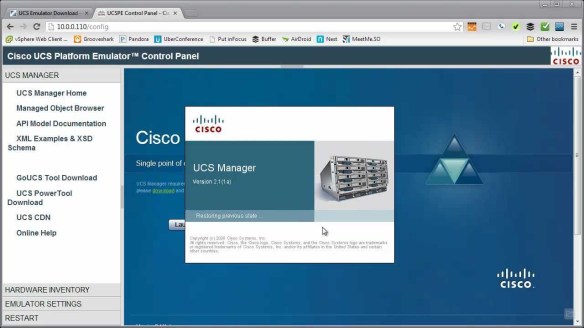
Chris Wahl has a video demonstrating the download process and a series introducing the Cisco UCS Platform Emulator here on Youtube. You can get the actual downloads at Cisco’s Communities Site and bring the emulator up on your own computer.
Chris Wahl UCS PE screenshotThe UCSPE should let you get a feel for how UCSM and server management works, and as of the 2.2 release lets you try out firmware updates as well (with some slightly dehydrated versions of the firmware packages).
It obviously won’t let you run OSes on the emulated servers, and it’s not a replacement for an actual UCS server environment, but it will get you started.
If you have access to a real UCS environment, you can back up that physical environment’s config and load it into the UCSPE system. This will let you experiment with real world configurations (including scripting/tools development) without taking your production environment down.

Is Cisco UCS the right solution to everything?

grumpy-cat

Grumpy cat says “No.” And I just heard my Cisco friends’ hearts drop. But hear me out, folks.
To be completely honest, the sweet spot for UCS is a utility computing design. If you have standard server designs that are fairly homogeneous, this is a very good fit. If your environment is based around some combination of Ethernet, iSCSI, and FCoE, you’re covered. If your snowflake servers are running under a standard virtualization platform, you’re probably covered as well.
On the other hand, if you build a 12GB server here, a 27.5GB server there, a 66GB server with FCoTR and a USB ballerina over there, it’s not a good fit. If you really need to run 32-bit operating systems on bare metal, you’re also going to run up against some challenges. Official driver support is limited to 21st Century 64-bit operating systems.
If you have a requirement for enormous local storage (more than, say, 24-48TB of disk), there are some better choices as well; the largest currently available UCS server holds either 12 3.5″ or 24 2.5″ drives. If you need a wide range of varied network and storage adapters beyond what’s supported under UCS (direct attach fibre channel, OC3/OC12 cards, modems, etc.), you might consider another platform that’s more generic.
Service profiles let you replace a server without reconfiguring your environment, but if every server is different, you’re not going to be able to use service profiles effectively. You can, of course, run UCS C-Series systems in standalone mode, with bare metal OSes or hypervisors, and they’ll work fine (with the 32-bit OS caveat above), and many companies do this in substantial volume, but you will lose some (not all) of the differentiation between Cisco UCS and other platforms.

Disclaimers:

I’ve worked with Cisco UCS as part of my day job for about two years. I don’t work for Cisco, and I’m not posting this as a representative of my employer or of Cisco. Any errors, omissions, confusion, or mislaid plans of mice and men gone astray are mine alone.

More details:

Images other than Grumpy Cat above borrowed under belief of fair use from the Cisco UCS Manager Architecture paper, the Understanding Cisco Unified Computing System Service Profiles paper, and the fine work of Chris Wahl of WahlNetwork.com.

How can your big tech conference experience benefit the less fortunate?

[I’m big on soft topics this month so far, but don’t fear, I have some other technical posts coming up.]

I was tweeting with Calvin @hpstorageguy Zito this morning, in response to an experience he had with a homeless person in San Francisco during VMware PEX (Partner Exchange).


When I was up in San Francisco for VMworld last summer, I had two encounters with homeless folks. One was a man being very aggressive outside CXIParty, which was not conducive to help, but the other was less uncomfortable.

A guy who had very recently received a tee shirt that had been given out in the vendor expo that week asked if the company on it was a good one. And it got me thinking. I couldn’t answer his question, honestly, although I had a vague memory of what that company did. I probably had the shirt in my bag back at the hotel, and it’s probably gone to Goodwill since then. So did it do anything for me? Not really. Could it have helped someone else? Almost definitely.

And having been accosted by many vendors at the shows last summer promising a chance at a free iPad, I got to thinking. The cheapest refurbished iPad on the Apple store today is $339. That’s probably going to feed a family of four for a month, maybe more. Not glamorously, and probably not at a San Francisco boutique grocery, but through a food pantry it will definitely make a difference.

Between my own experiences and Calvin’s thoughts this morning, I’m wondering what tech conferences can do to help enable attendees to help the host city’s homeless and helpless, and what attendees would do themselves.

How can we help?

It would be easy to find a local charity that helps the less fortunate, and find a way for attendees to contribute. However, there’s a lot more that could be done.

Vendors exhibiting in the Enormous Room Of Solutions could donate their leftover wearables and flashlights and other useful non-tech trinkets to local shelters. Maybe replace your tee shirt with a smaller take-home piece of swag (8GB USB drive with your glossies and demos?) and a donation on the booth visitor’s behalf to such a local shelter or food pantry or soup kitchen.

Conference organizers could simplify the donation of swag on site, for folks who don’t want to walk the mile to Glide or Goodwill or the like. Consider integrating a benefit operation into the customer apppreciation party or other large events. Make sure you have something helpful to do with the catering leftovers (no matter how much we complain about the food, it’s still better than what thousands of San Franciscans have to eat every day).

And whatever you do, make it clear (tastefully) what you’re doing. Many of the 20k+ people at VMworld or Cisco Live assume leftovers get thrown away at the end of the day. And we’ve all heard exhibiting vendors complain about having to take shirts home at the end of the event. If you can make a difference, make it clear.

So where do we go from here?

I’d love to hear from folks involved with organizing the big conferences, as well as those of you attending them, about what you think is practical and what you personally would do to help the host city when you go to a technology conference.

And if you’re local to San Francisco, what organizations do you think could do the most with donations (whether goods or cash) to get their benefits most effectively and efficiently to the people on the streets and shelters and underserved homes?

I’ve been called certifiable before – a sysadmin’s developing thoughts on certification

I’ve been a system administrator in some form or another since, I suppose, Summer 1988 when I provided ad hoc support for the RSTS/11 system at my college. I made a few bucks doing it as a lab assistant for two years, but I was probably too much of a proto-BOFH to stay on the payroll. I still fielded more questions than most of the lab assistants, and it prepared me moderately well for the following 25 years of user, system, and platform support.

One thing I’ve rarely ever done is get formally trained, or even less often, certified in a technology. I was three classes short of a computer science undergrad major just for fun, which should tell you I’m certifiable (didn’t take RPG, COBOL, or Calculus, but I did a bit of recreational Discrete Mathematics and two doses of Machine Structures).

Around the turn of the century, I took the Legato Certified Administrator (Data Protection) class and exam, and got certified on a technology I’d been deploying and managing for a few years at the time. In 2010 I took the Cloudera Hadoop Administrator course. I almost passed the certification exam then, but didn’t have time to go back and retake it before the retake offer expired. And that’s the extent of my formal training to date.

So what’s changed now?

Having been welcomed into the communities around Cisco’s datacenter technology and VMware’s virtualization platforms, I’m feeling an unnatural desire to work toward certifications in both of those areas. I have the 200-120 box set for CCNA Routing & Switching, although I’ve been leaning toward the datacenter path. I’m still trying to figure out what path to take with VMware, but we’ll have to see.

I was reading the Cisco Learning Network post “6 Reasons Employers Value Cisco Certifications” and it made me think about my aversion to certification over the last few years. So what’s wrong with certification, and what might be right about it?

What could possibly go wrong?

For one, some people collect certifications the way I collect old computers and soho routers. The cert may be representative of being able to complete a vendor’s exam, but may not reflect feet-on-the-ground (or hands-on-the-keyboard) skills, much less big picture architectural thinking. This was common when we were searching for a full year for a network admin at one job a few years back. No matter how many network certs you have, if you can’t at least give a shot to explaining subnetting, you’re probably not ready for the real world.

Another issue is that most certifications are vendor-specific, and may impart an undue bias toward that vendor over others. I’d like to think this isn’t the case, and a truly good network administrator/architect would know a broad swath of the market and be able to fit technology to an identified and triaged problem/business need, rather than trying to squeeze the business need into a given technology.

But what’s right?

For one, there are different skill levels and foci, and tiered/niched certifications can give a hint as to what level someone is. If I come in to an interview with a CCNA R&S, for example, I probably won’t be asked to provide in-depth explanations of SS7 or 802.11ac. There will always be bad interviewers, like the guy a few years ago who wanted me to explain in depth how BGP worked, after I had said twice that I wasn’t a network engineer and had only worked on LANs. So this isn’t foolproof on either end.

More important to me, now that I’m thinking about the process, is that pursuing a certification gives you a roadmap to study and prepare, and a somewhat finite goal to achieve. I never learned Perl because I didn’t really have a scope or a fixed goal. Making a personal goal to “learn me some networking,” alas, probably won’t get me anywhere.

Having a goal to, say, “take the CCNA DC exam at Cisco Live in May” gives me a framework and a finite goal. I can set aside time every week, study some of the Cisco Learning Network materials, watch some Pluralsight programs with Chris Wahl, and have a fixed time frame for preparation for the exam.

So where do we go from here?

For one, I think that box set of the 200-120 CCNA R&S library will probably sit in the closet for a few more months. It was on sale with an extra coupon at Barnes and Noble last summer, so I don’t feel too bad about it.

I will be plotting out my Cisco Certification Written Exam at Cisco Live in May, as hinted above. I blew off the free exam last year, which was probably good considering I’d had Tech Field Day 9 the week before (Tech Field Day events are great for scrambling the brain, and the 90-100F temperatures were leaning toward poaching my brain along with it).

I’m going to get more involved with Cisco Learning Network, as I’m sure Matt Saunders won’t let me slip on this. Hopefully some of my fellow Cisco Champions will cheer, jeer, prod, or otherwise support me on the journey as well.

And I’ll be sure to share my adventure with you fine readers… feel free to poke at me here if you have suggestions or haven’t heard from me on the certification path in a while.

Do share any certification feedback, suggestions for me, or warnings for other readers… in the comments below. 

Planned obsolescence is not green – respect your customers and your environment

2014-02-09 Update: IBM warns that they may require entitlements, but System x server firmware (i.e. x3750) seems to still allow open download with email registration only (unless my 2 year old ThinkCentre desktop includes server entitlements). Remember, the comparison to ProLiant is x86/x64 platform “commodity” servers, not POWER or Superdome or Alpha. Updated listing below.

2014-02-07 Update: @ProLiant on Twitter pointed me to a “response” from HP’s VP of Technology Services, Mary McCoy, which doesn’t respond to concerns at all. It just summarizes the earlier document (linked below), and reiterates the misunderstanding/lie about industry best practices for firmware access.

HP’s “Master Technologists” @tinkertwinsathp are repeating the company line as well. Their profile says they’re “driven to understand the entire IT environment” but they’re missing an easy and obvious one here. The only other x86 server vendor I’ve been able to find who has this “industry best practice” is Oracle. And their assertion that Cisco fiber channel switches and Redhat operating system are also industry standard servers, well, falls flat.

I’m still hopeful, but far less optimistic than before. But do read on.

There was a bit of drama on the Twitters yesterday… not the rumor that Punxsatawney Phil is actually not the same groundhog from 19th century fame, but the news that HP’s server division is going to be locking down firmware and service packs to current ProLiant warranty and service contract holders. Planned obsolescence anyone?

Firmware wants to be free

My Cisco UCS friends were quick to chime in on the news, noting that you don’t need a warranty, entitlement, or service contract to get current UCS server firmware. @CiscoServerGeek demonstrates this on his “Cisco UCS updates remain FREE” blog post, and I was able to reproduce this myself with an ancient totally-unentitled CCO account. This is cool, and to be honest I was a little bit surprised (keep reading to see why).

To my knowledge, most other industry standard server manufacturers also still make their current firmware and drivers available for free regardless of entitlements or contracts. I’ve downloaded Dell, NEC, IBM, and other industry standard x86/x64 server firmware updates for my home lab in the past month without having to spend money, and it’s basically a necessity for a home lab (or a startup test environment).

HP Firmware Update 20140206Now to be honest, the HP news is based on an unusually vague email from HP, stating that “Select server firmware and SPP” will require “product entitlement.” The HP support document on the matter (pictured at right) continues to use the “select updates” language, but seems to imply (as does the email) that if you have *any* HP server that’s out of warranty/contract, you are no longer allowed to update it.

HP states in the above document that “[t]his change brings HP into alignment with current industry practices” which is an outright lie, at least if you consider Dell, IBM, Supermicro, NEC, Fujitsu, or Cisco to be included in “current industry practices.” And if the policy applies to all HP servers, it’s going to effectively remove HP from home lab, aftermarket, and influencer/recommender scope.

Mind you, most of the big manufacturers of servers would probably be perfectly happy if they only got business from companies with a strict 3 year lifecycle, and the 3 year old servers got scrapped at the end when brand new ones were bought. Luckily most vendors have not followed this “planned obsolescence” path–in fact, none of the big names did up until this month.

So as a technologist, home lab operator, influencer, and recommender, I’m hoping HP clarifies and promptly fixes this shift in policy. Require a confirmed email address and support site login if you must (Cisco and IBM require this; Dell, Supermicro, Fujitsu, and NEC do not, as far as I know), so that you can provide a generically differentiated support experience and notify me of critical bugs in my products’ firmware that may cause the imminent heat death of my lab.

But you really have nothing to gain by locking me out of firmware for a server I legitimately own, no matter how old it is, who I bought it from, when I bought it, or whether I spend thousands of dollars a year on support contracts.

As an aside, I’ve heard from off-the-record sources that HP will be clarifying this policy in a blog post soon. I am hopeful, but not optimistic, that something positive will come of this. 

People who live in glass houses shouldn’t throw 10 year old routers

This got me to thinking about the last time (and actually every time) I’ve gone to look for a newer IOS version for my Cisco 1605R (or 1721 or 1751) router in my home lab stash. I can find lists of newer versions, read release notes, and see the filenames with my aforementioned ancient personal CCO login.

But I apparently have to spend about $400 on a SmartNet contract on my 10 year old router (if I’m lucky and the product isn’t past the final EOL) to download 20MBytes of firmware. Or I can throw the switch away. They both have issues when it comes to “green” if you know what I mean.

I get that there are different licensed feature sets, and there would’ve been financial considerations back when the 1605R was an available product, but it’s not costing much and it’s not losing Cisco any business to let me download current non-custom code that is obviously available on the site for functional 10+ year old gear, but that I can’t buy entitlement for anymore (or can’t reasonably afford to do so).

There are similar issues when it comes to aftermarket Meraki wireless gear–I mentioned in an older post that I bought an MR14 from an e-cycler and since the previous owner has changed jobs a few times and isn’t all that easy to find, I now have a nice Meraki paperweight under my desk. And I’ve seen similar issues with some other “small deployment” wireless gear as well.

But I know this guy who knows this guy, you know…

There are ways around these limitations, of course; some require a contact at the company to bend the rules, and some require someone else to break the rules (that’s the only way to get Solaris patches anymore). That’s better than nothing, if you’re lucky.

But most of us with home labs, offline test environments, and so forth want to be legitimate. Some of us go to great lengths to abide by the letter, if not the spirit, of the “law” on these things. And many of us make some noise about what we like to work with, which may lead others to try it out and then spend some money.

So where do we go from here?

I will be watching for updates from HP on this policy, and Cisco and others as well on their respective kneecapping methods. I welcome your thoughts on firmware availability and vendor support/empowerment for home labs and smaller environments. And if you know of any server manufacturers/OEMs whose “current industry practices” include limiting BIOS/firmware updates to under-warranty/under-contract customers only, please let me know so I can update this post.

Disclaimers (You know I love disclaimers): I do not work for Cisco, HP, or any other hardware company. I am personally a Cisco Champion, a friend of HP (who have had me in to one of their influencer events), and an employee of an enterprise who buys a lot from both Cisco and HP (among other vendors). I have never knowingly spoken with a groundhog.

My thoughts and observations above are independent of any of these associations. I am a long-time system administrator who has long worked with Cisco and HP and most of the other brands mentioned in this article in my lab and/or my day jobs over the years, and my observations are based on that experience alone, and should not be taken to represent my employer, any company that likes or hates me, or any coffee shop I may frequent.

Related links:

Enterprise-Class networking on the cheap for your home lab

This entry is part of my POHO (Psycho Overkill Home Office) series. 

I have a habit of overdoing my networking. My home core switch is a Juniper EX-series (courtesy of a Bay Area Juniper User Group meeting raffle), and for a while I had a 10-Gigabit Ethernet (10GbE) Extreme Networks switch (that cost less than a good laptop) ready to go in. Do I really need it? Probably not. I sold it last year but am now thinking about 10GbE again.

I’m here today to share some of my tips for finding affordable enterprise-class networking for your personal, home, lab, or photo shoot purposes. I also welcome your thoughts and experiences in the comments below. Let me know if you’ve found other ways to improve your dollars-to-metal KPIs at home or in a lab.

Caveat: I do not advocate these methods for anything your company may depend on, or anything production grade in general. However, if you’re closer to hobby network than to Fortune 500 core network, this may help you build beyond your budget.

Foreword: About 10 Gigabit Transceiver Formats

There are three formats or “sockets” for transceivers for 10GBE ports. Each of them can present short (SR), long (LR), or extended range (ER/XR/ZR) fiber interfaces, or “captive” cables in the form of CX4, twinax, or RJ45-type copper.

Module formats courtesy of  @networkhardware http://www.networkhardware.com/cisco-optics-cheat-sheetXENPAK are the oldest, largest, and least expensive (generally) of the form factors, and can be found integrated into older host interface cards as well as switches like the Extreme Summit 400. XFP are almost as old, smaller and lighter, and probably a bit more pricey than XENPAK. The current generation is SFP+, which has the same size as the gigabit SFP (almost the same size as a RJ45 connector) but supports 1 and 10 gigabit. (The second transceiver pictured above is X2, which I haven’t run into yet.)

Depending on distance between ports and the host adapter you choose, you may find one of these more desirable than the others. Fiber may be more flexible in terms of length and availability, and you can go from SC to LC if your transceivers don’t match, but CX4 or twinax will be more resilient to tension.

Be warned that some networking vendors break the standards and check for their own brand of transceivers, not allowing generic or other brand devices even if they are physically identical down to the manufacturer.  Vendor forums or a quick Google search will help you track down these issues and plan for, or work around, them.

1. Uplink ports are usually just ports. Stacking ports, not so much.

The cheapest and (maybe) easiest way to get 10GbE ports is to buy a 1GbE switch that has a few 10GbE uplink ports. My Extreme was this kind of solution–48 ports of 10/100/1000Base-T[X] and a two-port module on the back for 10GbE via XENPAK modules. There are a lot of switches out there on the used market that offer 2-4 “uplink” ports that can be used to connect a host.

Be warned that in many cases, the uplink modules will cost more than the base switch, if they’re not already included. I’ve been watching for the 10GBE uplink modules for a couple of my cheap 48 port switches, and they’re 4-5x what I paid for those switches. Dig into your datasheets and search for the module part numbers, and see what they’re going to cost you before investing in a base switch. (And see #2 below on this topic too.)

And don’t forget about optics. You can mix SC and LC endpoints with fairly affordable fiber cables, but if your uplink modules don’t have fixed connectors, you will need to get some sort of transceivers (optical, CX4, captive cables, TX) that can connect with your host adapters.

You might be able to use stacking ports as regular network ports, but that will warrant more research (and maybe finding a friend at the network vendor). I wouldn’t count on this option unless you already know otherwise.

2. Look for rebranded (or debranded) gear.

I got my first pair of 10GbE host adapters for about $23 each shipped from an eBay seller. Fully functional, PCI-X (backwards compatible with PCI if you don’t need full 10 gigabit speeds), with optical XENPAK modules built in.

Xframe_II_lores courtesy of hp.com information library http://on.rsts11.com/1buRCPG

Why so cheap? The seller had posted them with an HP part number, which 99% of the time returned compatibility only with HP/UX. Turns out they are very compatible with Linux, and while they don’t appear to be supported under VMware, you could put something like that in a homebrew SAN and run it into the core network at 10GbE.

Not everything is available rebranded, but you’ll find some network companies selling their products under IBM or Sun or Dell labels or the like. Switches, firewalls, and expansion modules have been known to show up under multiple vendors’ part numbers, and sometimes one vendor’s part can be half the price of the original manufacturer’s part, for identical metal and silicon.

This goes back quite a ways, at least to when Dell resold the Netgear FS switch line, Cisco resold QNAP storage arrays and HP Proliant servers, and IBM resold Brocade Silkworm SAN switches. Just like searching for typos, searching for alternate part numbers may help you get a good deal.

3. If you have a bit of budget, ask around about new and refurbished gear.

The big PC makers have outlet and financial services stores on their websites that sometimes have off-lease models for sale. There may also be first-market options if you have a bit more of a budget than I do.

ICX6430 via brocade.com http://on.rsts11.com/1buS1l3Recently on Twitter Gabe Chapman and were discussing low-density 10GbE options; Garrett from Brocade chimed in to point us toward a Brocade ICX6450-24 switch as an option. A quick web search showed that for about $3000 street price, you can get a brand new switch with 4 licensed 10GbE ports and a warranty. You could get it for about $2300 with only 2 10GBE ports, and then buy the extras later (or run them at gigabit speeds).

If you’re stocking a little closer to the revenue end of the network, or if you can’t quickly replace a failed model, you might be better off choosing new/retail over a $400 switch as-is on eBay with the same port count.

Disclaimer: I have no connection with Brocade; this is just an example from a Twitter conversation that included a helpful Brocade guy and a quick Google Shopping search. Although I’d be willing to review an ICX6450-24 if the option arose. 🙂 

4. Watch out for port/feature licensing!

Some vendors, especially those in the Fibre Channel world, offer port licensing as a way to reduce the initial outlay for a switch.  A lot of smaller FC switches worked this way, and when I had to sneak a SAN into the budget at a company where the finance folks insisted all servers cost $1000 because that’s what a PC costs at Fry’s, it saved my storage plan from extinction.

In the case of the ICX6450-24 above, the base switch has four SFP+ ports, two of which are enabled for 10GbE out of the box, and two of which are limited to regular gigabit speed. To get the other two ports up to 10GbE, you buy a license kit for about $800 (street) and enable the ports. That’s not too bad for a brand new enterprise switch, but if you buy a ten year old switch that has unlicensed ports, you may have trouble getting the license codes (even for a price).

You’ll probably want to talk to someone knowledgeable about the platform you’re considering, to evaluate the risk. Some vendors tie features to a serial number (Juniper for example), so as long as your device is licensed and the serial number is intact, you may be able to reinstall the licenses automatically. Others require a key code, so unless you can get into the switch and retrieve that, a factory reset could wipe out some of your ports. And in either case, if the equipment you’re buying doesn’t have the features you want, it may be expensive or impossible to obtain them.

5. Consider port-channel or other aggregation methods.

I’ll admit this is sort of a cop-out, but 8 ports of Gigabit Ethernet will likely be cheaper than a single port of 10GbE. You can get 4-port PCI-E 1GBE cards for $75 or so (as low as $25 if you don’t need ESXi 5/5.5 support), and a 48-port GigE switch that supports LACP or the like for under $200. So that’s under $150 per 8gbit link including cables. Check your OS or virtualization platform HCL to make sure the cheaper cards are compatible, of course, but it’s worth checking out this option if it works for your needs.

So where do we go from here?

Those are my tips so far… I’d welcome your comments below on how (or if) they’ve worked for you, or if you have any tips from your own experience to share with other readers. Maybe you’ve found a vendor whose 10GbE switches are more affordable for the home lab, or just had a good experience with a home-lab-friendly reseller? Please chime in.