The Awesome Power of a Fully Operational Decision-Making Mongoose; or, RASCI as a transitional responsibility model

250px-RASCI[1]I’ll apologize in advance to George Clinton.Video below.

As I prepare to transition out of my current job, my priorities change and I have to be a bit more cautious about what I get involved in, so as to not leave anyone hanging when I do hand over my badge in just over two weeks.

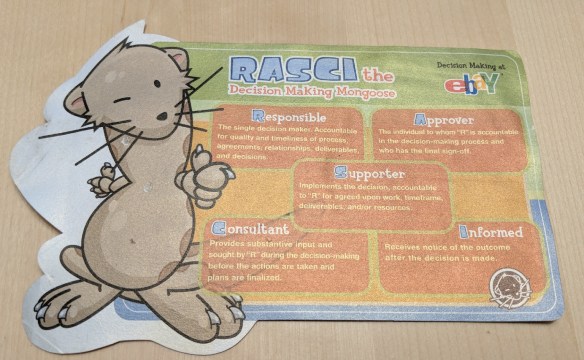
I’m reminded of the decision-making scheme we were taught at eBay–RASCI. That’s

  • Responsible (Person who does the work),
  • Accountable (the person in charge, also Approver of the work R does),
  • Supporting (someone who helps out with the process but is not the main responsible party–sometimes merged into Responsible for RACI),
  • Consulted (subject matter experts who provide advice), and
  • Informed (people who get status updates).

This model was obviously intended to set out expectations and points of responsibility within a project, defining responsibility and telling people who would be on either end of a communications channel as well as who is actually hands-on-keyboards (figuratively or literally) to do the actual work. However, it has another useful role.

At the point where someone gives notice and their countdown begins, they would move into the “C” category. They no longer get action items, presumably no on-call, and the ability to focus on passing along knowledge as needed to the people who would pick up their areas of responsibility.

I’m in the C category now at Disney, There’s a lot to be done, but I can’t take long-term ownership of it anymore. What I can do is work with the folks who are taking over for me, make sure they have the tools and contacts to do their best in my absence.

But what’s this with the mongoose?

Well, that’s controversial. RASCI is the name eBay gave to the mascot for their process, He’s the “decision-making mongoose at eBay.” There was a stuffed version (I have one somewhere in the garage, I’m sure), and it was entertaining and a bit creepy. There was also an unofficial travel blog, with pictures of RASCI in various settings. I can’t find that anymore, but it was out there, I promise.

My fiancee wondered why anyone would need a mascot for decision-making. Fair point, but it does make the model more personally accessible for people who aren’t in project management. And how many mongooses (mongeese?) do you run into in your daily life?

So where do we go from here?

Well, I’m going to Cisco. I don’t know about you guys.

But seriously, RASCI or its variants may be worth considering if you’re having problems with identifying roles in a project, or even if you aren’t yet. You don’t have to use the mongoose, but hey, it’s there.

It’s also worth considering RASCI or the like as a means of communicating a transition of responsibility, whether someone is leaving a project, a department, or the company entirely. Who owns that piece of infrastructure the guy who just left was handling for years? Who remains in the department to provide support and receive reports?

If you have experience with RASCI/RACI, or if you have an extra RASCI doll in need of a new home, let me know in the comments.

And for those of you who might not have known the title reference, have yourself some P.Funk.

[Video link updated 2017-11-30 since the old one has disappeared since 2014.]

[2018-03-02: The card we had to remind us of the RASCI model]

Maker:0x4c,Date:2017-10-14,Ver:4,Lens:Kan03,Act:Lar01,E-YMaker:0x4c,Date:2017-10-14,Ver:4,Lens:Kan03,Act:Lar01,E-Y

Do you know the way to San Jose? Ease on down the road…

tl;dr: In just over 3 weeks I’ll be leaving Disney Interactive, joining Cisco Systems as a Consulting Systems Engineer in Connected Architectures.


Time for some time travel?


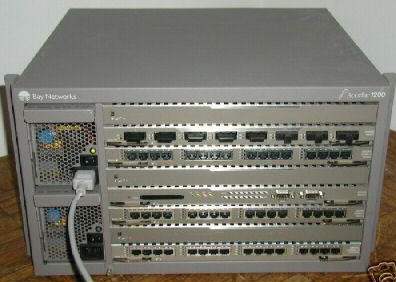
accelar_1200

Fifteen years ago I was working for Nortel Networks in their Ethernet Products Division (formerly the Rapid City Communications acquisition by Bay Networks). I was The Sysadmin for about 180 people at the peak, big data wasn’t even on the horizon yet, and if you’d asked me if I’d ever work with Cisco gear, I would have said “no” without hesitation. I wasn’t planning to become a network guy, and I cut my networking teeth on the Accelar line (now known as Avaya’s ERS 8600 etc) so I leaned that way for many years.

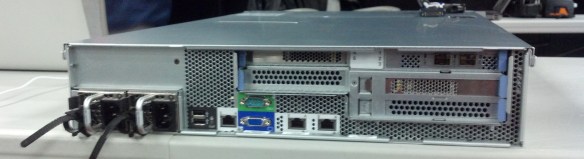
2011-12-22 cisco ucs c210

Fast forward to 2 1/2 years ago, when my boss at Disney asked “do you want to come to the datacenter and see some new servers?” I said yes, as I’ve been a hardware guy my entire career. I arrived at the datacenter to a pile of Cisco UCS C210 servers and the next 2 1/2 years would be spent wrangling C-Series servers into an environment for big data among other things, learning the quirks and questions of integrating with UCSM and communicating the platform out to my internal coworkers.

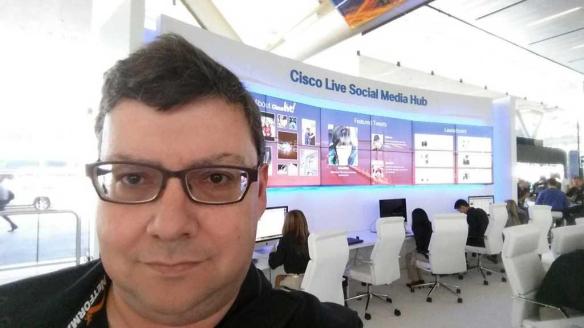
2014-05-19 rob-smh-clus

Just under a year ago, I got a message from Rachel Bakker of Cisco’s social media marketing team asking if I’d like to get involved with a new social media outreach program they were starting. My first thought was “do you know who I am?” And it wasn’t in the “I’m way too famous for this” sense, it’s the “do you have the wrong number?” sense. But I guess they knew who I was and wanted me to become one of the first 8 Cisco Champion program members. In the past 10 months, I’ve grown within the Cisco ecosystem and made great connections inside and outside Cisco through both the Cisco Champion program and my interactions with Cisco big data and UCS experts.

1200px-Cisco_Way_VTA_2165_09

In the past week, I got invited to be in a a different track of Cisco Champions. This invitation capped off a long week of Cisco Live in San Francisco, followed by a long weekend moving across town to a bigger home. It’s overwhelming, but exciting. And a little bit scary.

In just under a month, I will be joining Cisco Systems as a Consulting Systems Engineer (CSE) in the Connected Architectures Engineering department. My job will be to work with independent software vendors (ISVs) and channel partners as well as internal Cisco teams to integrate Cisco solutions in Big Data environments.

So where do we go from here?

My three years at Disney Interactive have been productive and inspiring, but I find my future lies along the Tasman Drive road. What a long, strange trip it’s been.

This will be the first time in my professional career that I haven’t been a system administrator of some flavor, but I’ll still be pulling in my systems, infrastructure, architecture, and big picture skills for the adventure. And while I’ll be in the sales division, I won’t be at your door trying to sell you hardware and SmartNet contracts (unless I lose a bet or something).


I’ll also, unfortunately, be off the roster of prospective Tech Field Day delegates, although Stephen Foskett has told me that I’m always welcome at the parties. If invited to participate in roundtables, I’d be happy to join. And if Tech Field Day ever does a Big Data Field Day, I might end up on the other side of the table.


And I plan to keep blogging, experimenting with POHO in all its flavors, and maybe eventually getting my own Cisco UCS gear at home (or more properly, in the garage, for domestic tranquility reasons). So keep following me here, on Twitter as @gallifreyan, and anywhere else you find me. I won’t be alone, dancing, you know it baby….


Last minute tips for Cisco Live 2014 in San Francisco

We just had a great Cisco Champion Radio program that was half about Cisco DevNet and half about surviving Cisco Live. The latter was more of a fit for me, and I wanted to open a post with some of the suggestions from that program.

Do you have suggestions for folks who are new to Cisco Live (or who haven’t been to a Live lately)? If so, please share them in the comments below.

1. Apparent apparel

Wear comfortable shoes. Tom @networkingnerd Hollingsworth brought this one up, and I definitely agree. Typical business shoes may seem de rigueur, but there’s a lot of walking between the three buildings of Moscone Center and a lot within each building. So you’ll want something that looks reasonable but is comfortable. Wear what you can stand in all day.

Bring a spare pair of shoes and alternate if you can. And by all means, don’t wear a new pair of shoes for the first time at an event. I’d say go buy your new shoes this week and wear them next week to break them in. Your feet will thank you.
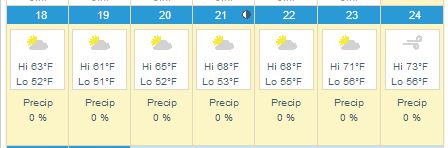
If you’re not direly familiar with San Francisco weather, or even if you are, bring cold/windy weather outerwear. The graphic above is Weather.com’s San Francisco planner. It’s linked to the current forecast page, so if you check after the 15th you’ll see the full week’s forecast. But consider a sweater, a sweater vest, a light jacket, a heavy jacket, a scarf, an anorak, and closed-toed shoes as your personal comfort may require.

2. Time management

Don’t feel the need to fill every session slot. There will be a lot of what LISA calls the “hallway track,” where you can talk to other professionals on an ad-hoc basis. The Social Media Hub is a good place to start, or the DevNet space if you’re more inclined in that direction. Or both!

Don’t feel obligated to attend every after-hours event either. You’ll find half a dozen events every night but you can prioritize, or try putting in an hour at each if you must. Note that some events may be offsite (a few miles away) and the sponsors may not offer transportation after the first hour. You can take taxis or Uber. Consider sharing rides with other attendees to save some money. You can also take MUNI (trains or buses) to AT&T Park (easy on the N or T trains) and to much of the rest of the City.

Do touch base with your favorite vendors to see if they’re hosting special events or receptions. It’s easier to get those arranged (and get on the guest list) before you get there.

3. Food and bev

There will be meals, snacks, coffee, and refreshments during the event, but you may not always be able to get away for them. Bring energy bars, protein bars, and other dry crush-proof snacks (thanks Rick @rickvanover Vanover for this suggestion) so that you can have a quick burst of energy between sessions even if you can’t get something to eat. There are places to buy them near Moscone if you prefer to shop on site.

Bring a water bottle. I recommend a crushable/collapsible bottle for convenience (also works for airports), something like this “H2O 2 GO” one. Last year, one of the vendors at one of the summer shows was giving these away, and it was possibly the most useful swag item I have received at a show. If you can’t find one of these, bring a relatively crush-proof bottle and fill it up often.

Cisco Live will have twitter tables in the lunch room by the way. If you want to meet up with other Twitter folks and the Cisco Champions, this would be the place to look. I believe they’re going to be near the front of the table space, but hopefully one of the CLUS coordinators will correct me if I’m wrong.

4. Technology

Plug in and charge up every chance you get. This goes for laptops, tablets, phones, and your portable battery packs as well. I have this Poweradd Pilot E2 12Ah battery that’s been one of the best USB power packs I’ve used (and I have at least a dozen of them). Great deal if you need something like this, to half-charge your iPad or fully charge most smartphones.

Travel light. As Tom Hollingsworth mentioned, it may not seem like a 10 pound bag is all that heavy, until you’ve been carrying it around for 18 hours. Empty your bag and only put what you know you’ll need. Even I won’t be carrying my usual two smart phones, Nexus 7, iPad, and two laptops. You can scale down too.

apple-microsoft-moscone

You can buy tech stuff here. In addition to the things that the Cisco Press store will offer, you will be within relatively easy walking distance of the One Stockton Apple Store and the Microsoft Store at Westfield, both along Market St within 10 minutes distance. And a little-known gem of the Bay Area is even closer. Central Computers is a Bay Area mainstay for computers, components, accessories, etc. It’s likely the best place to go if you forgot your charger cable or need a hard drive or phone case or a new laptop, and it’s directly across the street from what will probably be the bus terminal at the Moscone West building.

5. Communications

Follow @CiscoLive and the #CLUS hashtag. You’ll get lots of useful information and be able to get answers to your event-related questions wherever you are. There might even be giveaways and contests.

Bring business cards to share. Consider getting some printed (or making your own) with your personal contact info (Twitter handle, blog address, appropriate logos and such) in case you have affiliations aside from your employment.

Pick up a prepaid SIM once you get here if you’re not on a US cellular carrier. I have a T-Mobile starter kit in one of my phones; it’s $35 on Amazon and includes a month of service including 100 minutes/100 text messages/5GB 4G data. If you have an unlocked GSM-type phone, this or another SIM will get you covered for your stay in the US.

There will be WiFi. If you don’t have a data plan, don’t worry too much. Most hotels and most of the convention center will have wireless Internet access, and the odds are pretty good that Cisco will take care of us in terms of connectivity on-site.

6. Swag Management

Get some flat rate shipping boxes from the post office (either at home or in San Francisco–there’s a Post Office in the Macy’s on O’Farrell and Stockton a few blocks away) to send your swag bag home in. Domestic flat rate for a medium box is under $20 and may be more convenient than buying another suitcase. International shipping is also available. There is UPS service at Moscone, and a Fed Ex ship center on Bryant nearby, if you prefer those.

Ship stuff to your hotel. If you’re bringing things that would be more convenient not to go through airports with, consider shipping it to your hotel in advance. Check with the hotel first, though, to see if there are any limitations or charges for this sort of activity.

Drop-ship stuff to your hotel. I do this even within the US. If you know you’re going to want things like a battery pack, or a case of bacon raspberry cheesecake energy bars, or a new pair of eating pants, consider ordering them to be sent directly to the hotel. This can save you packing and shopping time in advance, and may be cheaper than finding them locally.

Don’t feel obligated to take every bit of swag you’re offered. Last year I think I came home from 4 conferences with 40-50 shirts. Half of them went straight to Goodwill, and I still had to lug them home from SF or Orlando. If you do take more than you need, consider taking them over to Goodwill or Out Of The Closet or another thrift store in the area. Or ask for smaller sizes for your kids. Or some mix of those.


7. Money Considerations (especially for non-USians)

There are automated teller machines (ATMs) all over the place. Before you come to San Francisco, check with your bank to see what ATMs you can use with minimal or no surcharge, or whether your bank rebates surcharges (many credit unions do this). ATMs in hotels and conference centers may charge $5 (or more) for a withdrawal, but most of the major US banks are available a couple of blocks away on Market St.

If you plan to use a non-US credit or debit card, check into whether your card has foreign transaction fees and be prepared for those.

Check with your bank or credit union to see if you should provide a “travel notification” to minimize the risk of your card being shut down by automated fraud checking systems.

So where do we go from here?

To San Francisco, and BEYOND!

Seriously though, these were just some of the suggestions I came up with in one hour (so far). If you have suggestions for fellow Cisco Live attendees, feel free to share them in the comments and I’ll pass them along. And check back often, as hopefully there will be updates and improvements to this post as we get closer to the magical date.

These 3 hot new trends in storage will blow your mind! Okay, maybe not quite. (2/2)

I’ve attended a couple of Tech Field Day events, and watched/participated remotely (in both senses of the word) in a few more, and each event seems to embody themes and trends in the field covered. Storage Field Day 5 was no exception.

I found a couple of undercurrents in this event’s presentations, and three of these are worth calling out, both to thank those who are following them, and give a hint to the next generation of new product startups to keep them in mind.

This post is the second of a series of two, for your manageable reading pleasure. The first post is here.

Be sure to check out the full event page, with links to presenters and videos of their presentations, at http://techfieldday.com/event/sfd5/

3. The Progressive Effect: Naming Names Is Great, Calling Names Not So Much

Back at the turn of the century, it was common for vendors to focus on their competition in an unhealthy way. As an example, Auspex (remember them) told me that their competitor’s offering of Gigabit Ethernet was superfluous, and that competitor was going out of business within months. I’ll go out on a limb and say this was a stupid thing to say to a company whose product was a wire-speed Gigabit Ethernet routing switch, and, well, you see how quickly Netapp went out of business, right?

At Storage Field Day 5, a couple of vendors presented competitive/comparative analysis of their market segment. This showed a strong awareness of the technology they were touting, understanding of what choices and tradeoffs have to be made, and why each vendor may have made the choices they did.

Beyond that, it can acknowledge the best use for each product, even if it’s the competition’s product. I’ll call this the Progressive Effect, after the insurance company who shows you the competitor’s pricing even if it’s a better deal. If you think your product is perfect for every customer use case, you don’t know your product or the customer very well.

Once again, Diablo Technologies did a comparison specifically naming the obvious competitor (Fusion-io), and it was clear that this was a forward-looking comparison, as you can order a hundred Fusion-io cards and put them into current industry standard servers. That won’t work with most of the servers in your datacenter with the ULLtraDIMMs just yet. But these are products that are likely to be compared in the foreseeable future, so it was useful context and use cases for both platforms were called out.

Solidfire’s CEO Dave Wright really rocked this topic though, tearing apart (in more of an iFixit manner than an Auspex manner) three hyperconverged solutions including his own, showing the details and decisions and where each one makes sense. I suspect most storage company CEOs wouldn’t get into that deep of a dive on their own product, much less the competition, so it was an impressive experience worth checking out if you haven’t already.

There were some rumblings in the Twittersphere about how knowing your competitor and not hiding them behind “Competitor A” or the like was invoking fear, uncertainty, and doubt (FUD). And while it is a conservative, and acceptable, option not to name a competitor if you have a lot of them–Veeam chose this path in their comparisons, for example–that doesn’t mean that it’s automatically deceptive to give a fair and informed comparison within your competitive market.

If Dave Wright had gone in front of the delegates and told us how bad all the competitors were and why they couldn’t do anything right, we probably would’ve caught up on our email backlogs faster, or asked him to change horses even in mid-stream. If he had dodged or danced around questions about his own company’s platform, some (most?) of us would have been disappointed. Luckily, neither of those happened.

But as it stands, he dug into the tech in an even-handed way, definitely adding value to the presentation and giving some insights that not all of us would have had beforehand. In fact, more than one delegate felt that Solidfire’s comparison gave us the best available information on one particular competitor’s product in that space.


This is a post related to Storage Field Day 5, the independent influencer event being held in Silicon Valley April 23-25, 2014. As a delegate to SFD5, I am chosen by the Tech Field Day community and my travel and expenses are covered by Gestalt IT. I am not required to write about any sponsoring vendor, nor is my content reviewed. No compensation has been or will be received for this or other Tech Field Day post.


These 3 hot new trends in storage will blow your mind! Okay, maybe not quite. (1/2)

I’ve attended a couple of Tech Field Day events, and watched/participated remotely (in both senses of the word) in a few more, and each event seems to embody themes and trends in the field covered. Storage Field Day 5 was no exception.

I found a couple of undercurrents in this event’s presentations, and three of these are worth calling out, both to thank those who are following them, and give a hint to the next generation of new product startups to keep them in mind.

This post is one of a series of two, for your manageable reading pleasure. Part two is now available here.

Be sure to check out the full event page, with links to presenters and videos of their presentations, at http://techfieldday.com/event/sfd5/

1. Predictability and Sustainability Are The Right Metrics

There are three kinds of falsehoods in tech marketing: lies, damned lies, and benchmarks. Many (most?) vendors will pitch their best case, perfect environment, most advantageous results as a reason to choose them. But as with Teavana’s in-store tasting controversy, when you get the stuff home and try to reproduce the advertised effects, you end up with weak tea. My friend Howard Marks wrote about this in relation to VMware’s 2-million IOP VSAN benchmark recently.

At SFD5, we had a couple of presenters not stress best case/least real results, but predictable and reproducible results. Most applications aren’t going to benefit a lot from a high burst rate and tepid average performance whether it’s on the server hardware, storage back-end, or network. But consistent quality of service (QoS) and a reliable set of expectations that can be met (and maybe exceeded) will lead to satisfied customers and successful implementation.

One example of this was with Diablo Technologies, the folks behind Memory Channel Storage implemented by Sandisk as ULLtraDIMM. In comparing the performance of the MCS flash implementation against a PCIe storage option (Fusion-io’s product, to be precise), they showed performance and I/O results across a range of measurements, and rather than pitching the best results, they touted the sustainable results that you’d expect to see regularly with the product.

Sandisk themselves referred to some configuration options under the hood, not generally available to end users, to trade some lifespan for daily duty cycles. Since these products are not yet mass market on the level of a consumer grade 2.5″ SSD, it makes sense to make that a support/integration option rather than just having users open up a Magician-like product to tweak ULLtraDIMMs themselves.

Another example was Solidfire, who also advocated setting expectations to what would be sustainable. They refer to “guaranteed performance,” which comes down to QoS and sane configuration. Linear scalability

2. Your Three Control Channels Should Be Equivalent

There are generally three ways to control a product, whether it’s a software appliance, a hardware platform, or more. You have a command-line interface (CLI), a graphical user interface (GUI) of some sort–often either a web front-end or an applet/installed application, and an API for automated access (XML, REST, SOAP, sendmail.cf).

I will assert that a good product will have all three of these: CLI, GUI, API. A truly mature product will have full feature equity between the three. Any operation you can execute against the product from one of them can be done with identical effectiveness from the other two.

This seems to be a stronger trend than it was a couple of years ago. At my first Tech Field Day events, as I recall, there were still people who felt a CLI was an afterthought, and an API could be limited. When you’re trying to get your product out the door, before your competitor locks you out of the market, it could be defensible, much as putting off documentation until your product shipped was once defended.

But today, nobody should consider a product ready to ship until it has full management channel equality. And as I recall, most of the vendors we met with who have a manageable product (I’m giving Sandisk and Diablo Tech a pass on this one for obvious reasons) were closer to the “of course we have that” stance than the “why would we need that” that used to be de rigueur in the industry.

Once again, this is part one of two on trends observed at Storage Field Day 5. Part 2 is now available at this link.

This is a post related to Storage Field Day 5, the independent influencer event being held in Silicon Valley April 23-25, 2014. As a delegate to SFD5, I am chosen by the Tech Field Day community and my travel and expenses are covered by Gestalt IT. I am not required to write about any sponsoring vendor, nor is my content reviewed. No compensation has been or will be received for this or any other Tech Field Day post.