I went to Cisco Live, and now it’s coming to me

So it looks like I’ll be back in fish-out-of-water territory May 18-21, 2014, when Cisco Live comes back to San Francisco for the 2014 US event. Read on…

Update: 2014-05-01 big news, win a free lab pass for Cisco Live US 2014; see the update at the bottom of this post!

Fish out of water?

I went to Cisco Live US in Orlando last year. It was my first really big event, and the reasons for the fish-out-of-water comment are twofold. One is that I’m not, for the most part, a networking guy. I’ve done networking, mostly LAN/VPN and a bit of wireless, but I’m primarily a server sysadmin, bare metal all the way. And two, I learned my original network chops (beyond 10b2 Ethernet and dialup networking) supporting the Ethernet switching products division of Nortel up until the turn of the century.

But two years ago last month, my boss asked, “Want to come to the datacenter in Vegas and work on some servers?” It was something to do, and I was curious how Cisco would make servers… so I went, and started loading cards into UCS C210 M2 servers and trying to get operating systems onto them.

And for the last two years, a big part of my day job has been setting up, maintaining, deploying, and troubleshooting a pretty big pile of Cisco UCS C-series servers and related infrastructure. It’s been a wild ride, and it’s probably a relatively rare patch of expertise, and I’ve learned a lot via trial by fire (and a lot of dumb questions to my TME/savior).

So last year, when I had the opportunity to go to Cisco Live (thanks to some help from Tech Field Day), I jumped at the chance. I stretched my trip home from Tech Field Day 9 in Austin to take me through Orlando and joined in a roundtable with Opengear while there, but mostly went around being a bit overwhelmed and meeting a lot of the people from Cisco who I’d worked with indirectly during the UCS adventure.

Stay social, my friends

Cisco Live 2013 Social Media

I also met a lot of the people I interact with daily on Twitter , and some I just started interacting with at the event. There’s a few of them above this paragraph (and I think I’m in the middle of the right side near the back). I couldn’t get anyone to give me a ride out to Disney World, even with the promise of free passes, but it was a good time anyway.

At some point as I was getting ready to leave for Orlando, I got a message on Twitter asking if I was interested in a new social media program Cisco was starting up. I was baffled but intrigued, and a month or two later I was one of the first dozen people in that program.

Will you come with me, won’t you come with me?

So this year I’m headed back, an hour’s train ride away rather than 5 hours plane ride, with some lessons in my backpack and bigger plans for this year’s adventure. This year I’m going back as a Cisco Champion, with a couple of posts on the Cisco Perspectives blog and an even wider ring of social contacts in all corners of the Cisco ecosystem. I’m planning to head into the certification forest a bit (have to branch out somehow, right?), and maybe show a bit more restraint as far as bringing tee shirts home (for the sake of domestic tranquility) .

If you’re considering going, well, by all means check it out. There’s the main site for Cisco Live US, and a page describing the packages and options for registration. If your company does a lot of business with Cisco, check to see if they have learning credits available, or see if your organization has training or professional development budgets.

If you’re local but on a tight budget (or if you can get to San Francisco cheaply anyway), consider Explorer ($49) or Explorer+ ($595) which give you access to the keynotes, the World Of Solutions vendor expo, and (with the plus) two tech sessions. Or there’s a social event pass for under $200 that lets you into the receptions, the expo, the keynotes, and the Wednesday night Customer Appreciation Event (likely a big concert and festival at AT&T Park or Treasure Island).

If you can’t make it at all, check out the “Learn Online with Cisco Live” section of the above registration link. You can see a lot of sessions from past events, including one or two that you’ll hear me in the background of (with the speaker’s approval), and access to live broadcasts from time to time. And of course, follow the conversation on Twitter with the hashtag #CLUS and follow @CiscoLive (the official event Twitter account).

If you’d like to read my observations and comparisons from VMworld 2013 and Cisco Live 2013, I conveniently have a blog post on those.

If you’d like to read Jeff Fry’s preview post on Cisco Live 2014, and you should… click on that link. The map of official hotels (some of which may be sold out of the CLUS discount block rates) is worth the price of clicking alone!

It should be interesting to see how Cisco Live translates onto the Moscone conference space. While I won’t miss the humidity and 90-degree heat from Orlando, I will miss the $90 walking-distance hotel option. But I’ll be back, joining the social fray again, and looking forward to meeting as many of you as possible.

And as a disclaimer, if you click on the Cisco Live links above, I get entered in a contest for a free lab or technical session at the event. Other than that, I get no compensation or consideration for this post beyond the warm fuzzies of supporting an event and team I like.


winner-winner-chicken-dinner[1]

Update as of May 1, 2014
I’ve been informed that I won the Cisco Live blogger contest for a free 4-hour lab or technical session at 2014’s Cisco Live conference May 18-21 in San Francisco.

This is great news, and I’m grateful to everyone who helped me win by reading my posts and clicking through to the Cisco Live website.

The downside is, I already have two labs scheduled and paid for, and my brain is likely enough to explode already. So by special dispensation, I’m going to give away my free lab pass. Here’s how to get in on the action:

If you are already registered for a Full Conference pass for Cisco Live US 2014 in San Francisco, and can use a lab or technical session, just tweet a link to your favorite blog post of mine. Include the hashtags #CLUS and #RSTS11 in any order. Up to three tweets per person will be accepted as entries, so that the first tweeters to enter aren’t left out. However, if my timeline view shows more than one tweet in a row from you, that only counts as one. So tweeting an entry 25 times in a row is nice but won’t win you the prize.

In honor of the 25th anniversary of Cisco Live, I will identify the 25th qualifying tweeter (with a link to a rsts11 blog post, and the two hashtags) and pass along your twitter handle to the Cisco Live team to arrange for your free lab or tech session. You might want to follow me (@gallifreyan) so I can DM congratulations and get your registered name to share with Cisco Live.

Note that the 25th in chronological order at the time I look at the tweet stream will be chosen, and retweeted, deleted, multiple, delayed, or incomplete tweets may not be considered or eligible. Tweets before @ciscolive announces this win will be ineligible. Bacon not included. This is only for a 4-hour lab or technical session; you must already have a valid registration for the full conference pass itself to use this prize. Neither I nor Cisco Live is responsible if your head explodes from the learning experience itself either.
Is Licensing Sexy? Asigra Might Think So, And So Might You

We were pleased to welcome Eran Farajun and Asigra back to Tech Field Day with a presentation at the VMworld US 2013 Tech Field Day Roundtables. I’ve also seen them present a differently-focused talk with live demo at Storage Field Day 2 in November 2012.

Disclosure: As a delegate to the Tech Field Day Roundtables at VMworld US 2013, I received support for my attendance at VMworld US. I received no compensation from sponsors of the Roundtables, nor Tech Field Day/Gestalt IT, nor were they promised any coverage in return for my attendance. All comments and opinions are my own thoughts and of my own motivation.

Asigra Who?

Asigra has exclusively developed backup and recovery technology for over 25 years. Let that sink in for a moment. Most of the companies I’ve worked for haven’t been in business for 25 years, and most companies change horses if not streams along the way.

But Asigra continues to grow, and evolve their products, a quarter of a century into the journey. They introduced agentless backup, deduplication (in 1993), FIPS140-2 certification in a cloud backup platform, and a number of other firsts in the market.

One reason you may never have heard of Asigra is that they don’t sell direct to the end user. They work through their service provider and partner network to aggregate access and expertise close to the end user. Of course the company backs their products and their partners, but you get the value add of the partner’s network of support personnel as well. And you might never know it was Asigra under the hood.

So what’s Asigra’s take on licensing?

In 1992, Asigra moved to a capacity-based licensing model, one that many of us are familiar with today. You pay a license fee one way or another based on the amount of data that is pushed to the backup infrastructure. This has been seen in various flavors, sometimes volume-based, sometimes slot-based or device capped. Restores are effectively free, but it’s likely that you rarely use them.

Think in terms of PTO or Vacation days (backup) and Sick Days (recovery). You probably have a certain amount of each, and while PTO may roll over if you don’t use it, those 19 sick days you didn’t use last year went away. Imagine if you could get something for the recovery days you didn’t have to use. Asigra thought about this (although not with the same analogy) and made it happen.

Introducing Recovery License Model

So in 2013, Asigra changed to what they call RLM, or Recovery License Model. You pay part of your licensing for backups, and part for recoveries. There are safety valves on both extremes, so that if you do one backup and have to restore it all shortly thereafter, you’re not screwed (not by licensing, at least–but have a chat with your server/software vendor). And if you have a perfect environment and never need to restore, Asigra and your reseller/partner can still make a living.

Your licensing costs are initially figured on the past 6 months’ deduped restore capacity. (After the first two 6-month periods, you are apportioned based on the past 12 months.) If you restored 25% of your backups, you pay 50 cents per gigabyte per month (list price). If you restored 5% or less of your backups, you’re paying 17 cents per gigabyte per month.

You don’t get fined for failed backups of any sort. Hardware failure, software failure, or some combination–it doesn’t count against you. You also get a waiver for the largest recovery event–so if your storage infrastructure melts into the ground like a big ol’ glowing gopher, you can focus on recovering to new hardware, not appeasing your finance department.

For those of you testing your backup/restore for disaster recovery purposes (that’s all of you, right?), you can schedule a DR drill at 7 cents per gigabyte per month for that recovery’s usage. Once again, it’s deduped capacity, so backing up 1000 VDI desktops doesn’t mean 1000 times 3GB of Windows binaries/DLLs. And your drill’s data expires at the end of the 6 month window, so don’t count on fire drills as permanent backups.

So where do we go from here?

I know a couple of my fellow delegates were disappointed with the focus on Asigra’s licensing innovations, and that there wasn’t more talk of erasure codes and app-centric backups, but they’re probably not the ones writing the checks for software licensing for enterprises. 

Is this the sexiest thing you’ve seen in tech this quarter? Maybe not. I’d point toward Pernix Data and Infinio for that distinction, in all honesty. But Asigra’s RLM is yet another in a series of innovations in what might be the most innovative DR/BC company you’d never heard of before.

Asigra estimates immediate savings of 40%, and long term savings of over 60% by separating backup and recovery costs.

As an aside, Asigra’s latest software version, 12.2 (released earlier in 2013), backs up Google Apps as well as traditional on-site applications and datastores. Support for Office 365 backups is coming soon.

Links

One Size Fits All: Hyper-V on VMware turf, custard trucks, and IT evangelism

At VMworld 2013 in San Francisco, there was a lot of buzz around Hyper-V, oddly enough. A few vendors mentioned multi-hypervisor heterogeneous cloud technologies in hushed tones, more than a few attendees bemoaned the very recent death of Microsoft TechNet Subscription offerings, and guess who showed up with a frozen custard truck?

8015.Custard_picks

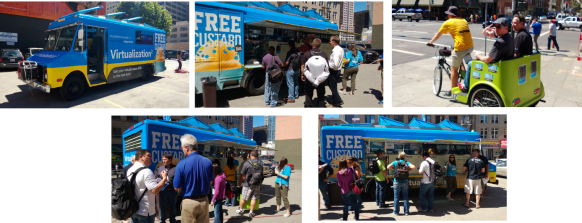
Yep, Microsoft’s server team showed up, rented out and re-skinned a Frozen Kuhsterd food truck, and handed out free frozen custard for a chance to promote and discuss their own virtualization platform and new publicity initiative, branded Virtualization2.

The frozen custard was pretty tasty. Well worth the 3 block walk from Moscone. It was a pretty effective way to get attention and mindshare as well–several people I spoke with were impressed with the marketing novelty and the reminder that VMware isn’t the only player in the game, even if one friend considered it an utter failure due to the insufficient description of frozen custard.

Almost two years ago when I did my Virtualization Field Day experience, the question I asked (and vendors were usually prepared to answer) was “when will you support Xen in addition to VMware?” This year, it’s more “when will you support Hyper-V?” So a lot of people are taking Microsoft seriously in the visualization market these days.

Insert Foot, Pull Trigger

One nominal advantage Microsoft has had over VMware in the last few years is an affordable way for IT professionals to evaluate their offerings for more than two months at a time. But first, some history.

time-bomb-meme

Once upon a time, VMware had a program called the VMTN (VMware Technology Network) Subscription. For about $300 a year, you got extended use licenses for VMware’s products, for non-production use. No 60-day time bomb, no 6-reinstalls-a-year for the home lab, and you can focus on learning and maybe even mastering the technology.

Well, in February 2007, VMware did away with the VMTN subscription. You can still see the promo/signup page on their site but you’re not going to be able to sign up for it today.

At that point, Microsoft had the advantage in that their TechNet Subscription program gave you a similar option. For about $300/year you could get non-production licenses for most Microsoft products, including servers and virtualization. I would believe that a few people found it easier to test and develop their skills in that environment, rather than in the “oops, it’s an odd month, better reinstall the lab from scratch” environment that VMware provided.

Well, as of today, September 1, the TechNet Subscription is no more. If you signed up or renewed by the end of August 31, you get one more year and then your licenses are no longer valid. If you wanted some fresh lab license love today, you’re out of luck.

Technically, you can get an MSDN subscription for several thousand dollars and have the same level of access. The Operating Systems level is “only” $699 (want other servers? You’re looking at $1199 to $6119). Or if you qualify for the Microsoft Partner Program as an IT solutions provider, you can use the Action Pack Solution Provider to get access to whatever is current in the Microsoft portfolio for about $300/year. But the latter is tricky in that you need to be a solutions provider and jump through hoops, and the former is tricky because you might not have several thousand dollars to send to Redmond every year.

Help me, Obi-Wan vExpert, you’re my only hope

In 2011, Mike Laverick started a campaign to reinstate the VMTN subscription program. The thread on the VMware communities forum is occasionally active even two years later. But after two years of increasing community demand and non-existent corporate support, a light appeared at the end of the tunnel last week at VMworld in San Francisco.

As Chris Wahl reported, Raghu Raghuram, VMware Executive Vice President of Cloud Infrastructure and Management, said the chances of a subscription program returning are “very high.” Chris notes that there’s not much detail beyond this glimmer of hope, but it’s more hope than we’ve had for most of the last 6 years. For those of you who remember Doctor Who between 1989 and 2005, yeah, it’s like that.

Today, your choices for a sustainable lab environment include being chosen as a vExpert (or possibly a Microsoft MVP–not as familiar with that program’s somatic components) with the ensuing NFR/eval licenses; working for a company that can get you non-expiring licenses; unseemly licensing workaround methods we won’t go into; or simply not having a sustainable lab environment.

I added my voice to the VMTN campaign quite a while ago. When nothing came of that campaign, and I found myself more engaged in the community, I applied for (and was chosen for) vExpert status. So the lab fulcrum in my environment definitely tilts toward the folks in Palo Alto, not Redmond.

But I did mention to the nice young lady handing out tee shirts at the Microsoft Custard Truck that I’d be far more likely to develop my Hyper-V skills if something like TechNet subscription came back. She noted this on her feedback notebook, so I feel I’ve done my part. And I did get a very comfy tee shirt from her.

When I got back to my hotel, I found that the XL shirt I’d asked for was actually a L. Had I not been eating lightly and walking way too much, it wouldn’t have come anywhere near fitting, and it probably won’t any more, now that I’m back to normal patterns. But maybe that size swap was an analogy for a bigger story.

One size doesn’t fit all.

If Microsoft and VMware can’t make something happen to help the new crop of IT professionals cut their teeth on those products, they’ll find the new technologists working with other products. KVM is picking up speed in the market, Xenserver is moving faster toward the free market (and now offers a $199 annual license if you want those benefits beyond the free version), and people who aren’t already entrenched in the big two aren’t likely to want to rebuild their lab every two months.

And when you layer Openstack or Cloudstack (yeah it’s still around) on top of the hypervisor, it becomes a commodity. So the benefits of vCenter Server or the like become minimal to non-existent.

So where do we go from here?

Best case, VMware comes up with a subscription program, and Microsoft comes up with something as well. Then you can compare them on even footing and go with what works for you and your career.

Worst case, try to live with the vCenter and related products’ 60 day trial. If your company is a VMware (or Microsoft) virtualization customer, see if your sales team can help, or at least take the feedback that you want to be able to work in a lab setting and spend more time testing than reinstalling. 

And along the way, check out the other virtualization players (and the alternatives to VMware and Microsoft management platforms… even Xtravirt’s vPi for Raspberry Pi). Wouldn’t hurt to get involved in the respective communities, follow some interesting folks on Twitter and Google+, and hope for the best.

Did you say something about Doctor Who up there?

Yeah, and I should share something else with you.

When I saw the mention of the custard truck, my first thought was honestly not frozen concoctions in general. Obviously, it was the first Matt Smith story on Doctor Who, Eleventh Hour, wherein he tries to find some food to eat at Amy Pond’s home after regenerating. He ends up going with fish fingers (fish sticks) and custard (not the frozen kind).

So I made a comment on Twitter, not directed at anyone, saying “I’d have more respect for Microsoft’s Hyper-V Custard if fish fingers were offered on the side.”

And this really happened.

this-really-happened

So even if they’re discouraging me and other technologists from effectively labbing their products, I have to give them credit for a sense of humor. Not usually what you expect to come out of Redmond, now is it?

Related Links:

Mr Jones posted an article that really annoyed me until I read his well-reasoned response to the well-reasoned comments. Check out his interpretation of the TechNet subscription and brave the comments for some very sane discussions.

A couple of pieces from the Microsoft team about their marketing activity. Fun read, and the source of the truck photos above.

tardis.wikia.com definitions and a BBC video clip from Youtube,to help you understand the Twitter exchange.

How do you download storage performance? A look at Infinio Accelerator

Many of you joined us (virtually) at Tech Field Day 9 back in June for the world premiere presentation of Infinio and their “downloadable storage performance” for VMware environments.

In the month and a half since we met Infinio, I’ve been planning to write about their presentation and their product. It’s an interesting technology, and something I can see being useful in small and large environments, but I hadn’t gotten around to piling the thoughts into the blog.

I did find that I was bringing them up in conversation more often than I do most Tech Field Day presenters (with the possible exception of Xangati). Whether I was talking to the CEO of a network optimization startup here in Silly Valley, or a sales VP for a well-established storage virtualization player at the Nth Symposium, or a couple of others, I found myself saying the same things. “Have you heard of Infinio? They just made a splash onto the scene at Tech Field Day 9. You should check them out.”

What is an Infinio?

201306 TFD9 Infinio 01 Peter Smith Model

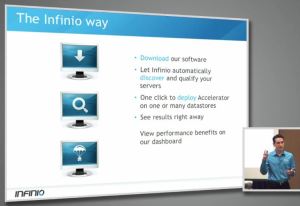
Peter Smith, Director of Product for Infinio, introducing the “Infinio Way” of deploying the Accelerator

Infinio is a two year old, 30ish-person startup whose Accelerator product is designed to be an easy drop-in to your VMware environment. They’re focusing on making the product easy to try (including substantial engineering focus on the installation process), simple and affordable to buy, and visibly useful to your environment as soon as possible.

CEO Arun Agarwal talked up the focus on the installation process, but even more interesting was his focus on the trial and sales model. This seemed important at the time, but as time passed, I really appreciated the idea more.

Just this past week, I downloaded a “free” VM from a much larger company, only to be told in a pushy followup email that I need to provide a phone number and mailing address and get trial licenses and talk to a sales guy on the phone to do anything with the “free” VM. It was annoying enough to get to this point, and I’m disinclined to actually buy and use that product.

I want a company to provide (1) enough information on their website for me to understand the product, (2) a hands-off model for acquiring and trying out the product (even if it’s at 2am on a Saturday because I can’t sleep and I’ve got a hundred servers sitting idle in a datacenter to play with), (3) smart and non-pushy people to help me with understanding, evaluating, and maybe buying the product if I do decide to move forward–when and if I need them, and not the other way around, and (4) a product that really solves the problem.

Infinio plans to provide all these things. You can download the trial without giving a lot of information (or any, as I recall), and you can buy your licenses with a credit card on the site. This would be a refreshing model, and I’m optimistic about their being able to do it.

So what are they doing?

I was wondering that too… and seeing the phrase “downloadable storage performance” a week or so before the visit, I was dubious.

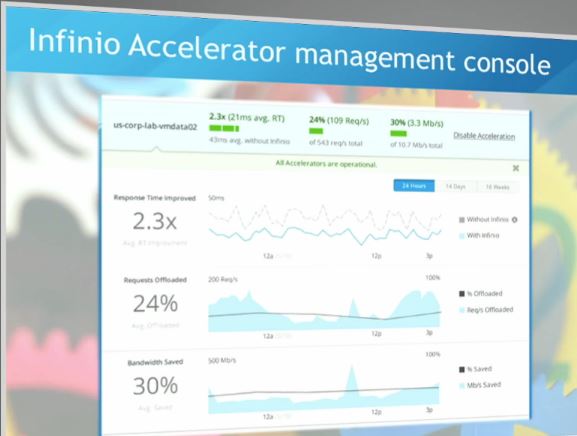
201306 TFD9 Infinio 02 Peter Smith DashboardThe Infinio Accelerator is a virtual NAS (NFS v3) accelerator for VMware. It sits between the vmkernel interface and the storage server on each host, providing a shared, deduplicated caching layer to improve performance across your systems. It also works transparently to both storage and server, so you don’t change your storage settings or ACLs (great for those of us who have siloed storage, networking, and virtualization management teams, and all the efficiencies they provide).

And possibly most impressive of all, you don’t have to reboot anything to install or remove the product.

The management console allows you to toggle acceleration on each datastore, and more importantly, monitor the performance and benefit you’re getting from the accelerator. They call out improvements in response time, request offload, and saved bandwidth to storage.

Let’s make this happen

201306 TFD9 Infinio 03 Peter Smith Improvement

It does make a difference.

Peter Smith demonstrated the Infinio Accelerator for us live, from downloading the installer from the Infinio home page (coming soon) to seeing it make a difference. The process, with questions and distractions included, came in around half an hour.

You download a ~28MB installer, and the installer will pull down about a CD’s worth of VM templates (the Accelerator and the management VM) while you go through the configuration process. (You can apparently work around this download if you need to for network/security reasons–this would be a good opportunity to enlist those smart and non-pushy people mentioned above.)

After the relatively brief installation (faster than checking for updates on a fresh Windows 7 installation, not including downloading and installing all 150 of them, mind you), Peter brought up a workload test with several parallel Linux kernel builds in 8 VMs, demonstrating a 4x speedup with the Accelerator in place even with the memory per VM halved to make room for the Accelerator.

201306 TFD9 Infinio 04 Peter Smith vTARDIS

vTARDIS, MacPro flavor

An aside about making room for Infinio: The accelerator will eat 8GB of RAM, 2 vCPUs, and 15GB of local disk space on each hypervisor host you’re accelerating. It will also use 4GB RAM, 2 vCPUs, and 20GB of storage for the management VM, on one of your hosts. So if your virtualization lab is running on your 8GB laptop, you’re gonna have a bad time, but a quad-core lab system with 32GB of RAM should be practical for testing. A typical production hypervisor host (128GB or more) will probably not notice the loss.

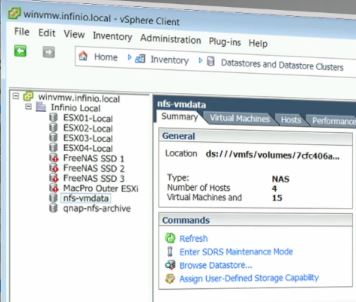
And a further aside about the demo system. As a big fan of Simon Gallagher’s vTARDIS concept of nesting hypervisors, I was pleased to see that the Mac Pro the Infinio folks rolled in for the demo was effectively a vTARDIS in itself. This is a pretty cool way to protect your live demo from the randomness of Internet and VPN connectivities and the very real risk that someone will turn your lab back at the home office into a demo for someone else, if your product lends itself to being demonstrated this way.

Some future-proofing considerations

The team at Infinio were very open to the suggestions that came up during the talk.

They have a “brag bar” that offers the chance to tweet your resource savings, but they understood why some companies might not want that option to be there. Some of us work (or have worked) in environments where releasing infrastructure and performance info without running the gauntlet of PR and legal teams could get us punished and/or fired.

They took suggestions of external integration and external access to the product’s information too, from being able to monitor and report on the Accelerator’s performance in another dashboard, to being able to work with the Accelerator from vCops. And they’re working on multi-hypervisor (read: Hyper-V) support and acceleration of block storage. Just takes enough beer and prioritization, we were told. 

So where do we go from here?

Infinio is releasing a more public beta of the Accelerator at VMworld in San Francisco in just a couple of weeks. Stop by and see them if you’re at VMworld, or watch their website for more details about the easy-to-use trial. You can sign up to be notified about the beta release, or just watch for more details near the end of August.

The pricing will be per-socket, with 1 year of support included[1], and hopefully it will be practical for smaller environments as well as large ones. We will see pricing when the product goes to GA later this year.

I’m planning to get the beta to try out in my new lab environment, so stay tuned for news on that when it happens.

And if you’re one of the lucky ones to get a ticket for #CXIParty, you can thank the folks from Infinio there for sponsoring this event as well. And I may see you there.

Disclosure: Infinio were among the presenters/sponsors of Tech Field Day 9, to which I was a delegate in June 2013. While they and other sponsors provided for my travel and other expenses to attend TFD9, there was no assumption or requirement that I write about them, nor was any compensation offered or received in return for this or any other coverage of TFD9 sponsors/presenters.

Some other write-ups from TFD9 Delegates (if I missed yours, let me know and I’ll be happy to add it):

[1] Update: When we talked with Infinio in June, they planned to include 3 years of support with the initial purchase. They are now planning to include 1 year with renewals beyond that being a separate item. This should make the initial purchase more economical, and make budgeting easier as well.

rsts11: Silicon Valley VMUG UC, and Storage Field Day

Quick thoughts on the SVVMUG Conference

I survived the Silicon Valley VMUG (VMware User Group) conference event on Wednesday. It was an interesting mix of educational and informative presentations, and vendor exposure and conversations. I have some thoughts to write on later… including a grand unifying theory of tech conferences (that will require a bit of graphic work)… but I thought I should put a note out there to thank the organizers for making an excellent event for the 500+ of us who registered, most of whom seem to have shown up (as I did).

I also thought I’d mention the VMUG Advantage membership option, which I only learned about the day before. You can get a free VMUG membership, and associate with your local VMUG if one exists, at http://www.vmug.com. This will likely qualify you for any local events like this week’s Silicon Valley conference, and give you access to the local VMUG community.

If you’re looking at using classroom training or certification testing from VMware, going to VMworld, or purchasing a license for Workstation 8 or Fusion 4, look into VMUG Advantage. For $200 a year (or less with a discount code), you get access to a wide range of eLearning courses, 20% off on classroom instruction, 20% off one certification exam a year, $100 off VMworld registration, and a 30% discount on one of the desktop virtualization products per year.

(I believe you can choose Workstation or Fusion, and not both, for this discount… however, if you’re on VMware’s marketing mailing list, you will probably see a 15-30% discount on Workstation every few month, and I’ve seen 20-40% discounts on Fusion in the same mailings.)

By the way, I attended this event as a free member of the local VMUG, and while I received free lunch and coffee/soda, these considerations did not impact my opinions of the sponsors.

Oh look, Storage Field Day

I’m also pleased to report that I’ve been invited to be a delegate[1] to the first Storage Field Day later this month in Silicon Valley. Looking forward to seeing Robin Harris and The Other Scott Lowe again, and meeting more independent thinkers on storage for the first time. There will be a couple of familiar names on the other side of the blogger “dragon’s den” tables as well, including PureStorage and Coraid, and some folks I haven’t been all that formally introduced to, such as Nimbus Data and Tintri (the latter I actually met Wednesday at the VMUG).

Early in my career I did a fair bit of storage work, and much as going to work for Nortel pushed me into networking, going to work for 3PAR pushed me even further into storage technology. I’ve done a range of implementations since then, from what was more SPOD than JBOD (i.e. “steaming pile”, or at least overstacked pile), to conventional Engenio and EMC and 3PAR, so it will be particularly intriguing to come up to speed on what’s closer to the bleeding edge, or at least the warm and shiny edge… and have a feel for what’s coming in advance.

I expect that my “deep generalist” nature is a benefit that I bring to the Tech Field Day events. There are a lot of people there who are waders-deep in the specific topic, and I may learn as much from the other delegates as I do from the presenters and sponsors, but by being ankles deep in almost everything (except sales… whew…) I can offer a valuable perspective and maybe ask a question that wouldn’t be obvious to someone who lived the specific flavor of technology 24/7. Like why there’s a Rick Roll easter egg[2] in the new vSphere Client.

So I’m looking forward to the Storage Field Day experience on April 26-27, and the “bonus” Solid State Storage Symposium on April 25. You can probably still get a ticket to SSSS if you’re gong to be near San Jose, California on April 25, and you should be able to see most of the presentations all three days via online streaming at techfieldday.com. You can also keep an eye on realtime conversations on Twitter on the hashtags #SFD1 and #techfieldday.

[1] As with all Tech Field Day events, the sponsors and presenters will be providing for my lodging, meals, and entertainment during the event. They may also provide gifts or promotional items. We definitely appreciate their support for these events. However, as Tech Field Day delegates, we’re not beholden to the presenters as far as content and perspective (or even reporting/blogging at all) . You’ll hear what each of us thinks, from our own perspectives, if we think it’s worth writing or talking about.

[2] I hope you didn’t look too long for the easter egg… I’m just making that up.