Check out the travel section – #rsts11travel has more coming this week!

You’re tuned to rsts11, the tech blog from Robert Novak (Est. 2011). If you’d like to turn to the new travel section, visit rsts11travel.com and see what we’re writing about over there.

2017-01-03-16-32-15-cards-crop-scale

Coming in the next week or two will be a two-part mobile power piece as well as a slightly more detailed hotel review from your host’s birthday escape. Unfortunately, no pina coladas, but fortunately, no getting caught in the rain either.

2017-01-16-20-00-32-z800-crop-backview

rsts11 will continue to roll out tech content,including some hardware reviews and homelab / POHO build travelogues, a bit of big data, and some more economy power-networking options.

Thanks for your support!

Another look at mobile workflow – iPad Air keyboard cases

I have a bad habit of buying lots of accessories for an electronic device I’ll have for a year or so, and then they pile up because people don’t want to buy them with the old device. This is usually the case with mobile phones and laptops, but it also comes up with tablets. I have three keyboard cases and at least three regular cases for my iPad 3rd gen, including a Hello Kitty keyboard.

During a particularly nifty Target promo around their Cartwheel app, I got a 15% discount off any electronic device over a two day period. This included iPads, and since my 16GB 3rd gen iPad was full, I got a 64GB Air at nearly 20% off (with redcard discount). Then I went about looking for a case.

I need a case, just in case, you know

An article someone pointed me toward said the Case Crown Omni was the best on the market. I bought it to use while I searched for a keyboard case that would work. I don’t have a lot to say about it except that it was indeed a good case, better than any I found at local retail in a few days of looking.

Among the recommendations that came in was one from Kieran Hannon, the CMO of Belkin (who also own the Linksys brand, in case you’ve been under a WRT54G for the past year).

https://twitter.com/kieranhannon/status/488927250650112001

He unsurprisingly recommended his firm’s “Qode” (pronounced as “Code”) line of keyboard cases, with the top-of-the-range Qode Ultimate Keyboard Case being well rated (albeit a bit pricey at $130). There’s also a Slim Style model (msrp $80) with a kickstand on the iPad holder, and a Thin Type model (msrp $100) that works as a stand when in use and clips over the iPad when not in use.

61gBQETEYkL._SL1500_[1]As an aside, the Belkin product I use the most (up until now, at least) is their swivel power adapter with USB and AC outlets. The SurgePlus model is the current one, with 2.1A charging on USB. I suspect the 3-4 of them I have are old enough to be the 1A versions (time to upgrade!). Great for travel, especially if you’re at an event where they think one power outlet per table is generous.

The Belkin Slim Style

I bought a Slim Style at Target, marked down from $80 to $71 and further discounted 5% via redcard (I think this was after the Cartwheel deal). I used it for a day or so before mentioning on Twitter that it was nice, but the kickstand design wasn’t very lap friendly. This is what you could call the Surface Dilemma, after Microsoft’s almost-there laptop-replacement tablet which hasn’t yet wowed everyone with its lap-friendliness.

71Swm5JrNTL._SL1500_[1]

My assessment of the Slim Style was that, on a desktop (or probably even on a roomier airline tray table), it would be good. The keyboard and its layout felt reasonable, and I felt it protected the iPad well enough that I could just drop it into my laptop bag without fear.

But I returned it, because of the lapability factor, and mentioned this on Twitter.

The @belkincares account asked if they could help, and were very courteous even though they (luckily) couldn’t make my lap resemble a tabletop more. I’ve had a few good exchanges with @belkincares over the past year or so, from stacking cable inquiries around their older KVMs to some arcane questions about the wireless bridge line.

This keyboard case goes to ULTIMATE

About a week later, Belkin had generously provided a Qode Ultimate Keyboard Case for me to try out at no cost.  I plugged it in to charge and then started using it the next morning.

The Belkin Qode Ultimate Keyboard Case

The Belkin Qode Ultimate Keyboard Case in use

The Qode Ultimate has a more contained layout, in that rather than a kickstand, the iPad shell magnetically “sticks” to the keyboard shell. It has three positions, as with the Slim Style, but they’re within the footprint of the keyboard, and thus much more convenient on the lap or on a tray table.
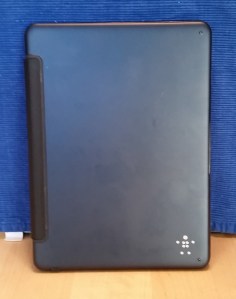
ipad-qode-shellThe keyboard shell is sort of a dark blue “aircraft-grade aluminum alloy” that I didn’t recognize as blue at first. It does pick up fingerprints and the occasional light scratch, but I only notice that when getting the iPad out or putting it away, since this part is on the bottom when in use, and also hidden when you’re using it in “reading mode” (i.e. folded back).

The iPad shell piece is black plastic with a leatherish inset that incorporates the kickstand “hinge.” The Belkin logo is on the “front” (i.e. bottom of the keyboard) and the Belkin name is on the leatherish hinge section and on the front of the keyboard.

The keyboard turns itself off unless the iPad is “connected” to one of the three kickstand positions. So if you flip it back so that the keyboard is behind the screen, it’s automatically powered off. Same with closing it up; the keyboard is off and the battery life is extended.

For some reason, Belkin have swapped two of the keys on their keyboards. I believe the Slim Style and Thin Style place the colon/semicolon key between “L” and “Enter” whereas the Ultimate places the quote key there. In each case the other key is to the right of the space bar.

Kensington to the semicolon’s rescue?

I’m slowly getting used to the keyboard layout. It’s very typeable except when I need a semicolon or a colon. However, I decided that if I was going to write a review, it would be good to make sure that I liked the Belkin keyboard case for reasons other than it being given to me at no cost.

So I picked up a Kensington KeyFolio Exact case, which I found on clearance at Marshall’s for $40. It includes a Google Drive offer (which is apparently processed manually by Kensington, as I haven’t received the code for the offer in the past week), so it was an inexpensive experiment.

The KeyFolio is bulkier, with a detachable bluetooth keyboard, a stylus holder in the hinge, a wider range of color options, and a lower price if you’re going to buy it at retail.

The Kensington Exact and Belkin Qode Ultimate keyboards

The Kensington Exact and Belkin Qode Ultimate keyboards

I found that the keyboard itself was brilliant, managing to fit both the semicolon and the quote key between “L” and Enter by making the keys a little bit smaller. And since the Kensington had a fixed “kickstand” mounting point in the case closer to the hinge, they had room to put separate number and function key rows on the keyboard. The Belkin Slim Style also does this, since it has most of the surface area to spend on keyboard real estate. And I actually found myself using the function keys on the Kensington, which I hadn’t done on the Belkin.

(Above photo is of the actual keyboards, Kensington Keyfolio Exact on the top and Belkin Qode Ultimate on the bottom.)

I used the Kensington for just short of a week, and while I loved the keyboard and almost got used to the stand layout, I found I had to go back to the Belkin Qode Ultimate. Why?

I preferred the Qode Ultimate’s ease of turning off the keyboard, the lightness and grace of the entire case, and its turning off the iPad screen and locking it when I closed the case.

I expect I will hold onto the Kensington in case someone I know needs a super-cheap case for their Air and doesn’t need lapability. I am tempted to try the Thin Style just to see how that style of keyboard feels as a case. But the iPad is back in my Qode Ultimate Keyboard Case, just in time to head off for a company sales meeting out of town next week. And maybe I’ll have to write with fewer semicolons.

Summary:

All keyboards tested charge with standard micro-USB cables (included), and paired very easily with the iPad Air via Bluetooth. Battery times are based on the manufacturer’s website or packaging (YMMV of course). Prices found on 8/22/2014 online.

Belkin Qode Slim Style keyboard case – $34 at Belkin or Amazon.

Good design, great keyboard, excellent value for the cost, but suboptimal for lap work.
2.5 days working time, 60 days standby time

Kensington KeyFolio Exact keyboard case – $29-39 at Amazon, $40 at Marshall’s, includes a 65GB 1 year Google Drive credit (~$15 value)

Great keyboard, kickstand design could use some work, doesn’t seem to lock the screen when closed.
40 days working time, 180 days standby time

Belkin Qode Ultimate keyboard case – $129 at Belkin, around $90 at Amazon.

Slim and sturdy case, very lap-friendly, no dedicated function key row, semicolon key is on the bottom row.
11 days working time, 180 days standby time

The final word:

The Qode Ultimate turns your iPad into a laptop, although it comes at a premium (which I feel is worth it). The Qode Slim Style and Kensington KeyFolio are good keyboards for tabletop use, and come in at a lower price.

Disclosure: Thanks to Kieran Hannon and Belkin for providing the Belkin Qode Ultimate Keyboard Case at no charge to me. Other than a twitter inquiry of “and the verdict?” they did not require or request a review, blog post, or any other consideration.

Last minute tips for Cisco Live 2014 in San Francisco

We just had a great Cisco Champion Radio program that was half about Cisco DevNet and half about surviving Cisco Live. The latter was more of a fit for me, and I wanted to open a post with some of the suggestions from that program.

Do you have suggestions for folks who are new to Cisco Live (or who haven’t been to a Live lately)? If so, please share them in the comments below.

1. Apparent apparel

Wear comfortable shoes. Tom @networkingnerd Hollingsworth brought this one up, and I definitely agree. Typical business shoes may seem de rigueur, but there’s a lot of walking between the three buildings of Moscone Center and a lot within each building. So you’ll want something that looks reasonable but is comfortable. Wear what you can stand in all day.

Bring a spare pair of shoes and alternate if you can. And by all means, don’t wear a new pair of shoes for the first time at an event. I’d say go buy your new shoes this week and wear them next week to break them in. Your feet will thank you.

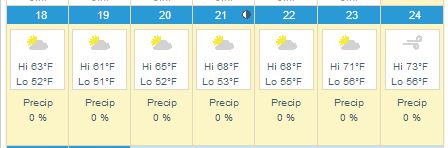
If you’re not direly familiar with San Francisco weather, or even if you are, bring cold/windy weather outerwear. The graphic above is Weather.com’s San Francisco planner. It’s linked to the current forecast page, so if you check after the 15th you’ll see the full week’s forecast. But consider a sweater, a sweater vest, a light jacket, a heavy jacket, a scarf, an anorak, and closed-toed shoes as your personal comfort may require.

2. Time management

Don’t feel the need to fill every session slot. There will be a lot of what LISA calls the “hallway track,” where you can talk to other professionals on an ad-hoc basis. The Social Media Hub is a good place to start, or the DevNet space if you’re more inclined in that direction. Or both!

Don’t feel obligated to attend every after-hours event either. You’ll find half a dozen events every night but you can prioritize, or try putting in an hour at each if you must. Note that some events may be offsite (a few miles away) and the sponsors may not offer transportation after the first hour. You can take taxis or Uber. Consider sharing rides with other attendees to save some money. You can also take MUNI (trains or buses) to AT&T Park (easy on the N or T trains) and to much of the rest of the City.

Do touch base with your favorite vendors to see if they’re hosting special events or receptions. It’s easier to get those arranged (and get on the guest list) before you get there.

3. Food and bev

There will be meals, snacks, coffee, and refreshments during the event, but you may not always be able to get away for them. Bring energy bars, protein bars, and other dry crush-proof snacks (thanks Rick @rickvanover Vanover for this suggestion) so that you can have a quick burst of energy between sessions even if you can’t get something to eat. There are places to buy them near Moscone if you prefer to shop on site.

Bring a water bottle. I recommend a crushable/collapsible bottle for convenience (also works for airports), something like this “H2O 2 GO” one. Last year, one of the vendors at one of the summer shows was giving these away, and it was possibly the most useful swag item I have received at a show. If you can’t find one of these, bring a relatively crush-proof bottle and fill it up often.

Cisco Live will have twitter tables in the lunch room by the way. If you want to meet up with other Twitter folks and the Cisco Champions, this would be the place to look. I believe they’re going to be near the front of the table space, but hopefully one of the CLUS coordinators will correct me if I’m wrong.

4. Technology

Plug in and charge up every chance you get. This goes for laptops, tablets, phones, and your portable battery packs as well. I have this Poweradd Pilot E2 12Ah battery that’s been one of the best USB power packs I’ve used (and I have at least a dozen of them). Great deal if you need something like this, to half-charge your iPad or fully charge most smartphones.

Travel light. As Tom Hollingsworth mentioned, it may not seem like a 10 pound bag is all that heavy, until you’ve been carrying it around for 18 hours. Empty your bag and only put what you know you’ll need. Even I won’t be carrying my usual two smart phones, Nexus 7, iPad, and two laptops. You can scale down too.

apple-microsoft-moscone

You can buy tech stuff here. In addition to the things that the Cisco Press store will offer, you will be within relatively easy walking distance of the One Stockton Apple Store and the Microsoft Store at Westfield, both along Market St within 10 minutes distance. And a little-known gem of the Bay Area is even closer. Central Computers is a Bay Area mainstay for computers, components, accessories, etc. It’s likely the best place to go if you forgot your charger cable or need a hard drive or phone case or a new laptop, and it’s directly across the street from what will probably be the bus terminal at the Moscone West building.

5. Communications

Follow @CiscoLive and the #CLUS hashtag. You’ll get lots of useful information and be able to get answers to your event-related questions wherever you are. There might even be giveaways and contests.

Bring business cards to share. Consider getting some printed (or making your own) with your personal contact info (Twitter handle, blog address, appropriate logos and such) in case you have affiliations aside from your employment.

Pick up a prepaid SIM once you get here if you’re not on a US cellular carrier. I have a T-Mobile starter kit in one of my phones; it’s $35 on Amazon and includes a month of service including 100 minutes/100 text messages/5GB 4G data. If you have an unlocked GSM-type phone, this or another SIM will get you covered for your stay in the US.

There will be WiFi. If you don’t have a data plan, don’t worry too much. Most hotels and most of the convention center will have wireless Internet access, and the odds are pretty good that Cisco will take care of us in terms of connectivity on-site.

6. Swag Management

Get some flat rate shipping boxes from the post office (either at home or in San Francisco–there’s a Post Office in the Macy’s on O’Farrell and Stockton a few blocks away) to send your swag bag home in. Domestic flat rate for a medium box is under $20 and may be more convenient than buying another suitcase. International shipping is also available. There is UPS service at Moscone, and a Fed Ex ship center on Bryant nearby, if you prefer those.

Ship stuff to your hotel. If you’re bringing things that would be more convenient not to go through airports with, consider shipping it to your hotel in advance. Check with the hotel first, though, to see if there are any limitations or charges for this sort of activity.

Drop-ship stuff to your hotel. I do this even within the US. If you know you’re going to want things like a battery pack, or a case of bacon raspberry cheesecake energy bars, or a new pair of eating pants, consider ordering them to be sent directly to the hotel. This can save you packing and shopping time in advance, and may be cheaper than finding them locally.

Don’t feel obligated to take every bit of swag you’re offered. Last year I think I came home from 4 conferences with 40-50 shirts. Half of them went straight to Goodwill, and I still had to lug them home from SF or Orlando. If you do take more than you need, consider taking them over to Goodwill or Out Of The Closet or another thrift store in the area. Or ask for smaller sizes for your kids. Or some mix of those.


7. Money Considerations (especially for non-USians)

There are automated teller machines (ATMs) all over the place. Before you come to San Francisco, check with your bank to see what ATMs you can use with minimal or no surcharge, or whether your bank rebates surcharges (many credit unions do this). ATMs in hotels and conference centers may charge $5 (or more) for a withdrawal, but most of the major US banks are available a couple of blocks away on Market St.

If you plan to use a non-US credit or debit card, check into whether your card has foreign transaction fees and be prepared for those.

Check with your bank or credit union to see if you should provide a “travel notification” to minimize the risk of your card being shut down by automated fraud checking systems.

So where do we go from here?

To San Francisco, and BEYOND!

Seriously though, these were just some of the suggestions I came up with in one hour (so far). If you have suggestions for fellow Cisco Live attendees, feel free to share them in the comments and I’ll pass them along. And check back often, as hopefully there will be updates and improvements to this post as we get closer to the magical date.

How can your big tech conference experience benefit the less fortunate?

[I’m big on soft topics this month so far, but don’t fear, I have some other technical posts coming up.]

I was tweeting with Calvin @hpstorageguy Zito this morning, in response to an experience he had with a homeless person in San Francisco during VMware PEX (Partner Exchange).


When I was up in San Francisco for VMworld last summer, I had two encounters with homeless folks. One was a man being very aggressive outside CXIParty, which was not conducive to help, but the other was less uncomfortable.

A guy who had very recently received a tee shirt that had been given out in the vendor expo that week asked if the company on it was a good one. And it got me thinking. I couldn’t answer his question, honestly, although I had a vague memory of what that company did. I probably had the shirt in my bag back at the hotel, and it’s probably gone to Goodwill since then. So did it do anything for me? Not really. Could it have helped someone else? Almost definitely.

And having been accosted by many vendors at the shows last summer promising a chance at a free iPad, I got to thinking. The cheapest refurbished iPad on the Apple store today is $339. That’s probably going to feed a family of four for a month, maybe more. Not glamorously, and probably not at a San Francisco boutique grocery, but through a food pantry it will definitely make a difference.

Between my own experiences and Calvin’s thoughts this morning, I’m wondering what tech conferences can do to help enable attendees to help the host city’s homeless and helpless, and what attendees would do themselves.

How can we help?

It would be easy to find a local charity that helps the less fortunate, and find a way for attendees to contribute. However, there’s a lot more that could be done.

Vendors exhibiting in the Enormous Room Of Solutions could donate their leftover wearables and flashlights and other useful non-tech trinkets to local shelters. Maybe replace your tee shirt with a smaller take-home piece of swag (8GB USB drive with your glossies and demos?) and a donation on the booth visitor’s behalf to such a local shelter or food pantry or soup kitchen.

Conference organizers could simplify the donation of swag on site, for folks who don’t want to walk the mile to Glide or Goodwill or the like. Consider integrating a benefit operation into the customer apppreciation party or other large events. Make sure you have something helpful to do with the catering leftovers (no matter how much we complain about the food, it’s still better than what thousands of San Franciscans have to eat every day).

And whatever you do, make it clear (tastefully) what you’re doing. Many of the 20k+ people at VMworld or Cisco Live assume leftovers get thrown away at the end of the day. And we’ve all heard exhibiting vendors complain about having to take shirts home at the end of the event. If you can make a difference, make it clear.

So where do we go from here?

I’d love to hear from folks involved with organizing the big conferences, as well as those of you attending them, about what you think is practical and what you personally would do to help the host city when you go to a technology conference.

And if you’re local to San Francisco, what organizations do you think could do the most with donations (whether goods or cash) to get their benefits most effectively and efficiently to the people on the streets and shelters and underserved homes?

I went to Cisco Live, and now it’s coming to me

So it looks like I’ll be back in fish-out-of-water territory May 18-21, 2014, when Cisco Live comes back to San Francisco for the 2014 US event. Read on…

Update: 2014-05-01 big news, win a free lab pass for Cisco Live US 2014; see the update at the bottom of this post!

Fish out of water?

I went to Cisco Live US in Orlando last year. It was my first really big event, and the reasons for the fish-out-of-water comment are twofold. One is that I’m not, for the most part, a networking guy. I’ve done networking, mostly LAN/VPN and a bit of wireless, but I’m primarily a server sysadmin, bare metal all the way. And two, I learned my original network chops (beyond 10b2 Ethernet and dialup networking) supporting the Ethernet switching products division of Nortel up until the turn of the century.

But two years ago last month, my boss asked, “Want to come to the datacenter in Vegas and work on some servers?” It was something to do, and I was curious how Cisco would make servers… so I went, and started loading cards into UCS C210 M2 servers and trying to get operating systems onto them.

And for the last two years, a big part of my day job has been setting up, maintaining, deploying, and troubleshooting a pretty big pile of Cisco UCS C-series servers and related infrastructure. It’s been a wild ride, and it’s probably a relatively rare patch of expertise, and I’ve learned a lot via trial by fire (and a lot of dumb questions to my TME/savior).

So last year, when I had the opportunity to go to Cisco Live (thanks to some help from Tech Field Day), I jumped at the chance. I stretched my trip home from Tech Field Day 9 in Austin to take me through Orlando and joined in a roundtable with Opengear while there, but mostly went around being a bit overwhelmed and meeting a lot of the people from Cisco who I’d worked with indirectly during the UCS adventure.

Stay social, my friends

Cisco Live 2013 Social Media

I also met a lot of the people I interact with daily on Twitter , and some I just started interacting with at the event. There’s a few of them above this paragraph (and I think I’m in the middle of the right side near the back). I couldn’t get anyone to give me a ride out to Disney World, even with the promise of free passes, but it was a good time anyway.

At some point as I was getting ready to leave for Orlando, I got a message on Twitter asking if I was interested in a new social media program Cisco was starting up. I was baffled but intrigued, and a month or two later I was one of the first dozen people in that program.

Will you come with me, won’t you come with me?

So this year I’m headed back, an hour’s train ride away rather than 5 hours plane ride, with some lessons in my backpack and bigger plans for this year’s adventure. This year I’m going back as a Cisco Champion, with a couple of posts on the Cisco Perspectives blog and an even wider ring of social contacts in all corners of the Cisco ecosystem. I’m planning to head into the certification forest a bit (have to branch out somehow, right?), and maybe show a bit more restraint as far as bringing tee shirts home (for the sake of domestic tranquility) .

If you’re considering going, well, by all means check it out. There’s the main site for Cisco Live US, and a page describing the packages and options for registration. If your company does a lot of business with Cisco, check to see if they have learning credits available, or see if your organization has training or professional development budgets.

If you’re local but on a tight budget (or if you can get to San Francisco cheaply anyway), consider Explorer ($49) or Explorer+ ($595) which give you access to the keynotes, the World Of Solutions vendor expo, and (with the plus) two tech sessions. Or there’s a social event pass for under $200 that lets you into the receptions, the expo, the keynotes, and the Wednesday night Customer Appreciation Event (likely a big concert and festival at AT&T Park or Treasure Island).

If you can’t make it at all, check out the “Learn Online with Cisco Live” section of the above registration link. You can see a lot of sessions from past events, including one or two that you’ll hear me in the background of (with the speaker’s approval), and access to live broadcasts from time to time. And of course, follow the conversation on Twitter with the hashtag #CLUS and follow @CiscoLive (the official event Twitter account).

If you’d like to read my observations and comparisons from VMworld 2013 and Cisco Live 2013, I conveniently have a blog post on those.

If you’d like to read Jeff Fry’s preview post on Cisco Live 2014, and you should… click on that link. The map of official hotels (some of which may be sold out of the CLUS discount block rates) is worth the price of clicking alone!

It should be interesting to see how Cisco Live translates onto the Moscone conference space. While I won’t miss the humidity and 90-degree heat from Orlando, I will miss the $90 walking-distance hotel option. But I’ll be back, joining the social fray again, and looking forward to meeting as many of you as possible.

And as a disclaimer, if you click on the Cisco Live links above, I get entered in a contest for a free lab or technical session at the event. Other than that, I get no compensation or consideration for this post beyond the warm fuzzies of supporting an event and team I like.


winner-winner-chicken-dinner[1]

Update as of May 1, 2014
I’ve been informed that I won the Cisco Live blogger contest for a free 4-hour lab or technical session at 2014’s Cisco Live conference May 18-21 in San Francisco.

This is great news, and I’m grateful to everyone who helped me win by reading my posts and clicking through to the Cisco Live website.

The downside is, I already have two labs scheduled and paid for, and my brain is likely enough to explode already. So by special dispensation, I’m going to give away my free lab pass. Here’s how to get in on the action:

If you are already registered for a Full Conference pass for Cisco Live US 2014 in San Francisco, and can use a lab or technical session, just tweet a link to your favorite blog post of mine. Include the hashtags #CLUS and #RSTS11 in any order. Up to three tweets per person will be accepted as entries, so that the first tweeters to enter aren’t left out. However, if my timeline view shows more than one tweet in a row from you, that only counts as one. So tweeting an entry 25 times in a row is nice but won’t win you the prize.

In honor of the 25th anniversary of Cisco Live, I will identify the 25th qualifying tweeter (with a link to a rsts11 blog post, and the two hashtags) and pass along your twitter handle to the Cisco Live team to arrange for your free lab or tech session. You might want to follow me (@gallifreyan) so I can DM congratulations and get your registered name to share with Cisco Live.

Note that the 25th in chronological order at the time I look at the tweet stream will be chosen, and retweeted, deleted, multiple, delayed, or incomplete tweets may not be considered or eligible. Tweets before @ciscolive announces this win will be ineligible. Bacon not included. This is only for a 4-hour lab or technical session; you must already have a valid registration for the full conference pass itself to use this prize. Neither I nor Cisco Live is responsible if your head explodes from the learning experience itself either.