Greetings from Storage Developer Conference 2012

I’m in Santa Clara this week (a whopping five miles from home) for the SNIA Storage Developer Conference (SDC).

I’m here as a guest of SNIA and Gestalt IT, who are sponsoring my attendance. I’ll be participating in daily SDC Tech Field Day roundtables–check out techfieldday.com at 2pm Monday and 1:30pm Tuesday and Wednesday, Pacific Time, to see my TFD colleagues and I review the past day’s material from the perspective of the end user of storage technologies.

An Englishman In New York?

I’ve been doing storage beyond DAS since 2001 (A Disk Space Odyssey?), and dabbled in the Windows interoperability world. But some of this material is way over my head. I’m a sysadmin by trade, not a storage developer or hardware designer. When I asked my boss for time off to come to this conference, he asked “do you really want to develop for storage?” And in the sense of writing code, no. I don’t care to write a line of code under the covers at this point.

But in the sense of growing in my experience, my trade, and my awareness of things that I’m not quite blamed for yet, definitely, I’d like to develop for storage.

It is good to get a sense of perspective. As some of you may commiserate with, I’ve been known to work with “experts” who know things that make no sense in the real world. CIFS/SMB is dead. Hadoop is dead. Hardware is dead. Vegan cookies are tasty.

This week I’m hearing from some of the most prominent people in the storage industry from the functional side (as opposed to the commercial product and sales side), and even if a fair bit of it is above my clue grade, it’s giving me perspective. And even if it’s not always useful to correct those “experts,” it’s good to know for myself and my own work what’s really worth knowing.

As I started writing this post, I was in a room with kernel and Samba developers and a lot of other people who work miracles in very low level code for the CIFS/SMB2/SMB3 layers in Linux. Steven French from IBM, who wrote the original CIFS support for Linux, was speaking, and getting corrected by some of the people who are qualified to do so.

Not all experts take correction well. The ones who admit when they’re wrong are the ones you want to pay attention to, unless you like driving around in circles. I’m expecting quite a few of that sort of expert this week at SDC. The ones that know their stuff but can still learn/refine, that is, not the ones who drive around in circles.

Back To The Fray

I’m going to get back to my sessions… tune in online at http://techfieldday.com/event/rsdc12/ (or come to the mezzanine if you’re here at SDC) for the first Tech Field Day roundtable today at 2:00pm Pacific time. And follow me at @gallifreyan on Twitter to see sporadic live comment on whatever I’m watching at the time.

Disclaimer: SNIA and Tech Field Day are sponsoring my presence at SDC this week. My blog and roundtable activities are based on my own perspectives, not necessarily those of SNIA, SDC, or Gestalt IT/Tech Field Day. And while my badge does mention my employer’s name for identification purposes, I am not formally representing my employer at SDC, and my opinions do not reflect the positions or opinions of my employer.


rsts11: Xangati’s latest VI/VDI dashboard, now featuring capacity planning!

Xangati has announced a new release of their performance management platform for VMware’s Virtual Infrastructure and Virtual Desktop Infrastructure platforms as well as Citrix’s VDI. They’ve improved their dashboards, added more performance monitoring around bursts and storms, and added capacity planning features to help VI/VDI admins move forward with expanding virtualization environments and keep some of their hair in the process.

Earlier this month, I sat down over a Webex with David Messina [1], Xangati’s VP of Product Management, to look at the new release of Xangati‘s VDI Dashboard in advance of today’s announcement. There’s some cool stuff coming out today, and even more coming in the second half of the year.

I’m going to give a quick overview, and then focus here on one really cool thing that jumped out at me from the presentation and demo. Some of my fellow Tech Field Day alums will most likely be covering other details, and I’m especially looking forward to Chris Wahl’s review, as I know he’s been using Xangati Management Dashboard (XMD) in his lab for a while now.

While you’re reading this, go on over to www.xangati.com in another tab and download your own eval (or free single-server edition) and check it out in your own environment. You can also see their press release and a fun blog post that came out this morning. And as a special bonus, keep reading for a chance to meet Xangati and see their latest product live and in person later this week (if you’re in the San Francisco Bay Area).

Why do I need XMD? I have vCenter!
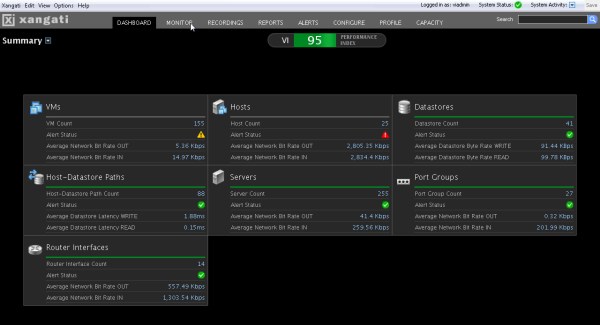
If you have a single vSphere server with local disk, and everyone uses VNC to get into their VMs, then the answer is “you might not need it.” But if you have external dependencies like networks, shared storage, variable load patterns, multiple VI admins creating and provisioning and resizing VMs without your blessing, or (gasp) VDI, you owe it to yourself to give XMD a look. You may make up the costs of deployment during your trial.

One thing vCenter doesn’t necessarily show you, for example, is bursts or storms of resource demand. Anyone who’s ever set up Cacti or MRTG or the like for metrics has found that bursty traffic definitely shows up on user experience, but most practical metrics tools will even out the peaks and you find yourself telling your end user “we’re only seeing 50 IOPs” when that twenty seconds of 500 IOPs may have been causing a serious impact. Or worse, you find yourself passing that trouble ticket off to the storage guys who see the same, and they tell you and your user two days later. Meanwhile, the problem still happens, and you’ve got a grumpier user.

Xangati focuses on fine-grained and broad measurements across your virtualization platform. And even better, they can tie together those bursts to help you find what’s cause and effect, and what’s just the result of troublesome trends in your environment. You can start from the Dashboard and find anything that their software has detected as out of the ordinary, and see the general pulse of your monitored environment as well.

You’ll also be able to dig into linked issues, linked metrics, and look at the measurements immediately surrounding an alert or issue. Maybe the first thing you saw wasn’t the cause, but just a slow decaying effect. XMD will help you track that down even if the issue (or the machine) is gone. Sure, it doesn’t have the 90s retro feeling of just having zoom in/zoom out on a graph, but you’ll get over the loss of greybeard cred when your NOC doesn’t call you as often.

Do These Pants Make My VM Look Too Small?
If you’re the only VI admin in your environment, and you provision all the VMs and storage, you’re probably tired by now. But you probably have a firm grasp on what your environment looks like and where it’s growing and going.

More likely though, you have a few people adding, reconfiguring, and removing VMs, storage, and maybe even network links or cluster nodes. And it’s not inconceivable that you have a spreadsheet somewhere tracking what’s where. Hopefully you’re keeping enough detail to know how fast your datastores are growing, how much of your network links are utilized, and how far in advance you need to boost your environment to avoid affecting users and products. No? Didn’t think so.

The new feature that really jumped out at me from the latest Xangati demo was their new capacity planning feature. This is already a very useful feature for a first iteration of the component, and you don’t pay anything extra for it once you’ve got the XMD in place and licensed. You set your thresholds of concern (maybe based on hardware acquisition turnaround time, comfort level, or how fast you expect Double Space or Stacker to kick in on your storage server), and XMD watches capacity, utilization, and basic trending for the resources.

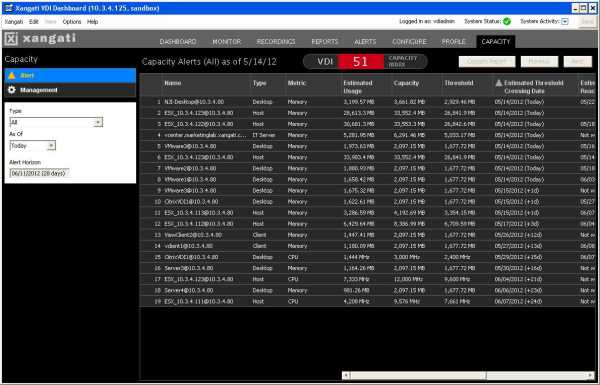
For now, as you see in the screen shot above, the focus is on objects. You can see a particular resource and metric and see status of that pairing on a per-day basis. This won’t save you from the 2:30pm “let’s fill up all the VM disks” party that your favorite developer with root access decides to do, but as code creep, log bloat, and memory leaks work their way into your nightmares, XMD will warn you and give you some time to address the issue. They’re already planning to do capacity monitoring on a cluster or resource pool basis, as I recall, so it will become an even stronger tool in your arsenal in the future.

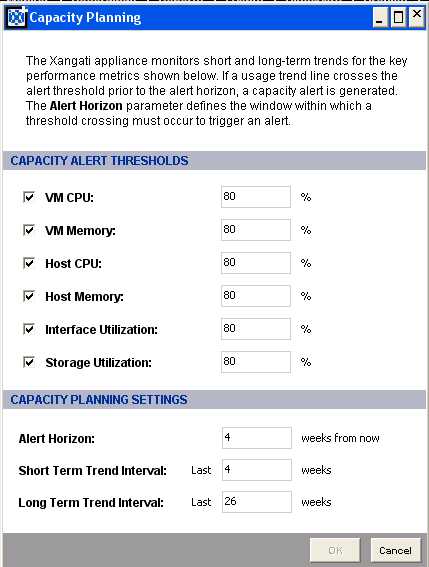
One item I discussed with Xangati as future improvements on this feature is what I’ll call trend trending. Look at line 15 in the chart above. Now back at me. Now back at line 15. I’m not on a horse. But line 15, a virtual desktop, sees increasing CPU usage and XMD tells us we have 15 days at current trend before we cross our 80% threshold (set in the dialog box at left). At the edge of the screen we see that we’ll probably reach 100% capacity on June 7th, about a week later.

Let’s pretend that’s storage utilization instead, just for the sake of argument. What happens if something changes drastically, say, Thursday night. Instead of that gradual growth of your log files and core dumps aiming for 15 days from now, the developers add a new feature that dumps core every 15 minutes, and we  find ourselves looking at threshold in 3 days, or worse, 100% capacity in 7 days. I’d like to see some advanced (and probably optional/granular) trend monitoring so that I’d get a special notification saying “not only are you going down, son, you’re going down faster than you were yesterday.”

I’d be more interested in storage/memory/network utilization on guests, and cpu/memory on hosts. If you’re overprovisioning your VDI resources, you may want more frequent info since one user discovering bittorrent or bitcoin can cause some pain (if you don’t have them blocked).

So where do we go from here?

I’ve only really touched on one feature of XMD, but it’s the one that means the most to me at the moment. If you’re in a VDI environment, you owe it to yourself to talk to Xangati or just get a demo set up with them. I’m not in a VDI environment, so I can’t speak to it very well, although I’ve seen that you get at least as much benefit as you do in the VI environment, but with more potential direct impact on your users in realtime.

As I get my instance of the VI Dashboard going, I’ll probably revisit the capacity planning as well as the other features, and I may get around to some of my other notes as well before the next release. But what’s coming next from Xangati, and what am I hoping for?

First of all, they’re already working on doubling their scaling to support more vCenters. More frequent trend updates for the capacity management piece, live analysis connecting to capacity management, and customizable dashboards across the product are all expected in upcoming releases, as well as more integration and interaction at the hardware level.

And, as much as I’d been hoping for XenServer integration, I am happy to see that Xangati are branching out to a second hypervisor, although it is in the form of Microsoft’s Hyper-V. You’ll see some special value from XMD in the Hyper-V world especially around storage visibility, and those of you with Technet or MAPS access will be able to test this out under existing license without the wonderful 60-day lab reinstall that VMware blesses us with.

Beyond the above, I’m hoping to see improvements in alert sensitivity and trend tracking/alerting on the capacity piece as well, although they’re not firmly carved into the roadmap yet. And I’d really love to see XenServer integration–Xangati has a good relationship with Citrix on the VDI side, so hopefully this will lead to hypervisor synergy as well.

Bonus: Come meet Xangati and Tegile and Hotlink (Oh My!)

By the way, if you’re in the San Francisco Bay Area, you can come meet Xangati (and Tegile and Hotlink) at this week’s BayLISA meeting in Mountain View. It’s free to attend (although we do ask you to RSVP so we can plan pizza and seating) and you’ll get to see a live demo of the freshest XMD around. See details at the previous link, and come join us Thursday night. As another disclaimer, I’m somewhat in charge of BayLISA these days, so it makes me feel good to see a full room, but I don’t get anything tangble if more people show up–more likely I get *less* pizza–but it’s worth it.

Credits and Disclaimer

I would like to thank Xangati for providing the screen shots in this entry… my lab isn’t quite up to providing useful trends yet, although it will be soon.

They have also provided me with a NFR/lab license for XMD which I appreciate, and am looking forward to warming up soon. However, you can test out everything I’ll be working on with the free trial (for vCenter) and the free single-server vSphere edition.

My thoughts in this piece (and in general) are not based on a free license, they’re based on what I find interesting and useful. If I weren’t excited about this technology, I would have left it to others to shout about.

[1] Most likely unrelated to the artist behind the True Blood comics and other IDW classics. And he probably gets enough Poco and “Your Mama Don’t Dance” jokes already, so I’ll spare him those for now.

Some Related Links…

Here are some write-ups on Xangati from Virtualization Field Day 2 in February:

And here are some more recent pieces around the launch:

Let me know what you think in the comments below!

rsts11: Silicon Valley VMUG UC, and Storage Field Day

Quick thoughts on the SVVMUG Conference

I survived the Silicon Valley VMUG (VMware User Group) conference event on Wednesday. It was an interesting mix of educational and informative presentations, and vendor exposure and conversations. I have some thoughts to write on later… including a grand unifying theory of tech conferences (that will require a bit of graphic work)… but I thought I should put a note out there to thank the organizers for making an excellent event for the 500+ of us who registered, most of whom seem to have shown up (as I did).

I also thought I’d mention the VMUG Advantage membership option, which I only learned about the day before. You can get a free VMUG membership, and associate with your local VMUG if one exists, at http://www.vmug.com. This will likely qualify you for any local events like this week’s Silicon Valley conference, and give you access to the local VMUG community.

If you’re looking at using classroom training or certification testing from VMware, going to VMworld, or purchasing a license for Workstation 8 or Fusion 4, look into VMUG Advantage. For $200 a year (or less with a discount code), you get access to a wide range of eLearning courses, 20% off on classroom instruction, 20% off one certification exam a year, $100 off VMworld registration, and a 30% discount on one of the desktop virtualization products per year.

(I believe you can choose Workstation or Fusion, and not both, for this discount… however, if you’re on VMware’s marketing mailing list, you will probably see a 15-30% discount on Workstation every few month, and I’ve seen 20-40% discounts on Fusion in the same mailings.)

By the way, I attended this event as a free member of the local VMUG, and while I received free lunch and coffee/soda, these considerations did not impact my opinions of the sponsors.

Oh look, Storage Field Day

I’m also pleased to report that I’ve been invited to be a delegate[1] to the first Storage Field Day later this month in Silicon Valley. Looking forward to seeing Robin Harris and The Other Scott Lowe again, and meeting more independent thinkers on storage for the first time. There will be a couple of familiar names on the other side of the blogger “dragon’s den” tables as well, including PureStorage and Coraid, and some folks I haven’t been all that formally introduced to, such as Nimbus Data and Tintri (the latter I actually met Wednesday at the VMUG).

Early in my career I did a fair bit of storage work, and much as going to work for Nortel pushed me into networking, going to work for 3PAR pushed me even further into storage technology. I’ve done a range of implementations since then, from what was more SPOD than JBOD (i.e. “steaming pile”, or at least overstacked pile), to conventional Engenio and EMC and 3PAR, so it will be particularly intriguing to come up to speed on what’s closer to the bleeding edge, or at least the warm and shiny edge… and have a feel for what’s coming in advance.

I expect that my “deep generalist” nature is a benefit that I bring to the Tech Field Day events. There are a lot of people there who are waders-deep in the specific topic, and I may learn as much from the other delegates as I do from the presenters and sponsors, but by being ankles deep in almost everything (except sales… whew…) I can offer a valuable perspective and maybe ask a question that wouldn’t be obvious to someone who lived the specific flavor of technology 24/7. Like why there’s a Rick Roll easter egg[2] in the new vSphere Client.

So I’m looking forward to the Storage Field Day experience on April 26-27, and the “bonus” Solid State Storage Symposium on April 25. You can probably still get a ticket to SSSS if you’re gong to be near San Jose, California on April 25, and you should be able to see most of the presentations all three days via online streaming at techfieldday.com. You can also keep an eye on realtime conversations on Twitter on the hashtags #SFD1 and #techfieldday.

[1] As with all Tech Field Day events, the sponsors and presenters will be providing for my lodging, meals, and entertainment during the event. They may also provide gifts or promotional items. We definitely appreciate their support for these events. However, as Tech Field Day delegates, we’re not beholden to the presenters as far as content and perspective (or even reporting/blogging at all) . You’ll hear what each of us thinks, from our own perspectives, if we think it’s worth writing or talking about.

[2] I hope you didn’t look too long for the easter egg… I’m just making that up.

rsts11: My first Tech Field Day is over…

As the only VFD2 participant who does not have to go through TSA security in the next week, I got delegated to take the open bottles of adult beverages home. So while I haven’t had all that much to drink these past few days, the final toasts have been raised and downed, hands have been shaken, and in the morning I’ll head all nine miles home and go back to my day job on  Monday. I think by then, the other delegates will all have left the west coast.

I still have a couple of sessions to write about, and I’m planning to do so next week if not before. PureStorage brought back memories of my days early on at 3PARdata, before they dropped the “data” so to speak. Xangati is an impressive solution for tracking performance and patterns in a virtualization environment. And despite my inaccurate guess at the Dell model of server used by Pivot3, they had an interesting product for distributed ESXi/VDI that I’m pondering a bit further.

I just wanted to take a moment to thank my colleages at Virtual Field Day 2 for making it an impressive experience for me… to Matt Simmons for a great job running the show in Stephen’s absence, and Stephen Foskett and all of the past delegates who decided to invite me to participate.  It was a bit overwhelming at times, when I stopped to think about how intensely involved in virtualization these guys are. I’ve been a deep/broad generalist for most of my career, and while I’ve done virtualization of multiple flavors and degrees, it’s not my living. But I think maybe that balanced out some of the crowd and brought a different perspective into the mix, which is a valuable element for a gathering such as this.

So here are the folks you should go check out. As they blog about the sessions we shared, I’ll add links to my posts about them, but they’re all interesting and involved and interactive, so I can’t over-recommend giving their respective sites a look.

Yeah, that copy and paste didn’t come through so well, but it should work.

So I hope to be invited back for a future event, and I’m pleased with the experience I had over the last 50ish hours. I don’t think this more-than-one-blog-entry-a-week thing will last too much longer, but I still have a draft on my Shuttle VMware box and some other stuff to share soon.

Thanks all… see you virtually, and physically soon.


rsts11: #VFD2 Day 0 rollup

Greetings from the Silicon Valley representative/delegate to Virtualization Field Day 2 by Gestalt IT. In about 9 hours we’ll be on a bus/limo to the first presentations of #VFD2 (watch our updates throughout the rest of the week on Twitter!).

Let’s Get It Started In Here

We had our opening ceremonies/hometown gift exchange/thorough discussion of kangaroo scrotums (hope there wasn’t an embargo on those) and great dinner at Zeytoun across the road from our home base at the Doubletree. I won’t write much about the meal (although I will probably Yelp it later).  It was fun getting to know and chat with the other eleven delegates and our fearless leader Matt Simmons (@standaloneSA). We’re missing Steve Foskett, but he had family priorities that meant it was right for him to miss his first of 14 TFD events.

I have to admit it’s weird being the only one from Silicon Valley here. It’s easy to live in the Valley and feel like technology only exists here, or only thrives here. But we’ve got folks who make their living and livelihood at virtualization from across the country, across the pond, and somewhere that has a famous opera house on the other side of the world. So it can give a sense of proportion, although I am happy to have Fry’s, Central Computer, Action Surplus, Weird Stuff, and Halted within a couple miles of home, and most of the big names in technology nearby as well.

wolfgang puck single serve

In-room coffee done right

Welcome To The Hotel (in) California

I’m back in my room, and I think many of the delegates took the opportunity to get wound down for bed in their respective rooms across the hotel (we’re not the only geeks in the house — Ethernet Summit is winding down tomorrow it seems — but we’re not wearing name tags).  I have to make some comments on the hotel experience, having spent some time in hotels in Las Vegas, Seattle, and Los Angeles in the last six months.

The in-room coffee is, in fact, the best I’ve found yet. W Seattle and Hard Rock Hotel did not have in-room coffee, and LAX Marriott has weird disposable-brew-basket coffee that, while it tastes good, is really enough for one cup but they only give you one unless you ask. Doubletree is putting out a two-bay Wolfgang Puck branded pod-based coffeemaker that uses Senseo-style pods (Puck’s line is provided though, individually wrapped). There are two cups, two sleeves, two lids, and enough coffee and treatments for 2-4 cups. It’s probably not as good as I would have made with my Clever Dripper and some fresh-ground coffee, as I went for on my LA trip last weekend, but it’s pretty good, convenient, and drinkable even after Starbucks closes.

Also, the service is excellent so far. I called their “careline” to get help with the wifi, figuring out how to get my free service provided as part of the reservation. It was explained promptly and courteously, and I even had time to add my Hilton number to the reservation before I got overly annoyed with the phone itself. 🙂 The people are great, greet you by name, and provide all the information you need (and a warm chocolate cookie at check-in too).

I have to say the room and the experience almost rise to the level of a Disney deluxe resort at WDW. Cell/wifi is better here than at Wilderness Lodge, but it’s much closer in experience quality than any of the other hotels I’ve been in over the last few months. (When I last stayed at Wilderness Lodge, I was not a cast member, so I didn’t get special rates or treatment… my last visit to WDW was as a cast member but at a moderate resort.)

I’ve already discovered a thing or two I’ve forgotten, and while I could drive home to pick up a few things, it wouldn’t be in the spirit of the event, so I’ll just rush to the lobby store in the morning… and be grateful I had a spare mini/micro USB adapter still packed from the weekend to charge my phone up.

Tomorrow, Tomorrow

Tomorrow we’re off to see Symantec in the morning (did they really say we’re leaving the hotel at 7:30am? AIEEE), and then Zerto and Xangati will come see us in the afternoon. I’ve worked with Symantec in the enterprise antivirus/endpoint protection arena as a customer before, and have long used their Norton end user security products at home. Never got around to deploying their backup solutions (one of my two certifications ever was Legato Networker about a decade ago).

Zerto is new to me, other than an amusing Twitter exchange last week… I met Xangati at Tech Field Day 5 over a year ago now as a fly-on-the-wall sort of guest, and am looking forward to seeing where they’ve come with their offerings.

Disclaimer

As you’ll see me mention a few times this week… the presenters/sponsors for VFD2 are providing for my lodging, meals, and entertainment over the next 48 hours, and may also provide gifts or promotional items. We definitely appreciate their support for this event. However, as Tech Field Day delegates, we’re not beholden to the presenters as far as content and perspective (or even reporting/blogging at all)  by virtue of their generous support of the event. If something is interesting, noteworthy, yawnworthy, or downright unfathomable, you’ll hear it from me because it’s what I think, not because the provider of said something supported the event. If it’s just bleh, you may not hear about it at all, but hopefully that won’t happen. Same goes for the other delegates as well; we’re here as independent thought leaders, not cheerleaders (I’ll be the first to say I shouldn’t be wearing a skirt anyway).

More tomorrow… watch Twitter for live treatment of the presentations, and check back on rsts11 for more detailed coverage as time permits and interest warrants.