What’s a commodity server? Why should you want one?

A lot of people talk about commodity servers, especially where and when to use them, and many have good reasons one way or the other. However, not everyone has a good definition of what makes a commodity server (or platform), and that can lead to confusion.

Today on RSTS11, I’m going to look at contexts where a commodity server or platform is important, how I define the concept, and what you might find when getting into a discussion about commodity servers.

What’s a commodity server?

My definition of a commodity server is a piece of fairly standard hardware that can be purchased at retail, to have any particular software installed on it.

I further define ‘fairly standard’ to mean an industry standard platform that does not require custom coding to implement an operating system on. I define ‘purchased at retail’ to mean that you can call/email/visit the website of a vendor and acquire the hardware without a pre-existing contract or design process (vs OEM/ODM arrangements).

Some examples of commodity servers would be any server you can order from Supermicro (or its integrators), HP, Dell, Cisco, Lenovo, or various other maintream vendors. If there’s a “Buy now” button next to it on their website, and you can order it with a credit card right then and there, it’s probably commodity. These are sometimes called “Industry Standard Servers” but there may be some distinctions between the two concepts. And in theory, blade servers could count (since they don’t require anything custom other than the chassis) but I generally don’t think of them in the category.

The goal for a platform that’s based on commodity servers is that you’re not tied into a given brand of server, or seller of servers, for acquiring your hardware. If a vendor fails you (i.e. trying to force you to buy service contracts or extra licensing for basic functionality and maintenance), you can go to another vendor for the servers, and as long as you specify components (cpu, memory, disk, network) properly, you’re good to go.

Where would I use a commodity server?

#1: Hadoop.

One place commodity servers are often discussed is in Hadoop clusters. Hadoop was designed, on one level, to be the RAID of compute farms. You use inexpensive, homogeneous servers that can be easily replaced, with software that can handle losing a few servers at a time.

There is a not-uncommon misgiving about Hadoop’s node model; namely, that using branded servers is somehow counter to the nature of Hadoop. The impression some folks get is that since Hadoop doesn’t care about any given server (at least for datanodes and tasktrackers), you have to go with the cheapest possible hardware, possibly even building it yourself. Those folks believe that spending money to have someone else build the servers for you, or going with a brand name server, is a bad thing.

I see their perspective, in a sense. If you have a team of people who can maintain your servers at that level, rebuild them when they fail, and keep track of component versioning and compatibility and firmware levels, that’s great. Larger environments (Yahoo, Google, etc) may have this, but your typical environment with fewer ops people than Google has chefs can’t hold up under those considerations.

On the other hand, if you pick a brand of servers, you’re more likely to have consistent configurations, support mechanisms, warranties, remote management, firmware updates, and so forth.

Mind you, some vendors do change hardware or firmware in mid-release without telling anyone (even Apple’s done it a few times), and no vendor has perfect support or perfect firmware.

But the advantages to focusing on what your team can do (deploying and supporting applications and platforms, satisfying your users), and letting others do the stuff that’s not in your core (building servers, stocking hard drives and memory by the ton, making bezels), should be pretty obvious if you can’t allocate a full team to the latter.

Where else would I use a commodity server?

#2: Storage platforms.

A Twitter friend who works for a VAR was asking about scalable storage platforms that run on commodity hardware. Think a mixture of Nexenta, Nutanix, and VMware Virtual SAN (a.k.a. vSAN), but not any of those particular ones for reasons that may become evident (they don’t have to, as they’re his requirements, not ours, of course). One of the first recommendations was Nutanix “because it runs on commodity hardware.” 

There are a lot of virtualization and storage vendors whose platform is based on a commodity hardware base. However, I don’t consider them a commodity platform unless I can choose the server to run on (within reason, of course… I’ll keep my Macintosh Quadras in storage for this project).

I completely understand why companies use, for example, Dell Poweredge R-series servers (or Intel reference chassis back in the day). You can buy them in bulk, don’t have to do the interoperability testing for standard hardware and firmware, parts and maintenance are easy to arrange, and they tend to have a reasonable shelf life. In case of an emergency, you can buy one that has the OEM’s bezel rather than yours. And you can test your solution (and iterate on your logo and company name a few times) before investing in your own bezels anyway. 

And if you’re a VAR wanting to deploy a solution on the hardware your company has a particularly good relationship with, or a warehouse full of off-lease hardware from, or just a company your client prefers, the model that Nutanix or Nimble Storage or Pivot3 uses wouldn’t work for you. That doesn’t mean their model (which is far from uncommon in the rackmount appliance world) is bad or wrong, it’s just not a fit in this case.

Speaking of cases, one of the concerns that came up was needing short chassis. Sometimes you have a customer needing short cases (think Rackable half-depth, for example), or maybe a desktop-looking platform for SOHO/ROBO/POHO.

So we’re left looking for something that is readily available like Nexenta, serves out multiprotocol storage like Nutanix, scales out like Nutanix and vSAN, but isn’t tied to VMware like vSAN. In this context, while the definition is like Michaelangelo’s model–simply chip away anything that doesn’t look like our scalable platform on our choice of hardware.

So where do we go from here?

The conversation on Twitter led us toward Maxta, and toward Nutanix being curious about what form factor my friend was looking to meet. While it’s outside the scope of this post, if you have other suggestions for fellow readers of RSTS11, feel free to suggest them below.

If you have thoughts on commodity servers, or questions about anything up there, feel free to chime in as well.

Disclaimer (I love these things): I have friends and acquaintances at most of the companies mentioned above. However, my paraphrasings and overgeneralizations should be taken in context, and not as representing any official positions or standards of any of them.

And today’s pithy tweet:
Is Licensing Sexy? Asigra Might Think So, And So Might You

We were pleased to welcome Eran Farajun and Asigra back to Tech Field Day with a presentation at the VMworld US 2013 Tech Field Day Roundtables. I’ve also seen them present a differently-focused talk with live demo at Storage Field Day 2 in November 2012.

Disclosure: As a delegate to the Tech Field Day Roundtables at VMworld US 2013, I received support for my attendance at VMworld US. I received no compensation from sponsors of the Roundtables, nor Tech Field Day/Gestalt IT, nor were they promised any coverage in return for my attendance. All comments and opinions are my own thoughts and of my own motivation.

Asigra Who?

Asigra has exclusively developed backup and recovery technology for over 25 years. Let that sink in for a moment. Most of the companies I’ve worked for haven’t been in business for 25 years, and most companies change horses if not streams along the way.

But Asigra continues to grow, and evolve their products, a quarter of a century into the journey. They introduced agentless backup, deduplication (in 1993), FIPS140-2 certification in a cloud backup platform, and a number of other firsts in the market.

One reason you may never have heard of Asigra is that they don’t sell direct to the end user. They work through their service provider and partner network to aggregate access and expertise close to the end user. Of course the company backs their products and their partners, but you get the value add of the partner’s network of support personnel as well. And you might never know it was Asigra under the hood.

So what’s Asigra’s take on licensing?

In 1992, Asigra moved to a capacity-based licensing model, one that many of us are familiar with today. You pay a license fee one way or another based on the amount of data that is pushed to the backup infrastructure. This has been seen in various flavors, sometimes volume-based, sometimes slot-based or device capped. Restores are effectively free, but it’s likely that you rarely use them.

Think in terms of PTO or Vacation days (backup) and Sick Days (recovery). You probably have a certain amount of each, and while PTO may roll over if you don’t use it, those 19 sick days you didn’t use last year went away. Imagine if you could get something for the recovery days you didn’t have to use. Asigra thought about this (although not with the same analogy) and made it happen.

Introducing Recovery License Model

So in 2013, Asigra changed to what they call RLM, or Recovery License Model. You pay part of your licensing for backups, and part for recoveries. There are safety valves on both extremes, so that if you do one backup and have to restore it all shortly thereafter, you’re not screwed (not by licensing, at least–but have a chat with your server/software vendor). And if you have a perfect environment and never need to restore, Asigra and your reseller/partner can still make a living.

Your licensing costs are initially figured on the past 6 months’ deduped restore capacity. (After the first two 6-month periods, you are apportioned based on the past 12 months.) If you restored 25% of your backups, you pay 50 cents per gigabyte per month (list price). If you restored 5% or less of your backups, you’re paying 17 cents per gigabyte per month.

You don’t get fined for failed backups of any sort. Hardware failure, software failure, or some combination–it doesn’t count against you. You also get a waiver for the largest recovery event–so if your storage infrastructure melts into the ground like a big ol’ glowing gopher, you can focus on recovering to new hardware, not appeasing your finance department.

For those of you testing your backup/restore for disaster recovery purposes (that’s all of you, right?), you can schedule a DR drill at 7 cents per gigabyte per month for that recovery’s usage. Once again, it’s deduped capacity, so backing up 1000 VDI desktops doesn’t mean 1000 times 3GB of Windows binaries/DLLs. And your drill’s data expires at the end of the 6 month window, so don’t count on fire drills as permanent backups.

So where do we go from here?

I know a couple of my fellow delegates were disappointed with the focus on Asigra’s licensing innovations, and that there wasn’t more talk of erasure codes and app-centric backups, but they’re probably not the ones writing the checks for software licensing for enterprises. 

Is this the sexiest thing you’ve seen in tech this quarter? Maybe not. I’d point toward Pernix Data and Infinio for that distinction, in all honesty. But Asigra’s RLM is yet another in a series of innovations in what might be the most innovative DR/BC company you’d never heard of before.

Asigra estimates immediate savings of 40%, and long term savings of over 60% by separating backup and recovery costs.

As an aside, Asigra’s latest software version, 12.2 (released earlier in 2013), backs up Google Apps as well as traditional on-site applications and datastores. Support for Office 365 backups is coming soon.

Links

How do you download storage performance? A look at Infinio Accelerator

Many of you joined us (virtually) at Tech Field Day 9 back in June for the world premiere presentation of Infinio and their “downloadable storage performance” for VMware environments.

In the month and a half since we met Infinio, I’ve been planning to write about their presentation and their product. It’s an interesting technology, and something I can see being useful in small and large environments, but I hadn’t gotten around to piling the thoughts into the blog.

I did find that I was bringing them up in conversation more often than I do most Tech Field Day presenters (with the possible exception of Xangati). Whether I was talking to the CEO of a network optimization startup here in Silly Valley, or a sales VP for a well-established storage virtualization player at the Nth Symposium, or a couple of others, I found myself saying the same things. “Have you heard of Infinio? They just made a splash onto the scene at Tech Field Day 9. You should check them out.”

What is an Infinio?

201306 TFD9 Infinio 01 Peter Smith Model

Peter Smith, Director of Product for Infinio, introducing the “Infinio Way” of deploying the Accelerator

Infinio is a two year old, 30ish-person startup whose Accelerator product is designed to be an easy drop-in to your VMware environment. They’re focusing on making the product easy to try (including substantial engineering focus on the installation process), simple and affordable to buy, and visibly useful to your environment as soon as possible.

CEO Arun Agarwal talked up the focus on the installation process, but even more interesting was his focus on the trial and sales model. This seemed important at the time, but as time passed, I really appreciated the idea more.

Just this past week, I downloaded a “free” VM from a much larger company, only to be told in a pushy followup email that I need to provide a phone number and mailing address and get trial licenses and talk to a sales guy on the phone to do anything with the “free” VM. It was annoying enough to get to this point, and I’m disinclined to actually buy and use that product.

I want a company to provide (1) enough information on their website for me to understand the product, (2) a hands-off model for acquiring and trying out the product (even if it’s at 2am on a Saturday because I can’t sleep and I’ve got a hundred servers sitting idle in a datacenter to play with), (3) smart and non-pushy people to help me with understanding, evaluating, and maybe buying the product if I do decide to move forward–when and if I need them, and not the other way around, and (4) a product that really solves the problem.

Infinio plans to provide all these things. You can download the trial without giving a lot of information (or any, as I recall), and you can buy your licenses with a credit card on the site. This would be a refreshing model, and I’m optimistic about their being able to do it.

So what are they doing?

I was wondering that too… and seeing the phrase “downloadable storage performance” a week or so before the visit, I was dubious.

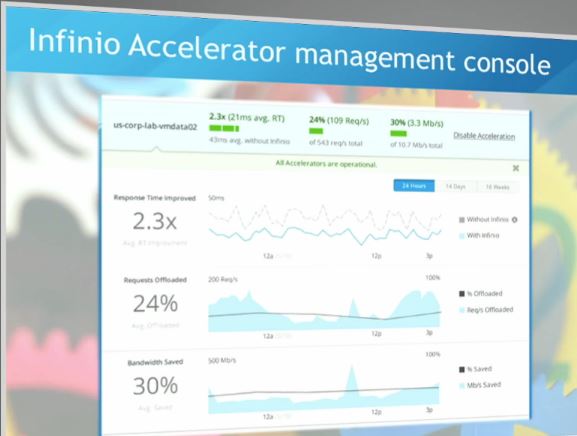
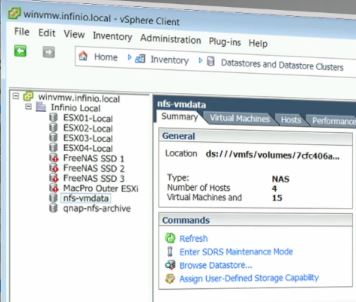
201306 TFD9 Infinio 02 Peter Smith DashboardThe Infinio Accelerator is a virtual NAS (NFS v3) accelerator for VMware. It sits between the vmkernel interface and the storage server on each host, providing a shared, deduplicated caching layer to improve performance across your systems. It also works transparently to both storage and server, so you don’t change your storage settings or ACLs (great for those of us who have siloed storage, networking, and virtualization management teams, and all the efficiencies they provide).

And possibly most impressive of all, you don’t have to reboot anything to install or remove the product.

The management console allows you to toggle acceleration on each datastore, and more importantly, monitor the performance and benefit you’re getting from the accelerator. They call out improvements in response time, request offload, and saved bandwidth to storage.

Let’s make this happen

201306 TFD9 Infinio 03 Peter Smith Improvement

It does make a difference.

Peter Smith demonstrated the Infinio Accelerator for us live, from downloading the installer from the Infinio home page (coming soon) to seeing it make a difference. The process, with questions and distractions included, came in around half an hour.

You download a ~28MB installer, and the installer will pull down about a CD’s worth of VM templates (the Accelerator and the management VM) while you go through the configuration process. (You can apparently work around this download if you need to for network/security reasons–this would be a good opportunity to enlist those smart and non-pushy people mentioned above.)

After the relatively brief installation (faster than checking for updates on a fresh Windows 7 installation, not including downloading and installing all 150 of them, mind you), Peter brought up a workload test with several parallel Linux kernel builds in 8 VMs, demonstrating a 4x speedup with the Accelerator in place even with the memory per VM halved to make room for the Accelerator.

201306 TFD9 Infinio 04 Peter Smith vTARDIS

vTARDIS, MacPro flavor

An aside about making room for Infinio: The accelerator will eat 8GB of RAM, 2 vCPUs, and 15GB of local disk space on each hypervisor host you’re accelerating. It will also use 4GB RAM, 2 vCPUs, and 20GB of storage for the management VM, on one of your hosts. So if your virtualization lab is running on your 8GB laptop, you’re gonna have a bad time, but a quad-core lab system with 32GB of RAM should be practical for testing. A typical production hypervisor host (128GB or more) will probably not notice the loss.

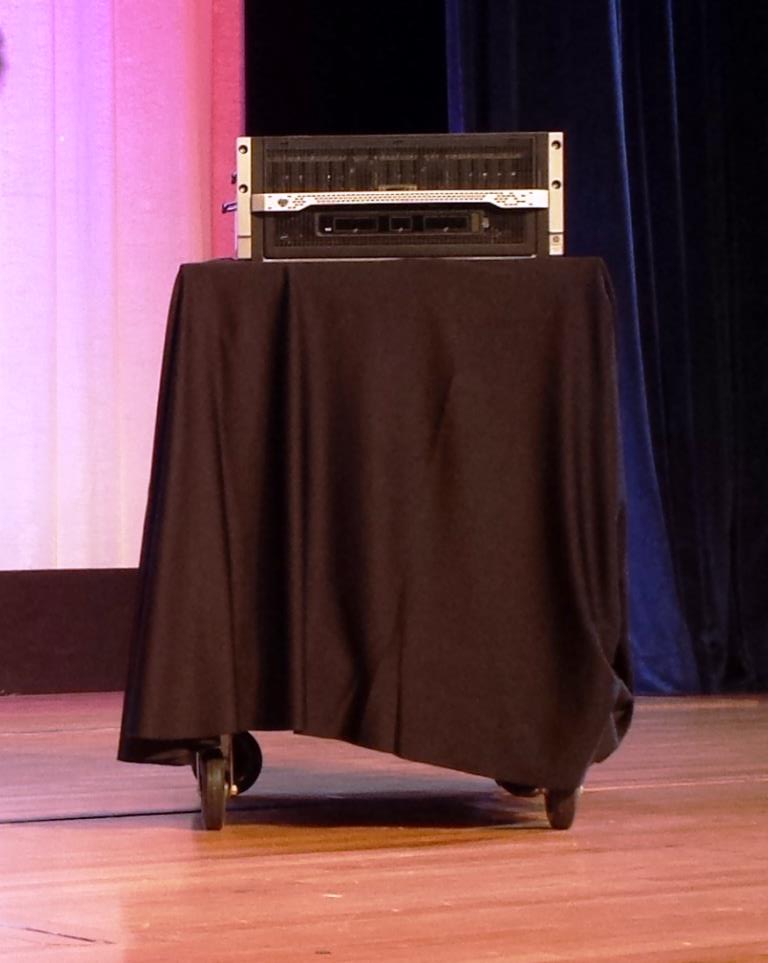
And a further aside about the demo system. As a big fan of Simon Gallagher’s vTARDIS concept of nesting hypervisors, I was pleased to see that the Mac Pro the Infinio folks rolled in for the demo was effectively a vTARDIS in itself. This is a pretty cool way to protect your live demo from the randomness of Internet and VPN connectivities and the very real risk that someone will turn your lab back at the home office into a demo for someone else, if your product lends itself to being demonstrated this way.

Some future-proofing considerations

The team at Infinio were very open to the suggestions that came up during the talk.

They have a “brag bar” that offers the chance to tweet your resource savings, but they understood why some companies might not want that option to be there. Some of us work (or have worked) in environments where releasing infrastructure and performance info without running the gauntlet of PR and legal teams could get us punished and/or fired.

They took suggestions of external integration and external access to the product’s information too, from being able to monitor and report on the Accelerator’s performance in another dashboard, to being able to work with the Accelerator from vCops. And they’re working on multi-hypervisor (read: Hyper-V) support and acceleration of block storage. Just takes enough beer and prioritization, we were told. 

So where do we go from here?

Infinio is releasing a more public beta of the Accelerator at VMworld in San Francisco in just a couple of weeks. Stop by and see them if you’re at VMworld, or watch their website for more details about the easy-to-use trial. You can sign up to be notified about the beta release, or just watch for more details near the end of August.

The pricing will be per-socket, with 1 year of support included[1], and hopefully it will be practical for smaller environments as well as large ones. We will see pricing when the product goes to GA later this year.

I’m planning to get the beta to try out in my new lab environment, so stay tuned for news on that when it happens.

And if you’re one of the lucky ones to get a ticket for #CXIParty, you can thank the folks from Infinio there for sponsoring this event as well. And I may see you there.

Disclosure: Infinio were among the presenters/sponsors of Tech Field Day 9, to which I was a delegate in June 2013. While they and other sponsors provided for my travel and other expenses to attend TFD9, there was no assumption or requirement that I write about them, nor was any compensation offered or received in return for this or any other coverage of TFD9 sponsors/presenters.

Some other write-ups from TFD9 Delegates (if I missed yours, let me know and I’ll be happy to add it):

[1] Update: When we talked with Infinio in June, they planned to include 3 years of support with the initial purchase. They are now planning to include 1 year with renewals beyond that being a separate item. This should make the initial purchase more economical, and make budgeting easier as well.

Rough cut: HP Moonshot and CEO Meg Whitman at Nth Symposium 2013

I gotta say the withdrawal symptoms from daily Disneyland visits are getting milder, but I’m home from a week in Anaheim for HP Storage Tech Day  and Nth Generation’s 13th Symposium. If you didn’t see it, my preview was posted last month here on rsts11.

I’ll have some more detailed thoughts, including at least one topic that I hadn’t really expected to provoke so much thought, in the next few days. But I wanted to touch on two of the highlights from the Symposium while they’re fresh in my mind.

Disclaimer: Travel to HP Storage Tech Day/Nth Generation Symposium was paid for by HP; however, no monetary compensation is expected nor received for the content that is written in this blog.

Quick Overview of Nth Symposium

Nth Symposium is an annual partner and customer summit held by Nth Generation, the leading HP channel partner in southern California. They’ve done this thirteen times now, bringing customer technologists and executives together with HP and partner representatives for a very productive event. It’s free to qualified IT professionals, so I’d suggest checking it out next year if you are in the area.

Two of the three Nth Symposium keynotes were by execs I’ve worked for before. I was farther down the org chart from (now HP CEO) Meg Whitman when I was at the shopping.com division of eBay in 2006, but she gave the executive welcome at my new hire orientation. I reported to a VP at 3PAR who reported directly to (now HP Storage VP/GM) David Scott back in 2001. I knew both would be very impressive speakers for a keynote.

HP CEO Meg Whitman

HP CEO Meg Whitman (not channeling Clint Eastwood, don't worry)

HP CEO Meg Whitman (not channeling Clint Eastwood, don’t worry)

In a definite score for Nth Generation, they convinced Meg Whitman, president and CEO of HP, to give the headline keynote at this year’s symposium.

Whitman’s ability to know on a detailed level, communicate, and see the path forward for a hugely disparate business that probably seems like it’s going that-a-way at full speed in every direction is impressive.

The high level overview of the company’s direction, and the “New Style of IT,”  was to be expected, but her willingness and ability to field unstaged questions from the audience and respond to them in an honest and aware way was what really impressed me.

“Don’t be shy, remember, I ran for public office.”
–Meg Whitman

The three questions I remember involved cross-border ordering and SKU simplification (so that you can easily order the same model for delivery to multiple countries), support cohesiveness and contactability (and responsibility), and the morass that is hp.com.

Fellow blogger John Obeto was set up for a question when Meg called out Nigeria as one of the countries that would not see SKU simplification this year. But she acknowledged that the complexity was counterproductive, and that the company is already working to solve the problems for multinational customers.

Another attendee mentioned the challenges of finding the right contact for support, especially (as I recall) when multiple product lines are involved, or when your contacts at HP leave the company. Having had my HP account manager leave after my first order a couple of jobs ago, and having had her replacements actively and effectively lose my followup business in the months that followed, I know what a pain this can be.

Meg acknowledged the problem as a significant one, suggested using a partner or VAR as an aggregator for contacts within HP (since VARs would have more access to experts and resources within the HP organization), and concluded by offering her personal email address and committing to help until other paths are finalized.

But back to John, who came up to the microphone to decry the exclusion of Nigeria for the 2013 SKU project, and to mention something that probably everyone who has tried to used the HP site for anything but B2C e-commerce already knows… that hp.com is pretty difficult to navigate. Meg once again acknowledged the problem–see a pattern here?–and said that they were working on the business-to-business (B2B) and business-to-consumer (B2C) sites separately. One is already under a substantial reorganization, and the other will follow as soon as practical.

In general, I got the sense of Meg Whitman as a CEO being not entirely unlike the (parody) President Jimmy Carter’s fireside chat from Saturday Night Live in the late 70s. I wouldn’t ask her about acid experiences, but it seemed if you asked her about something even several levels down in the chain that was affecting customers, she’d know what was going on and be able to respond to it (or be willing to take the question on and find an answer).

The Moonshot heard round the worldnth moonshot on stage

On the topic of hp.com, Paul Santeler put further time into the discussion of Moonshot in the talk that followed Meg’s keynote, but as I recall Meg also made the bullet point on Moonshot that hp.com now runs on Moonshot rather than a huge farm of servers.

To be specific, they’re using about 720 watts of power to run the whole site. Think about that… as she suggested, you probably use more power on lighting in your home than they do to run a large enterprise web site with support, e-commerce, marketing, and all sorts of other content. (Unless you’ve gone green–I think I’m at a bit under 700W between all the lighting in my home thanks to CFL bulbs, but steady-state power rating for these power supplies is 653W so they win.)

Moonshot is a sub-5U chassis that contains up to 45 server “cartridges” running the Intel Atom S1260 at 2GHz. The cartridge is a bit larger than a Kindle Fire and sports an 8GB ECC dimm, dual gigabit Ethernet (through a central switching module pair), and a single 2.5″ laptop-style hard drive that can be 500GB or 1TB of 7200rpm spinning disk a 200GB MLC SSD.

The 45G switching modules live in the center of the chassis, and the two 6SFP uplink modules give 6 1GBE/10GBE uplinks each via SFP+ connectors. Standard configuration gives you one switch module and one uplink module; the redundancy option is a custom configuration. A 40GBE module is coming soon. The systems are managed via iLO Chassis Management, and multiple systems can be daisy-chained.

If you’d seen the Seamicro systems circa 2009-2010, the Moonshot will seem like at least an evolutionary development from that concept. The first times I spoke with Seamicro about their 10U chassis, I asked about a smaller system, around 4U, with fewer than the stock 64 systems. Moonshot gives nearly the capacity of that 10U system, 40% more system RAM, dedicated per-system storage,  a third the footprint, and a lower power draw.

There are other cartridges coming, including an 8-core 32GB cassette (good for thin virtualization) and a DSP-targeted cassette (voice processing and so forth, running on ARM), so it shouldn’t be a one-trick pony platform. It won’t replace all rackmount and conventional blade servers, but hyperscale is likely to fill a few niches and simplify management and scalability.

So where do we go from here?

I’ve been a fan of 3PAR’s “Utility Storage” platform since I joined the company in 2001. (They’re now buzzwording around Polymorphic Storage which is also cool.)

One thing I asked about often during my time on Technology Drive in 2001-2002 was a smaller starting point for the InServ platform. With the E and F series, they made some steps in that direction, and I bought an E200 for high performance storage at Trulia a few years ago. But with their new 7200 model, they go even farther into the realm of possibility with a starting list price around $25k.

I’ll be bringing you some details on their platform and enhancements in the next week. I’ll also be looking at the comparison between utility computing platforms from HP and Cisco, a topic that was featured in one of the second tier keynotes.

Stay tuned, and wish me luck on the recovery from convention plague if you don’t mind.

A quick word on VAAI and FreeNAS/TrueNAS

[I have a lot of stuff in my head to tell you all about, but I also have a thousand square feet of inventory and storage to move an average of two miles this weekend… so keep an eye out for more lengthy posts coming later in the month. ]

I’m helping a friend’s startup get some infrastructure built, and one of the things I’m looking at is shoring up their VMware environment. They’re not ready for any of the common sub-six-letter names that usually come up for a vSphere storage platform yet… even a Celerra is overkill for five developers, I’d have to say.

So I was looking into VAAI support on the TrueNAS appliances from iXsystems (and of course FreeNAS itself). The first three search results I found were actually this blog, some cached twitter roll comments where I said I didn’t know if TrueNAS/FreeNAS supported VAAI.

truenas-search-rsts11

Well, I got it on good authority this afternoon that VAAI support is in the plans for FreeNAS over at iXsystems. There’s no current date for when it will be released, but they’ve jumped through a number of flaming hoops already to get ready, and will be keeping me (and you all by extension) up to date on progress.

For those of you using FreeNAS in your home lab, this probably won’t stop you from using it as shared storage for your VMware lab environment, or anything else for that matter. But if you’re considering TrueNAS for VMware storage, or need the full-on VAAI feature set, this will make things smoother in the foreseeable future.

And an unsolicited and uncompensated plug here (although if they want help testing a FreeNAS Mini Plus, they know where to find me)…

iXsystems are a hardware vendor who are a good friend to open source. They’re probably best known for their support of FreeBSD and FreeNAS (and Jordan Hubbard is joining them as new CTO this month), but they also sponsor Slackware, and make some cool storage appliances as well as a line of servers that come with open software history and support behind them. They’ve long been a friend of BayLISA, the Silicon Valley sysadmin group I’m involved with, as well as the Bay Area FreeBSD User Group and other organizations. Check them out if you’re looking for servers, workstations, or software.

Now back to moving… why did I need a Centillion 100 again? Anybody?

[PS: Welcome to all of you who followed iXsystems over here to my blog. For full disclosure, I am currently president of BayLISA, the Silicon Valley system administration user group, but this stuff is mostly written as Robert Novak, blogger, rather than Robert Novak, BayLISA cheerleader-in-chief.]