Network Neutrality may not be what you think it is

So Comcast is peering with Netflix now. To believe the flitter on my twitter feed this weekend, this is actually worse news than what’s coming out of Venezuela or Kiev. And under the flag of “Network Neutrality,” many are claiming this is the end of the Internet, un-American, more evil than that 10% of Google, confirmation of Half-Life 3, or other random things.

Good write-up on this just showed up at streamingmedia.com … more technical detail lives over there, check it out if you like.

I’ve seen arguments like “I have a cable modem at home, therefore Comcast should not be allowed to connect directly to Netflix and give me better service at the same price” and “Netflix should connect to the Internet, not to Comcast.” Neither of these really makes much sense to me.

But I may be misunderstanding net neutrality. Here’s where I’m coming from.

A description I’ve seen on Wikipedia defines network neutrality as treating data equally without discrimination based on “user, content, site, platform, application, type of attached equipment, and modes of communication.” I’m okay with this definition, until I see a better one. Comments section is below, folks.

There’s nothing in there that says a provider can’t choose how they connect to the Internet, or to other providers on the Internet. There’s actually nothing in there that absolutely defines what “the Internet” means. But if you can accept a definition of “the Internet” that includes network providers that connect to each other to get your traffic from where it’s coming from to where it’s going, whether you’re an individual/business providing a network service or an individual/business consuming a network service, you start to see how this peering agreement may not be a network neutrality violation.

Larger networked companies have been doing this for quite some time, including (I believe) the #2 consumer of residential Internet traffic. (The data on this chart are from early-to-mid 2013, but I suspect it’s conservatively believable in scale.) I’m pretty sure peering has been around since at least 1996, although it may have been more of a luxury then for “smaller” providers.

The argument that “we don’t know all the details so we must assume the worst” doesn’t hold much water either… as some folks have noted, it’s easy to assume the worst for a company with the reputation of Comcast, but it’s just as easy (and a bit more logical) to assume that a technically competent network service provider would look to optimize the path for a third to half of their customers’ network consumption.

A bus route would look to stop close to where its riders want to go; a stop at the far end of the mall parking lot makes less sense than a stop in front of a major entrance or popular retailer, for example. Is the fact of the bus not stopping in front of Hot Topic and Sbarro aswell (if you’re lucky enough to still have one) unfair? Not really.

Now to be fair, there’s a possibility that Comcast was doing something truly evil to Netflix traffic. Maybe they routed all Netflix traffic through a stack of WRT54G routers with cascaded NAT. Or maybe they had congestion issues in some areas. Maybe something between Comcast and Netflix broke. Maybe net neutrality requires an end to oversubscription. Maybe we’ll never know. (I think two of those are pretty unlikely though.)

For now, however, if you want to confuse the net neutrality concept, or distract from more substantial issues, or just troll people on the Internet, you should feel free to keep arguing that peering violates network neutrality. But if you’re not that sort of person, step back a bit, wait for actual supportive evidence one way or the other, and worst case, watch a Hulu video instead.

And a message I share on twitter every month seems pertinent here, so I’ll leave you with this:

Disclaimer: I am a Comcast residential customer, Netflix streaming customer, as well as a residential customer of an early adopter of Netflix Open Connect. I pay for all three services out of my own pocket. I’m only really fond of one of them, and it’s the least pertinent of the three to this story.

A bend in the road for Fitbit, and a year’s experience therewith

I’ve been meaning to write about my experiences with the Fitbit trackers for a while now, having just passed 12 months of using a series of three of their devices. With some new news coming out this week, this might be a particularly good time to share my thoughts.

Voluntary Recall On Fitbit Force Trackers

James Park, CEO and Co-founder of Fitbit, posted a note Yesterday on the Fitbit website (updating a note from last month) declaring a voluntary recall and end of sale on the Force tracker. Force is gone from Amazon already, and if you wanted one but didn’t get it yet, you may not be in luck.

For those of you who’ve bought the Force (a feat in and of itself) and found your skin irritated by the tracker, this is an opportunity to get a full refund directly from Fitbit and either go back to an earlier product from Fitbit, or move to a different product.

Their return page does not require that you prove or even claim injury, so if you were disappointed with the condensation issue, the clasp, or the announcement of a competing product the week after you bought the Force, you can still get a refund and move on with your life.

This move by Park and the Fitbit organization is an unexpectedly responsive action by the company. We’ve all seen companies hem and haw and blame the customer for holding the product wrong (iPhone 4 bumper anyone?), and while Fitbit did investigate the problem before ceasing sale, they’ve offered admirable support during the process.

I have not experienced the symptoms above (other than some annoyance with the clasp), so I will be keeping mine. If you don’t have the symptoms, it’s the best tracker yet, but I’ll be curious to see how long the recall/refund goes, and what’s next on the road map for Fitbit.

Let’s start with One, shall we?

In February 2013, I bought the Fitbit One tracker. This is a bean-shaped tracker that fits into a clip holder that you can clip onto a belt or pocket, a bra if you’re the sort who wears those, or probably a shirt or other clothing item.

For those of you unfamiliar with the Fitbit, it’s a fitness tracker that communicates with select phones, tablets, and computers via Bluetooth 4.0 Low-Energy (BLE). A year ago, Android support was minimal, so you had to use the USB dongle on a personal computer, or a fairly current iPhone/iPod Touch (5th Gen, I believe). There is no direct cable sync like the original, and the charger is separate from the sync dongle.

Fitbit One holds a charge for about 7 days or 70,000 steps in my experience, more or less depending on how often you wake up the display, or use the silent alarm (with its vibration mode). It is available in different colors but most people won’t notice this so much.

Fitbit PanelThe Fitbit One tracks the usual stuff (steps, active minutes, estimated calories burned, miles walked), as well as flights of stairs ascended (walking downstairs doesn’t count), and the feature that sold me on One vs Zip: sleep.
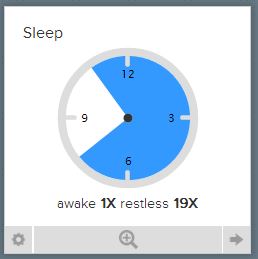
Fitbit SleepBy placing your Zip in a wrist wrap strap, and setting it into “sleep” mode, it monitors your movement and steps (if you get up and move around during the night), and rates your sleep efficiency and duration.

The Fitbit app and website offer dashboards to show your progress. You can automatically share your daily/weekly results on social media, or with “friends” in the dashboard, or both, or neither.

The One was pretty cool, although I worried that I would lose it… three or four times the One itself came out of the belt clip, usually when getting into or out of the car. And finally, on a shuttle bus at Cisco Live in Orlando, it completely left my person. I struggled on with the Samsung S-Health tracker on my phone until I got home, and then I went hunting for another device. 

Flex your fitness tracker

The Fitbit Flex is a small device that snaps flexibly into a wristband. It uses the same connections (Bluetooth Low Energy with supported devices), and charges via USB albeit with a new charger. The device comes with a small wristband and a large one, and my wrist is just about at the overlap between the sizes. I wore the large, but that doesn’t impact anything about the device itself. Replacement bands in several colors were promised, and finally became available earlier this year.

Flex removes tracking of flights of stairs, and replaces the digital display with five LED lights that can indicate mode changes (sleep, alarm, reaching your goal) as well as 10% increments toward your primary goal. For example, if your goal is 10,000 steps (the default), up to 1000 steps will show the first LED indicator blinking. From 1000 to 2000 will show the first LED solid, and so forth.

Flex also removes the need to change the mounting to track your sleep. Just tap the wristband a few times quickly and it goes into sleep tracking mode; do the same to take it out of sleep mode. It took a while to get the timing down on this, as opposed to holding down the button for sleep mode on One, but I didn’t have to carry an extra piece to track my sleep on the road.

Like the One, Flex has about a 7 day/70k step battery life.

The Justifiable Use of Force

Fitbit Force was announced in the fall of 2013. It only became readily available in the last month or two; in early November I had to call around and eventually drive over half an hour to find one of two within that range in Silicon Valley. But it was worth it.

Force brought back the clock display, with a button on the side to scroll through the various goals. It also restored tracking of flights of stairs, and while wider and heavier than the Flex, it is still light enough to occasionally forget you’re wearing it.

Force is “permanently” installed in a wristband. This forces you to make some decisions upon purchase, specifically the color (slate blue or black) and the size (small or large, as with the Flex band). It doubles the battery life to 14 days, and brings yet another unique USB charging adapter.

Alas, as of yesterday, the Force is no longer for sale. You might find one at a local Best Buy or other retailer if they haven’t been pulled/returned yet, but Amazon and Fitbit have removed them from their websites.

So what are Fitbits good for?

I won’t tell you that buying or wearing a Fitbit will make you healthier or lighter or more attractive to members of the appropriate sex. Buying one through the links above (i.e. a Fitbit One or a Fitbit Flex) might (okay, probably not), but I use the Fitbit trackers to encourage me to walk more and take the stairs instead of an elevator. The competition with some friends with trackers helps a bit as well, although it doesn’t help enough to get me to stay over 10k as often as I’d like.

It also gives me a sense of relative activity. For example, today I worked from home, ate at home instead of going out, and forgot to go check the mail. As a result, my dashboard dials are all disappointedly green  (845 steps, really?) and I know I have to get out more tomorrow. A day at Disneyland (graphed above) definitely shows a different picture, and explains why my feet were sore.

I forgot to mention earlier, but there is also a scale, Aria, that links via the same Bluetooth methods and lets you track your weight (gain or loss) in the same system as your step tracking. It’s $130, and I haven’t been able to bring myself to buy it yet, but I’m still tempted.

So where do we go from here?

The exact number of steps I walked isn’t as important to me–if it’s 10,300 vs 10,195 that is almost as important as which foot I started walking on this morning. But knowing how close I am to average/goal walk levels, and hopefully being inspired to keep up with my friends and my goals, makes a much bigger difference.

Could I do the same with Samsung’s S-Health app? Sure. But I have to have the phone in my pocket or on my person for it to work. They never came out with the S-Band in the US at least, so the only available sensor is in the phone.

There’s also a Moves app that tracks your travels, and I find it nice to see how long I spent driving vs riding or walking, but again, it’s based on the phone being on my person. If I walk down to the far end of the building and leave my phone on the charger, Fitbit catches that. Moves and S-Health don’t.

There are other devices as well, and you may find Jawbone or Withings or any number of other devices that will fit your needs. But I’d seriously consider Fitbit.

As the news on Force shows, they are responsive to their customers. They have been very generous in replacing failed or lost devices in the past (which is why I have a Fitbit One sitting here again). Keep your receipts, kids.

And they have been innovating regularly over the past few years. I expect that even with the Force withdrawal, they will have something similar in scope and even better in some way, by the end of the year if not sooner.

All things considered, I’ve been happy with my Fitbit experience over the last 12.5 months. I wish they’d standardize their charging connections, and get accessories (bands, clasps, etc) out to retail faster, but I’ve worked with companies whose growing pains were far worse. 

What has your experience been? Feel free to chime in below with your experience with these or other trackers.

Disclaimer: I’ve purchased three Fitbit trackers at retail with my own money. The lost Fitbit One was replaced by Fitbit at no expense to me, just by my filing a ticket and asking if something could be done. I may have gotten a discount on the first one at Verizon with my corporate plan (I don’t remember), but I’ve received no consideration from Fitbit or any reseller at any time.

 

How can your big tech conference experience benefit the less fortunate?

[I’m big on soft topics this month so far, but don’t fear, I have some other technical posts coming up.]

I was tweeting with Calvin @hpstorageguy Zito this morning, in response to an experience he had with a homeless person in San Francisco during VMware PEX (Partner Exchange).


When I was up in San Francisco for VMworld last summer, I had two encounters with homeless folks. One was a man being very aggressive outside CXIParty, which was not conducive to help, but the other was less uncomfortable.

A guy who had very recently received a tee shirt that had been given out in the vendor expo that week asked if the company on it was a good one. And it got me thinking. I couldn’t answer his question, honestly, although I had a vague memory of what that company did. I probably had the shirt in my bag back at the hotel, and it’s probably gone to Goodwill since then. So did it do anything for me? Not really. Could it have helped someone else? Almost definitely.

And having been accosted by many vendors at the shows last summer promising a chance at a free iPad, I got to thinking. The cheapest refurbished iPad on the Apple store today is $339. That’s probably going to feed a family of four for a month, maybe more. Not glamorously, and probably not at a San Francisco boutique grocery, but through a food pantry it will definitely make a difference.

Between my own experiences and Calvin’s thoughts this morning, I’m wondering what tech conferences can do to help enable attendees to help the host city’s homeless and helpless, and what attendees would do themselves.

How can we help?

It would be easy to find a local charity that helps the less fortunate, and find a way for attendees to contribute. However, there’s a lot more that could be done.

Vendors exhibiting in the Enormous Room Of Solutions could donate their leftover wearables and flashlights and other useful non-tech trinkets to local shelters. Maybe replace your tee shirt with a smaller take-home piece of swag (8GB USB drive with your glossies and demos?) and a donation on the booth visitor’s behalf to such a local shelter or food pantry or soup kitchen.

Conference organizers could simplify the donation of swag on site, for folks who don’t want to walk the mile to Glide or Goodwill or the like. Consider integrating a benefit operation into the customer apppreciation party or other large events. Make sure you have something helpful to do with the catering leftovers (no matter how much we complain about the food, it’s still better than what thousands of San Franciscans have to eat every day).

And whatever you do, make it clear (tastefully) what you’re doing. Many of the 20k+ people at VMworld or Cisco Live assume leftovers get thrown away at the end of the day. And we’ve all heard exhibiting vendors complain about having to take shirts home at the end of the event. If you can make a difference, make it clear.

So where do we go from here?

I’d love to hear from folks involved with organizing the big conferences, as well as those of you attending them, about what you think is practical and what you personally would do to help the host city when you go to a technology conference.

And if you’re local to San Francisco, what organizations do you think could do the most with donations (whether goods or cash) to get their benefits most effectively and efficiently to the people on the streets and shelters and underserved homes?

I’ve been called certifiable before – a sysadmin’s developing thoughts on certification

I’ve been a system administrator in some form or another since, I suppose, Summer 1988 when I provided ad hoc support for the RSTS/11 system at my college. I made a few bucks doing it as a lab assistant for two years, but I was probably too much of a proto-BOFH to stay on the payroll. I still fielded more questions than most of the lab assistants, and it prepared me moderately well for the following 25 years of user, system, and platform support.

One thing I’ve rarely ever done is get formally trained, or even less often, certified in a technology. I was three classes short of a computer science undergrad major just for fun, which should tell you I’m certifiable (didn’t take RPG, COBOL, or Calculus, but I did a bit of recreational Discrete Mathematics and two doses of Machine Structures).

Around the turn of the century, I took the Legato Certified Administrator (Data Protection) class and exam, and got certified on a technology I’d been deploying and managing for a few years at the time. In 2010 I took the Cloudera Hadoop Administrator course. I almost passed the certification exam then, but didn’t have time to go back and retake it before the retake offer expired. And that’s the extent of my formal training to date.

So what’s changed now?

Having been welcomed into the communities around Cisco’s datacenter technology and VMware’s virtualization platforms, I’m feeling an unnatural desire to work toward certifications in both of those areas. I have the 200-120 box set for CCNA Routing & Switching, although I’ve been leaning toward the datacenter path. I’m still trying to figure out what path to take with VMware, but we’ll have to see.

I was reading the Cisco Learning Network post “6 Reasons Employers Value Cisco Certifications” and it made me think about my aversion to certification over the last few years. So what’s wrong with certification, and what might be right about it?

What could possibly go wrong?

For one, some people collect certifications the way I collect old computers and soho routers. The cert may be representative of being able to complete a vendor’s exam, but may not reflect feet-on-the-ground (or hands-on-the-keyboard) skills, much less big picture architectural thinking. This was common when we were searching for a full year for a network admin at one job a few years back. No matter how many network certs you have, if you can’t at least give a shot to explaining subnetting, you’re probably not ready for the real world.

Another issue is that most certifications are vendor-specific, and may impart an undue bias toward that vendor over others. I’d like to think this isn’t the case, and a truly good network administrator/architect would know a broad swath of the market and be able to fit technology to an identified and triaged problem/business need, rather than trying to squeeze the business need into a given technology.

But what’s right?

For one, there are different skill levels and foci, and tiered/niched certifications can give a hint as to what level someone is. If I come in to an interview with a CCNA R&S, for example, I probably won’t be asked to provide in-depth explanations of SS7 or 802.11ac. There will always be bad interviewers, like the guy a few years ago who wanted me to explain in depth how BGP worked, after I had said twice that I wasn’t a network engineer and had only worked on LANs. So this isn’t foolproof on either end.

More important to me, now that I’m thinking about the process, is that pursuing a certification gives you a roadmap to study and prepare, and a somewhat finite goal to achieve. I never learned Perl because I didn’t really have a scope or a fixed goal. Making a personal goal to “learn me some networking,” alas, probably won’t get me anywhere.

Having a goal to, say, “take the CCNA DC exam at Cisco Live in May” gives me a framework and a finite goal. I can set aside time every week, study some of the Cisco Learning Network materials, watch some Pluralsight programs with Chris Wahl, and have a fixed time frame for preparation for the exam.

So where do we go from here?

For one, I think that box set of the 200-120 CCNA R&S library will probably sit in the closet for a few more months. It was on sale with an extra coupon at Barnes and Noble last summer, so I don’t feel too bad about it.

I will be plotting out my Cisco Certification Written Exam at Cisco Live in May, as hinted above. I blew off the free exam last year, which was probably good considering I’d had Tech Field Day 9 the week before (Tech Field Day events are great for scrambling the brain, and the 90-100F temperatures were leaning toward poaching my brain along with it).

I’m going to get more involved with Cisco Learning Network, as I’m sure Matt Saunders won’t let me slip on this. Hopefully some of my fellow Cisco Champions will cheer, jeer, prod, or otherwise support me on the journey as well.

And I’ll be sure to share my adventure with you fine readers… feel free to poke at me here if you have suggestions or haven’t heard from me on the certification path in a while.

Do share any certification feedback, suggestions for me, or warnings for other readers… in the comments below. 

Building the Best Lego Data Center for Juniper

jdc-out-bag-of-bricks

What is this, a data center for ANTS?

So Ashton Bothman, social media goddess for Juniper Networks, dropped off a datacenter kit (right) for me last week. Alas, there were no actual routers in the gallon zipperbag, but that’s probably for the best.

I was chosen as one of about a dozen people to take a bag of Legos and a large gray building base, and build “The Best (Lego) Data Center.” It’s a charity thing; each participant gets to direct a donation to a 501(c)3 charity of their choice, and the best ones get a bigger donation to direct. And we get to play with Lego for a good cause.

So I got to thinking about the three datacenters I’ve worked in most. One was a Savvis facility in San Francisco, another was the Equinix SV2 center in Santa Clara, and a third was Switch in Las Vegas. They each had unique quirks which I thought I could integrate without violating any NDAs or getting kicked out of any of them.

We were allowed to add pieces that didn’t come in the kit. I had a little box of Lego my friend Derek gave me when he was cleaning out his storage unit, and I did go out and spend $7.99+tax of my own money to get a kit for the two mini-figs that came with it. I hadn’t realized at the time that I had the box from Derek, or that there were a couple of figures in the Juniper kit.

But at the most obvious level, Juniper provided the foundation for my datacenter. So I don’t think they’ll mind my going a bit overboard with added parts.

Let’s take a tour of the datacenter, shall we? Please leave your food and drink outside the computer, and we do not advise flash photography.

jdc-out-entry-1

Here is the entry. Unlike some datacenters where you walk up a ramp to the raised floor, here we’ll walk down. The friendly security personnel are on the turret at the bottom, ready to watch over and protect you at all times. Please have your ID handy.

jdc-out-kitchen-sync

Here we see the security guard at his post. No doubt the red and green lights will tell you if you’re allowed in. And as you can see, this data center has everything, including the kitchen sink.

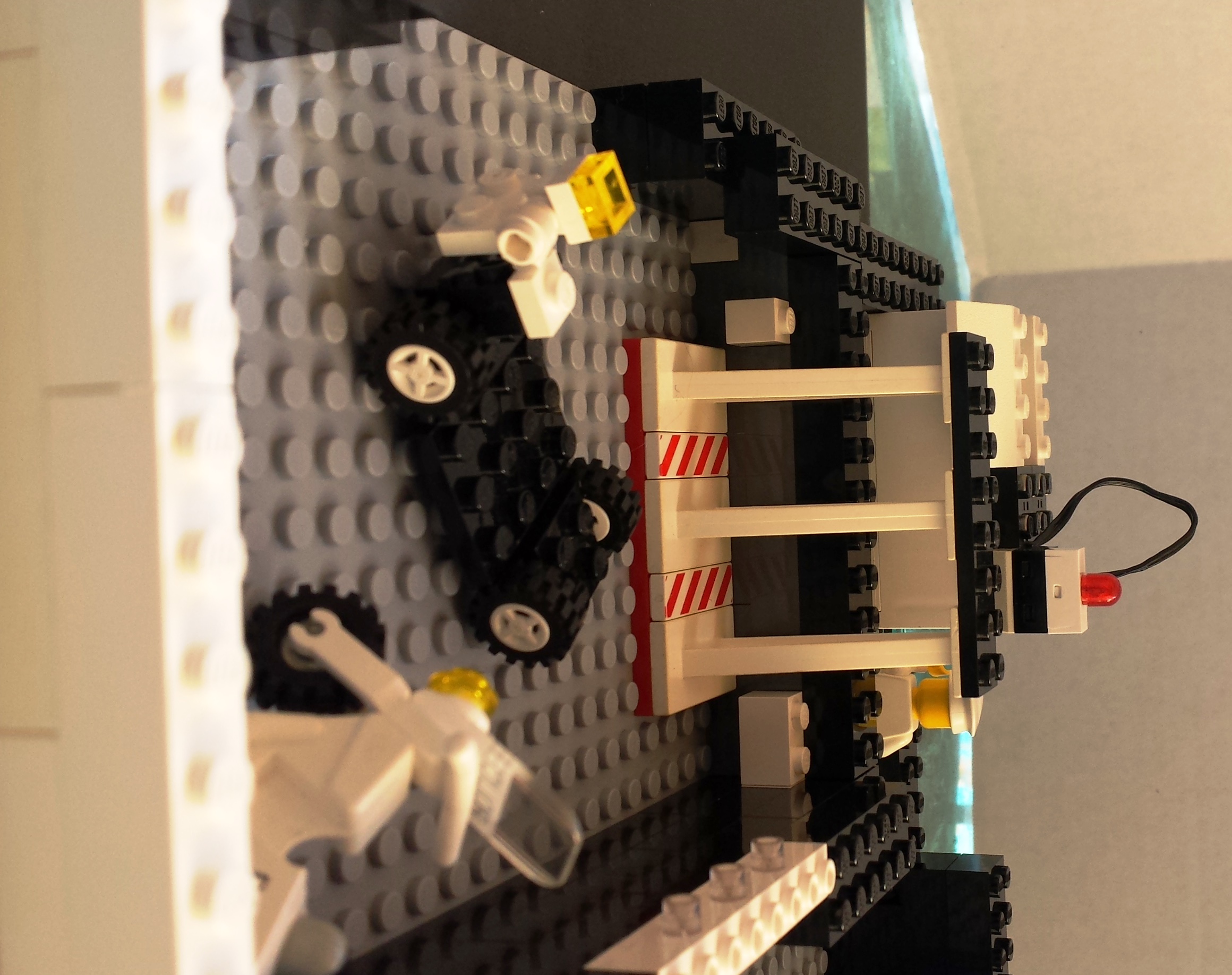
As you can see from this angle, tape is not dead. It's alive and well in our datacenter. And our backup operator may be a fan of Devo, or of Troma Films, I'm not sure which.

As you can see from this angle, tape is not dead. It’s alive and well in our datacenter. And our backup operator may be a fan of Devo, or of Troma Films, I’m not sure which. And that might be a pizza oven there on the left, but don’t tell the security folks.

jdc-in-cable-jockey

Here is our cable jockey attempting to connect a power drop himself. I tried this once, didn’t electrocute myself, but didn’t endear myself to the datacenter facilities team.
A fun aside here, those grey ladder racks are actually power-carrying blocks. They’re not connected in the datacenter but they could be.

jdc-out-power-skipper

Speaking of power, we of course have generators in the back. Here, the power skipper monitors the control panel, because his alarm light there is blinking. And his cables are loose. I hope he figures out what’s going on before the alarm klaxon goes off.

jdc-out-power-plant

Here is the other side of the generator assembly. It seems well-vented. And you can see some of the solar panels on the right–this is a very green data center.

jdc-out-loading-dock

We have a very security-conscious data center here. Police on site to guard the receiving dock.

jdc-out-loading-area-solar

Here we have another view of the receiving dock and solar tower, along with our motorized cart to help you get your deliveries to your cage. Remember, no cardboard on the datacenter floor please.

I'm sure many of you will understand that, at a certain point in a day of data center work, you just want to dance.

I’m sure many of you will understand that, at a certain point in a day of data center work, you just want to dance.

And while data centers don't generally have kimonos, here we've pulled the roof back to show you the whole place.

And while data centers don’t generally have kimonos, here we’ve pulled the roof back to show you the whole place.

Thank you for touring my data center.

If you’d like to see some of the other data centers on the tour circuit, here are the ones I’ve found.

If anyone else would like to be linked, let me know. Looking forward to hearing next week who Juniper chooses as the top datacenter builders!