FirmwareGate and FCoEgate two months later

I was surprised last week at Interop to hear people still talking about both FCoEgate and HP FirmwareGate. It seems that in the absence of any clarity or resolution, both still bother many in the industry.

For those of you who missed the early February drama (and my relevant blog post):

FCoE-gate

FCoEgate: An analyst group called The Evaluator Group released a “seriously flawed” competitive comparison between an HP/Brocade/FC environment and a Cisco/FCoE environment. Several technical inquiries were answered with confusing evidence that the testers didn’t really know what they were doing.

Several people I talked to at Interop mentioned that this was a perfectly understandable mistake for a newbie analyst, but experienced analysts should have known better. Brocade should have known better as well, but I believe they still stand by the story.

The take-home from this effort is that if you don’t know how to configure a product or technology, and you don’t know how it works, it may not perform optimally in comparison to the one you’re being paid to show off.

This one doesn’t affect me as much personally, but I’ll note that there doesn’t seem to have been a clear resolution of the flaws in this report. Brocade has no reason to pay Evaluator Group to redo a valid comparison, and technologists worth their salt would see through it anyway (as many have). So we have to count on that latter part.

FirmwareGate

https://twitter.com/ProLiant/status/433252908755582976

FirmwareGate: HP’s server division announced that, for the good of their “Customers For Life,” they would stop making server firmware available unless it was “safety and security” updates. How can you tell if it’s “safety and security?” Try to download it.

HP claimed repeatedly that this brings them in line with “industry best practices,” thus defining their “industry” as consisting exclusively of HP and Oracle. I don’t know any working technologists who would go along with that definition.

HP promised clarification on this, and defended their policy change by declaring industry standard x86/x64 servers as equivalent to commercial operating system releases and Cisco routers.

They even had a conversation with my friend John Obeto, wherein they convinced him that nothing had changed. Ah, if only this were true. (It isn’t.)

But I had fleeting faith that maybe they’d fixed the problem. So I went to get the firmware update for a nearly 2-year-old Microserver N40L, which had a critical firmware bug keeping it from installing a couple of current OSes. Turns out it’s not a “safety and security” fix, and my system apparently came with a one year warranty.

So if I wanted to run a current Windows OS, I either have to spend more on the support contract than I did on the server (if I can find the support contract anymore), or go with an aftermarket third party reverse-engineered firmware (which, unlike HP’s offerings actually enhances functionality and adds value).

Or I can go with the option that I suspect I and many other hobbyists, home lab users, influencers, and recommenders will — simply purchase servers by companies that respect their customers.

What should HP be doing instead?

The “industry best practices” HP should be subscribing to include open access to industry standard server firmware that fixes bugs they delivered, not just vaguely declared “safety and security” upgrades, much as every other industry standard server vendor except Oracle does. That includes Dell, Cisco, Supermicro, Fujitsu, NEC, Lenovo/IBM, and probably a number of other smaller players.

As my friend Howard Marks noted, some of us would be satisfied with a software-only or firmware-only support contract. On-site hardware maintenance isn’t necessary or even affordable for many of us. Many of us who buy used servers would be better off buying an extra server for parts, and most of us buying used servers know how to replace a part or swap out a server. Some of us even better than the vendor’s field engineers.

HP has been silent on this matter for over a month now, as far as I can tell. The “Master Technologists” from HP who won’t distinguish an MDS router from an x86 server have gone silent. And I’m sure many of the “customers for life” that the 30-year HP veteran graciously invites to keep buying support contracts will start looking around if there’s not a critical feature in HP servers that they need.

So where do we go from here?

I can no longer advocate HP servers for people with budgets containing fewer than 2 commas, and even for those I’d suggest thinking about what’s next. There are analogous or better options out there from Dell, Cisco, Supermicro, Fujitsu, NEC, Lenovo, and for the smaller lab form factors, Intel, Gigabyte, Shuttle, and others. (It’s also worth noting that most of those also provide fully functional remote management without an extra license cost as well.)

If you do want to go with HP, or if you can’t replace your current homelab investment, there are ways to find firmware out there (as there has been in the past for Sun^wOracle Solaris). It took me about 15 minutes to find the newly-locked-down Microserver firmware, for example. It didn’t even require a torrent. I can’t advocate that path, as there may be legal, ethical, and safety concerns, but it might be better than going without, at least until you can replace your servers.

And I’ve replaced most of my HP servers in the lab with Dell servers. One more to go. If anyone wants to buy a couple of orphaned DL servers in Silicon Valley (maybe for parts), contact me.

If anyone else has seen any clarity or correction in the state of FCoEgate or FirmwareGate in the last month or so, let me know in the comments. I’d love to be wrong.


Taking POHO to Interop 2014 – Three Roads To Take

I’m looking forward to returning to Interop Las Vegas in under two weeks. Where has the winter gone? I know, I’m in Northern California, I can’t complain much about the weather.

interop-2014-banner

Click above for conference details, or visit this link for a free expo and keynote pass.

There are three aspects of Interop that I’m looking forward to.

First, I’m looking forward to meeting some Twitterverse friends, and maybe a Twitter-averse friend or two, as well as contacts I’ve made at my conferences last year. I will be dropping in on the Interop HQ and Social Media Command Center to see how the UBM team handles social media on-site. As my friends at @CiscoLive and VMworld know, I find the social media aspect of a conference to be as important as the formal content. Networking and getting advice and answers as you go makes the event more efficient and useful, and it’s always good to say hi to the folks who make it happen. I also hear there are collectible pins, and those of you who know where I work know we’re known for our pins, among other things.

Watch the hashtags #Interop and #CloudConnect and follow @interop for the latest news from the events.

cloud-connect-summit-logoSecond, I’ll be trying to take a bootcamp or two at the Cloud Connect Summit  and come up to speed on some technologies that are newish to me. There’s an AWS Boot Camp presented by Bernard Golden (alas, it’s not hands-on, so I’m not sure I’d call it a boot camp), and an OpenStack Boot Camp that looks promising as well. These may end up just being focus opportunities, or I may change my plans, but they look interesting. And as a guy who’s mostly running bare metal big data on a daily basis, it’ll be good to get some exposure to the virtual side of things outside of VMware.

Third, while I’m attending with my press hat and not my mouse ears, I do work in a sizable technology environment, so I’ll be checking out some larger technology options that may not find their way into my lab but may find their way into my day job.

Highlights in the enterprise space for me (alphabetically): Arista Networks, Cisco, Juniper Networks.

tfd-generalFourth, I’ll be joining the Tech Field Day Roundtables again this year. HP Networking will be presenting at this event, and they tie in with POHO below as well. Also presentingwill be a company rather dear to my heart in a strange way, Avaya. At the turn of the century, I worked for the Ethernet Products Group (or whatever we were called that quarter) at Nortel Networks, and my team’s flagship product was the Nortel Passport 8600 routing switch. Imagine my surprise when I ran across a slightly different color of 8600 (with much newer line cards) at the Interop network last year, now known as the Avaya Ethernet Routing Switch 8600. A couple of my Rapid City/Bay Networks/Nortel Networks coworkers are still at Avaya, or were until fairly recently… so it’s sort of a family thing for me.

If you can’t make it to the roundtables, we usually live-stream the presentations, or have them posted afterward, at TechFieldDay.com. Check it out and track #RILV14 and #TechFieldDay on Twitter for the latest news.

And last, but not least… there’s POHO. The Psycho Overkill Home Office, a gateway to big business functionality on a small business budget, is a topic near and dear to my blog, my budget, and my two home labs. I will be stopping by to speak with several vendors at Interop whose products intersect with the burgeoning (and occasionally bludgeoning) home lab market and the smaller side of the SMB world (I’m taking to calling it the one-comma-budget side of SMB).

Some of the POHO highlights that I’m seeing so far (in alphabetic order) include Chenbro Micom, Cradlepoint, Linksys (now part of Belkin), Memphis Electronic (think 16GB SODIMMs), Monoprice, Opengear, Shuttle Computer Group, Synology, and Xi3.

There are a lot of other names on the exhibitor list who will appeal to anyone, and if you’re going to be there with an exhibitor who you think would be of interest to my POHO audience, feel free to get in touch (I’m on the media list, or contact me through this blog).

And if you noticed that I went down five roads instead of three, give yourself a pat on the back. I should’ve seen that coming.

Enterprise-Class networking on the cheap for your home lab

This entry is part of my POHO (Psycho Overkill Home Office) series. 

I have a habit of overdoing my networking. My home core switch is a Juniper EX-series (courtesy of a Bay Area Juniper User Group meeting raffle), and for a while I had a 10-Gigabit Ethernet (10GbE) Extreme Networks switch (that cost less than a good laptop) ready to go in. Do I really need it? Probably not. I sold it last year but am now thinking about 10GbE again.

I’m here today to share some of my tips for finding affordable enterprise-class networking for your personal, home, lab, or photo shoot purposes. I also welcome your thoughts and experiences in the comments below. Let me know if you’ve found other ways to improve your dollars-to-metal KPIs at home or in a lab.

Caveat: I do not advocate these methods for anything your company may depend on, or anything production grade in general. However, if you’re closer to hobby network than to Fortune 500 core network, this may help you build beyond your budget.

Foreword: About 10 Gigabit Transceiver Formats

There are three formats or “sockets” for transceivers for 10GBE ports. Each of them can present short (SR), long (LR), or extended range (ER/XR/ZR) fiber interfaces, or “captive” cables in the form of CX4, twinax, or RJ45-type copper.

Module formats courtesy of  @networkhardware http://www.networkhardware.com/cisco-optics-cheat-sheetXENPAK are the oldest, largest, and least expensive (generally) of the form factors, and can be found integrated into older host interface cards as well as switches like the Extreme Summit 400. XFP are almost as old, smaller and lighter, and probably a bit more pricey than XENPAK. The current generation is SFP+, which has the same size as the gigabit SFP (almost the same size as a RJ45 connector) but supports 1 and 10 gigabit. (The second transceiver pictured above is X2, which I haven’t run into yet.)

Depending on distance between ports and the host adapter you choose, you may find one of these more desirable than the others. Fiber may be more flexible in terms of length and availability, and you can go from SC to LC if your transceivers don’t match, but CX4 or twinax will be more resilient to tension.

Be warned that some networking vendors break the standards and check for their own brand of transceivers, not allowing generic or other brand devices even if they are physically identical down to the manufacturer.  Vendor forums or a quick Google search will help you track down these issues and plan for, or work around, them.

1. Uplink ports are usually just ports. Stacking ports, not so much.

The cheapest and (maybe) easiest way to get 10GbE ports is to buy a 1GbE switch that has a few 10GbE uplink ports. My Extreme was this kind of solution–48 ports of 10/100/1000Base-T[X] and a two-port module on the back for 10GbE via XENPAK modules. There are a lot of switches out there on the used market that offer 2-4 “uplink” ports that can be used to connect a host.

Be warned that in many cases, the uplink modules will cost more than the base switch, if they’re not already included. I’ve been watching for the 10GBE uplink modules for a couple of my cheap 48 port switches, and they’re 4-5x what I paid for those switches. Dig into your datasheets and search for the module part numbers, and see what they’re going to cost you before investing in a base switch. (And see #2 below on this topic too.)

And don’t forget about optics. You can mix SC and LC endpoints with fairly affordable fiber cables, but if your uplink modules don’t have fixed connectors, you will need to get some sort of transceivers (optical, CX4, captive cables, TX) that can connect with your host adapters.

You might be able to use stacking ports as regular network ports, but that will warrant more research (and maybe finding a friend at the network vendor). I wouldn’t count on this option unless you already know otherwise.

2. Look for rebranded (or debranded) gear.

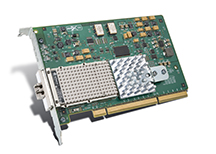
I got my first pair of 10GbE host adapters for about $23 each shipped from an eBay seller. Fully functional, PCI-X (backwards compatible with PCI if you don’t need full 10 gigabit speeds), with optical XENPAK modules built in.

Xframe_II_lores courtesy of hp.com information library http://on.rsts11.com/1buRCPG

Why so cheap? The seller had posted them with an HP part number, which 99% of the time returned compatibility only with HP/UX. Turns out they are very compatible with Linux, and while they don’t appear to be supported under VMware, you could put something like that in a homebrew SAN and run it into the core network at 10GbE.

Not everything is available rebranded, but you’ll find some network companies selling their products under IBM or Sun or Dell labels or the like. Switches, firewalls, and expansion modules have been known to show up under multiple vendors’ part numbers, and sometimes one vendor’s part can be half the price of the original manufacturer’s part, for identical metal and silicon.

This goes back quite a ways, at least to when Dell resold the Netgear FS switch line, Cisco resold QNAP storage arrays and HP Proliant servers, and IBM resold Brocade Silkworm SAN switches. Just like searching for typos, searching for alternate part numbers may help you get a good deal.

3. If you have a bit of budget, ask around about new and refurbished gear.

The big PC makers have outlet and financial services stores on their websites that sometimes have off-lease models for sale. There may also be first-market options if you have a bit more of a budget than I do.

ICX6430 via brocade.com http://on.rsts11.com/1buS1l3Recently on Twitter Gabe Chapman and were discussing low-density 10GbE options; Garrett from Brocade chimed in to point us toward a Brocade ICX6450-24 switch as an option. A quick web search showed that for about $3000 street price, you can get a brand new switch with 4 licensed 10GbE ports and a warranty. You could get it for about $2300 with only 2 10GBE ports, and then buy the extras later (or run them at gigabit speeds).

If you’re stocking a little closer to the revenue end of the network, or if you can’t quickly replace a failed model, you might be better off choosing new/retail over a $400 switch as-is on eBay with the same port count.

Disclaimer: I have no connection with Brocade; this is just an example from a Twitter conversation that included a helpful Brocade guy and a quick Google Shopping search. Although I’d be willing to review an ICX6450-24 if the option arose. 🙂 

4. Watch out for port/feature licensing!

Some vendors, especially those in the Fibre Channel world, offer port licensing as a way to reduce the initial outlay for a switch.  A lot of smaller FC switches worked this way, and when I had to sneak a SAN into the budget at a company where the finance folks insisted all servers cost $1000 because that’s what a PC costs at Fry’s, it saved my storage plan from extinction.

In the case of the ICX6450-24 above, the base switch has four SFP+ ports, two of which are enabled for 10GbE out of the box, and two of which are limited to regular gigabit speed. To get the other two ports up to 10GbE, you buy a license kit for about $800 (street) and enable the ports. That’s not too bad for a brand new enterprise switch, but if you buy a ten year old switch that has unlicensed ports, you may have trouble getting the license codes (even for a price).

You’ll probably want to talk to someone knowledgeable about the platform you’re considering, to evaluate the risk. Some vendors tie features to a serial number (Juniper for example), so as long as your device is licensed and the serial number is intact, you may be able to reinstall the licenses automatically. Others require a key code, so unless you can get into the switch and retrieve that, a factory reset could wipe out some of your ports. And in either case, if the equipment you’re buying doesn’t have the features you want, it may be expensive or impossible to obtain them.

5. Consider port-channel or other aggregation methods.

I’ll admit this is sort of a cop-out, but 8 ports of Gigabit Ethernet will likely be cheaper than a single port of 10GbE. You can get 4-port PCI-E 1GBE cards for $75 or so (as low as $25 if you don’t need ESXi 5/5.5 support), and a 48-port GigE switch that supports LACP or the like for under $200. So that’s under $150 per 8gbit link including cables. Check your OS or virtualization platform HCL to make sure the cheaper cards are compatible, of course, but it’s worth checking out this option if it works for your needs.

So where do we go from here?

Those are my tips so far… I’d welcome your comments below on how (or if) they’ve worked for you, or if you have any tips from your own experience to share with other readers. Maybe you’ve found a vendor whose 10GbE switches are more affordable for the home lab, or just had a good experience with a home-lab-friendly reseller? Please chime in.

New hardware thoughts for home labs (Winter 2013)

It’s been almost two years since I wrote my first home lab post, on the occasion of rolling a Shuttle SH67H3 VMware server. Since then, I’ve rambled on Twitter about a lot of other options, and figured I would bring some of them to your more-easily-searched-for attention.

I will update this post in the near future – most recent update 2013-12-12 – so you can look (probably at the bottom) for new details and references.

Disclosure: I’m not paid or coerced to promote the items in this post. Anything I own below was bought with my own money. Most of it probably will not blend. Any references to vendors or manufacturers are based on my experience and not any consideration from the company.

Many of the links are to Amazon.com, and if you buy through them, I get a small commission credit to spend on more coffee gear or some of the same things. I appreciate your support and suggestions.

My lab cluster today

I recently bought two batches of rackmount servers at absurd prices. We’re talking less-than-the-memory-was-worth prices. For now, I have an NEC Express 5800/120Rh-1 (dual E5405/16GB) and a HP DL365 G1 (dual-core Opteron 2214HE/16GB) running 5.5. vCenter Server is running on my NUC i3 box out of convenience. When I get some more PC2-5300F RAM, I’ll switch out that Opteron for another Xeon to get a bit more consistency.

The downside to this environment is that it’s noisy and a bit power-hungry. At rest, the two servers use about 400W. So until I upgrade the UPS, I’m a bit stuck on that level of server.

But the upside is that the two servers as configured cost less than I spend on coffee in a month at home. And my lab is in a location that isn’t as sensitive to power load or noise as my home office might be.

Using a Dell Poweredge C6100 for dense rackmount computing

There are a lot of 1u and 2u rackmount servers out there on Craigslist, eBay, Weird Stuff, and such venues. I’ve picked up various HP boxes for chump change and scrounged for memory, so it is an option. You can probably get a dual socket 8-core server (DL160, DL360, DL365, DL380, DL385) with some memory and drive trays for under $100 until you run out of power outlets. If your tolerance for power draw and noise allow, that’s definitely a cost-effective way to go.

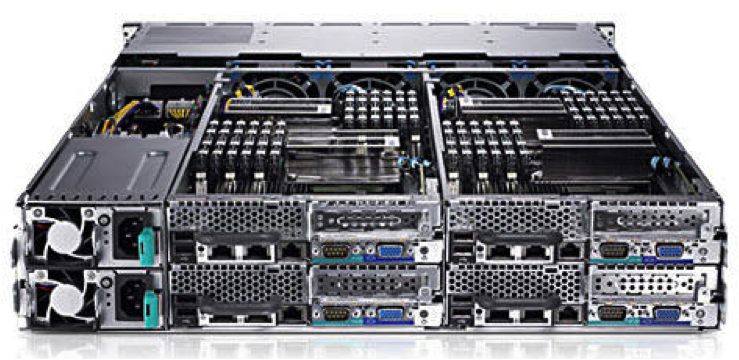
C6100

There are also a lot of Dell C6100 “blade” servers (pictured above) out there as well. These are 2u enclosures with up to 4 two-socket nodes. Each blade can take 12 DIMMs (up to 192GB), two quad or hex core Xeon processors, and 3 LFF 3.5 drives or 6 SFF 2.5 drives (SATA, SAS, SSD). And from what I’ve read, you can run four dual-L5420 blades at about 300W.

I’m seeing these priced at around $750 for a two-L5520-node config, or a four-L5420-node config, with minimal RAM. You can find a four-L5520-node config for around $1k, or you can add extra nodes later. ServeTheHome has a thread on community update findings, including fan improvements and internal USB.

I don’t know what the noise level is out of the box, but hopefully one of my readers can chime in. Or I may pick one up next month and come back with an update.

Ye Olde HP Proliant Microserver… And Ye Newe Microserver

I have a Proliant Microserver N40L in my environment. It, and its siblings N36L and N54L, are classic home lab servers, with secret BIOS tweaks and undocumented memory upgrades and a $200-300 price tag. Much like the NUC, they are, but perhaps a bit less processing power and a lot more expandability.

Microserver Gen 8

Well, HP released their Microserver Gen 8 this summer, with two dual-core Pentium processor options. One option has a G1610T 2.3GHz processor, and the other has a G2020T 2.5Ghz processor; there’s even a stackable 8-port switch to match. You still get four non-hot-plug SATA bays; the new ones offer a glitzier front door and a laptop-size optical drive bay. You also get dual gigabit Ethernet and a dedicated iLo port.

The price has gone up with the specs; you’re looking at $450-500 for the base 2GB/250GB system, plus your upgrades, so probably $700 with 16GB of RAM.

Be sure not to purchase the Windows Server bundles (unless you’re into that sort of thing). The Microserver Gen 8 shows up in bundles between $700-1200 with various Windows licenses included, and if you’re throwing your own OS on afterward, there’s no reason to shell out the extra money.

NUC NUC… not again…

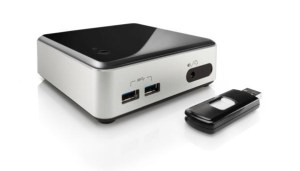
Intel has added new Next Unit of Computing (NUC) models to their line, with 4th generation i3/i5 processors. There’s an i3-4010U model and an i5-4250U model available. Perhaps obviously, they’re no longer fanless or silent, but probably quieter than the options above.

Wilson Canyon NUC with USB

You still need to add your power cable, some laptop memory (8GB or 16GB depending), an mSATA module if you want internal storage, and a flash drive to boot from. So you’re probably looking at about $600 for a complete system, give or take. But if space is of an essence, and your workloads can handle 16GB dual core modules, this is a great option.

As an aside, Intel has 4th generation NUCs with support for an internal 2.5″ drive. These don’t seem to be as commonly available, but it’s something to watch for if you need more internal storage.

A surprising contender – Dell’s Inspiron 660 desktop

I was having an exchange on Twitter with someone looking for options with Gen 3 PCI Express for virtualization lab use. He ended up getting an Inspiron 660 desktop, which has more convenient expansion options than pretty much everything above.

The i5-3340 model with 8GB of RAM comes in under $600 on Amazon (you can buy it directly from Dell but might get quicker delivery from Amazon). You should be able to load it up with 16GB of RAM, and you can get 4x and 6x SATA (and 4x SAS) drive bay inserts to get dense 2.5″ drive deployments. Probably won’t need that DVD burner on a hypervisor platform, will you?

What else can I read about home lab options?

I’m glad you asked. One thing that pushed me to write this post was Chris Wahl’s update on his home lab. He’s moving to Haswell, and building out a well-optimized lab. He’s an avid advocate of remote management, so definitely take a look at his board selection if you need remote control of your server.

Simon Seagrave at TechHead has a lengthy write-up on the Microserver Gen 8 that’s worth a look if you’re leaning that way.

2013-12-12: Erik Bussink has built a compact lab with the Shuttle XH61V that finds a happy medium between my Shuttle and NUC builds.

2013-12-12: A friend on Facebook reported in with Benjamin Bryan’s blog about installing a Xeon E3 in the HP Microserver Gen 8. This may be the best reason to go with the low-end G1610T model.

2014-01-14: Greg Schulz (@storageio on Twitter) has a new post today on some of his recent discoveries and acquisitions. Check out Dell Inspiron 660 i660, Virtual Server Diamond in the rough? for a surprising choice for virtualization.

If you’ve written a blog post about sub-$1k home lab servers, feel free to let me know and I’ll try to get you added to this list. I’m happy to exchange links and spread the joy of home lab adventures.

One Size Fits All: Hyper-V on VMware turf, custard trucks, and IT evangelism

At VMworld 2013 in San Francisco, there was a lot of buzz around Hyper-V, oddly enough. A few vendors mentioned multi-hypervisor heterogeneous cloud technologies in hushed tones, more than a few attendees bemoaned the very recent death of Microsoft TechNet Subscription offerings, and guess who showed up with a frozen custard truck?

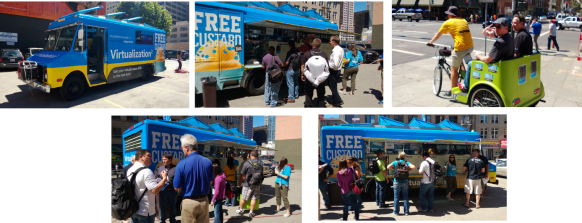
8015.Custard_picks

Yep, Microsoft’s server team showed up, rented out and re-skinned a Frozen Kuhsterd food truck, and handed out free frozen custard for a chance to promote and discuss their own virtualization platform and new publicity initiative, branded Virtualization2.

The frozen custard was pretty tasty. Well worth the 3 block walk from Moscone. It was a pretty effective way to get attention and mindshare as well–several people I spoke with were impressed with the marketing novelty and the reminder that VMware isn’t the only player in the game, even if one friend considered it an utter failure due to the insufficient description of frozen custard.

Almost two years ago when I did my Virtualization Field Day experience, the question I asked (and vendors were usually prepared to answer) was “when will you support Xen in addition to VMware?” This year, it’s more “when will you support Hyper-V?” So a lot of people are taking Microsoft seriously in the visualization market these days.

Insert Foot, Pull Trigger

One nominal advantage Microsoft has had over VMware in the last few years is an affordable way for IT professionals to evaluate their offerings for more than two months at a time. But first, some history.

time-bomb-meme

Once upon a time, VMware had a program called the VMTN (VMware Technology Network) Subscription. For about $300 a year, you got extended use licenses for VMware’s products, for non-production use. No 60-day time bomb, no 6-reinstalls-a-year for the home lab, and you can focus on learning and maybe even mastering the technology.

Well, in February 2007, VMware did away with the VMTN subscription. You can still see the promo/signup page on their site but you’re not going to be able to sign up for it today.

At that point, Microsoft had the advantage in that their TechNet Subscription program gave you a similar option. For about $300/year you could get non-production licenses for most Microsoft products, including servers and virtualization. I would believe that a few people found it easier to test and develop their skills in that environment, rather than in the “oops, it’s an odd month, better reinstall the lab from scratch” environment that VMware provided.

Well, as of today, September 1, the TechNet Subscription is no more. If you signed up or renewed by the end of August 31, you get one more year and then your licenses are no longer valid. If you wanted some fresh lab license love today, you’re out of luck.

Technically, you can get an MSDN subscription for several thousand dollars and have the same level of access. The Operating Systems level is “only” $699 (want other servers? You’re looking at $1199 to $6119). Or if you qualify for the Microsoft Partner Program as an IT solutions provider, you can use the Action Pack Solution Provider to get access to whatever is current in the Microsoft portfolio for about $300/year. But the latter is tricky in that you need to be a solutions provider and jump through hoops, and the former is tricky because you might not have several thousand dollars to send to Redmond every year.

Help me, Obi-Wan vExpert, you’re my only hope

In 2011, Mike Laverick started a campaign to reinstate the VMTN subscription program. The thread on the VMware communities forum is occasionally active even two years later. But after two years of increasing community demand and non-existent corporate support, a light appeared at the end of the tunnel last week at VMworld in San Francisco.

As Chris Wahl reported, Raghu Raghuram, VMware Executive Vice President of Cloud Infrastructure and Management, said the chances of a subscription program returning are “very high.” Chris notes that there’s not much detail beyond this glimmer of hope, but it’s more hope than we’ve had for most of the last 6 years. For those of you who remember Doctor Who between 1989 and 2005, yeah, it’s like that.

Today, your choices for a sustainable lab environment include being chosen as a vExpert (or possibly a Microsoft MVP–not as familiar with that program’s somatic components) with the ensuing NFR/eval licenses; working for a company that can get you non-expiring licenses; unseemly licensing workaround methods we won’t go into; or simply not having a sustainable lab environment.

I added my voice to the VMTN campaign quite a while ago. When nothing came of that campaign, and I found myself more engaged in the community, I applied for (and was chosen for) vExpert status. So the lab fulcrum in my environment definitely tilts toward the folks in Palo Alto, not Redmond.

But I did mention to the nice young lady handing out tee shirts at the Microsoft Custard Truck that I’d be far more likely to develop my Hyper-V skills if something like TechNet subscription came back. She noted this on her feedback notebook, so I feel I’ve done my part. And I did get a very comfy tee shirt from her.

When I got back to my hotel, I found that the XL shirt I’d asked for was actually a L. Had I not been eating lightly and walking way too much, it wouldn’t have come anywhere near fitting, and it probably won’t any more, now that I’m back to normal patterns. But maybe that size swap was an analogy for a bigger story.

One size doesn’t fit all.

If Microsoft and VMware can’t make something happen to help the new crop of IT professionals cut their teeth on those products, they’ll find the new technologists working with other products. KVM is picking up speed in the market, Xenserver is moving faster toward the free market (and now offers a $199 annual license if you want those benefits beyond the free version), and people who aren’t already entrenched in the big two aren’t likely to want to rebuild their lab every two months.

And when you layer Openstack or Cloudstack (yeah it’s still around) on top of the hypervisor, it becomes a commodity. So the benefits of vCenter Server or the like become minimal to non-existent.

So where do we go from here?

Best case, VMware comes up with a subscription program, and Microsoft comes up with something as well. Then you can compare them on even footing and go with what works for you and your career.

Worst case, try to live with the vCenter and related products’ 60 day trial. If your company is a VMware (or Microsoft) virtualization customer, see if your sales team can help, or at least take the feedback that you want to be able to work in a lab setting and spend more time testing than reinstalling. 

And along the way, check out the other virtualization players (and the alternatives to VMware and Microsoft management platforms… even Xtravirt’s vPi for Raspberry Pi). Wouldn’t hurt to get involved in the respective communities, follow some interesting folks on Twitter and Google+, and hope for the best.

Did you say something about Doctor Who up there?

Yeah, and I should share something else with you.

When I saw the mention of the custard truck, my first thought was honestly not frozen concoctions in general. Obviously, it was the first Matt Smith story on Doctor Who, Eleventh Hour, wherein he tries to find some food to eat at Amy Pond’s home after regenerating. He ends up going with fish fingers (fish sticks) and custard (not the frozen kind).

So I made a comment on Twitter, not directed at anyone, saying “I’d have more respect for Microsoft’s Hyper-V Custard if fish fingers were offered on the side.”

And this really happened.

this-really-happened

So even if they’re discouraging me and other technologists from effectively labbing their products, I have to give them credit for a sense of humor. Not usually what you expect to come out of Redmond, now is it?

Related Links:

Mr Jones posted an article that really annoyed me until I read his well-reasoned response to the well-reasoned comments. Check out his interpretation of the TechNet subscription and brave the comments for some very sane discussions.

A couple of pieces from the Microsoft team about their marketing activity. Fun read, and the source of the truck photos above.

tardis.wikia.com definitions and a BBC video clip from Youtube,to help you understand the Twitter exchange.