Belated Post-Strata Thoughts 1: Hadoop is finally over…

[Apology: Formatting issues may have been resolved.]

Last month I managed to attend a big data event as an attendee, for the first time in nearly two years. One upside to being a big data storyteller is that you don’t get 3am oncall pages. Downsides at events like Strata include that you’re often working the booth, or preparing for and recovering from a presentation, or trying to convince vendors that your role doesn’t involve buying software and services for a Fortune 50 company personally.

Sure, I did give a brief booth presentation for my friends at MapR on both expo days at Strata SJ, but more time was spent catching up with the people in my ecosystem who I rarely see, learning what they’re doing new these days (or who they’re working for these days), and occasionally getting a no-BS perspective on a very rife-for-BS idea, product, or company.

One of the other upsides to not being a buyer anymore is that it is easy, and practical, to jettison the sales pitches and move on to the stories. I tell stories. I don’t deploy production environments anymore. And it’s refreshing to be able to look at things outside the sales pressure.

HADOOP IS OVER…

So the first point, which was teased at Strata NYC last fall, is that Hadoop is finally over…

Continue reading

What planet are we on? (The Third) — the RSTS11 Interop preview

Greetings from Fabulous Las Vegas, Nevada. For the third year, with apologies to Men Without Hats, I’m back in the Mandalay Bay Convention Center for Interop. 

This week, I’m actually a man without hats as well. My Big Data Safari hat is in my home office, and my virtual Cisco ears are back at home as well, next to the VPN router that was powered down before I headed for the airport. (Alas, after moving from Disney to Cisco, I lost the theme park discounts and the epic mascot reference.)

What are you up to at Interop this year, Robert?

So why am I back at Interop, when a dozen conference calls a day could have been in the cards for me this week? 

My readers, my fans, and my groupie all know that I’ve been a fan of the Psycho Overkill Home Office (POHO) for quite a while, going back to when I had a 19-server, 5-architecture environment with a 3-vendor network in my spare bedroom. Today it’s about 12 servers, all x64 (Shuttle, Intel, Cisco, Supermicro, Dell, and maybe another secret brand or two), and technically a 5-vendor network, but the idea is similar enough.

And having built a couple of startups up from the under-the-desk model to a scalable, sustainable production-grade infrastructure, the overkill in my home office and labs has led to efficient and effective environments in my workplaces. 

This week I’m taking a break from my usual big data evangelism and the identity aspects of working for a huge multinational juggernaut. It’s a bit of a relief, to be honest; earlier this month I attended my first event in 10 months as a non-booth-babe, and now I’m getting to focus on my more traditional interests. 

What’s on the agenda this week?

I’m looking forward to return visits to the folks at Sandisk, Opengear, and Cradlepoint. Cradlepoint was the first interview I did two years ago at Interop 2013, and I’ve been a customer on my own for many years; Opengear was a presenter at Tech Field Day Extra at Cisco Live 2013; and I last talked with Sandisk at Storage Field Day 5 about a year ago, as well as having been a Fusion-io customer at a previous job. 

I have a couple of other meeting requests out, so we may hear from a couple of other POHO/SOHO/ROBO/lab staples, and I’ll at least be dropping by their booths in the Interop Expo to see what’s new. 

While I’m only recording this week for notetaking convenience, I am starting to ponder what to do about the podcast I’ve been thinking about for a couple of years. So maybe I can pull in some interesting people from time to time… last night’s conversation over Burger Bar shakes with Chris Wahl and Howard Marks probably would have been fodder for several podcasts alone (and I don’t think any of us even had any alcohol!).

And seeing as a number of my friends are presenting this year, including Chris and Howard, I’ll be trying to make my way to their sessions (although there’s a LOT of overlap, and triple-booking isn’t uncommon… there’s a lot more than the Expo floor to experience at Interop, as always).

So where do we go from here?

If you’re at Interop, who are you looking forward to seeing/hearing/heckling/buying drinks for? (And if you’d like to meet up, catch me on Twitter at @gallifreyan.) If not, check out the exhibitor list at interop.com/lasvegas and let me know who you are curious about on that list. 

The Endpoint Justifies The Veeam: New free “personal” backup product coming soon

Apologies to Sondheim and Lapine for the updated title on this article.

Veeam announced their “Endpoint Backup FREE” product in the wee hours of the morning Wednesday, as about a thousand attendeees of the first-ever VeeamON user conference were still recovering from the event party at LIGHT nightclub in Las Vegas. More on VeeamON in another post later… but let’s get back to the new product for now.

Nope, this isn’t a hangover. Veeam, a leader in virtual machine backup/recovery and disaster recovery technology, is stepping out of the virtual world to allow you to back up bare metal systems. From early comments, this has been a long-awaited feature.

Veeam Endpoint Backup FREE

Endpoint Backup FREE is a standalone software package targeted at IT professionals and technophiles for use on standalone systems with local or networked storage. It should fit into anyone’s budget, and with flash drives and external USB drives coming down in price, none of us should have an excuse not to back up our personal laptops and desktops anymore (I’m talking to me here).

eblog5_thumb advanced recovery disk

Veeam offers an “Advanced Recovery Disk” that enables you to do a bare metal restore to a point in time. With some products you can restore from a backup image to a new disk or replacement computer, but you have to install and patch your OS from scratch first. Other products may limit you to local storage, or require driver alchemy, but with the Endpoint Backup recovery disk, you can boot from it (i.e. USB flash drive or optical media) and restore your full system image from a network share on your LAN.

Hey, can I back up a million Windows Servers with this product?

grumpy-cat

No, you can’t, and you shouldn’t.

Veeam are using a specific term in the product name–endpoint–to distinguish this offering from a bare metal server backup product. While it runs on Windows Server 2008 and later (as well as Windows 7 and later on the desktop side), it is being developed as a client OS backup solution. It does not have any central control or client management functionality, as it is a standalone program. This model doesn’t really scale for a large number of systems.

However, if you’ve virtualized all but two or three servers in your environment, or if you run a small number of physical servers in a home lab, this can cover that gap without having to license an additional enterprise product for a small number of legacy servers. You can even use a Veeam infrastructure as your backup target, whether backing up Windows Server or the standard desktop offerings.

Also, at this time Veeam does not support mobile devices (iOS, Android, Windows Phone, Sybian, Tizen, etc) so it is not a universal endpoint solution. You’ll want to either use your platform’s cloud option or something like Lookout or a carrier-specific app to back up your tablets and phones.

What are the downsides to this new product?

Well, the main thing for me personally is this (courtesy of Rick Vanover’s vBrownBag talk this morning):

Veeam Not Yet

It’s not available yet. Veeam employees are doing an alpha test now. A public beta is expected in November, with general availability (GA) offering in early 2015. However, for me it’s not that bad as it will take me a couple more weeks to have any free time, so for once I can probably wait patiently.

Another thing, which will probably affect a few of my readers:

no macs

That’s right, no Macs. At launch, and for the foreseeable future, Endpoint Backup FREE will only support Windows systems. Today there is no Linux or Mac OS X support. You can of course back up the Windows VM on your Mac with this product, but you’d have to use one of the server products to back up Linux, and if customers request Mac OS X support enough, they will likely consider it down the road.

And a fifth thing, that builds on the previous item:

Windows_me_logo

For reasons that should be obvious, Veeam has chosen to support only current Windows OS revisions. Windows 7 and later and Windows Server 2008 and later will be supported.

XP is out of service, and Vista is, well, Vista. Windows Server 2003 goes out of service next year. So for most users this will not be a major hindrance, but if your home lab has a lot of old Windows OSes, the Endpoint Backup FREE product will probably not fit your needs. And you should use this as an excuse to start upgrading (as if you needed any more reasons).

So where do we go from here?

It’s going to be an interesting year coming up, in the PC backup world. Veeam has a long history of free products, going back to their first product, FastSCP from 2006. Many technologically savvy end users will probably try out the new offering and then be tempted to check out Veeam’s other products if they haven’t already.

I wouldn’t be surprised to see this functionality integrated and expanded into a paid/enterprise grade offering in Veeam’s future, incorporating feedback from the beta and first production release of Endpoint Backup FREE. There’s some logic in expanding from there to supporting bare metal servers in a scalable way as well. If Veeam follows this path, the other big backup players may end up with a bit of heartburn.

You can sign up for the beta at go.veeam.com/endpoint and get notified when it’s available for download.

Disclosure: Veeam provided me with a complimentary media pass to attend VeeamON 2014. No other consideration was offered, and there was no requirement or request that I write about anything at the event. As always, any coverage you read here at rsts11 is because I found it interesting on its merits.

The cloudy nature of cloud and big data – with Gan Sharma at Asigra Summit

Last month, during a week off between jobs, I did what anyone would do on their vacation… I went to Canada for a software vendor’s partner summit.

What, you don’t do that sort of thing on your time off?

Well, the fine folks at Asigra invited me to attend their partner summit (disclosure: travel and accomodations were provided by Asigra) and, having been impressed with their technology and their history in the past, I accepted the invitation and made my first visit to Canada in about ten years.

First, the videos.

Gan Sharma, Asigra’s Director of Business Development, sat down with me before the event to talk about a couple of technological topics of broad interest, that both he and I are “a little bit obsessed with” (in my words). We had our friends at Prime Image Media, also known as the team behind Tech Field Day’s videos, there to record our conversations. I’m pleased to be able to share them with you here.

First, we talked about balancing the budget impact of backup and recovery with the risk factors of not having a backup and recovery strategy.

To be honest, backup and recovery can be a serious investment (some might call it a money pit, especially if it’s not planned and executed properly). But having to recover your data from pre-data-pipeline sources, or not being able to recover it, can be a far more financially draining experience.

Second, we talked about two very cloudy topics–“The Cloud” and “Big Data.”

One of the biggest sources of confusion, fear, uncertainty, and doubt around both The Cloud and Big Data is the lack of a clear and unassailable definition for either. As I mentioned, nobody has come up with one answer to what The Cloud is, or what Big Data is… because there isn’t exactly one complete and true answer.

But wait, there’s more… soon…

Stay tuned for another post or two around the Asigra Partner Summit. I need to write enough about the Partner Summit at least long enough to be able to not spell it “parnter” the first time I type it.


Disclosure:

I attended the 2014 Asigra Partner Summit at Asigra’s invitation, as an independent blogger, and the company paid for my travel and lodging to attend. I have not received any compensation for participating, nor have Asigra requested or required any particular coverage or content. Anything related on rsts11.com or in my twitter feed are my own thoughts and of my own motivation.


Last minute tips for Cisco Live 2014 in San Francisco

We just had a great Cisco Champion Radio program that was half about Cisco DevNet and half about surviving Cisco Live. The latter was more of a fit for me, and I wanted to open a post with some of the suggestions from that program.

Do you have suggestions for folks who are new to Cisco Live (or who haven’t been to a Live lately)? If so, please share them in the comments below.

1. Apparent apparel

Wear comfortable shoes. Tom @networkingnerd Hollingsworth brought this one up, and I definitely agree. Typical business shoes may seem de rigueur, but there’s a lot of walking between the three buildings of Moscone Center and a lot within each building. So you’ll want something that looks reasonable but is comfortable. Wear what you can stand in all day.

Bring a spare pair of shoes and alternate if you can. And by all means, don’t wear a new pair of shoes for the first time at an event. I’d say go buy your new shoes this week and wear them next week to break them in. Your feet will thank you.
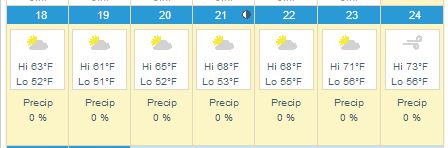
If you’re not direly familiar with San Francisco weather, or even if you are, bring cold/windy weather outerwear. The graphic above is Weather.com’s San Francisco planner. It’s linked to the current forecast page, so if you check after the 15th you’ll see the full week’s forecast. But consider a sweater, a sweater vest, a light jacket, a heavy jacket, a scarf, an anorak, and closed-toed shoes as your personal comfort may require.

2. Time management

Don’t feel the need to fill every session slot. There will be a lot of what LISA calls the “hallway track,” where you can talk to other professionals on an ad-hoc basis. The Social Media Hub is a good place to start, or the DevNet space if you’re more inclined in that direction. Or both!

Don’t feel obligated to attend every after-hours event either. You’ll find half a dozen events every night but you can prioritize, or try putting in an hour at each if you must. Note that some events may be offsite (a few miles away) and the sponsors may not offer transportation after the first hour. You can take taxis or Uber. Consider sharing rides with other attendees to save some money. You can also take MUNI (trains or buses) to AT&T Park (easy on the N or T trains) and to much of the rest of the City.

Do touch base with your favorite vendors to see if they’re hosting special events or receptions. It’s easier to get those arranged (and get on the guest list) before you get there.

3. Food and bev

There will be meals, snacks, coffee, and refreshments during the event, but you may not always be able to get away for them. Bring energy bars, protein bars, and other dry crush-proof snacks (thanks Rick @rickvanover Vanover for this suggestion) so that you can have a quick burst of energy between sessions even if you can’t get something to eat. There are places to buy them near Moscone if you prefer to shop on site.

Bring a water bottle. I recommend a crushable/collapsible bottle for convenience (also works for airports), something like this “H2O 2 GO” one. Last year, one of the vendors at one of the summer shows was giving these away, and it was possibly the most useful swag item I have received at a show. If you can’t find one of these, bring a relatively crush-proof bottle and fill it up often.

Cisco Live will have twitter tables in the lunch room by the way. If you want to meet up with other Twitter folks and the Cisco Champions, this would be the place to look. I believe they’re going to be near the front of the table space, but hopefully one of the CLUS coordinators will correct me if I’m wrong.

4. Technology

Plug in and charge up every chance you get. This goes for laptops, tablets, phones, and your portable battery packs as well. I have this Poweradd Pilot E2 12Ah battery that’s been one of the best USB power packs I’ve used (and I have at least a dozen of them). Great deal if you need something like this, to half-charge your iPad or fully charge most smartphones.

Travel light. As Tom Hollingsworth mentioned, it may not seem like a 10 pound bag is all that heavy, until you’ve been carrying it around for 18 hours. Empty your bag and only put what you know you’ll need. Even I won’t be carrying my usual two smart phones, Nexus 7, iPad, and two laptops. You can scale down too.

apple-microsoft-moscone

You can buy tech stuff here. In addition to the things that the Cisco Press store will offer, you will be within relatively easy walking distance of the One Stockton Apple Store and the Microsoft Store at Westfield, both along Market St within 10 minutes distance. And a little-known gem of the Bay Area is even closer. Central Computers is a Bay Area mainstay for computers, components, accessories, etc. It’s likely the best place to go if you forgot your charger cable or need a hard drive or phone case or a new laptop, and it’s directly across the street from what will probably be the bus terminal at the Moscone West building.

5. Communications

Follow @CiscoLive and the #CLUS hashtag. You’ll get lots of useful information and be able to get answers to your event-related questions wherever you are. There might even be giveaways and contests.

Bring business cards to share. Consider getting some printed (or making your own) with your personal contact info (Twitter handle, blog address, appropriate logos and such) in case you have affiliations aside from your employment.

Pick up a prepaid SIM once you get here if you’re not on a US cellular carrier. I have a T-Mobile starter kit in one of my phones; it’s $35 on Amazon and includes a month of service including 100 minutes/100 text messages/5GB 4G data. If you have an unlocked GSM-type phone, this or another SIM will get you covered for your stay in the US.

There will be WiFi. If you don’t have a data plan, don’t worry too much. Most hotels and most of the convention center will have wireless Internet access, and the odds are pretty good that Cisco will take care of us in terms of connectivity on-site.

6. Swag Management

Get some flat rate shipping boxes from the post office (either at home or in San Francisco–there’s a Post Office in the Macy’s on O’Farrell and Stockton a few blocks away) to send your swag bag home in. Domestic flat rate for a medium box is under $20 and may be more convenient than buying another suitcase. International shipping is also available. There is UPS service at Moscone, and a Fed Ex ship center on Bryant nearby, if you prefer those.

Ship stuff to your hotel. If you’re bringing things that would be more convenient not to go through airports with, consider shipping it to your hotel in advance. Check with the hotel first, though, to see if there are any limitations or charges for this sort of activity.

Drop-ship stuff to your hotel. I do this even within the US. If you know you’re going to want things like a battery pack, or a case of bacon raspberry cheesecake energy bars, or a new pair of eating pants, consider ordering them to be sent directly to the hotel. This can save you packing and shopping time in advance, and may be cheaper than finding them locally.

Don’t feel obligated to take every bit of swag you’re offered. Last year I think I came home from 4 conferences with 40-50 shirts. Half of them went straight to Goodwill, and I still had to lug them home from SF or Orlando. If you do take more than you need, consider taking them over to Goodwill or Out Of The Closet or another thrift store in the area. Or ask for smaller sizes for your kids. Or some mix of those.


7. Money Considerations (especially for non-USians)

There are automated teller machines (ATMs) all over the place. Before you come to San Francisco, check with your bank to see what ATMs you can use with minimal or no surcharge, or whether your bank rebates surcharges (many credit unions do this). ATMs in hotels and conference centers may charge $5 (or more) for a withdrawal, but most of the major US banks are available a couple of blocks away on Market St.

If you plan to use a non-US credit or debit card, check into whether your card has foreign transaction fees and be prepared for those.

Check with your bank or credit union to see if you should provide a “travel notification” to minimize the risk of your card being shut down by automated fraud checking systems.

So where do we go from here?

To San Francisco, and BEYOND!

Seriously though, these were just some of the suggestions I came up with in one hour (so far). If you have suggestions for fellow Cisco Live attendees, feel free to share them in the comments and I’ll pass them along. And check back often, as hopefully there will be updates and improvements to this post as we get closer to the magical date.
