Unknown's avatar

About rsts11

Big data integrator/evangelist I suppose. Formerly a deep generalist sysadmin and team lead, still a coffee guru, and who knows what else...

Event thoughts and event hygiene pre-VMworld

Tomorrow I’ll be in San Francisco for the pre-event festivities of VMworld 2013.

I have a couple of thoughts/observations my prep for this event, and my adventures to Interop Las Vegas, Cisco Live, and Nth Symposium this “summer.”

I’d welcome your feedback and other suggestions… maybe this will all end up in front of the right eyes.

And maybe people planning other similar events can take this advice and at least think about it over a scotch on the rocks next weekend.

Make Scheduling Easier

I think the Cisco Live and VMworld scheduler sites are the same back-end. However, as I pointed out when I first tuned into Schedule Builder, VMworld’s schedule is far more limited in usefulness.

Admittedly, Cisco Live didn’t give 5 minute granularity for scheduling, which has to be useful for people who want to attend 15 minutes of each presentation. But I can live without that granularity.

What I find more difficult to deal with is the inability to schedule after-hours “personal time” to keep track of social and vendor events. Sure, I can load everything into Google Calendar or Outlook, but then if I change things in the Schedule Builder, it’s a manual resync or I miss something.

As a bonus option, it would be great if vendors could get unlisted codes for their events, so instead of manually adding, say, VMware Customer Event, I could put in 9EVT2039 or something and have the details populate. Password-protect if you want, so people can’t randomly find the events as easily, but it’d be nice to make the scheduling and planning as uneventful (heh) as possible.

Manage Scanner Pouncing, or, I just want free stuff

I try to manage my badge scanning. I know I’m going to get a year or five of random untargeted emails from most companies that scan my badge, and while the free iPad you’re giving away would be a nice late birthday present for my fiancee at home, you’re not going to note on the contact form on your scanner that I’m not really interested in your call management system considering my job is running Hadoop clusters.

I’d love to have two scan codes… one for “yes, I want to hear more about your products,” and one for “no, I’m not interested in your products, but I’d like to be entered in your giveaway so you don’t stalk me everytime I walk by.”

I’d love a third one for “my employer spent 7 figures with you already this year, but thanks for asking” (I’d use that one a few times most likely, even if I’m not wearing my mouse ears) and maybe a fourth one for “I’ve had dinner with your CEO and I suggested that new feature you’re touting between the fourth and fifth scotches” but then the name badges would get really crowded. And Hans would probably only scan that last one all week.

Don’t Be That Idiot, or, control your devices

I have probably tweeted about this during conferences dozens of times already this year… and it would be really great if presenters and organizers would help remind the less considerate/professional in the crowd…

We’re not here to hear your cell phone, pager, IM tone, etc… or to see the presenter/musical guest/keynoter through your iPad.

Before your session begins, set your mobile devices to silent, or vibrate only if they’re not sitting on a table or other noise-amplifying surface.

If you’re expecting a call that you absolutely have to take, sit near the door. And don’t take a call until you have left the room. If we needed to be on the call, they’d have called us too, right?

And as much as you want to share the experience with all your Instagram/Facebook/Vine/blog followers–you don’t need to block the view of people behind you by holding your iPad up pretending you’re a videographer. If your iPad wasn’t in the way, we could still see the speakers/performers, so you’re not doing anyone a favor. . Just don’t do it. Put the iPad away and enjoy the show. 

This is what it ends up looking like, and we don’t want this .

Speaking of hygiene…

I’ve often thought someone like Right Guard or Axe should be a sponsor for job fairs, expo floors, etc. There are always people who don’t bathe/shower/change clothes, and people who thought the TSA 3oz figure was a suggestion for daily cologne/perfume use.

Unless you’re trying to snag a Kardashian, you can go easy on the fragrances. Beyond that, wear a clean shirt, and clean up a bit before going into close quarters with other people who’ve hopefully have done the same.

Like the rest of this, it should go without saying, but there always seems to be at least one or two of what a hairstylist friend of mine used to call “the peanut butter people.” As in warm peanut butter fragrance. Not becoming, I tell you.

So where do we go from here?

If you’re a presenter or organizer, consider finding some slightly more filtered way to encourage people in your events to silence their mobile devices.

If you’re a professional human attending an event, learn how to set your devices (laptops, tablets, phones, pagers, Tamagotchi, etc) to silent mode. Set your devices to silent mode before the presentation, event, concert, or keynote begins. Identify the nearest exit to you in case you have to take a call. Don’t talk on the phone during a session/lecture (there were people doing this at Cisco Live, seriously). Gently encourage your friends, colleagues, and anyone else who might listen to you to do the same.

If you are at this event just to show off how loud and obnoxious your ringtones, IM notifications, email alerts, and iPad videography can be… well… there’s a Justin Bieber concert for you somewhere. And they’ll love your Cheetah Girls ringtone.

What suggestions do you have for fellow event attendees? Feel free to share in the comments.

Oh, and GET OFF MY LAWN. 🙂
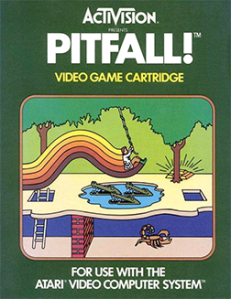
Pitfalls of an Adventurous Laptop Purchase

Pitfall!_Coverart

I’ve gone through a lot of laptops in the last 15 years. A LOT. Today I have about 20 usable ones and a few for parts.

There’s a definite benefit to going with one of the big names. One is consistency of chargers. For Dell, for example, you can use the same charger from the newest E6530 all the way back to a D400. Thinkpads tend to have reverse compatibility over a long span as well.

And I really like removable batteries. The C6xx and C8xx series from Dell supported two modular bay batteries, one dedicated battery slot and one battery/drive hybrid, and you can swap one out without shutting down. On the larger C8xx series you could even have a fixed-bay optical drive and two batteries. The D830 has one standard battery, but like the C8xx you can pull the modular bay drive and put a battery in its place. I have three of those batteries, and the bulk battery charger for them even.

I’m also a big fan of high-resolution displays, from the 1600×1200 days (C840/I8200 in 2001-2002) to 1920×1200 (D830 in 2008ish?) to today’s 1920×1080. I’ve been willing to take a heavier laptop to get that screen real estate. Four ssh terminals at a time plus a browser or two and two IM clients is not uncommon for me.

But for my last laptop purchase, i decided to risk losing the consistent power supplies, the expandable power, and maybe even some of the display resolution… and consider an Ultrabook. Sure, I miss the quad-core 8-thread 16GB system, but I found I wasn’t doing much virtualization on the laptop. And I was starting to get sore shoulders from the laptop bag. So I scaled it back.

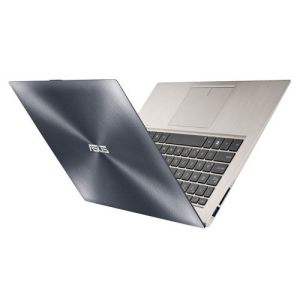
Introducing the ASUS Zenbook UX32VD

ux32vd-500-asusI ended up with the ASUS Zenbook UX32VD, which gave me a dual-core i7 Ivy Bridge processor, a 1920×1080 IPS display (13.3″, which took some getting used to) with discrete NVidia graphics in addition to onboard Intel graphics, USB3 and HDMI built in, and a pretty good battery life estimated at 4-5 hours. I went with Windows 7 since there’s no touchscreen on this model, and I didn’t want to bother with the “upgrade” just yet.

Most people who see it mistake it for a Macbook Air, until they see the color (more of a champagne than the plain brushed aluminum that Apple is fond of) and, of course, the ASUS name on the back. If they’d seen the price tag, they’d know it wasn’t an Apple device as well.

It had two additional features that were much harder to find on an Ultrabook, and those are easy RAM and disk upgrade options.  The factory configuration was 4GB of RAM (2GB onboard, 2GB SODIMM), and a 500GB 5400rpm hard drive (with 24GB iSSD to cache), which is probably more than most casual users need… but I want to run more than the bare minimum. In about 15 minutes or so, I upgraded to 10GB of RAM (via the Corsair Vengeance 1600MHz SODIMM) and a 500GB Samsung 840 SSD.

In terms of performance, I have no complaints. We’re talking instant-on sleep mode that goes into sleep in about 7 seconds, comes back in 2 seconds, and a full reboot for Windows 7 in under 10 seconds most of the time. Apps run fast, USB3 peripherals are snappy too, and I don’t dread Windows Update reboots anymore.

But the downside to this laptop was power expansion. There was no easy story for third party AC adapters or for external batteries. And as I’ve learned with my conference travel this year, you can’t count on easy access to outlets to plug in, or enough time between sessions to charge up.

First, the AC adapters

The stock ASUS AC adapter is pretty cool, a Macbook-adapter-sized wall brick (but in black, and with the Windows COA on the original one), and the tip that goes into the laptop snaps into place quite firmly and has an amber/green charge indicator light on it. But I had trouble finding a third party charger, and the ASUS one was selling for $60+ at the time.

I’ve been a fan of iGo’s universal adapters since the Juice, and have 3-4 of their Green line now (mostly because I keep misplacing the bits). There was no listed iGo tip for the Zenbook–the third machine I’ve found that iGo doesn’t support.

I tried an alternative model of ASUS charger for $15 off eBay, and it worked as long as I held the connector in place. It has a USB port for phone charging, like the iGo, so if it had worked it would’ve been great. But it didn’t have that snap or even the right fit.

AC Adapter: Problem Solved

It turns out that iGo’s 712 bit (which works with their green line of universal adapters) works pretty well with the UX32VD. It doesn’t snap in and doesn’t directly indicate charge (although the two higher-level iGo Green chargers will shut off automatically when there’s no more power draw, which is close enough). It does stay in under normal use, so it’s my usual travel option now. (Thanks to “mykie” on Notebook Review for confirming the tip almost a year ago… iGo was kind enough to not even respond to my inquiry about a tip for the laptop).

The stock adapter is now only $40 on Amazon, which is a nice price. I bought a spare to use at my desk at work.

Second, the batteries

I’ve had a Stiger external battery for a while (bought at Central Computers, who no longer carry or support them). This 7Ah  battery has interchangeable tips for everything from Dell’s old three prong connectors (Latitude C-series and the like) to fairly modern Dell, HP, IBM/Lenovo, etc. But no bit for my new ASUS.

And while Stiger seems impossible to find on the Internet, Central has dodged or ignored inquiries for a while now about this device (even though I bought the laptop and two of the batteries from them in the first place).

Battery Problem: Status TBD

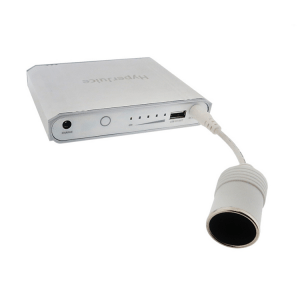
hyperjuice-60wh-3I *think* I’ve found a solution, although it’s going to cost me at least $200 to try it out.
ASUS does have a car/airplane adapter for this laptop, and a company called Hyper has a line of Mac-centric batteries that include a 12V cigar plug adapter. In theory, these should go together, but in practice, the smallest HyperJuice is $170 for 60WHr (16Ah I believe).  So I’m looking at another $60 for the car adapter, $170 for the Hyperjuice, and several crossed appendages to hope that they work.

So where do we go from here?

Well, since I started writing this entry, I found that there’s an air/auto input cable for the iGo Green line, which should be under $20. I think this will be a nominally more sane way to get DC input for my existing power adapters. I also found the $40 “Laptop Travel Charger” which includes the DC cable, and is in stock at the Fry’s 3 blocks from work.  Remember what I said about lost tips?

And since Amazon carries the HyperJuice batteries, I may try one out once I get the DC cable for my power adapter. If it doesn’t work, it goes back. If it does work, we’ll have to see.

Since Hyper is local here in the Bay Area, I’m reaching out to them to see if they can part with an eval battery, or let me stop by their site with my adapter and laptop and try it out in person. If it is a viable option, I expect a few other PC users would consider an extra investment to have killer battery life even without the Apple logo on their screen back.

I’ll keep you all posted. Let me know if you have any ideas or success stories in the comments below.

Some upcoming events worth a look

I haven’t been to my datacenter in over six months. I have a feeling the front desk folks at the Westin Casuarina are missing me by now. But I’m still on the move. Hopefully I’ll see some of you at one of the following events in the near future. 

VMworld US 2013

& Tech Field Day Roundtables at VMworld

This year’s VMworld is in San Francisco, just a 90-180 minute commute (each way) from where I live in Silicon Valley. Thanks to the gracious support of Gestalt IT’s Tech Field Day and the Tech Field Day Roundtable at VMworld sponsors, I’ll be camping in San Francisco and making the most of the opportunities during the week. 

Along with a dozen and a half other Tech Field Day delegates, I’ll be meeting with our friends from Asigra, Commvault, Infinio, and Simplivity. I’ve been to TFD sessions with all but Simplivity, but I’ve met Gabriel Chapman (@bacon_is_king) at the SV VMUG so they’re not strangers to me either (even if their “cube” is actually not cubical). 

In addition to the vExpert and VMware customer events, I’ll also be visiting friends from past Tech Field Day meetings, including Scale Computing, Nutanix, Zerto, Pure Storage, and Tintri. If I’ve missed anyone, feel free to touch base. 

Software Defined Data Center Symposium

Gestalt IT is hosting a full day SDDC symposium at Techmart in Santa Clara, a mere 10-15 minute commute for me. There’s still room to join us on Tuesday, September 10th, for a day of discussions about SDDC topics, featuring Greg Ferro, Jim Duffy, Ivan Peplnjak, and several leading vendors in the field. The event will set you back a mere $25 and that includes lunch. 

The Cloudera Sessions

This one actually has nothing to do with Gestalt IT, but if you’re deep into Hadoop, and Cloudera’s particular flavor of it, it’s definitely worth a visit. Cloudera hosts The Cloudera Sessions in cities around the United States, and I’ll be attending the San Francisco event on September 11th.

Several Cloudera technologists, from the system engineering manager to the co-founder/CTO will be talking about where the company is going and where Hadoop is going in the foreseeable future. This event will set you back $149, but if you are a current Cloudera customer, check with your account manager to see if you can get a discount. 

BayLISA At Joyent

The October 17 meeting of BayLISA, Silicon Valley and the San Francisco Bay Area’s oldest system administration group will be held in San Francisco at the headquarters of one of the most prominent Solaris technology companies, Joyent. We’re looking forward to hearing from Brendan Gregg about his new book, Systems Performance: Enterprise and the Cloud, as well as getting an update on Joyent’s Manta storage service.

Attendance is free, but space is limited. RSVP at the BayLISA Meetup site if you’re interested. 

IEEE Computer Society’s Rock Stars Of Big Data

As much as I hate the use of the term “rock stars” (since that’s not necessarily a compliment or a good thing), this event looks interesting. I’m not sure how useful it will be for technologists, but it’s worth a look. IEEE Computer Society is hosting their Rock Stars Of Big Data event at the Computer History Museum in Mountain View on October 29th. It will set you back $239 as an IEEECS member, or $299 without membership. Group discounts are available for registration of 3 or more people on one ticket. 

Mickey’s Not So Scary Halloween Party

Everyone deserves a bit of a break, and big data can wear a technologist out…. If you’re planning to be at the Magic Kingdom between September 10 and November 1, you should check out the Mickey’s Not So Scary Halloween Party. I went two years ago and it was pretty enjoyable. I do work for the Mouse, but I don’t get any benefit if you go. So I highly recommend it. 


Traveling with too much stuff?

I’ve been traveling a lot this spring/summer. There are a couple of things I’ve come up with that really help me travel more efficiently, or make the most of overpacking at least.

If you have tricks of the travel trade to add to this list, please join in on the comments below.

Too Much Stuff To Take?

Planning to buy more souvenirs than your suitcase will hold?

If you’re traveling light on the way, get nested suitcases and pack for the trip in the smaller one. This probably only works if you get free checked bags, or if you don’t mind the $50-75 extra charge, but it depends on what you’re buying.

Whether you’re traveling light or heavy, get a couple of flat rate shipping boxes from your US Post Office, and buy the postage in advance (you can print a label with postage at usps.com for a discounted rate off “retail”). Then when you’re packing up to go home, put the souvenirs in the flat rate boxes and leave them at the resort front desk for mailing back. You’ll wait a couple of days for delivery, but it’s better than dragging all those coffee mugs and other heavy or bulky items home.

(Drop) Ship It!

The Priority Mail trick also works if you want to ship something there. I once sent my brother’s and my niece’s birthday presents to Disney’s Wilderness Lodge Resort 3 days in advance of my trip, so I wouldn’t forget them and wouldn’t have to pack them and risk over-weight fees on my luggage (a few meals at Whispering Canyon and Boma and I had to risk over-weight fees on myself, of course).

Another space saver that I recommend if you can plan ahead and/or have Amazon Prime. You can have Amazon (and probably many other web retailers for that matter) ship to a third party address. So if you need things like coffee, diapers, non-perishable food items, clothing, a new laptop, etc…, you can order them online to be shipped to your hotel.

Create a new ship-to address and put “Guest Arriving X/X” on one of the address lines, and check with the front desk when Amazon notifies you of delivery.

Suck it up!

You probably won’t take a vacuum cleaner with you, but Space Bags, or their poor cousins zipper bags, are great for compressing clothing and waterproofing your non-wet stuff if your swimsuit, bath puffs, etc don’t dry before you leave.

I found that the genuine Space Bags roll-up varieties, the ones you don’t need a vacuum for, tended to last 2 or 3 trips before they died. So I started cheaping out and getting 2.5 gallon Ziploc brand zipper bags. They now have even larger ones that can be used to pack pillows, blankets, snowmobile suits, whatever you need to get the air out of.

Trade Shows Sometimes Give Away Shirts

I usually forget about this until I get an entire jumbo messenger bag full of tee shirts, but if you’re going to a trade show or technical convention, you’re probably going to be offered more tee shirts than you can use. If you can get away with wearing tee shirts at the event, you can probably get by with one or two shirts.

And if it doesn’t offend your sensibilities, you can save some space on the way home by getting shirts in a size for the smaller life forms at home.

Disposable What?

This isn’t always green, but if nobody on your trip is going to be seeing your underwear or bath puffs or socks, you can take the ones your spouse wants you to throw away, wear them one last time, and then throw them away. I tend to do this with bath puffs, since only one of the last dozen hotels I’ve stayed in provides a puff, and that one only did it once.

An alternative, if you can do a quick batch of laundry before taking off, is to donate non-unmentionables to a local thrift shop or charity. Backpacks, bags, and some other trinkets from trade shows can probably find a better home than the box your spouse keeps offering to help you throw away.

Galaxy S 4 Onboarding – Use Protection

For a while I had it made. With four lines on my cellular plan, three of which started out without a contract, I could sanely upgrade my phone every six months at a discount/promo rate, pass the old device down the chain, and just repeat every time a new device came out.

To the death? No, to the pain.

I do use the word “sanely” very loosely here. It’s still about $300 for the upgrade with tax. Every six months. Re-learning the new phone’s customizations, quirks, ringtones, etc.

And there are two more painful problems with this model, though. One is that you often have to re-buy all your accessories. Car docks, home docks, cases, cool Doctor Who skins… they all have to be replaced with your phone changes form factor and/or manufacturer. The other is that my cellular carrier makes it increasingly challenging to keep an unlimited data plan. The last thing I want to do is slip up on an upgrade transfer and start paying current rates for a sharing plan that really doesn’t meet my needs.

So for a few months I drooled silently over the Motorola RAZR MAXX HD and the HTC DROID DNA, until I saw that Samsung was coming out with a new Galaxy S 4 any day now. Those of you on Big Red probably know that we got it last of the major carriers–I think Credo Mobile even had the GS4 before Verizon did. But finally it came along, and I started suffering the same curse I’d suffered when buying previous bleeding-edge machines, even going back to those sweet 60GB iPods I bought last decade.

So I’m here today with some thoughts on protecting a new phone, and on the accessory ecosystem for the Galaxy S4 specifically.

Disclaimer: With the exception of the Speck case (free sample) and the Skinomi case (birthday present), all devices and accessories mentioned in this article were purchased by me through retail channels, albeit some with standard Verizon corporate discounts. Also, links in this post might result in affiliate commissions if you buy stuff from Amazon through them.

Use protection

Seriously. It doesn’t have to be ugly, or mint-flavored, but the first two things you should do with your new phone are protect the screen and protect the body.

I’ve found that the 3-pack screen protectors that the cell carriers sell are quite acceptable. I won’t leave the phone shop without one. You pay about $10-12 after discounts and you might never need the other two. Double-check whether the ones you’re offered are matte or glossy screen style (and if the shop doesn’t have the one you prefer, shop around quickly). Set them aside for when you sell the phone (more on this later). But if you’re mean to your phone, consider the Zagg option below.

As for protecting the body, you have a couple of options, depending on your aesthetics, usage needs, and your phone materials.

Slimline option – go with a clear protective skin for the whole phone. Zagg is the most prominent name, and if you install them properly (or pay the mobile folks at Best Buy $12 to do it), the skin will last forever. I’ve also used Skinomi once, thanks to a birthday gift from a coworker, with no concerns there.

Zagg Invisible Shield is a pain to install, although they now have different levels of installation difficulty/resilience. You can buy screen-only, which is good if you share your phone pocket with keys or bricks or angry rodents. I’d lean toward the full body coverage though.

Standard/slim case – you can get a variety of cases that basically cover the phone except for the screen, providing a somewhat resilient bumper for the edges (something the protective skins can’t really do). These are often available in different materials (silicone, hard plastic, even various metals) and opacities (solid, translucent, clear).

Standard/chunky case – If you want more of a sense of protection for your device, there are a lot of cases out there that provide more of a bumper, including Otterbox and the like. I wouldn’t recommend this for the Zoolander style of phone, but if you’re resigned to (or enamored with) a large phone already, and know you’re going to put it through abuse, you may find this option the best.

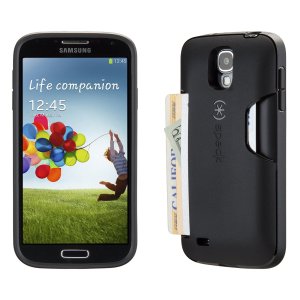
speck-cardcase-gs4

Featureful case – with larger screens and more multimedia, many people want a phone case that doubles as a stand, so you can watch a video or type with a bluetooth keyboard while using the phone’s display. There are also cases a couple of vendors which offer a mini-wallet for various devices. I tried the Bear Motion wallet case but got annoyed with having to open and close it. It does offer a stand feature, and more screen protection than some other options.

After I visited with Speck at Interop, they were kind enough to provide me with a free sample of the SmartFlex Card Case for GS4 (pictured here), which I’ve been using for over a month now. I wasn’t sure I’d be able to survive with just three cards of space, but it was perfect for a week around Disneyland and for most of my other travel (ID, work credit card, personal credit card). I could leave a thin wallet in my front pocket and rarely need it.

Battery case – With that huge brilliant screen, the high speed data, and the always-on mode we live in these days, you’re going to run out of power sooner than before. For a few devices (iPhones, Galaxy S3 and S4, probably others) you can find a case that contains an extra battery for your phone. I found a random import 3200mAh “Power Bank” case at a local computer shop for $30, and it saved my butt a few times at Cisco Live and other conference events. It also features a kickstand and an audio reflector to send the sound from your phone back toward you. The iDevice battery cases are a bit more polished, but hopefully this segment will expand a bit.

Cool But Not Protective Cases – When I bought my Galaxy S4, I got the Flip View cover, which lets you see notifications through the cover without flipping it open. I found that the flip view window picked up fingerprints from my screen, and I didn’t really use it as it was meant to be used, so it sits on my desk at home now. I’m glad Verizon price-matched Amazon on this, as I would have hated to write off $60 for the case.

There are also skins you can get that provide a nominal amount of protection (or distraction) from damage. I’ve been a big fan of the Custom Phone Skins line, especially their Doctor Who phone skins, and have bought 3-4 of them. However, while they protect a bit from scuffs, they won’t do much for you when you bounce your phone off the pavement getting out of a car. This would be a good choice if you go with a transparent/translucent case, or if your phone has a Kevlar coating like the RAZR MAXX did.

My daily driver is the Speck case these days, with the stock Verizon/Samsung screen protector. I keep the battery case in my laptop bag just in case, but most days when I’m not traveling, I’m rarely more than 200 feet from a charging cable. And as I learned in Nanowrimo in 2002, if you can plug in, do plug in.

So where do we go from here?

I’ll be sharing some thoughts on car accessories, as well as the evaluation process I went through before deciding not to change carriers, in upcoming posts. You can see some caveats for car accessories, and the TARDIS phone skin I had on my RAZR MAXX, at my earlier post on fun with Verizon phones and vehicle navigation mounts.

Have you found an accessory for your mobile phone or tablet that you can’t do without? Or something you wish you’d done without? Feel free to share in the comments.