Unknown's avatar

About rsts11

Big data integrator/evangelist I suppose. Formerly a deep generalist sysadmin and team lead, still a coffee guru, and who knows what else...

Pope Francis and Devops – On Further Genuflection

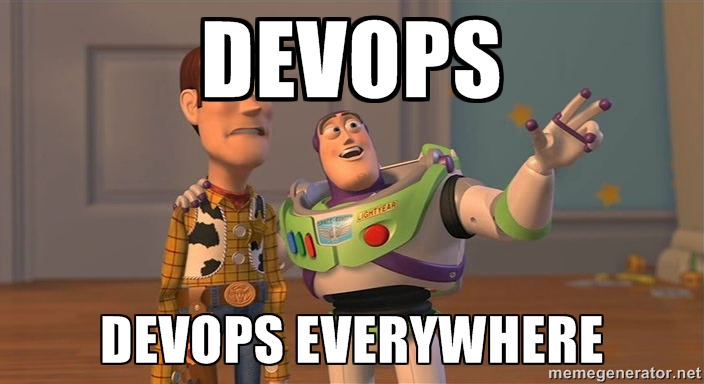
devops-everywhere

I have long been uncomfortable with the branding of “devops” in what used to be the world of system administration. It’s becoming almost as dynamic and imprecise as the F-word is (just two more parts of speech to go, i think), up there with “cloud” even (someone out there must be proud).

Matt Simmons had a good write-up on his blog about what he called the “worst ideas of the [devops] movement” and I have to agree with his take on that whole matter (except his misspelling of sherbet, which I’m told is now an accepted spelling).

We practicitioners in the sysadmin world are surrounded by marketers, headhunters, and opportunistic writers who latch onto different flavors of the Devops concept. People outside our sphere see the buzz and the branding from us and from this border element as well. When those of us doing the work can’t agree on a message that is clear and accurate without being exclusionary, we do more harm than good.

But this morning, I figured out the core of my objection, while being berated on Twitter by someone who could be considered one of the “high priests” of Devops. What bugs me is the “organized religion” nature of Devops.

nobody-expects-devops

I don’t need people who say “either you’re [a] Devops or your dumb[sic].” I don’t want to trick people into Devopsing. And I don’t feel the need to tie any particular buzzword or brand identity into everything interesting and useful in my industry or profession.

What does Pope Francis have to do with all of this? Well, recently he’s been talking about deeds and actions, rather than branding and dogma, and going a bit gentler than his predecessors on people who are conscientious but not Catholic. My take on that is that it doesn’t devalue the good works and good conscience of a Catholic to acknowledge that you can have good works and a good conscience without being Catholic.

spidey-devops

Now imagine if you could play well with others in a technology setting, be a good sysadmin, and build scalable and sustainable environments… even without calling them, yourself, your department, or your religion Devops. (ps: it’s easy if you try; I was doing that at the turn of the century, although I wouldn’t even label that as hipster devops.)

And imagine if you could acknowledge others doing the same, without having to staple the Devops label on them. It’s true, you’ll risk losing the people who have bought into the upper-case D branding, or people whose managers say “we have to be Devops, take a few devopses and go devops at that devops conference.” You may also confuse HR people who are under fire to hire X number of devopses. But the profession and your environment probably won’t suffer.

If you have to brand, or rebrand, your personal practice for your own reason, go ahead and do it. It’s your business card, after all. But if you feel that building scalable and sustainable environments, working well with your coworkers, and being a good sysadmin require a brand label that is inconsistently defined at best, well, you’ve lost me, and probably at least a few other sysadmins.

Disclaimer: I used to be Catholic, still believe in the one true spelling of sherbet, and claim fair use on the Toy Story picture above, which obviously is not owned by me.

Wrangling a Cisco Meraki Wireless network into VPN duty

As many of you know, I have a side line of distraction running a computer shop. From February 2012 through July 2013, it was walking distance from home but still had a 20mbit ADSL line from Sonic.net.

In July I had to move out of the shop for the construction of new luxury apartments on the property. And in the year and a half I had that location, Sonic went through some adjustments and the costs involved with setting up service at the new location more than doubled. So I’m holding off until I have time to spend more than a couple hours at a time in the shop. For now I’m connected with a Verizon Wireless 4G LTE USB modem on a Cradlepoint MBR1000 router/access point. 

In the last week I’ve found a pretty good way to access systems in the shop from home without too much hardware wrangling. My home network has two Meraki access points, a MR12 (courtesy of the Meraki webinar series) and a MR16 (courtesy of a fellow Tech Field Day delegate who wasn’t using his). I have an MR14 on the floor of my office, waiting for me to track down its previous owner and try to get it removed from his account so I can add it to my account, but I expect that may not happen soon.

High Level Wrangling Overview – Picking Out The Pieces

I was looking at the Meraki Teleworker Z1 router, which supports VPN connectivity back to a VPN concentrator. It was tempting, still is in fact, but in the process of researching that solution, I discovered three interesting things.

1) Meraki provides a virtual concentrator for low-volume use, as a free download if you have the enterprise dashboard (i.e. have a MR device under cloud management) already. You don’t need a physical concentrator/MX device. And you don’t need ESXi to use it; I have it in VMware Player on my desktop for now.

2) That VPN connectivity works between MR access points as well, so you can set up, say, an MR12 in one location, specify a SSID as a VPN tunnel, and access the other network that way.

3) The MR12 access point has a second wired Ethernet connection that can be used to bridge wired clients into the VPN. I knew about this from the day I unpacked the MR12, but I only learned today how to make it work.

Low Level Wrangling Implementation – The Secret Of Association

Prerequisites:

  • Access to your Meraki dashboard
  • Two MR devices installed and working, one at either site. (MR12/MR58 required if you want to bridge a LAN through the VPN, as seen in Fourth step below)
  • Internet connectivity for both MR devices
  • A way to run a VMware virtual machine (Player, Fusion, ESXi, Workstation should all do) at your HQ site

In these steps we may refer to “HQ” as the main location, where your VPN concentrator and most of the servers your remote clients need to access would be.

First step – Create a virtual VPN concentrator “network” at “HQ”
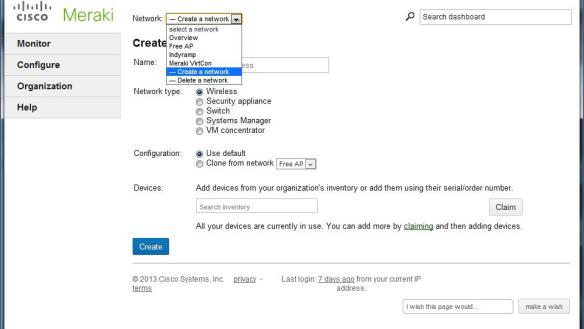
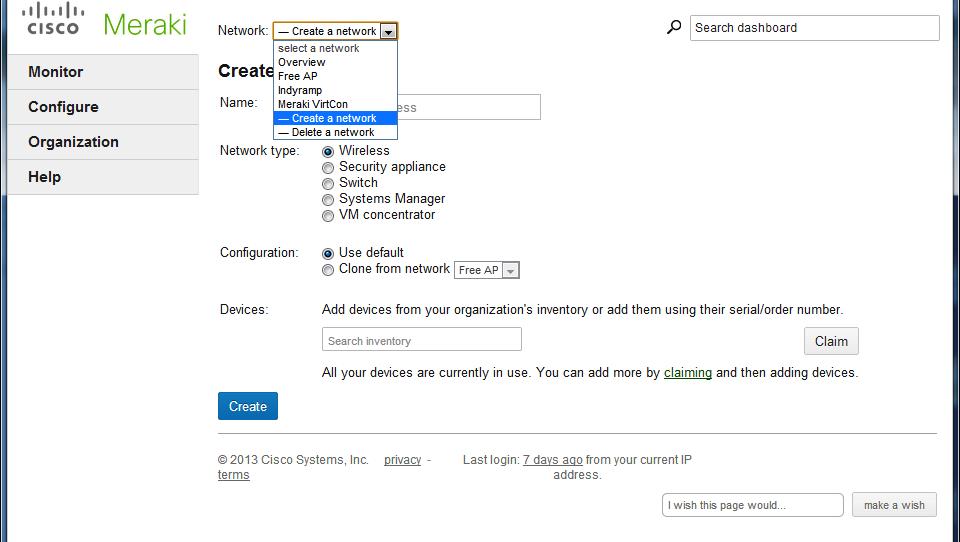
meraki-vpn-01-create-networkWe’re going to set up the virtual machine that hosts the VPN concentrator. This should run at your HQ site.

You’ll go to the Network pulldown at the top and choose “Create a network.” Give it a name and choose a network type of “VM concentrator.” Click Create.

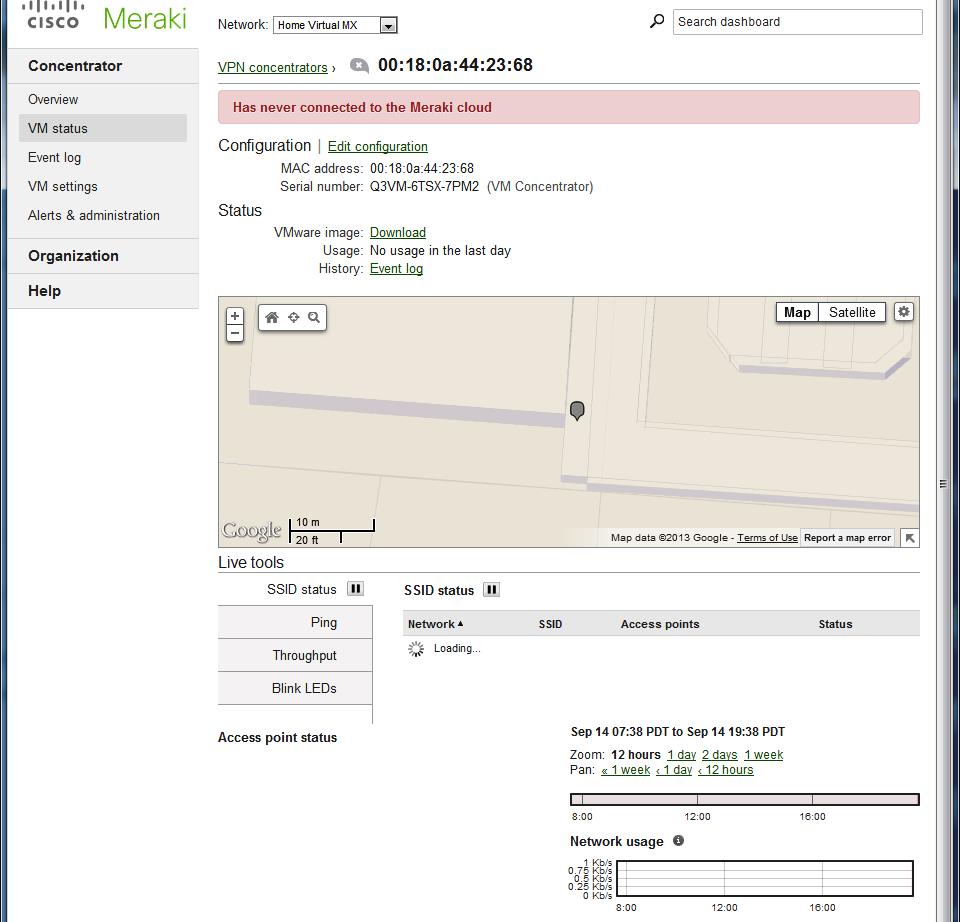
Then you go to Concentrator-> VM status and see that this concentrator has never connected to the cloud. This might be because you’ve not started it up yet. Let’s do that now. meraki-vpn-02-new-mx
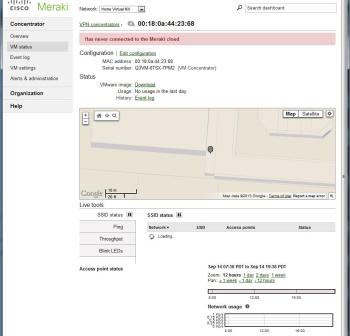
Click “Download” next to “Vmware image” and receive the zipfile (about 15MByte, 24MByte when you uncompress it). Create a new directory and extract it to that directory. Then open it with your choice of virtualization products. For VMware Player you’d use “Open a virtual machine.”

Note that the requirements are pretty small, and take that into account when considering your VPN load as well. By default the VM comes up with 1 vCPU, 512MB RAM, and 128.5MB disk allocated.

Now start up the VM and wait for it to make contact with the Meraki Cloud. When it connects, you’ll see Internet Port, Public IP, and no more “never connected” message on the Meraki dashboard.

Second step – Create a VPN SSID

Meraki’s documentation says that VPN tunnels are configured on a per SSID basis. This means that you either need to make an existing SSID serve VPN traffic (not recommended by me, as it may get confusing at the site that hosts the VPN concentrator), or create a new one explicitly for VPN traffic.

You can create a new SSID on the Configure->SSIDs page. I named mine Home VPN since the VPN concentrator is at home. Name it, and leave it disabled. Save changes.

Now we’re going to set up access control for the new SSID before enabling it. Go to Configure->Access Control, choose your new SSID name, and change these settings.

  • Association requirements – Set to whatever you like; most home or casual users will use Pre-shared key with WPA2
  • Addressing and traffic – Here’s the magic bit, choose VPN: tunnel data to a concentrator. This will open the “Concentrator” menu item, and you choose “Tunnel traffic to <your concentrator name>.” Test connectivity but don’t panic if it fails.
  • VPN tunnel type – If you want all traffic from the other end of the VPN to go through your “main” site, leave it at Full tunnel: tunnel all traffic. If you only want to tunnel traffic intended for your “HQ” site (where the concentrator lives), choose “Split tunnel: tunnel only selected traffic” and check the “VPN split tunnel rules.” By default they’re probably good enough, but if you have other networks at your “HQ” that don’t show up, add them as separate split tunnel rules.

Other options can be set, but don’t necessarily pertain to the VPN, so I’ll leave them as an exercise for the reader.

Now go back to Configure-SSIDs and you may enable your newly secured VPN SSID.

Third step – lock down the VPN SSID to your remote sites

Connecting to the VPN SSID from your headquarters may have unexpected results, and if you take devices between sites, you may get suboptimal performance when you’re at HQ. So I’d recommend limiting the SSID availability for this SSID.

The way I do this is to use a “tag” in the access point configuration. For each AP that’s remote and will get VPN access, go to Monitor->Access Points and choose your remote AP. “Edit Configuration” and add a tag like “RemoteVPN” (note that tags are individual words, not comma-separated, so “remote vpn” is two tags). Save your changes.

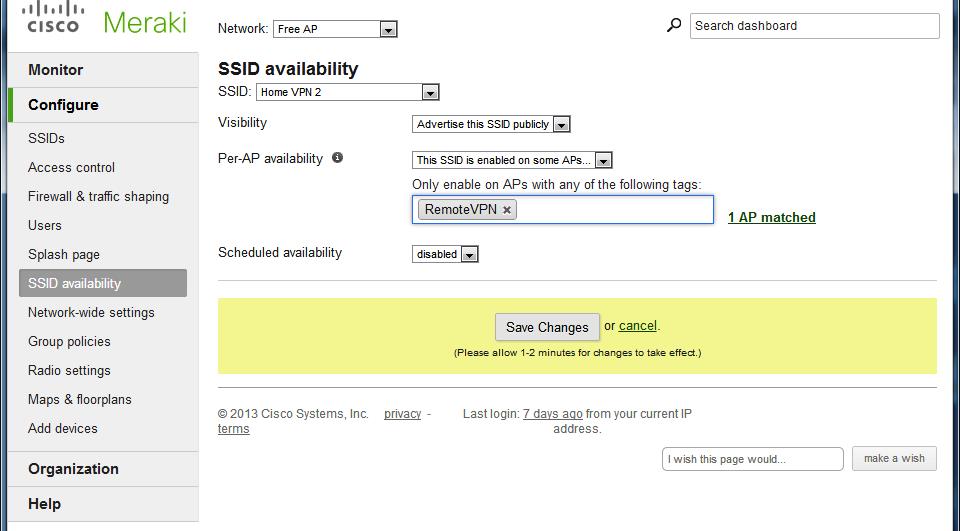
meraki-vpn-05-ssid-availability

Now go back to Configure->SSID Availability, choose your VPN SSID, and change Per-AP availability to “This SSID is enabled on some APs.” Choose your tag and save your changes.

Now the VPN SSID will only show up on the APs you’ve tagged as RemoteVPN, and not on your HQ APs.

Fourth step – enable wired connectivity to the VPN

The MR12 and MR58 access points have a second 10/100 Ethernet port on the back. This port can be used as failover in case the first Ethernet port loses Internet connectivity, but for this project I want to use it to connect wired systems (i.e. my shop lab, wired cameras, etc) to the VPN.

The port is disabled by default. I didn’t realize this at first, and gave up on it for quite a while, but during this project I found that you can bridge the wired port on the MR12 to any of your SSIDs.

Oddly, this shows up in “Network-wide settings” under Configure. You can go down to the Device configuration section and change “Clients wired directly to Meraki APs” to “Behave like they are connected to ‘Home VPN'” (or whatever you call your VPN SSID).

When you do this, and save your changes, anything connected to that wired port will behave, for network purposes, like it was a wireless client on the SSID.

One caveat from Meraki, though:

If you disable an SSID on an AP, and the SSID is also specified for wired clients, the wired clients feature will still be enabled on the AP. 

This means you can use a MR12 purely as a wired bridge to your VPN if you want to. I believe it also means that the wired client functionality is independent of the settings we made in the third step above. And if you have an MR12 at your HQ site, connecting anything to the second ethernet on that AP will VPN it through your concentrator.

It may have other security and availability implications. In the small networks we’re talking about, it probably isn’t too significant. You probably have switch ports available elsewhere at your HQ location anyway.

So where do we go from here?

At this point, I have transparent connectivity between my home office and the shop. Anything connected in the shop on my VPN SSID, and anything on the wired port on the MR12, gets its DHCP lease, DNS settings, and so forth from the Cradlepoint MBR1200 router in my home office, as if it were under my desk at home.

My next steps will be to wire up a switch on the shop end of the connection and hang a VMware server off of it. I’m still stocking parts for the other machines, but one server will be good enough to validate the VPN connectivity and start working on upgrades.

I will have to go with a real wired connection someday, most likely Sonic with bonded ADSL2+, and then it’s conceivable that I might outgrow the virtual VPN concentrator. At that point I’ll either look at getting a deal on a MX60, or revamping the VPN altogether (possibly with the Cradlepoint MBR1200 and MBR1400).

If you’ve played with this method of VPN connection and have any further suggestions, or observations on the performance limits of the virtual concentrator, I’d love to hear about them in the comments below.

Is Licensing Sexy? Asigra Might Think So, And So Might You

We were pleased to welcome Eran Farajun and Asigra back to Tech Field Day with a presentation at the VMworld US 2013 Tech Field Day Roundtables. I’ve also seen them present a differently-focused talk with live demo at Storage Field Day 2 in November 2012.

Disclosure: As a delegate to the Tech Field Day Roundtables at VMworld US 2013, I received support for my attendance at VMworld US. I received no compensation from sponsors of the Roundtables, nor Tech Field Day/Gestalt IT, nor were they promised any coverage in return for my attendance. All comments and opinions are my own thoughts and of my own motivation.

Asigra Who?

Asigra has exclusively developed backup and recovery technology for over 25 years. Let that sink in for a moment. Most of the companies I’ve worked for haven’t been in business for 25 years, and most companies change horses if not streams along the way.

But Asigra continues to grow, and evolve their products, a quarter of a century into the journey. They introduced agentless backup, deduplication (in 1993), FIPS140-2 certification in a cloud backup platform, and a number of other firsts in the market.

One reason you may never have heard of Asigra is that they don’t sell direct to the end user. They work through their service provider and partner network to aggregate access and expertise close to the end user. Of course the company backs their products and their partners, but you get the value add of the partner’s network of support personnel as well. And you might never know it was Asigra under the hood.

So what’s Asigra’s take on licensing?

In 1992, Asigra moved to a capacity-based licensing model, one that many of us are familiar with today. You pay a license fee one way or another based on the amount of data that is pushed to the backup infrastructure. This has been seen in various flavors, sometimes volume-based, sometimes slot-based or device capped. Restores are effectively free, but it’s likely that you rarely use them.

Think in terms of PTO or Vacation days (backup) and Sick Days (recovery). You probably have a certain amount of each, and while PTO may roll over if you don’t use it, those 19 sick days you didn’t use last year went away. Imagine if you could get something for the recovery days you didn’t have to use. Asigra thought about this (although not with the same analogy) and made it happen.

Introducing Recovery License Model

So in 2013, Asigra changed to what they call RLM, or Recovery License Model. You pay part of your licensing for backups, and part for recoveries. There are safety valves on both extremes, so that if you do one backup and have to restore it all shortly thereafter, you’re not screwed (not by licensing, at least–but have a chat with your server/software vendor). And if you have a perfect environment and never need to restore, Asigra and your reseller/partner can still make a living.

Your licensing costs are initially figured on the past 6 months’ deduped restore capacity. (After the first two 6-month periods, you are apportioned based on the past 12 months.) If you restored 25% of your backups, you pay 50 cents per gigabyte per month (list price). If you restored 5% or less of your backups, you’re paying 17 cents per gigabyte per month.

You don’t get fined for failed backups of any sort. Hardware failure, software failure, or some combination–it doesn’t count against you. You also get a waiver for the largest recovery event–so if your storage infrastructure melts into the ground like a big ol’ glowing gopher, you can focus on recovering to new hardware, not appeasing your finance department.

For those of you testing your backup/restore for disaster recovery purposes (that’s all of you, right?), you can schedule a DR drill at 7 cents per gigabyte per month for that recovery’s usage. Once again, it’s deduped capacity, so backing up 1000 VDI desktops doesn’t mean 1000 times 3GB of Windows binaries/DLLs. And your drill’s data expires at the end of the 6 month window, so don’t count on fire drills as permanent backups.

So where do we go from here?

I know a couple of my fellow delegates were disappointed with the focus on Asigra’s licensing innovations, and that there wasn’t more talk of erasure codes and app-centric backups, but they’re probably not the ones writing the checks for software licensing for enterprises. 

Is this the sexiest thing you’ve seen in tech this quarter? Maybe not. I’d point toward Pernix Data and Infinio for that distinction, in all honesty. But Asigra’s RLM is yet another in a series of innovations in what might be the most innovative DR/BC company you’d never heard of before.

Asigra estimates immediate savings of 40%, and long term savings of over 60% by separating backup and recovery costs.

As an aside, Asigra’s latest software version, 12.2 (released earlier in 2013), backs up Google Apps as well as traditional on-site applications and datastores. Support for Office 365 backups is coming soon.

Links

Cisco Live and VMworld: Two first times compared

This was a year of many firsts for me, including four conferences I attended for the first time: Interop Las Vegas, Cisco Live, Nth Symposium, and VMworld. This is a long one, but I wanted to share my comparison and suggestions for future events.

Disclosure: I received support from Tech Field Day, HP Storage, and VMware in attending these events. I was a delegate to roundtables with Tech Field Day at all but Nth, and a HP Tech Day delegate at Nth. None of these sponsors were promised any special consideration in my coverage (or lack thereof) of the events, nor was I compensated for any participation in or around their events.

0. Overview

Both Cisco Live US and VMworld US were huge affairs, effectively a full week with 20k+ attendees, keynotes, breakout sessions, noticeable social media engagement, and all the challenges that come with housing, feeding, entertaining, and educating a large crowd, not to mention navigating that crowd.

Cisco Live was at the Orange County Convention Center in Orlando, Florida. About a dozen official Convention Hotels were within a few blocks of the convention center.

VMworld was at the three buildings of the Moscone Center, and conference facilities in two or three nearby hotels as I recall. Attendees had choices of hotels within a mile of the conference center.

Continue reading

One Size Fits All: Hyper-V on VMware turf, custard trucks, and IT evangelism

At VMworld 2013 in San Francisco, there was a lot of buzz around Hyper-V, oddly enough. A few vendors mentioned multi-hypervisor heterogeneous cloud technologies in hushed tones, more than a few attendees bemoaned the very recent death of Microsoft TechNet Subscription offerings, and guess who showed up with a frozen custard truck?

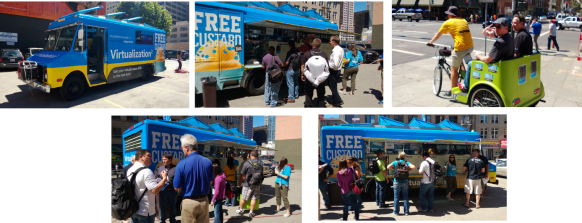
8015.Custard_picks

Yep, Microsoft’s server team showed up, rented out and re-skinned a Frozen Kuhsterd food truck, and handed out free frozen custard for a chance to promote and discuss their own virtualization platform and new publicity initiative, branded Virtualization2.

The frozen custard was pretty tasty. Well worth the 3 block walk from Moscone. It was a pretty effective way to get attention and mindshare as well–several people I spoke with were impressed with the marketing novelty and the reminder that VMware isn’t the only player in the game, even if one friend considered it an utter failure due to the insufficient description of frozen custard.

Almost two years ago when I did my Virtualization Field Day experience, the question I asked (and vendors were usually prepared to answer) was “when will you support Xen in addition to VMware?” This year, it’s more “when will you support Hyper-V?” So a lot of people are taking Microsoft seriously in the visualization market these days.

Insert Foot, Pull Trigger

One nominal advantage Microsoft has had over VMware in the last few years is an affordable way for IT professionals to evaluate their offerings for more than two months at a time. But first, some history.

time-bomb-meme

Once upon a time, VMware had a program called the VMTN (VMware Technology Network) Subscription. For about $300 a year, you got extended use licenses for VMware’s products, for non-production use. No 60-day time bomb, no 6-reinstalls-a-year for the home lab, and you can focus on learning and maybe even mastering the technology.

Well, in February 2007, VMware did away with the VMTN subscription. You can still see the promo/signup page on their site but you’re not going to be able to sign up for it today.

At that point, Microsoft had the advantage in that their TechNet Subscription program gave you a similar option. For about $300/year you could get non-production licenses for most Microsoft products, including servers and virtualization. I would believe that a few people found it easier to test and develop their skills in that environment, rather than in the “oops, it’s an odd month, better reinstall the lab from scratch” environment that VMware provided.

Well, as of today, September 1, the TechNet Subscription is no more. If you signed up or renewed by the end of August 31, you get one more year and then your licenses are no longer valid. If you wanted some fresh lab license love today, you’re out of luck.

Technically, you can get an MSDN subscription for several thousand dollars and have the same level of access. The Operating Systems level is “only” $699 (want other servers? You’re looking at $1199 to $6119). Or if you qualify for the Microsoft Partner Program as an IT solutions provider, you can use the Action Pack Solution Provider to get access to whatever is current in the Microsoft portfolio for about $300/year. But the latter is tricky in that you need to be a solutions provider and jump through hoops, and the former is tricky because you might not have several thousand dollars to send to Redmond every year.

Help me, Obi-Wan vExpert, you’re my only hope

In 2011, Mike Laverick started a campaign to reinstate the VMTN subscription program. The thread on the VMware communities forum is occasionally active even two years later. But after two years of increasing community demand and non-existent corporate support, a light appeared at the end of the tunnel last week at VMworld in San Francisco.

As Chris Wahl reported, Raghu Raghuram, VMware Executive Vice President of Cloud Infrastructure and Management, said the chances of a subscription program returning are “very high.” Chris notes that there’s not much detail beyond this glimmer of hope, but it’s more hope than we’ve had for most of the last 6 years. For those of you who remember Doctor Who between 1989 and 2005, yeah, it’s like that.

Today, your choices for a sustainable lab environment include being chosen as a vExpert (or possibly a Microsoft MVP–not as familiar with that program’s somatic components) with the ensuing NFR/eval licenses; working for a company that can get you non-expiring licenses; unseemly licensing workaround methods we won’t go into; or simply not having a sustainable lab environment.

I added my voice to the VMTN campaign quite a while ago. When nothing came of that campaign, and I found myself more engaged in the community, I applied for (and was chosen for) vExpert status. So the lab fulcrum in my environment definitely tilts toward the folks in Palo Alto, not Redmond.

But I did mention to the nice young lady handing out tee shirts at the Microsoft Custard Truck that I’d be far more likely to develop my Hyper-V skills if something like TechNet subscription came back. She noted this on her feedback notebook, so I feel I’ve done my part. And I did get a very comfy tee shirt from her.

When I got back to my hotel, I found that the XL shirt I’d asked for was actually a L. Had I not been eating lightly and walking way too much, it wouldn’t have come anywhere near fitting, and it probably won’t any more, now that I’m back to normal patterns. But maybe that size swap was an analogy for a bigger story.

One size doesn’t fit all.

If Microsoft and VMware can’t make something happen to help the new crop of IT professionals cut their teeth on those products, they’ll find the new technologists working with other products. KVM is picking up speed in the market, Xenserver is moving faster toward the free market (and now offers a $199 annual license if you want those benefits beyond the free version), and people who aren’t already entrenched in the big two aren’t likely to want to rebuild their lab every two months.

And when you layer Openstack or Cloudstack (yeah it’s still around) on top of the hypervisor, it becomes a commodity. So the benefits of vCenter Server or the like become minimal to non-existent.

So where do we go from here?

Best case, VMware comes up with a subscription program, and Microsoft comes up with something as well. Then you can compare them on even footing and go with what works for you and your career.

Worst case, try to live with the vCenter and related products’ 60 day trial. If your company is a VMware (or Microsoft) virtualization customer, see if your sales team can help, or at least take the feedback that you want to be able to work in a lab setting and spend more time testing than reinstalling. 

And along the way, check out the other virtualization players (and the alternatives to VMware and Microsoft management platforms… even Xtravirt’s vPi for Raspberry Pi). Wouldn’t hurt to get involved in the respective communities, follow some interesting folks on Twitter and Google+, and hope for the best.

Did you say something about Doctor Who up there?

Yeah, and I should share something else with you.

When I saw the mention of the custard truck, my first thought was honestly not frozen concoctions in general. Obviously, it was the first Matt Smith story on Doctor Who, Eleventh Hour, wherein he tries to find some food to eat at Amy Pond’s home after regenerating. He ends up going with fish fingers (fish sticks) and custard (not the frozen kind).

So I made a comment on Twitter, not directed at anyone, saying “I’d have more respect for Microsoft’s Hyper-V Custard if fish fingers were offered on the side.”

And this really happened.

this-really-happened

So even if they’re discouraging me and other technologists from effectively labbing their products, I have to give them credit for a sense of humor. Not usually what you expect to come out of Redmond, now is it?

Related Links:

Mr Jones posted an article that really annoyed me until I read his well-reasoned response to the well-reasoned comments. Check out his interpretation of the TechNet subscription and brave the comments for some very sane discussions.

A couple of pieces from the Microsoft team about their marketing activity. Fun read, and the source of the truck photos above.

tardis.wikia.com definitions and a BBC video clip from Youtube,to help you understand the Twitter exchange.