Unknown's avatar

About rsts11

Big data integrator/evangelist I suppose. Formerly a deep generalist sysadmin and team lead, still a coffee guru, and who knows what else...

I went to Cisco Live, and now it’s coming to me

So it looks like I’ll be back in fish-out-of-water territory May 18-21, 2014, when Cisco Live comes back to San Francisco for the 2014 US event. Read on…

Update: 2014-05-01 big news, win a free lab pass for Cisco Live US 2014; see the update at the bottom of this post!

Fish out of water?

I went to Cisco Live US in Orlando last year. It was my first really big event, and the reasons for the fish-out-of-water comment are twofold. One is that I’m not, for the most part, a networking guy. I’ve done networking, mostly LAN/VPN and a bit of wireless, but I’m primarily a server sysadmin, bare metal all the way. And two, I learned my original network chops (beyond 10b2 Ethernet and dialup networking) supporting the Ethernet switching products division of Nortel up until the turn of the century.

But two years ago last month, my boss asked, “Want to come to the datacenter in Vegas and work on some servers?” It was something to do, and I was curious how Cisco would make servers… so I went, and started loading cards into UCS C210 M2 servers and trying to get operating systems onto them.

And for the last two years, a big part of my day job has been setting up, maintaining, deploying, and troubleshooting a pretty big pile of Cisco UCS C-series servers and related infrastructure. It’s been a wild ride, and it’s probably a relatively rare patch of expertise, and I’ve learned a lot via trial by fire (and a lot of dumb questions to my TME/savior).

So last year, when I had the opportunity to go to Cisco Live (thanks to some help from Tech Field Day), I jumped at the chance. I stretched my trip home from Tech Field Day 9 in Austin to take me through Orlando and joined in a roundtable with Opengear while there, but mostly went around being a bit overwhelmed and meeting a lot of the people from Cisco who I’d worked with indirectly during the UCS adventure.

Stay social, my friends

Cisco Live 2013 Social Media

I also met a lot of the people I interact with daily on Twitter , and some I just started interacting with at the event. There’s a few of them above this paragraph (and I think I’m in the middle of the right side near the back). I couldn’t get anyone to give me a ride out to Disney World, even with the promise of free passes, but it was a good time anyway.

At some point as I was getting ready to leave for Orlando, I got a message on Twitter asking if I was interested in a new social media program Cisco was starting up. I was baffled but intrigued, and a month or two later I was one of the first dozen people in that program.

Will you come with me, won’t you come with me?

So this year I’m headed back, an hour’s train ride away rather than 5 hours plane ride, with some lessons in my backpack and bigger plans for this year’s adventure. This year I’m going back as a Cisco Champion, with a couple of posts on the Cisco Perspectives blog and an even wider ring of social contacts in all corners of the Cisco ecosystem. I’m planning to head into the certification forest a bit (have to branch out somehow, right?), and maybe show a bit more restraint as far as bringing tee shirts home (for the sake of domestic tranquility) .

If you’re considering going, well, by all means check it out. There’s the main site for Cisco Live US, and a page describing the packages and options for registration. If your company does a lot of business with Cisco, check to see if they have learning credits available, or see if your organization has training or professional development budgets.

If you’re local but on a tight budget (or if you can get to San Francisco cheaply anyway), consider Explorer ($49) or Explorer+ ($595) which give you access to the keynotes, the World Of Solutions vendor expo, and (with the plus) two tech sessions. Or there’s a social event pass for under $200 that lets you into the receptions, the expo, the keynotes, and the Wednesday night Customer Appreciation Event (likely a big concert and festival at AT&T Park or Treasure Island).

If you can’t make it at all, check out the “Learn Online with Cisco Live” section of the above registration link. You can see a lot of sessions from past events, including one or two that you’ll hear me in the background of (with the speaker’s approval), and access to live broadcasts from time to time. And of course, follow the conversation on Twitter with the hashtag #CLUS and follow @CiscoLive (the official event Twitter account).

If you’d like to read my observations and comparisons from VMworld 2013 and Cisco Live 2013, I conveniently have a blog post on those.

If you’d like to read Jeff Fry’s preview post on Cisco Live 2014, and you should… click on that link. The map of official hotels (some of which may be sold out of the CLUS discount block rates) is worth the price of clicking alone!

It should be interesting to see how Cisco Live translates onto the Moscone conference space. While I won’t miss the humidity and 90-degree heat from Orlando, I will miss the $90 walking-distance hotel option. But I’ll be back, joining the social fray again, and looking forward to meeting as many of you as possible.

And as a disclaimer, if you click on the Cisco Live links above, I get entered in a contest for a free lab or technical session at the event. Other than that, I get no compensation or consideration for this post beyond the warm fuzzies of supporting an event and team I like.


winner-winner-chicken-dinner[1]

Update as of May 1, 2014
I’ve been informed that I won the Cisco Live blogger contest for a free 4-hour lab or technical session at 2014’s Cisco Live conference May 18-21 in San Francisco.

This is great news, and I’m grateful to everyone who helped me win by reading my posts and clicking through to the Cisco Live website.

The downside is, I already have two labs scheduled and paid for, and my brain is likely enough to explode already. So by special dispensation, I’m going to give away my free lab pass. Here’s how to get in on the action:

If you are already registered for a Full Conference pass for Cisco Live US 2014 in San Francisco, and can use a lab or technical session, just tweet a link to your favorite blog post of mine. Include the hashtags #CLUS and #RSTS11 in any order. Up to three tweets per person will be accepted as entries, so that the first tweeters to enter aren’t left out. However, if my timeline view shows more than one tweet in a row from you, that only counts as one. So tweeting an entry 25 times in a row is nice but won’t win you the prize.

In honor of the 25th anniversary of Cisco Live, I will identify the 25th qualifying tweeter (with a link to a rsts11 blog post, and the two hashtags) and pass along your twitter handle to the Cisco Live team to arrange for your free lab or tech session. You might want to follow me (@gallifreyan) so I can DM congratulations and get your registered name to share with Cisco Live.

Note that the 25th in chronological order at the time I look at the tweet stream will be chosen, and retweeted, deleted, multiple, delayed, or incomplete tweets may not be considered or eligible. Tweets before @ciscolive announces this win will be ineligible. Bacon not included. This is only for a 4-hour lab or technical session; you must already have a valid registration for the full conference pass itself to use this prize. Neither I nor Cisco Live is responsible if your head explodes from the learning experience itself either.
New hardware thoughts for home labs (Winter 2013)

It’s been almost two years since I wrote my first home lab post, on the occasion of rolling a Shuttle SH67H3 VMware server. Since then, I’ve rambled on Twitter about a lot of other options, and figured I would bring some of them to your more-easily-searched-for attention.

I will update this post in the near future – most recent update 2013-12-12 – so you can look (probably at the bottom) for new details and references.

Disclosure: I’m not paid or coerced to promote the items in this post. Anything I own below was bought with my own money. Most of it probably will not blend. Any references to vendors or manufacturers are based on my experience and not any consideration from the company.

Many of the links are to Amazon.com, and if you buy through them, I get a small commission credit to spend on more coffee gear or some of the same things. I appreciate your support and suggestions.

My lab cluster today

I recently bought two batches of rackmount servers at absurd prices. We’re talking less-than-the-memory-was-worth prices. For now, I have an NEC Express 5800/120Rh-1 (dual E5405/16GB) and a HP DL365 G1 (dual-core Opteron 2214HE/16GB) running 5.5. vCenter Server is running on my NUC i3 box out of convenience. When I get some more PC2-5300F RAM, I’ll switch out that Opteron for another Xeon to get a bit more consistency.

The downside to this environment is that it’s noisy and a bit power-hungry. At rest, the two servers use about 400W. So until I upgrade the UPS, I’m a bit stuck on that level of server.

But the upside is that the two servers as configured cost less than I spend on coffee in a month at home. And my lab is in a location that isn’t as sensitive to power load or noise as my home office might be.

Using a Dell Poweredge C6100 for dense rackmount computing

There are a lot of 1u and 2u rackmount servers out there on Craigslist, eBay, Weird Stuff, and such venues. I’ve picked up various HP boxes for chump change and scrounged for memory, so it is an option. You can probably get a dual socket 8-core server (DL160, DL360, DL365, DL380, DL385) with some memory and drive trays for under $100 until you run out of power outlets. If your tolerance for power draw and noise allow, that’s definitely a cost-effective way to go.

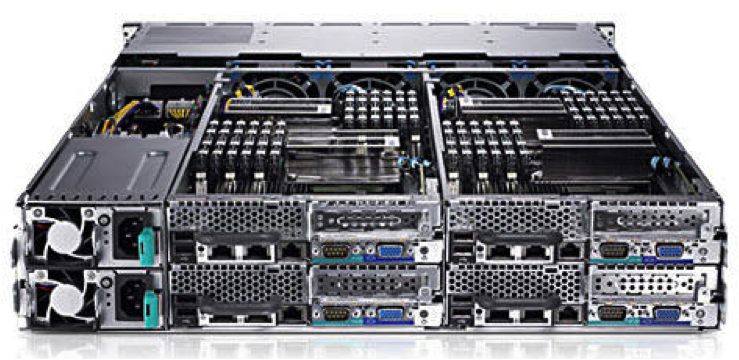
C6100

There are also a lot of Dell C6100 “blade” servers (pictured above) out there as well. These are 2u enclosures with up to 4 two-socket nodes. Each blade can take 12 DIMMs (up to 192GB), two quad or hex core Xeon processors, and 3 LFF 3.5 drives or 6 SFF 2.5 drives (SATA, SAS, SSD). And from what I’ve read, you can run four dual-L5420 blades at about 300W.

I’m seeing these priced at around $750 for a two-L5520-node config, or a four-L5420-node config, with minimal RAM. You can find a four-L5520-node config for around $1k, or you can add extra nodes later. ServeTheHome has a thread on community update findings, including fan improvements and internal USB.

I don’t know what the noise level is out of the box, but hopefully one of my readers can chime in. Or I may pick one up next month and come back with an update.

Ye Olde HP Proliant Microserver… And Ye Newe Microserver

I have a Proliant Microserver N40L in my environment. It, and its siblings N36L and N54L, are classic home lab servers, with secret BIOS tweaks and undocumented memory upgrades and a $200-300 price tag. Much like the NUC, they are, but perhaps a bit less processing power and a lot more expandability.

Microserver Gen 8

Well, HP released their Microserver Gen 8 this summer, with two dual-core Pentium processor options. One option has a G1610T 2.3GHz processor, and the other has a G2020T 2.5Ghz processor; there’s even a stackable 8-port switch to match. You still get four non-hot-plug SATA bays; the new ones offer a glitzier front door and a laptop-size optical drive bay. You also get dual gigabit Ethernet and a dedicated iLo port.

The price has gone up with the specs; you’re looking at $450-500 for the base 2GB/250GB system, plus your upgrades, so probably $700 with 16GB of RAM.

Be sure not to purchase the Windows Server bundles (unless you’re into that sort of thing). The Microserver Gen 8 shows up in bundles between $700-1200 with various Windows licenses included, and if you’re throwing your own OS on afterward, there’s no reason to shell out the extra money.

NUC NUC… not again…

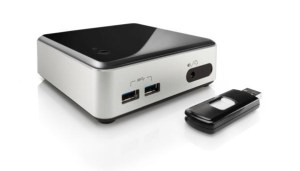
Intel has added new Next Unit of Computing (NUC) models to their line, with 4th generation i3/i5 processors. There’s an i3-4010U model and an i5-4250U model available. Perhaps obviously, they’re no longer fanless or silent, but probably quieter than the options above.

Wilson Canyon NUC with USB

You still need to add your power cable, some laptop memory (8GB or 16GB depending), an mSATA module if you want internal storage, and a flash drive to boot from. So you’re probably looking at about $600 for a complete system, give or take. But if space is of an essence, and your workloads can handle 16GB dual core modules, this is a great option.

As an aside, Intel has 4th generation NUCs with support for an internal 2.5″ drive. These don’t seem to be as commonly available, but it’s something to watch for if you need more internal storage.

A surprising contender – Dell’s Inspiron 660 desktop

I was having an exchange on Twitter with someone looking for options with Gen 3 PCI Express for virtualization lab use. He ended up getting an Inspiron 660 desktop, which has more convenient expansion options than pretty much everything above.

The i5-3340 model with 8GB of RAM comes in under $600 on Amazon (you can buy it directly from Dell but might get quicker delivery from Amazon). You should be able to load it up with 16GB of RAM, and you can get 4x and 6x SATA (and 4x SAS) drive bay inserts to get dense 2.5″ drive deployments. Probably won’t need that DVD burner on a hypervisor platform, will you?

What else can I read about home lab options?

I’m glad you asked. One thing that pushed me to write this post was Chris Wahl’s update on his home lab. He’s moving to Haswell, and building out a well-optimized lab. He’s an avid advocate of remote management, so definitely take a look at his board selection if you need remote control of your server.

Simon Seagrave at TechHead has a lengthy write-up on the Microserver Gen 8 that’s worth a look if you’re leaning that way.

2013-12-12: Erik Bussink has built a compact lab with the Shuttle XH61V that finds a happy medium between my Shuttle and NUC builds.

2013-12-12: A friend on Facebook reported in with Benjamin Bryan’s blog about installing a Xeon E3 in the HP Microserver Gen 8. This may be the best reason to go with the low-end G1610T model.

2014-01-14: Greg Schulz (@storageio on Twitter) has a new post today on some of his recent discoveries and acquisitions. Check out Dell Inspiron 660 i660, Virtual Server Diamond in the rough? for a surprising choice for virtualization.

If you’ve written a blog post about sub-$1k home lab servers, feel free to let me know and I’ll try to get you added to this list. I’m happy to exchange links and spread the joy of home lab adventures.

Tiny Death Star or MJ7 OTA upgrade? What’s killing GPS for my Galaxy S4?

This is sort of a meta-post/supertweet. I’m hoping to hear from folks who may have seen weird issues with GPS on a Samsung Galaxy S4 recently. There are two correlated factors. 

1. Firmware update.

I’m running stock firmware on my S4, Verizon Wireless 16GB edition. Never rooted or modded. About 3 weeks ago (November 2 I guess) I was offered the MI1_to_MJ7 upgrade over the air from Verizon. Since then, I’ve found my location services to be intermittent. 

2. Tiny Death Star.

About the same time I installed the new Disney/NimbleBit “Tiny Death Star” game. It crashed a lot, and got a few updates within a week or so. I still play it daily. it oddly requires front facing camera and GPS/”Digital Compass” which has me curious whether it’s related to the GPS issues. 

So I’m trying to figure out if one or both of these is actually causal. When the GPS (either GPS status app or Waze) starts reporting no GPS signal, turning location services off and on again in Settings fixes the problem. So does the “GPS” button in the pulldown menu. 

I’ve tried Verizon’s (abnormal) suggestion of rebooting the phone daily but I’d be disappointed if that was the (only) fix. I normally reset only when flying. And other than a well-known bug in my old HTC Thunderbolt that had me GPS-located 10k feet below Guam, I haven’t had to do this for GPS reasons before. 

Any of my readers have suggestions?

Building the Best Lego Data Center for Juniper

jdc-out-bag-of-bricks

What is this, a data center for ANTS?

So Ashton Bothman, social media goddess for Juniper Networks, dropped off a datacenter kit (right) for me last week. Alas, there were no actual routers in the gallon zipperbag, but that’s probably for the best.

I was chosen as one of about a dozen people to take a bag of Legos and a large gray building base, and build “The Best (Lego) Data Center.” It’s a charity thing; each participant gets to direct a donation to a 501(c)3 charity of their choice, and the best ones get a bigger donation to direct. And we get to play with Lego for a good cause.

So I got to thinking about the three datacenters I’ve worked in most. One was a Savvis facility in San Francisco, another was the Equinix SV2 center in Santa Clara, and a third was Switch in Las Vegas. They each had unique quirks which I thought I could integrate without violating any NDAs or getting kicked out of any of them.

We were allowed to add pieces that didn’t come in the kit. I had a little box of Lego my friend Derek gave me when he was cleaning out his storage unit, and I did go out and spend $7.99+tax of my own money to get a kit for the two mini-figs that came with it. I hadn’t realized at the time that I had the box from Derek, or that there were a couple of figures in the Juniper kit.

But at the most obvious level, Juniper provided the foundation for my datacenter. So I don’t think they’ll mind my going a bit overboard with added parts.

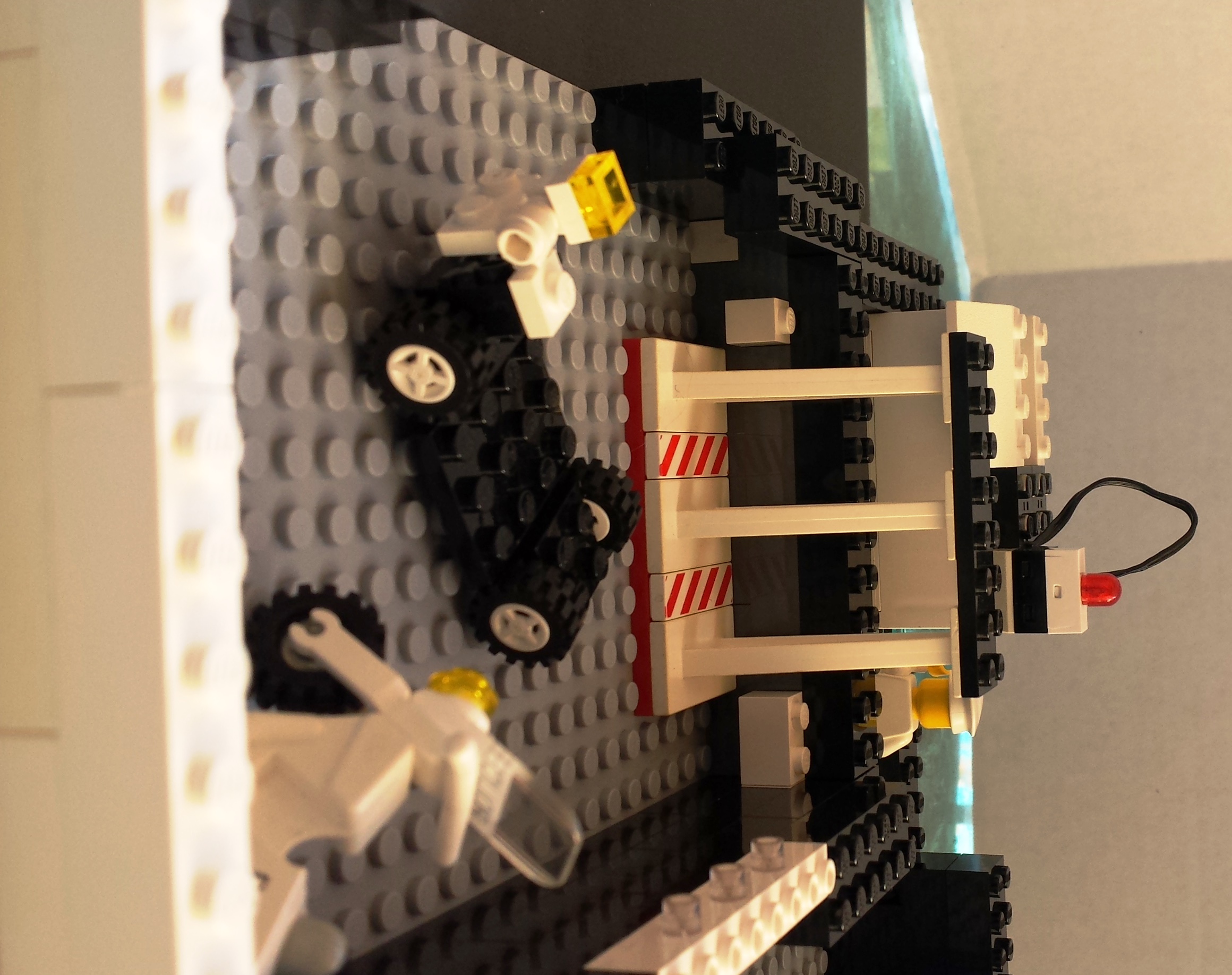
Let’s take a tour of the datacenter, shall we? Please leave your food and drink outside the computer, and we do not advise flash photography.

jdc-out-entry-1

Here is the entry. Unlike some datacenters where you walk up a ramp to the raised floor, here we’ll walk down. The friendly security personnel are on the turret at the bottom, ready to watch over and protect you at all times. Please have your ID handy.

jdc-out-kitchen-sync

Here we see the security guard at his post. No doubt the red and green lights will tell you if you’re allowed in. And as you can see, this data center has everything, including the kitchen sink.

As you can see from this angle, tape is not dead. It's alive and well in our datacenter. And our backup operator may be a fan of Devo, or of Troma Films, I'm not sure which.

As you can see from this angle, tape is not dead. It’s alive and well in our datacenter. And our backup operator may be a fan of Devo, or of Troma Films, I’m not sure which. And that might be a pizza oven there on the left, but don’t tell the security folks.

jdc-in-cable-jockey

Here is our cable jockey attempting to connect a power drop himself. I tried this once, didn’t electrocute myself, but didn’t endear myself to the datacenter facilities team.
A fun aside here, those grey ladder racks are actually power-carrying blocks. They’re not connected in the datacenter but they could be.

jdc-out-power-skipper

Speaking of power, we of course have generators in the back. Here, the power skipper monitors the control panel, because his alarm light there is blinking. And his cables are loose. I hope he figures out what’s going on before the alarm klaxon goes off.

jdc-out-power-plant

Here is the other side of the generator assembly. It seems well-vented. And you can see some of the solar panels on the right–this is a very green data center.

jdc-out-loading-dock

We have a very security-conscious data center here. Police on site to guard the receiving dock.

jdc-out-loading-area-solar

Here we have another view of the receiving dock and solar tower, along with our motorized cart to help you get your deliveries to your cage. Remember, no cardboard on the datacenter floor please.

I'm sure many of you will understand that, at a certain point in a day of data center work, you just want to dance.

I’m sure many of you will understand that, at a certain point in a day of data center work, you just want to dance.

And while data centers don't generally have kimonos, here we've pulled the roof back to show you the whole place.

And while data centers don’t generally have kimonos, here we’ve pulled the roof back to show you the whole place.

Thank you for touring my data center.

If you’d like to see some of the other data centers on the tour circuit, here are the ones I’ve found.

If anyone else would like to be linked, let me know. Looking forward to hearing next week who Juniper chooses as the top datacenter builders!

How to avoid Funky Town – pet peeves on ‘sudo echo’ and pipelines #rsts11

I was reading about a Raspberry Pi supercomputer design at University of Southampton. Pretty cool stuff, but something bugged me about one of the later sections. it’s something that bites me sometimes when I’m trying to be good and use ‘sudo’ instead of ‘su’ or logging in as root.

For those of you who may not remember, ‘sudo‘ is a command that gives you some or all of the privileges of another user (often root, but not limited to that user). A sysadmin can define certain commands, options, and users that each user can “take over,” as it were. But I would guess most readers of this blog generally use ‘sudo’ to execute a command as root, or worse, to become root with ‘sudo su –

So what’s your bucket, Robert?

But anyway, Southampton’s document specifies the following command invocations to edit a system config file.

Hostname Script

If you want to rename each machine, you can do it from the Master node using:

ssh pi@192.168.1.162 ‘sudo echo “iridispi002” | sudo tee /etc/hostname’

ssh pi@192.168.1.163 ‘sudo echo “iridispi003” | sudo tee /etc/hostname’

ssh pi@192.168.1.164 ‘sudo echo “iridispi004” | sudo tee /etc/hostname’

There’s a very good reason for part of that — the ‘pi’ user cannot edit files in /etc. So what you might do as root:

ssh root@192.168.1.162 echo  iridispi002 > /etc/hostname

would fail if run as a non root account.

The eagle-eyed among you will want to write in and mention that the command above would replace /etc/hostname on the local system *after* sshing to 192.168.1.162, and you’d be right, assuming you run it as root on the local system. The way around that would be

ssh root@192.168.1.162 'echo iridispi002 > /etc/hostname'

But as a non-root user, you have to escalate your privilege to change most system config files. The suggested command:

ssh pi@192.168.1.162 'sudo echo "iridispi002" | sudo tee /etc/hostname'

is excessive for one reason.

echo‘ is not a privileged command. There is no reason to ‘sudo echo‘ — at least not that I can think of. It will not take you to Funkytown (even if you are more of a Lipps, Inc fan)

This won’t break anything, but it does execute another potentially auditable command, write another line to the sudo log file, and get you into a suboptimal habit. 

Instead,

ssh pi@192.168.1.162 'echo iridispi002 | sudo tee /etc/hostname'

would do just what we want.

Tell me about this “tee” command

tee,’ by the way, is a command that takes standard input (STDIN), writes it both to standard output (STDOUT) *and* the filename specified as a parameter. Note that tee will create a file if it doesn’t already exist, and overwrite it if it does. If you want to append to an existing file, use something like ‘tee -a <filename>‘ … for example, this will propagate your hosts file with hostnames for a popular RFC1918 subnet:

for h in $(seq 1 255);
do
      echo 192.168.1.$h host$h.mydomain host$h |\
      tee -a /etc/hosts
done

There are other ways to execute non-privileged commands and use the output to affect priviliged files. One way is to use ‘dd‘ to pass data through. For example, creating a bootable USB drive in Linux from a boot image could be done with:

dd if=ubuntugolden.img | sudo dd of=/dev/sdf1

But note that dd doesn’t protect you from yourself, so check that command before you wreck it.

So where do we go from here?

If you’re going to keep to minimal privilege escalation, which is the Right Thing(tm) to do, even if it’s inconvenient… think about what you’re using sudo for, and keep it between the navigational beacons.

And by the way, am I the only one who thinks of Robotech when I use the sixth scsi device? Probably not the best way to party like it’s 1999.