Unknown's avatar

About rsts11

Big data integrator/evangelist I suppose. Formerly a deep generalist sysadmin and team lead, still a coffee guru, and who knows what else...

In Praise Of Microsoft Store, or, To QHD And Back Again (Another Laptop Journey)

There are two pieces of information that will inform this article, and I’ll get them out there first.

One, I’m not a Microsoft fanboy. My favorite MS products are still the 16KB expansion card for the Apple ][+ and a selection of their keyboard and mouse options. I liked Windows 2000, Windows XP, and Windows 7, and when each was current it was my daily driver OS for the most part. But I’m usually no more likely to advocate them than I am any other jumbo company.

Two, I probably buy more laptops than you do. As in, personally purchasing out of my own pocket (not IT department purchases). Probably twenty in the last 14 months. These ranged from old HP “thin client” laptops to play with, to my current daily driver, the ASUS Zenbook UX32VD I talked about in my Pitfalls blog post last August (more toward the cheaper side of course). I’ve agonized over details of some (like the Zenbook) and just thrown the cash down on others (like the thin clients or some other cheaper ones). So I’ve been through the process before.

You already want another laptop? And what’s QHD?

So I’ve been thinking about upgrading the daily driver role again. I went from a very heavy but very powerful Sony VAIO with 16GB ram, 4c/8t, 1080p display, USB3… to the Zenbook with 10GB ram, 2c/4t, 1080p display, USB3, and about half the mass/weight. But I’d like to get that memory back up there, and add some real estate, and get rid of the proprietary third display connector while keeping discrete graphics. Getting a 1920×1200 (WUXGA+) display requires 17″ LCD and/or Core2 processor, neither of which is optimal, so I have to look larger. I did pick up a 1920×1200 Macbook Pro last year, but it’s limited to 6-8GB of RAM and has a Core 2 processor.

QHD, for those among you not familiar, is “quad high definition,” generally 2560×1440, WQHD, or 4x 720p. There’s WQXGA+, which is 3200×1800, which also gets called QHD or QHD+, which is 4x 1600×900. Don’t confuse this with lower-case-q qHD, which is a 960×540 standard, a quarter of 1080p resolution. I’m okay with 2560×1440 or 3200×1800 or anything in that range, to be honest.

QHD? Could you spell that?

As an aside, I go to Fry’s a couple of times a week, as I live a mile from one store and work 3 blocks from another, so I just do. One time I wandered around looking at laptops and one of the helpful but useless sales associates asked if he could help. “Yes,” I said, “I’m looking for a QHD laptop, you know, 2600×1800 or so resolution?” He scrambled for a piece of paper to write on, asking me to spell Q-H-D, and then handing me off to another sales associate who told me what I’d already discovered–they didn’t carry any such devices.

So I’ve been browsing the web every so often, searching eBay for Precision M6500 (17″ 1920×1200 with 32GB capacity and first gen i7 processors), looking at other retailers when I’m in their laptop sections, and pondering what to do when the urge to upgrade finally takes over. I don’t really have to explain the decision to my significant other, although she wonders why I need a new laptop in less than five years.

The first three I found online were

  • Fujitsu Lifebook u904, an i7-4600U with 14″ 3200×1800 display, 10GB max RAM like my current ultrabook, 802.11abgn; $2154 with 4GB RAM from shopfujitsu.com.
  • Dell XPS15 6842sLV, which has an i7-4702HQ, 15.6″ 3200×1880  display, 802.11ac, and 16GB max RAM; $1766 used with 16GB RAM from Amazon.com
  • IBMLenovo Thinkpad W540 with i7-4700MQ, 15.5″ 2880×1620, 802.11ac, and support for 32GB on the quad-core models. $1830 with 16GB from lenovo.com

Yeah, that’s kinda pricy, but I’m looking for what turns out to be workstation-class hardware, not pure 720p ultrabook.

I suspect I’d do nicely with either of the 15″ displays, but as you might guess, I’m nervous about buying into a product line I’ve never touched or seen in person, especially when it’d set me back $2000.

So I just kept looking, and asked around on Twitter about any Bay Area retail or showcase options. Jake Ludington came up with a good suggestion, just about the time Google found a hint to the same effect.

So, having had an uneventful morning, I headed out to the Microsoft retail store at Valley Fair.

Microsoft Store? What’chu talking about, Willis?

Here’s where I used to be a little bit critical, and some of my friends downright ridiculed the idea. Apple has their retail thing down cold pretty much after 13 years… you can find Apple Stores all over the place and go in and see what they want you to buy.  You can talk to a person whose boss has declared him or her a “Genius(tm),” in much the same sense as some companies declare all their managers “Leaders(tm).” And you can buy one of their preconfigured options for a laptop.

Microsoft started opening up their own retail stores almost five years ago. They’re not quite the same, as Microsoft doesn’t manufacture/brand a whole lot of systems. So instead of the company’s hardware, software, and blessed accessories, you get a lot more partner products. For example, alongside the Surface tablet line you’ll see Nokia and Dell tablets. Next row over, you’ll find laptops and ultrabooks and convertibles from Samsung, Acer, Dell, HP, ASUS, and probably some I forgot about. There’s a corner for XBox (including Disney Infinity), a corner for accessories and gadgets, and a display section for Windows Phone. And you’ll find “Technical Advisors” available to help you… a bit more down-to-earth ranking, I’d say. 

Those of you who were in San Francisco around the turn of the century may remember the Microsoft store on the second floor at Metreon, and the XBox Store on the first floor. It’s like that, but combined and a lot more focused, and there are 60+ of them in North America.

Some people joke that the Apple Store is filled to the gills with customers, whereas the Microsoft Store has 3-5 sales associates for each customer. That was probably true five years ago. But I’d guess the buying-customer to browsing-customer ratio is higher under the four-colored logo. It’s seemed that way each time I’ve been in the Microsoft Store.

So how’d your visit go?

It was actually pretty good. The store has tables set up like the Apple Store, with a couple of demo products on either side. There are stools for you to sit on while you try out the devices, which is a nice touch… unless you use a standing desk you won’t get a feel for the keyboard and display without sitting down and relaxing a bit.

The labeling of the laptops was concise and easily compared. Some models had multiple sample devices out. I tried four models that mostly met my requirements:

  • Samsung ATIV Book 9 Plus, a 13.3″ i5 with 8GB RAM/128GB SSD and 802.11n for $1449. The i7 with 256GB SSD is listed on their site for $1599.
  • Acer Aspire S7, a 13.3″ i7 with 8GB RAM/256GB SSD and 802.11n for $1499
  • Dell XPS 15, a 15.6″ i7 with 16GB RAM/512GB SSD and 802.11ac for $2299
  • HP Envy Touch 14, a 14.0″ i5 with 8GB RAM/500GB SATA and 802.11ac as well as 200MB/mo free mobile broadband, for $899

(The links above are to approximate analogues on Amazon; there are a lot of configurations and they don’t always match with what’s in retail locations or microsoftstore.com.)

The machines were all logged in to a regular user account (Device Manager warned me about this on each system), wireless was working, and I was able to check out the details without sales reps acting like I was trying to stick my tongue in the USB ports.

I probably could’ve stayed longer, and there was one idle sales rep of about half a dozen who was available should I have any questions. However, I was fully aware that I wouldn’t be making a purchase today. Even if I were, I’d have done my own research (probably on one one of the sample laptops) before engaging the staff, but they seemed friendly and reachable despite my not befriending or reaching for them.

So I just got the stand-out details tapped into my Evernote client on Android, and even disqualified one of the machines because it had a very weird keyboard (the Aspire S7 has some weird keyboard features including Caps Lock sharing its traditional space with the backtick/tilde key)

Then I wandered around looking at what else was available. There was a Surface Music Kit cover on display which, while not set up with the app, looked pretty cool. Lots of tablets were present, including my 2-in-1 ASUS T100TA and the Dell Venue 8 (Pro, I think).  The staff were smiling but not creepily so, and thanked me for visiting when I left to find some caffeine.

So where do you go from here?

Well… as I mentioned, I am not buying just yet. So I have some time for absurd amounts of research, review-reading, comparison shopping, maybe even looking into fan/rumor sites to see what’s coming out in the next four weeks.

I may head back in to look into any other interests or concerns I have during the research phase; it seems like the odds of the model systems being functional and available are higher there than at most consumer electronics stores I visit (hi Best Buy, Fry’s). And I can give the sales associates a chance to show their chops in terms of customer experience with the QHD laptops.

But assuming the prices aren’t that different from competitors and the specs I want are available, I’d be happy to head back to the Microsoft Store to buy my next laptop.

If you’ve had an experience buying a laptop at a Microsoft Store, or have recommendations or warnings about QHD/WQHD/QHD+ display laptops, feel free to chime in on the comments below. I’m especially interested in anything with 32GB memory capacity, and I’ll be digging deeper into specs in the near future.  I’ll keep you posted as my search progresses.

Disclaimer: I’ve received no consideration or influence from Microsoft on this post. I’ve not yet spent even a penny at a Microsoft Store. Although I wouldn’t turn down promo codes or coupons of course.


Khaaaaaaaaan! And Cisco Live Scheduler coming soon!

cumberkhan

Khan (2259)

I know, I’m sure he’s never heard that before…

For those of you coming to Cisco Live US in San Francisco this May, prepare to hear from Sal Khan in the guest keynote on Thursday morning, May 22.

Khan is the founder of Khan Academy, one of the earliest and best-known MOOC (massive open online course) environments… wait a sec. who put that picture over there?

Photo - Sal

Sal Khan, 21st Century

Click click click. That’s better.

Sal Khan wrote “One World Schoolhouse: Education Reimagined,” on the use of technology to improve education, based on his personal history and the development of Khan Academy.

His presence at Cisco Live should give us a different perspective on the real-world application of technology, and underscore the importance of bridging the technology gap around the world.

So where do we go from here?

Have you already registered for Cisco Live US in San Francisco? If so, this Thursday, February 27, you can now go into the session scheduler and start signing up for sessions and blocking out time for the keynotes (including Sal Khan, and probably John Chambers as well). Lots of people already in and reporting happiness over the March 1-2 weekend.

If you’re a Netvet, you got early access to scheduling functions, but if not, you have another two days of read-only access before they open it up to the masses. And you can become a Netvet after you’ve attended three Cisco Live conferences on full passes (IT Management or Full Conference track) in five years, so that’s something to look forward to.

Cisco Live 20140227

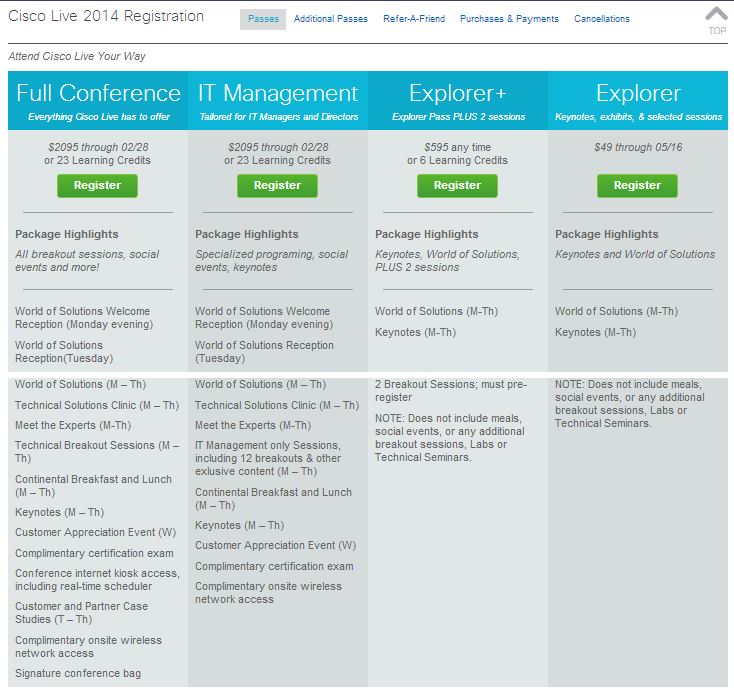
If you’re not registered yet, hey, what are you waiting for? There are several options for registration, including the full passes ($2095 through FridayMarch 14, $2295 from then until onsite) which give you access to just about everything depending on whether you are more focused on IT Management or the general Full Conference path.

But if you don’t have the money, the learning credits, or the corporate backing to cover a full pass, there’s still hope. Cisco Live offers a $49 “Explorer” pass, which gives you access to the World of Solutions vendor expo and the daily keynotes, as well as the Social Media Lounge (confirmed!) and the Cisco Live onsite store which offers books, gadgets, and Cisco memorabilia. If you have $595 to spend, go for the Explorer+ pass, which gives you the Explorer benefits plus access to two technical sessions.

Update 2014/02/27: The “Social Event Pass” has been brought to my attention as a good option as well. For $195, you get the receptions and Customer Appreciation Event/party (unlike Explorer/Explorer+), as well as the benefits of the $49 Explorer pass. You don’t get the breakout sessions, but those end up online anyway.

Update 2014/03/03: @CiscoLive on Twitter has advised that the early registration period that originally ended February 28 has been extended until March 14.

The site will be updated soon, but you can get in and save $200 for the next almost-two-weeks!

Protip: Check with your manager or HR/benefits team to see if your company might sponsor your attendance. If not, consider checking with a tax adviser to see if professional development expenses might be tax-deductible in your circumstances. 

You can read about my path to Cisco Live US 2014 in an earlier blog post if you like. A few other Cisco Live attendees have blogged about this year’s event as well. And if you have questions, feel free to ask in the comments below.

And as a disclaimer, if you click on the Cisco Live links above, I get entered in a contest for a free lab or technical session at the event. Other than that, I get no compensation or consideration for this post beyond the warm fuzzies of supporting an event and team I like.

What’s a commodity server? Why should you want one?

A lot of people talk about commodity servers, especially where and when to use them, and many have good reasons one way or the other. However, not everyone has a good definition of what makes a commodity server (or platform), and that can lead to confusion.

Today on RSTS11, I’m going to look at contexts where a commodity server or platform is important, how I define the concept, and what you might find when getting into a discussion about commodity servers.

What’s a commodity server?

My definition of a commodity server is a piece of fairly standard hardware that can be purchased at retail, to have any particular software installed on it.

I further define ‘fairly standard’ to mean an industry standard platform that does not require custom coding to implement an operating system on. I define ‘purchased at retail’ to mean that you can call/email/visit the website of a vendor and acquire the hardware without a pre-existing contract or design process (vs OEM/ODM arrangements).

Some examples of commodity servers would be any server you can order from Supermicro (or its integrators), HP, Dell, Cisco, Lenovo, or various other maintream vendors. If there’s a “Buy now” button next to it on their website, and you can order it with a credit card right then and there, it’s probably commodity. These are sometimes called “Industry Standard Servers” but there may be some distinctions between the two concepts. And in theory, blade servers could count (since they don’t require anything custom other than the chassis) but I generally don’t think of them in the category.

The goal for a platform that’s based on commodity servers is that you’re not tied into a given brand of server, or seller of servers, for acquiring your hardware. If a vendor fails you (i.e. trying to force you to buy service contracts or extra licensing for basic functionality and maintenance), you can go to another vendor for the servers, and as long as you specify components (cpu, memory, disk, network) properly, you’re good to go.

Where would I use a commodity server?

#1: Hadoop.

One place commodity servers are often discussed is in Hadoop clusters. Hadoop was designed, on one level, to be the RAID of compute farms. You use inexpensive, homogeneous servers that can be easily replaced, with software that can handle losing a few servers at a time.

There is a not-uncommon misgiving about Hadoop’s node model; namely, that using branded servers is somehow counter to the nature of Hadoop. The impression some folks get is that since Hadoop doesn’t care about any given server (at least for datanodes and tasktrackers), you have to go with the cheapest possible hardware, possibly even building it yourself. Those folks believe that spending money to have someone else build the servers for you, or going with a brand name server, is a bad thing.

I see their perspective, in a sense. If you have a team of people who can maintain your servers at that level, rebuild them when they fail, and keep track of component versioning and compatibility and firmware levels, that’s great. Larger environments (Yahoo, Google, etc) may have this, but your typical environment with fewer ops people than Google has chefs can’t hold up under those considerations.

On the other hand, if you pick a brand of servers, you’re more likely to have consistent configurations, support mechanisms, warranties, remote management, firmware updates, and so forth.

Mind you, some vendors do change hardware or firmware in mid-release without telling anyone (even Apple’s done it a few times), and no vendor has perfect support or perfect firmware.

But the advantages to focusing on what your team can do (deploying and supporting applications and platforms, satisfying your users), and letting others do the stuff that’s not in your core (building servers, stocking hard drives and memory by the ton, making bezels), should be pretty obvious if you can’t allocate a full team to the latter.

Where else would I use a commodity server?

#2: Storage platforms.

A Twitter friend who works for a VAR was asking about scalable storage platforms that run on commodity hardware. Think a mixture of Nexenta, Nutanix, and VMware Virtual SAN (a.k.a. vSAN), but not any of those particular ones for reasons that may become evident (they don’t have to, as they’re his requirements, not ours, of course). One of the first recommendations was Nutanix “because it runs on commodity hardware.” 

There are a lot of virtualization and storage vendors whose platform is based on a commodity hardware base. However, I don’t consider them a commodity platform unless I can choose the server to run on (within reason, of course… I’ll keep my Macintosh Quadras in storage for this project).

I completely understand why companies use, for example, Dell Poweredge R-series servers (or Intel reference chassis back in the day). You can buy them in bulk, don’t have to do the interoperability testing for standard hardware and firmware, parts and maintenance are easy to arrange, and they tend to have a reasonable shelf life. In case of an emergency, you can buy one that has the OEM’s bezel rather than yours. And you can test your solution (and iterate on your logo and company name a few times) before investing in your own bezels anyway. 

And if you’re a VAR wanting to deploy a solution on the hardware your company has a particularly good relationship with, or a warehouse full of off-lease hardware from, or just a company your client prefers, the model that Nutanix or Nimble Storage or Pivot3 uses wouldn’t work for you. That doesn’t mean their model (which is far from uncommon in the rackmount appliance world) is bad or wrong, it’s just not a fit in this case.

Speaking of cases, one of the concerns that came up was needing short chassis. Sometimes you have a customer needing short cases (think Rackable half-depth, for example), or maybe a desktop-looking platform for SOHO/ROBO/POHO.

So we’re left looking for something that is readily available like Nexenta, serves out multiprotocol storage like Nutanix, scales out like Nutanix and vSAN, but isn’t tied to VMware like vSAN. In this context, while the definition is like Michaelangelo’s model–simply chip away anything that doesn’t look like our scalable platform on our choice of hardware.

So where do we go from here?

The conversation on Twitter led us toward Maxta, and toward Nutanix being curious about what form factor my friend was looking to meet. While it’s outside the scope of this post, if you have other suggestions for fellow readers of RSTS11, feel free to suggest them below.

If you have thoughts on commodity servers, or questions about anything up there, feel free to chime in as well.

Disclaimer (I love these things): I have friends and acquaintances at most of the companies mentioned above. However, my paraphrasings and overgeneralizations should be taken in context, and not as representing any official positions or standards of any of them.

And today’s pithy tweet:

Network Neutrality may not be what you think it is

So Comcast is peering with Netflix now. To believe the flitter on my twitter feed this weekend, this is actually worse news than what’s coming out of Venezuela or Kiev. And under the flag of “Network Neutrality,” many are claiming this is the end of the Internet, un-American, more evil than that 10% of Google, confirmation of Half-Life 3, or other random things.

Good write-up on this just showed up at streamingmedia.com … more technical detail lives over there, check it out if you like.

I’ve seen arguments like “I have a cable modem at home, therefore Comcast should not be allowed to connect directly to Netflix and give me better service at the same price” and “Netflix should connect to the Internet, not to Comcast.” Neither of these really makes much sense to me.

But I may be misunderstanding net neutrality. Here’s where I’m coming from.

A description I’ve seen on Wikipedia defines network neutrality as treating data equally without discrimination based on “user, content, site, platform, application, type of attached equipment, and modes of communication.” I’m okay with this definition, until I see a better one. Comments section is below, folks.

There’s nothing in there that says a provider can’t choose how they connect to the Internet, or to other providers on the Internet. There’s actually nothing in there that absolutely defines what “the Internet” means. But if you can accept a definition of “the Internet” that includes network providers that connect to each other to get your traffic from where it’s coming from to where it’s going, whether you’re an individual/business providing a network service or an individual/business consuming a network service, you start to see how this peering agreement may not be a network neutrality violation.

Larger networked companies have been doing this for quite some time, including (I believe) the #2 consumer of residential Internet traffic. (The data on this chart are from early-to-mid 2013, but I suspect it’s conservatively believable in scale.) I’m pretty sure peering has been around since at least 1996, although it may have been more of a luxury then for “smaller” providers.

The argument that “we don’t know all the details so we must assume the worst” doesn’t hold much water either… as some folks have noted, it’s easy to assume the worst for a company with the reputation of Comcast, but it’s just as easy (and a bit more logical) to assume that a technically competent network service provider would look to optimize the path for a third to half of their customers’ network consumption.

A bus route would look to stop close to where its riders want to go; a stop at the far end of the mall parking lot makes less sense than a stop in front of a major entrance or popular retailer, for example. Is the fact of the bus not stopping in front of Hot Topic and Sbarro aswell (if you’re lucky enough to still have one) unfair? Not really.

Now to be fair, there’s a possibility that Comcast was doing something truly evil to Netflix traffic. Maybe they routed all Netflix traffic through a stack of WRT54G routers with cascaded NAT. Or maybe they had congestion issues in some areas. Maybe something between Comcast and Netflix broke. Maybe net neutrality requires an end to oversubscription. Maybe we’ll never know. (I think two of those are pretty unlikely though.)

For now, however, if you want to confuse the net neutrality concept, or distract from more substantial issues, or just troll people on the Internet, you should feel free to keep arguing that peering violates network neutrality. But if you’re not that sort of person, step back a bit, wait for actual supportive evidence one way or the other, and worst case, watch a Hulu video instead.

And a message I share on twitter every month seems pertinent here, so I’ll leave you with this:

Disclaimer: I am a Comcast residential customer, Netflix streaming customer, as well as a residential customer of an early adopter of Netflix Open Connect. I pay for all three services out of my own pocket. I’m only really fond of one of them, and it’s the least pertinent of the three to this story.

A bend in the road for Fitbit, and a year’s experience therewith

I’ve been meaning to write about my experiences with the Fitbit trackers for a while now, having just passed 12 months of using a series of three of their devices. With some new news coming out this week, this might be a particularly good time to share my thoughts.

Voluntary Recall On Fitbit Force Trackers

James Park, CEO and Co-founder of Fitbit, posted a note Yesterday on the Fitbit website (updating a note from last month) declaring a voluntary recall and end of sale on the Force tracker. Force is gone from Amazon already, and if you wanted one but didn’t get it yet, you may not be in luck.

For those of you who’ve bought the Force (a feat in and of itself) and found your skin irritated by the tracker, this is an opportunity to get a full refund directly from Fitbit and either go back to an earlier product from Fitbit, or move to a different product.

Their return page does not require that you prove or even claim injury, so if you were disappointed with the condensation issue, the clasp, or the announcement of a competing product the week after you bought the Force, you can still get a refund and move on with your life.

This move by Park and the Fitbit organization is an unexpectedly responsive action by the company. We’ve all seen companies hem and haw and blame the customer for holding the product wrong (iPhone 4 bumper anyone?), and while Fitbit did investigate the problem before ceasing sale, they’ve offered admirable support during the process.

I have not experienced the symptoms above (other than some annoyance with the clasp), so I will be keeping mine. If you don’t have the symptoms, it’s the best tracker yet, but I’ll be curious to see how long the recall/refund goes, and what’s next on the road map for Fitbit.

Let’s start with One, shall we?

In February 2013, I bought the Fitbit One tracker. This is a bean-shaped tracker that fits into a clip holder that you can clip onto a belt or pocket, a bra if you’re the sort who wears those, or probably a shirt or other clothing item.

For those of you unfamiliar with the Fitbit, it’s a fitness tracker that communicates with select phones, tablets, and computers via Bluetooth 4.0 Low-Energy (BLE). A year ago, Android support was minimal, so you had to use the USB dongle on a personal computer, or a fairly current iPhone/iPod Touch (5th Gen, I believe). There is no direct cable sync like the original, and the charger is separate from the sync dongle.

Fitbit One holds a charge for about 7 days or 70,000 steps in my experience, more or less depending on how often you wake up the display, or use the silent alarm (with its vibration mode). It is available in different colors but most people won’t notice this so much.

Fitbit PanelThe Fitbit One tracks the usual stuff (steps, active minutes, estimated calories burned, miles walked), as well as flights of stairs ascended (walking downstairs doesn’t count), and the feature that sold me on One vs Zip: sleep.

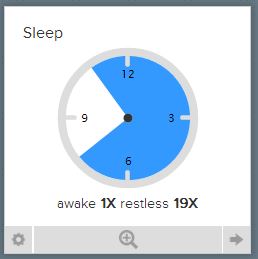
Fitbit SleepBy placing your Zip in a wrist wrap strap, and setting it into “sleep” mode, it monitors your movement and steps (if you get up and move around during the night), and rates your sleep efficiency and duration.

The Fitbit app and website offer dashboards to show your progress. You can automatically share your daily/weekly results on social media, or with “friends” in the dashboard, or both, or neither.

The One was pretty cool, although I worried that I would lose it… three or four times the One itself came out of the belt clip, usually when getting into or out of the car. And finally, on a shuttle bus at Cisco Live in Orlando, it completely left my person. I struggled on with the Samsung S-Health tracker on my phone until I got home, and then I went hunting for another device. 

Flex your fitness tracker

The Fitbit Flex is a small device that snaps flexibly into a wristband. It uses the same connections (Bluetooth Low Energy with supported devices), and charges via USB albeit with a new charger. The device comes with a small wristband and a large one, and my wrist is just about at the overlap between the sizes. I wore the large, but that doesn’t impact anything about the device itself. Replacement bands in several colors were promised, and finally became available earlier this year.

Flex removes tracking of flights of stairs, and replaces the digital display with five LED lights that can indicate mode changes (sleep, alarm, reaching your goal) as well as 10% increments toward your primary goal. For example, if your goal is 10,000 steps (the default), up to 1000 steps will show the first LED indicator blinking. From 1000 to 2000 will show the first LED solid, and so forth.

Flex also removes the need to change the mounting to track your sleep. Just tap the wristband a few times quickly and it goes into sleep tracking mode; do the same to take it out of sleep mode. It took a while to get the timing down on this, as opposed to holding down the button for sleep mode on One, but I didn’t have to carry an extra piece to track my sleep on the road.

Like the One, Flex has about a 7 day/70k step battery life.

The Justifiable Use of Force

Fitbit Force was announced in the fall of 2013. It only became readily available in the last month or two; in early November I had to call around and eventually drive over half an hour to find one of two within that range in Silicon Valley. But it was worth it.

Force brought back the clock display, with a button on the side to scroll through the various goals. It also restored tracking of flights of stairs, and while wider and heavier than the Flex, it is still light enough to occasionally forget you’re wearing it.

Force is “permanently” installed in a wristband. This forces you to make some decisions upon purchase, specifically the color (slate blue or black) and the size (small or large, as with the Flex band). It doubles the battery life to 14 days, and brings yet another unique USB charging adapter.

Alas, as of yesterday, the Force is no longer for sale. You might find one at a local Best Buy or other retailer if they haven’t been pulled/returned yet, but Amazon and Fitbit have removed them from their websites.

So what are Fitbits good for?

I won’t tell you that buying or wearing a Fitbit will make you healthier or lighter or more attractive to members of the appropriate sex. Buying one through the links above (i.e. a Fitbit One or a Fitbit Flex) might (okay, probably not), but I use the Fitbit trackers to encourage me to walk more and take the stairs instead of an elevator. The competition with some friends with trackers helps a bit as well, although it doesn’t help enough to get me to stay over 10k as often as I’d like.

It also gives me a sense of relative activity. For example, today I worked from home, ate at home instead of going out, and forgot to go check the mail. As a result, my dashboard dials are all disappointedly green  (845 steps, really?) and I know I have to get out more tomorrow. A day at Disneyland (graphed above) definitely shows a different picture, and explains why my feet were sore.

I forgot to mention earlier, but there is also a scale, Aria, that links via the same Bluetooth methods and lets you track your weight (gain or loss) in the same system as your step tracking. It’s $130, and I haven’t been able to bring myself to buy it yet, but I’m still tempted.

So where do we go from here?

The exact number of steps I walked isn’t as important to me–if it’s 10,300 vs 10,195 that is almost as important as which foot I started walking on this morning. But knowing how close I am to average/goal walk levels, and hopefully being inspired to keep up with my friends and my goals, makes a much bigger difference.

Could I do the same with Samsung’s S-Health app? Sure. But I have to have the phone in my pocket or on my person for it to work. They never came out with the S-Band in the US at least, so the only available sensor is in the phone.

There’s also a Moves app that tracks your travels, and I find it nice to see how long I spent driving vs riding or walking, but again, it’s based on the phone being on my person. If I walk down to the far end of the building and leave my phone on the charger, Fitbit catches that. Moves and S-Health don’t.

There are other devices as well, and you may find Jawbone or Withings or any number of other devices that will fit your needs. But I’d seriously consider Fitbit.

As the news on Force shows, they are responsive to their customers. They have been very generous in replacing failed or lost devices in the past (which is why I have a Fitbit One sitting here again). Keep your receipts, kids.

And they have been innovating regularly over the past few years. I expect that even with the Force withdrawal, they will have something similar in scope and even better in some way, by the end of the year if not sooner.

All things considered, I’ve been happy with my Fitbit experience over the last 12.5 months. I wish they’d standardize their charging connections, and get accessories (bands, clasps, etc) out to retail faster, but I’ve worked with companies whose growing pains were far worse. 

What has your experience been? Feel free to chime in below with your experience with these or other trackers.

Disclaimer: I’ve purchased three Fitbit trackers at retail with my own money. The lost Fitbit One was replaced by Fitbit at no expense to me, just by my filing a ticket and asking if something could be done. I may have gotten a discount on the first one at Verizon with my corporate plan (I don’t remember), but I’ve received no consideration from Fitbit or any reseller at any time.