
Ever buy a spiffy new laptop, and then a few months later see that everyone else is buying laptops that take TWICE as much RAM as yours? Too late for buyer’s remorse or a return… but you can’t justify another thousand dollars for another new laptop?
I’ve been in that position twice… once with a laptop I’ve had for 4 years now, and one that’s coming up on 1 year.
UPDATE: I just remembered a third time when I managed a lucky super-upgrade to a laptop… that’s added now.
Inspiron 8200 with 2GB RAM. Pretty good for 2002 tech!
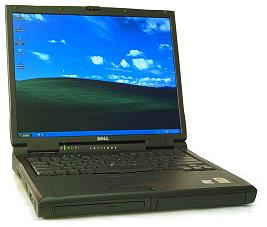 Back in 2001 or so I bought a Dell Inspiron 8200. This was a Pentium 4 Mobile based machine of the same design as the Latitude C840, about with a 1600×1200 15″ lcd, the C-series batteries (one dedicated battery bay, one battery/optical/zip/floppy/hard disk bay), one fixed (but upgradable) optical bay on the side, and a maximum of 1GB RAM. Or so I thought. Now to be honest, I sold the 8200 back in 2003, but later restocked with a short stack of Latitude C840s, which were the business spin of the same machine.
Recently when pulling one of my C840s out, I thought “I have some 1GB DDR SODIMMs. Why not try?” Turns out, while it takes longer to POST now, the C840 readily supports 2x1GB PC2700/PC3200 DIMMs for a total of 2GB RAM. You may find these sticks on close-out at consumer electronics stores… I bought out the closeout stock at 2-3 local Best Buy stores last fall.
The 8200 is still a very viable UNIX laptop, and runs XP or Windows 7 respectably if you keep it clean (I wouldn’t put Creative Suite or Mathematica on it). The docks, including one with a PCI slot, are easily available online, and while you might not want to carry it on trips with you, it’s very convenient for basic computing needs even 10 years later.
Latitude D830 with 8GB RAM? Yup.

I bought a Dell Latitude D830 with a corporate discount two jobs ago. It was as close to top-of-the-line as I could get with all the features I wanted. I’m a screen real estate addict… yes, I’m looking down my nose at your 1920×1080 display, over the top of my 1920×1200 display. Sure, it’s only 12% difference but it matters to me. I think this D830 had the second highest speed Core 2 Duo mobile chip available at the time, dedicated 256MB or 512MB video card, DVD burner, and 1920×1200 display. Three years of Complete Care and corporate-grade in-house service contract, which ended up helping at one point when the power subsystem started failing to charge, and one of my favorite features of some Dell and one Apple model–hot-pluggable modular bay batteries.
Power To The People!
My Powerbook “Pismo” had the option for two batteries, and if both batteries died and you had a third with a charge, you could close your lid, the computer would sleep, you could put another battery in and open it up and keep going. So of course I had three or four batteries. Dell has had a couple of models that supported modular bay batteries, from the Latitude C840/Inspiron 8200 (and I believe earlier C800/820 and I8000/8100) to the D800/830 line. Excellent feature, since I’m more likely to have use for an extra 2-2.5 hrs of battery life than a dvd burner on trips and in meetings/conferences.
I bought the D830 with 2GB of RAM, knowing I could upgrade to 4GB more cheaply through Amazon or Fry’s or Crucial, than buying it pre-installed from Dell. So I did so, and bumped the hard drive up aftermarket as well.
Within less than a year came the Latitude E-series, very sleek, brushed metal case, and 8GB max RAM. I found threads like this one suggesting that BIOS rev A14 would support 4GB dimms.
The 5300, 6400, and 6500 as I recall all supported 8GB RAM on the same Core 2 Duo chips and chipsets, but when I asked my Dell rep about 8GB on my D830, he said “no dice.” So I quietly ordered the appropriate Dell part anyway, and when it arrived, I updated my BIOS and installed it. It worked, of course. I ordered another stick, and have been rocking 8GB in my D830 (with a variety of disk choices) for the last 3 1/2 years.
Sony VPCF22KFX/B with 16GB of RAM? Whoa!
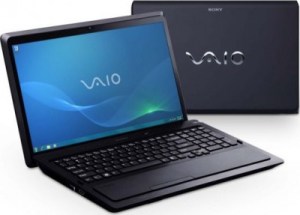 Fast forward to last summer. I changed jobs, got a vacation payout, and found a Sony Vaio VPCF22KFX/B laptop on near-closeout sale at Fry’s. You can still find it at the preceding link for about $1k from Amazon (and if you buy it through my link I’ll be grateful of course), but I paid about $800 for it as memory serves. It came with a 500gb 5400rpm disk, 4GB of RAM, and the i7-2630QM processor — 4 cores, 8 threads, turbo, hyper threading, the typical power features. I bumped it up to 8GB of Patriot RAM, and a 500GB Momentus XT hard drive (500GB spinning disk with 4GB of SLC flash memory in front of it). It’s been working okay for me for the most part, but I started getting random BSODs, and in one night last week I found myself meeting over half a dozen STOP codes I’d never seen before, and a couple I had.
I did not want to believe that the laptop itself was dying, even though I have another 2 months of warranty left. So I pulled the memory and went back to the original Samsung 2GB sticks that came with it. Still got a crash every 3-5 minutes. Pulled the disk and put the original disk in, and other than having 100+ Windows Updates to execute, it worked fine. In fact, it survived three rounds of Windows Updates and three rounds of Vaio Updates. So I put the 8GB kit back in, and it was happy still.
But then I got to thinking… I’ve seen some Sandy Bridge laptops listed with 16GB, and Simon Gallagher (of vTARDIS fame) mentioned 16GB in his Macbook Pro last December. I’ve been waiting for the new Air-y Macbooks to come out hoping for 16GB capacity and a 1920px widescreen, but they’re not out yet and I was impatient. Saw a $110 16GB kit from Corsair, the CMSO16GX3M2A1333C9 to be precise, in the weekly Fry’s ad. It’s also $110 from Amazon but I hadn’t been in to Fry’s in almost 24 hours, so… I picked it up, brought it home, went to the little one’s Glee recital, and came home for a nap. After dinner, I started in on the upgrade project, slow and steady.

First step was a single 8GB dimm. I know the machine works with 8GB total, but will it handle a single 8GB dimm? Yup.

Next step, 8GB plus 4GB. Little bit risky, as the 4GB is slower than the 8GB and is the second stick. But it seemed okay with that. So, next step is obvious.

Yeah, I was thirsty. And Coca Cola has not paid me for their mention here, although if they wanted to send me a fully stocked vending machine for my store, I wouldn’t turn it down.

There we go. 16GB RAM, and it seems to be running pretty stably.
I still need to find the issue with the Momentus XT, and figure out a better disk option for this machine. I have some 60GB Pyro SSDs but I haven’t quite gotten the hang of a small internal disk on a laptop yet. So I may shell out for a 120GB SSD with rebate, or just bump up to a 500 or 640 GB 7200 spinning disk. The D830 is working well with a 640GB Caviar Blue drive, and I have a 48GB ExpressCard that I could use for high performance supplemental storage.


 rsts11 - Robert Novak on system administration