
I have a few build reports for you in the coming month or so. In the meantime, this is a quick look at an interesting series of mini-PCs from ACEMAGICIAN, including one I ordered late last month and will be giving you some perspective on in this post.
As a disclosure, purchases through the links in this post may earn me a commission from Amazon’s affiliate program, and possibly a bonus from ACEMAGICIAN through Amazon from a bonus program they are offering through the end of 2024. I chose to purchase the computer itself out of my own funds, though, and neither Amazon, nor ACEMAGICIAN and its associated companies, have any say in the content of this post.
I also have another one to review for you soon. Acemagician is promoting a Ryzen 7 5700 model with more USB and some other different features. I’ll be writing that one up soon, and doing a bit more testing and benchmarking to compare them in the near future. Same caveats above, including paying out of my own pocket, apply to the newer one as well.
With that out of the way, let’s look at the computer itself.

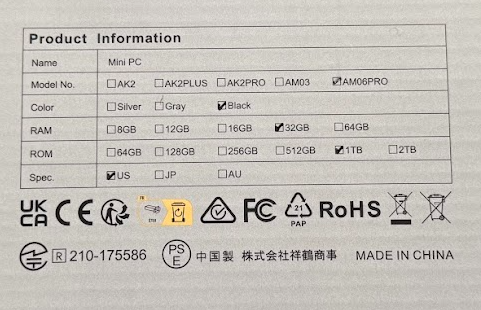
The machine I got, the AM06PRO with a Ryzen 7 5825U, 32GB RAM (2x16G), and a 1TB m.2 SATA SSD, came in pretty much the same packaging ACEMAGICIAN uses for most of their mini-PCs in the NUC/MacMini form factor. Specs are listed partially on the back, and at the time of my order, the computer was selling for $319 after checkbox coupon on Amazon. It’s currently unlisted, but there are 16/512 and 32/512 versions for under $300 on the page this link leads to.
I chose the 5825U over the 5800U options for a tiny bit of extra juice (2.00-4.50GHz for the 5825U vs 1.90-4.40GHz on the 5800U). Some benchmarks I read had the 5825U at as much as a 30% advantage in certain apps. It was one factor for me, along with the RAM and SSD specs for the price. As a regular desktop, a mini-server with Linux, home firewall/router, or even a USB-based NAS, either CPU should be fine for your needs.
Note that this is NOT a fanless computer, and on first boot it will spin up relatively loud for its size. However, it is a relatively quiet machine under normal load, and I rarely saw it over about 30 watts on a Kill A Watt power monitor. Run it closer to the 4.4GHz top speed and it will probably make some noise.

On the front, we have a USB Type C port and two USB 3.0 Type A ports, as well as a headphone jack and a single microphone.

On the back we get a USB-C power jack–more on this later–as well as two USB 2.0 Type A ports, HDMI, Displayport, two Ethernet ports (one 1Gbps and one 2.5Gbps port, not labeled), and the Kensington lock hole.
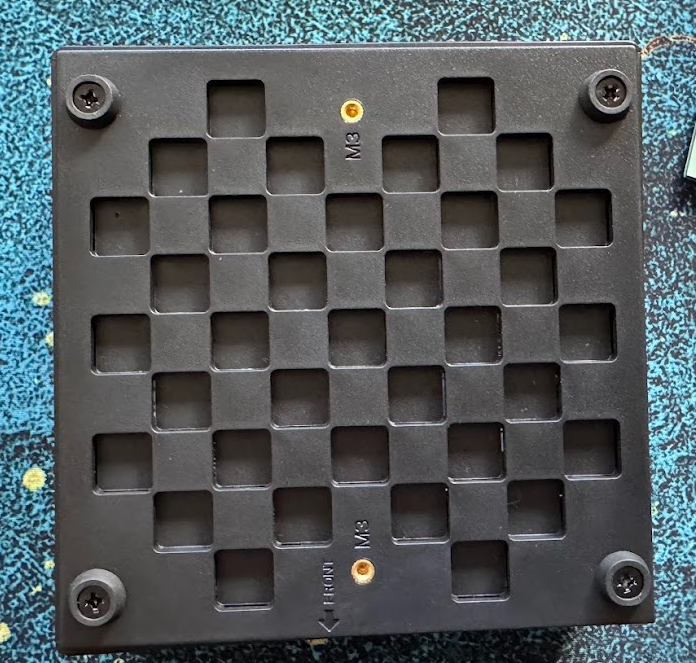
The bottom has two screwholes for the VESA mount (screws and mount bracket included), and the bottom comes off pretty easily with four apparently-partially-stripped Phillips head screws holding the rubber feet in place.
Also included in the package are a single HDMI cable, the power adapter, and a ribbon cable to connect a 2.5″ SATA SSD (or possibly HDD) that clips inside the bottom of the case.

The side has the model and specs again, along with certification marks and the specs for the power adapter. A word about the power adapter – it is USB-C but the power spec is more typical for a standard 65W computer. It is speced at 19V 3.42A, or 64.98 watts. So you probably can’t use a standard USB-C Power Delivery source, although I might give it a try later.

I powered the machine up and went through the OOBE (Out Of Box Experience) for Windows 11 before opening it up. The process was about what I’d expect for a brand new machine.

I took the advice on the packaging and left it off the network, as I would be installing a fresh operating system on a wiped drive (or a new one) before connecting it to my LAN.
After completing the initial Windows setup, I shut the system down and opened it up. Again, the bottom of the case comes off, pretty easily with a standard Phillips head screwdriver, revealing a predictable inside for one of these computers.
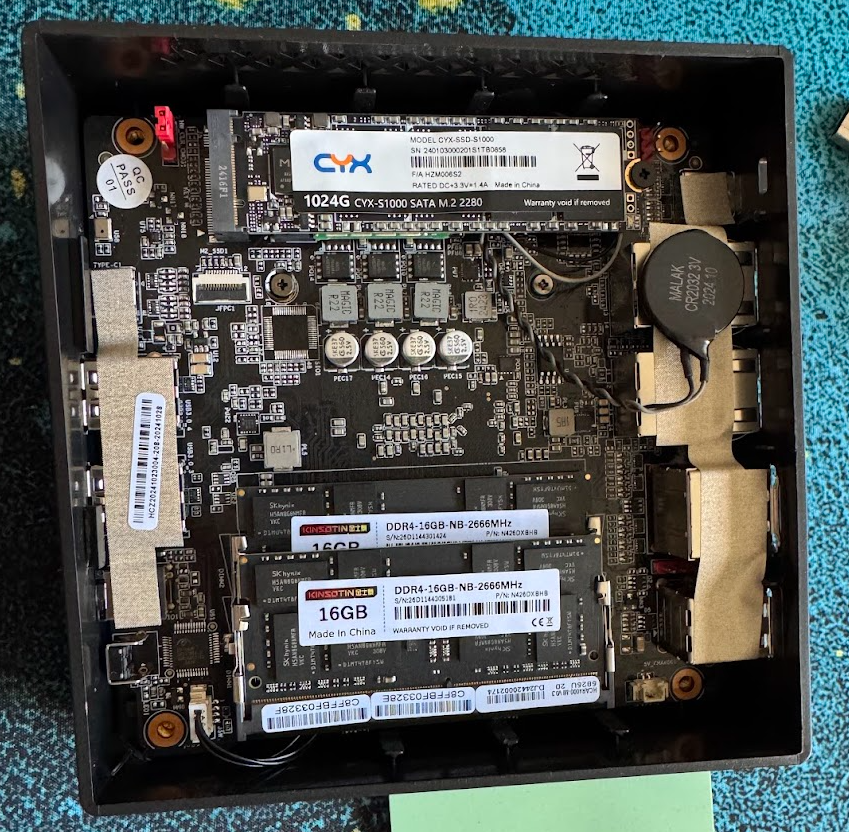
We have a CYX 1TB SATA SSD. The slot should take an NVMe drive as well, and I plan to test that idea in the more detailed testing later in the month. The red jumper at the top right is a CMOS clear jumper. Just below the SSD connector is JFPC1, the connector for that SATA ribbon cable. At the bottom we have two KINSOTIN 2666MHz DDR4 DIMMS at 16GB each, obviously with SK Hynix memory chips on them. The CMOS battery is a wrapped and cabled one, so you’ll either have to tear into it in ten years or replace it with a sleeved one when the time comes. Under the SSD we see the wireless card, which I’ll detail on my next teardown.
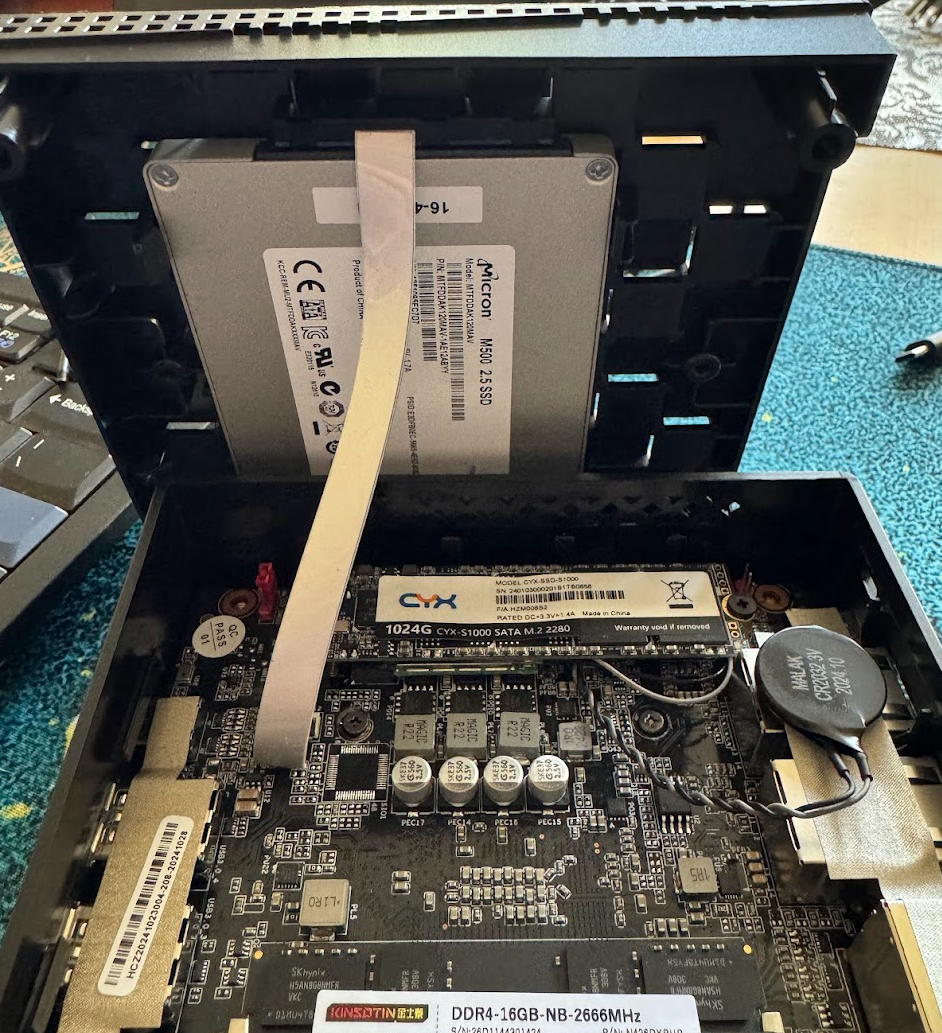
Here we have a random 2.5″ SSD installed with the ribbon cable. The mount in the bottom cover is toolless, just snapping into plastic brackets, and the cable is easy to slot into the board connector.

When I powered back up after installing the SSD, we see the Micron M500 120GB SSD showing up. We also see the Realtek Gigabit Ethernet, Wifi6 wireless network, and Bluetooth adapters, along with the Intel i226-V 2.5Gbps Ethernet port.
The Intel adapter should support jumbo frames and 1Gbps (probably 10/100 as well?). It also features IEEE 1588 Precision Time Protocol in case that’s important to you, although you may need to run Linux to take advantage of that feature.
I haven’t yet done my fresh OS install or benchmarking on this machine. It’s not likely to surprise, and if you want to save a few bucks, there are models available with the 5800U processor.
The current promotion from ACEMAGICIAN is offering two models on the 5825U model, one with 32GB RAM and 512GB SSD at $269 before $30 coupon, one with 16GB and 512GB at $299 with no current coupon (but a 6% discount if you buy two). You get the same 8 core, 16 thread processor, support for triple 4k displays with Displayport, HDMI, and USB-C using the onboard octacore 2GHz Radeon RX Vega graphics, and an easily-stashed, low-power base chassis that’s easy to fit on, under, or behind your desk.
If you’d like to try one of these ACEMAGICIAN Ryzen 7 mini-PCs out, see what’s available here on Amazon. Again, if you buy through my link, I may earn a commission and/or bonus (especially through the end of 2024), and that money can go toward acquiring more gear to try out and review.
I’m planning to reinstall the machine over the holiday break and run some CPU, graphics, and storage benchmarks, an OCCT stability test, and maybe try more than one operating system while I’m at it. I do have USB 2.5Gbps and 5Gbps network adapters, so I could even swap over my home network to a firewall running on it for a bit (or at least share the outbound bandwidth without interrupting the family’s holiday streaming).
What would you like to know more about on this mini-PC? If you have one, what are you doing with it? If not, why not order one today?
Afterword: After posting this I found a good video demonstrating repasting the CPU on this model. You may not need to do that in the first year or two of use, but the video also shows the insides in motion, including the fan, the power button cable, and more. I have no connection to the maker but I did find it useful to watch.
Also, I’ve found other users reporting that the USB-C power outlet is not only USB-PD (which I hoped for), but it also supports video out or port expansion over USB-C. Another bit of experimentation for me to work on, and the potential to use this machine on the road with a USB-powered monitor and a beefy DC power bank.
 rsts11 - Robert Novak on system administration