
A lot of people hate reading documentation, so I’m writing meta-documentation based on the documentation to help you get things going with FlexFarmer and Gigahorse compressed plots.
The authoritative site for Gigahorse details is madMAx43v34’s github, which is where you can find all of his software. And any references in this post will be to Gigahorse software, not Bladebit.
And as always, anything I post even vaguely related to Flexpool here on rsts11.com is not official or endorsed by Flexpool, even though I have been on their support team for over two years now.
In this post:
- Farming Gigahorse compressed plots on Windows
- Using a remote GPU for farming from Windows or Linux
- Selecting which GPUs to use for farming
- There is no spoon
- A shortcut to farming compressed plots (albeit Bladebit compressed), at a premium
Farming Gigahorse compressed plots on Windows (kinda)
You need a Linux system to farm compressed plots at this point. Luckily if you have Windows 10 or later with current patches, you have a Linux system ready to install.
I’ve co-written a guide to FlexFarmer + Gigahorse compressed plots + Windows + WSL over on Reddit. It’s not an official supported deployment for Flexpool (i.e. the pool doesn’t provide official support for it) but it does work. I’ve used it myself on a small farm to verify the guide, and many others do the same with as much as a petabyte or more.
Using a remote GPU for farming from Windows or Linux
But maybe your Windows machine doesn’t have a suitable GPU, or you want to farm using an AMD GPU when the Gigahorse module in FlexFarmer only recognizes NVIDIA.
That’s easier to document, and in fact it works with Linux farmers too (I set up remote compute from my Linux plotter to my Windows 10 desktop so I could dedicate the GPU to plotting for a while).
The right thing to do of course would be to go to the Remote Compute section of madMAx43v34’s github and read up on the feature there. But to simplify it, here are the steps.
On the machine with the GPU you want to share (the “recompute server”), either get the Gigahorse bundle for the relevant OS, or download the chia_recompute_server program from the appropriate directory.
- chiapos -> chia_recompute_server binary for Linux (arm64 or x86_64)
- chiapos -> chia_recompute_server binary for Windows (x86_64)
On the recompute server, make the downloaded binary executable (on Linux), and then run it.
That’s it.
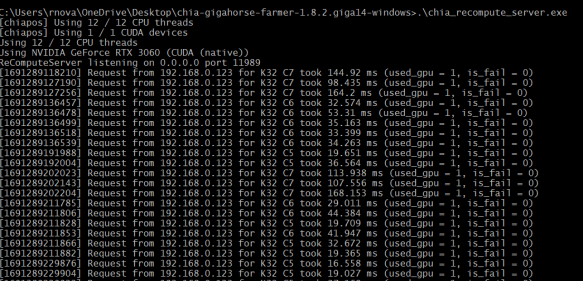
Now on your farmer, you need to set the environment variable CHIAPOS_RECOMPUTE_HOST to your recompute server’s name or IP address.
Note that this name does NOT mean you need to be running chiapos plotter or the Chia or Gigahorse full node. If you are running Gigahorse farmer, you have to restart the Gigahorse farmer after setting the variable, but for FlexFarmer you do not.
For example, if your recompute server is 192.168.0.2, you enter:
export CHIAPOS_RECOMPUTE_HOST=192.168.0.2
before running FlexFarmer on your Linux farmer.
If you’re running Windows WITHOUT WSL, Max provides this link on to set environment variables in Windows: https://phoenixnap.com/kb/windows-set-environment-variable#ftoc-heading-4
Selecting GPUs to farm with
If you have multiple GPUs but you want to only use selected GPUs with FlexFarmer, Max’s documentation explains how to do this. It’s worth noting that this generally applies to any CUDA software.
Use the “nvidia-smi” command inside of WSL, or under Linux natively, to list your GPUs and determine which device numbers apply.

You use the CUDA_VISIBLE_DEVICES environment variable to choose the devices you want the farmer to use. In the example above, I only have one GPU so it’s device 0, but if you have multiples, they will be listed and you can choose the ones you want.
From Max’s documentation:

Once again, the note above about full notes applies. If you’re using a configured FlexFarmer instance, just set this environment variable and the CUDA libraries used in the Gigahorse module will pick it up.

If you want to disable GPU usage in FlexFarmer, there’s a two line configuration option to disable hardware (GPU) acceleration.
Using Evergreen Miner as a shortcut to compressed farming
This is a somewhat controversial option, and if you already have the hardware to plot and farm and can manage your software on your own, you don’t need Evergreen.
Based on developments between August 2024 and February 2025, I can no longer recommend this option, but I am leaving the content here (and removing my affiliate link).

However, if you want a power optimized option where you don’t have to have a plotter at all, and just buy drives in enclosures with plots already made for you, Evergreen Miner is a viable option.
In short, you buy an “Evergreen Hub” which is a single-board computer with a customized Linux install that provides all the software for farming, interacting with the mobile app, and managing storage attached to it. Then you buy (or provide and plot your own) hard drives that connect to the Hub over USB.
Generally you’d buy a starter kit that includes 1 or more hard drives pre-loaded with plotted drives. You can then add more drives, up to 25 per hub, either through their pre-plotted offer or sourced and plotted by you (if you choose to expand on your own).
With the kits and drives from Evergreen, you get the needed cabling, including a single PSU (12V 10A) and splitter cables, as well as everything to connect the hub to the drives and to your network.
Even though I’ve been plotting since mainnet launch in 2021, and have plenty of gear and ~160TB plotted and farming, I bought a 12TB starter kit and it’s been chugging along.
I believe the beta compressed-plot farmer for Evergreen is going into general release in the next week or two (i.e. mid August 2023), and the Chia Blockchain software release that includes Bladebit compressed plot generation is coming soon after (it’s in release candidate 3 as I write this). When those both happen, I’ll be giving a try to the Bladebit compression, and may get a chance to update this post with the details.
Where do we go from here?
I’m working on some video demos of the Chia process, from initial downloads to first payout. I hope those will go live later this month.
I also have some mini-PC reviews in the buffer. Stay tuned. It’s not all crypto out there after all.
Have you been working with compressed plots or Evergreen Miner or both? Any observations, discoveries, or questions? Join us in the comments below.
 rsts11 - Robert Novak on system administration